Classic form
Meal prep order form with a weekly menu grid
A meal prep order form has to turn a weekly menu into a cooking list: which meals, how many of each, what size and which delivery day. This one prints the week's menu above a seven row meal and quantity table, asks portion size and dietary swaps, and is set up to send each order to the kitchen sheet by webhook.
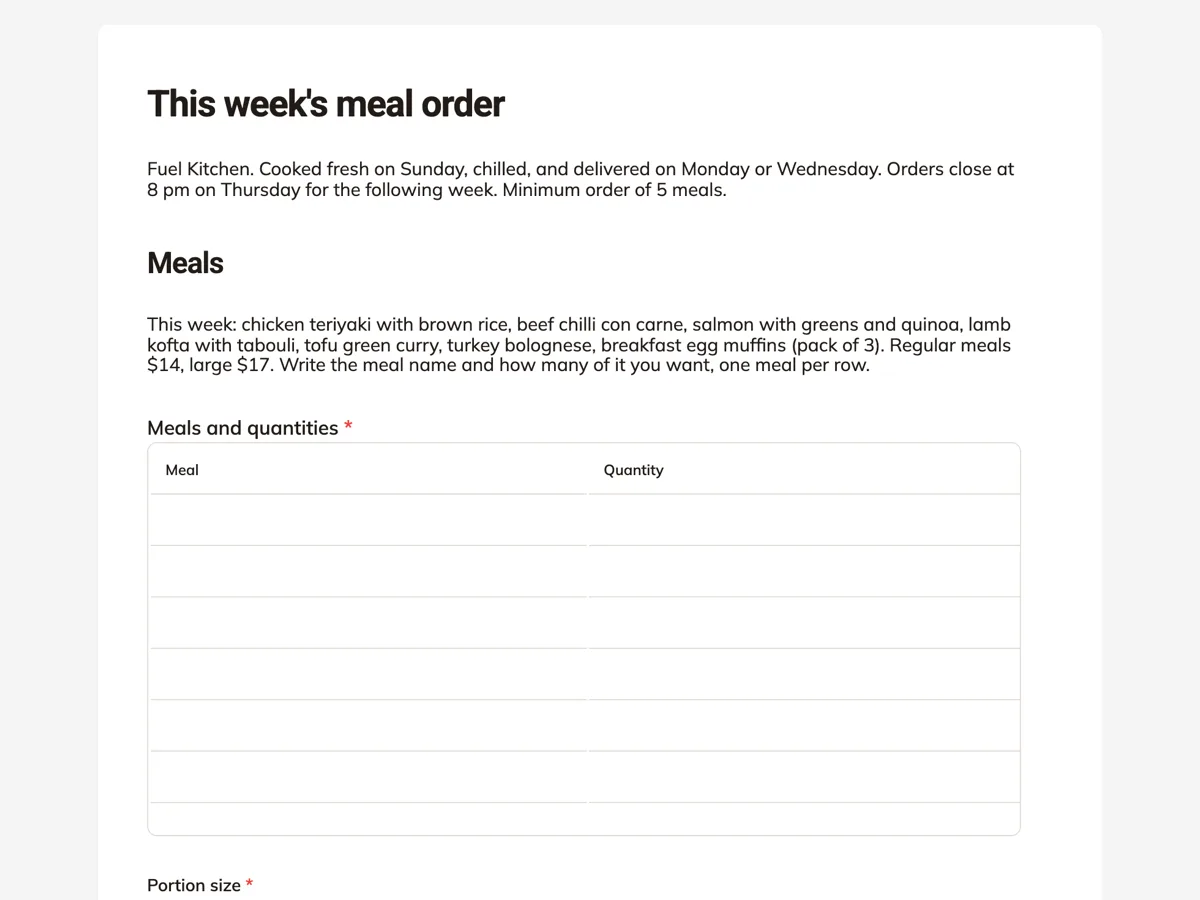
The form itself
A static copy of the finished form, exactly as it renders. Nothing here can be filled in or submitted, so read it as a reference and build your own from the button above.
Every field, and what it collects
The complete field list, in the order respondents meet it.
- Meals and quantitiesTableRequired
- Columns: Meal · Quantity
- Portion sizeSingle choiceRequired
- Options: Regular, about 400 g, $14 · Large, about 550 g with extra protein, $17 · Mix, I wrote large next to the ones I want large
- Dietary needsMultiple choiceRequired
- Options: Gluten free · Dairy free · Low carb, swap rice for greens · No chilli · No pork · None
- Delivery daySingle choiceRequired
- Options: Monday, 6 to 10 am · Wednesday, 6 to 10 am
- Delivery addressAddressRequired
- Notes for the kitchen or the driverLong text
- NameShort textRequired
- Mobile, for the total and payment linkShort textRequired
Meals
You
What each field on this form collects
A paragraph lists the seven meals on this week's menu with the regular and large prices. Meals and quantities is a seven row table with meal and quantity columns, one meal per row. Portion size is a radio of three: regular at about 400 g, large at about 550 g, or a mix marked in the table. An allergen paragraph names the eight allergens the kitchen handles. Dietary needs is a required checkbox of six, ending in none. Delivery day is a radio of two morning windows. Delivery address takes the street, the unit or business, city, region and postcode. Notes is an optional long text for the kitchen or driver. Name and a mobile for the total close it.
How the webhook feeds the kitchen sheet
The kitchen cooks from one sheet: a row per order, a column per meal. The owner turns on the webhook add-on and points it at a small script that writes each order into that sheet. The webhook fires once per submission as a POST with JSON, keyed by field label and by field id, with a ten second timeout and no retry. The table arrives as a list of the filled rows, so the script can add up how many chilli con carne to cook on Sunday. Because there is no retry, the owner should also check the response list on Thursday night before shopping.
How to adapt this form
A meal prep business for gyms adds a macros goal radio and prints protein grams per meal in the menu paragraph. A family meal service swaps portion size for the number of serves, two, four or six, and adds a kids meal row. A business that changes its menu every week keeps the table and edits only the menu paragraph, which takes a minute in the builder and keeps the same link live.
What makes this form work
The menu sits on top of the order
Seven meals and two prices in one paragraph, directly above a seven row table. The customer orders from the week's menu without opening another page, and the owner changes the menu by editing one block.
Orders land in the kitchen's own sheet
The webhook add-on posts each order as JSON to a script that writes the kitchen sheet. The Sunday cooking list builds itself during the week, and the table rows arrive ready to be counted.
Delivery day matches shelf life
Monday or Wednesday morning, and the thank-you screen explains the four day fridge life. A customer choosing a day knows which days of eating that delivery covers.
Questions people ask
Why is the menu in a paragraph instead of a dropdown in the table?
Because a table column takes typed text, not a list of choices, and seven meals in a short paragraph read faster than a set of dropdowns. The customer writes the meal name and the quantity in each row. When the menu changes, the owner edits one paragraph and the table stays the same.
Does the form work out the price of the order?
No. The prices sit in the menu paragraph and the portion size options, and the kitchen texts a total and a payment link on Friday, which the welcome and thank-you screens say. A form records the order and does not calculate a total. Orders are cooked once paid.
What happens if the webhook fails?
The submission is still saved in the form's responses, but the kitchen sheet will miss that order, because the webhook does not retry. That is why the order cut off is Thursday at 8 pm and the owner reviews the response list before shopping on Friday. Any order missing from the sheet shows up in that check.
How should a meal prep form handle allergies?
Honestly. The paragraph above the dietary checkbox names every allergen the kitchen handles and says a severe allergy is safest elsewhere. The checkbox covers swaps the kitchen can make, such as gluten free or no chilli. Promising an allergen free meal from a shared kitchen is a risk no small business should take.
Why does the form set a minimum of five meals?
Because delivery costs the same for two meals as for ten, and five is roughly where a delivery pays for itself. The intro states it. The form does not count the rows, so the kitchen checks the minimum when it sends the total and contacts anyone under it before cooking.
How long do the meals keep?
Four days in the fridge, which the thank-you screen states. That is why there are two delivery days: Monday covers Monday to Thursday and Wednesday covers the second half of the week. A customer who orders ten meals for one delivery is told to freeze the later ones, which most cooked meals handle well.
Build your own in about a minute
The button below opens the generator with this use case already described. Change the wording to match your own, generate, then edit anything you like.
Make one like thisOther form examples
Printing order form with stock, finish and artwork
A printing order form has to pin down the product, the finished size, the paper, the sides, the finishes and the quantity, because a print shop cannot quote a job missing any one of them. This one asks all six in the order an estimator prices them, then takes the PDF, the proof choice and the date.
Flower order form with the occasion, budget and card message
A flower order form has to settle what the flowers are for, how much to spend, what the card says and exactly where and when they arrive. This one asks each on its own screen, leaves the stems to the florist inside a style and colour brief, and separates the person receiving from the person paying.
Invitation order form with wording, quantity and proofs
An invitation order form has to collect the exact wording, spelled as it will print, plus the count, the envelopes and how many proofs it takes to get it right. This one separates the names and the date line from the full wording, explains household counts, and takes the guest list as a PDF for addressing.
Want the steps in the builder? Read Automate your form with add-ons, then Form builder components. For everything this generator can do, see the form maker.
Sources
Written and checked by the OneCraft team. Last checked .