Classic form
Reorder form for repeat customers with account and items
A reorder form has to let a customer who already knows what they buy send the same order again fast, using their account and the product codes on their last invoice. This one fits on one screen: account number, who ordered, six lines of code and quantity, delivery, a date, the purchase order and notes.
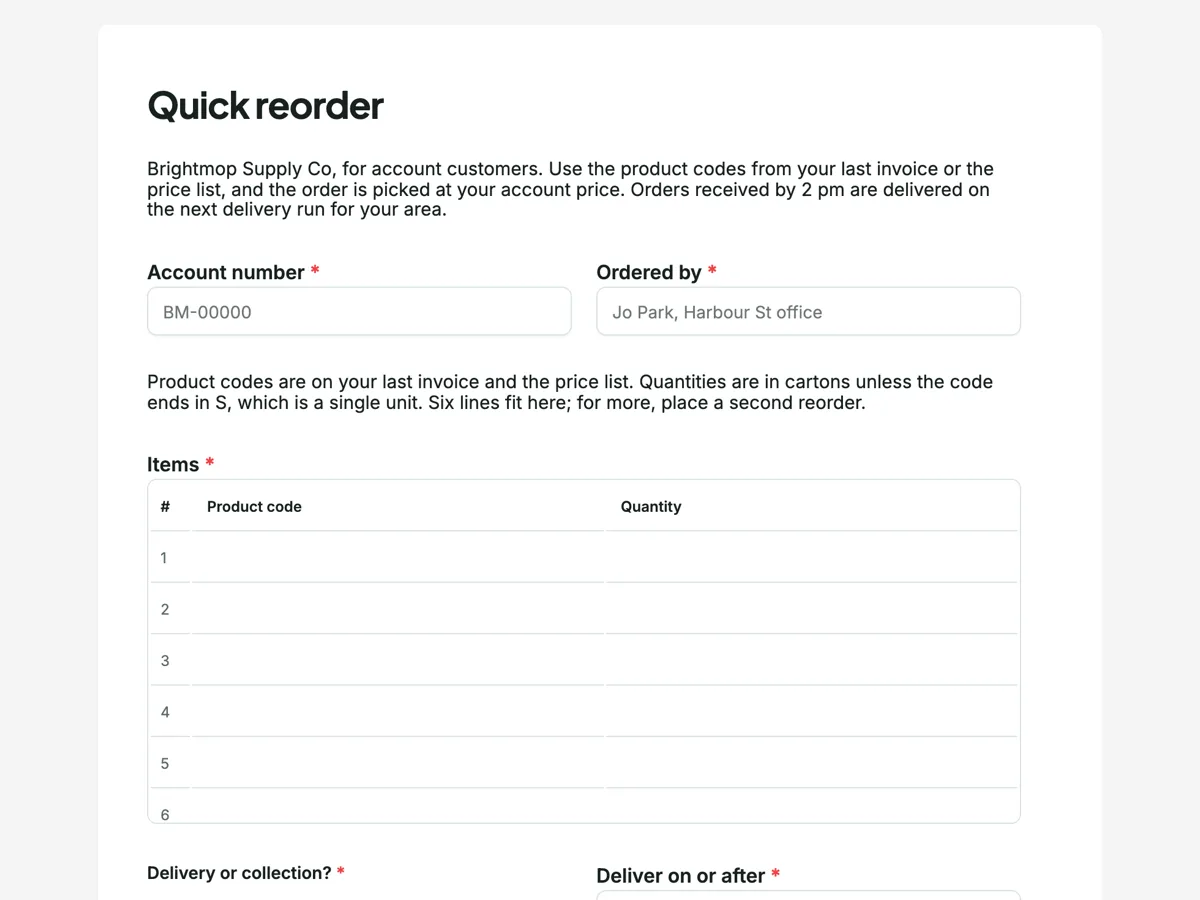
The form itself
A static copy of the finished form, exactly as it renders. Nothing here can be filled in or submitted, so read it as a reference and build your own from the button above.
Every field, and what it collects
The complete field list, in the order respondents meet it.
- Account numberShort textRequired
- Ordered byShort textRequired
- ItemsTableRequired
- Columns: Product code · Quantity
- Delivery or collection?Single choiceRequired
- Options: Deliver on my next area run · Express courier, charged at cost · I will collect from the warehouse
- Deliver on or afterDateRequired
- Purchase order numberShort text
- Notes for the warehouseLong text
What each field on this form collects
Account number and ordered by sit side by side as required short texts; the second placeholder asks for a name and a site. A paragraph says where product codes are and that quantities are cartons unless a code ends in S. Items is a required, numbered six row table of product code and quantity. Delivery or collection is a radio of three, beside a deliver on or after date. Purchase order number is optional, with a placeholder explaining when it is needed. Notes for the warehouse is an optional long text. Five of the seven fields are required.
Why codes and not product names
A repeat customer ordering hand towels, bin liners and floor cleaner is not choosing, they are restocking. Product codes from the last invoice are exact: there is one 5 litre neutral floor cleaner, and its code says so, where a name like floor cleaner matches six products. Codes also map straight onto the wholesaler's system. With the webhook add-on turned on, each submission is posted once as JSON to the address the owner sets, with answers keyed by field label, so an order inbox or ERP that accepts webhooks receives the table as rows. There is no retry, so the owner also keeps the response list as the record.
How to adapt this form
A food distributor adds a delivery window and a cold chain note. A wholesaler with many sites per account turns ordered by into a dropdown of site names. A business that wants first time buyers too adds a link to a new account form in the intro rather than mixing new customer fields into a reorder.
What makes this form work
Codes from the last invoice
The paragraph points to the invoice and price list and explains the S suffix for single units. A six line numbered table of code and quantity leaves no product ambiguous.
Seven fields, one screen
Account, who ordered, items, delivery, date, PO and notes. A regular customer restocks in about a minute, which is the reason a reorder form exists.
Built to feed a system
With the webhook add-on on, the submission posts once as JSON keyed by field label. The order inbox gets the account, the codes and the date without retyping.
Questions people ask
What is the difference between a reorder form and an order form?
A reorder form assumes the customer has an account and knows the products, so it skips the catalogue, pricing and billing details. It asks only what changes between orders: what, how many, when and where. That keeps it to seven fields, short enough for someone restocking a cleaners' cupboard on a phone.
Can a reorder form go straight into an ERP?
Through the webhook add-on, if the ERP or its order inbox accepts a JSON post. Each submission is sent once, with a 10 second timeout and no retry, so the response list in the form stays the backup record. A wholesaler without a webhook endpoint uses the email alert add-on instead.
Why does the table have only six lines?
Most restock orders are a handful of lines, and a table renders a fixed number of rows that cannot grow. Six covers the usual order without a wall of empty rows. The paragraph above it says to place a second reorder for more, which also keeps each order a manageable pick for the warehouse.
Does the customer see prices on the form?
No. The intro says the order is picked at the customer's account price, which lives in the wholesaler's system, not on the form. Showing prices would mean keeping a form in step with every account's price list. The invoice follows on the customer's normal terms, as the thank-you screen says.
Why ask who ordered when the account is known?
Because one account often has several people ordering across sites, and the warehouse needs to know which site the cartons go to and who to call about a backorder. The placeholder asks for a name and a site. Accounts teams also use it to match purchase orders to the right budget holder.
What happens if a product is out of stock?
The thank-you screen says it is backordered and listed on the packing slip that comes with the delivery. The form does not check stock, because it records the order rather than reserving items. Customers who need a substitute write it in the notes field, such as any 5 litre neutral cleaner.
Build your own in about a minute
The button below opens the generator with this use case already described. Change the wording to match your own, generate, then edit anything you like.
Make one like thisOther form examples
Product sample request form with project details
A product sample request form has to say which samples to send and where, and give the supplier enough about the project to know which requests are a future order. This one lets a visitor pick up to five tiles, then asks the project type, its stage, the area in square metres and whether they are in the trade.
Custom furniture order form with dimensions, timber and finish
A custom furniture order form has to capture exact dimensions, the timber and the finish, plus how the finished piece gets through the door, because a made to measure table cannot be returned. This one takes the size as one line of three numbers, asks about stairs and hallways, and records a signed deposit agreement.
Spare parts order form with model, serial and part numbers
A spare parts order form has to identify the exact machine before the part, because the same model can take different parts across production runs. This one asks the model and serial number first, takes part numbers, descriptions and quantities in a numbered table, and accepts a photo when a part number is missing.
Want the steps in the builder? Read Automate your form with add-ons, then View, export and manage your responses. For everything this generator can do, see the form maker.
Written and checked by the OneCraft team. Last checked .