Classic form
Spare parts order form with model, serial and part numbers
A spare parts order form has to identify the exact machine before the part, because the same model can take different parts across production runs. This one asks the model and serial number first, takes part numbers, descriptions and quantities in a numbered table, and accepts a photo when a part number is missing.
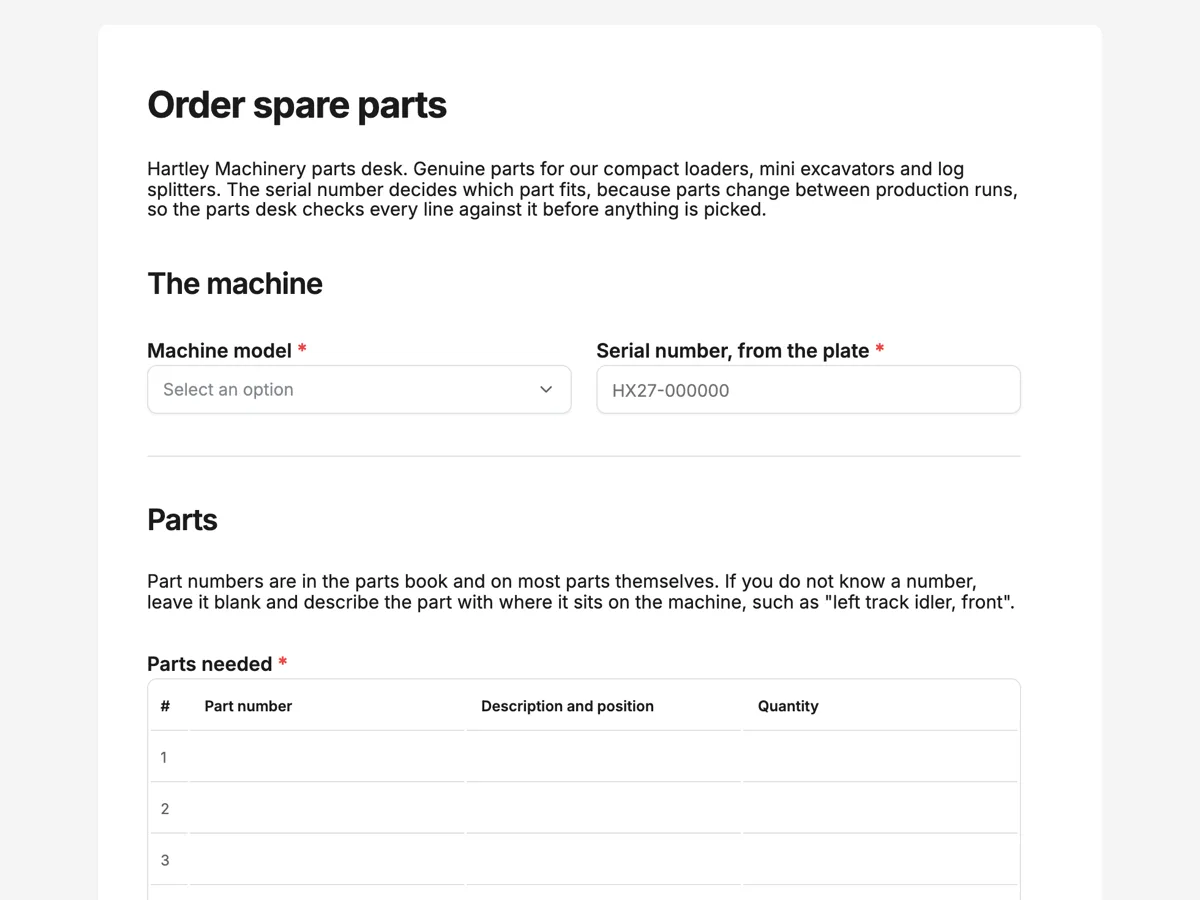
The form itself
A static copy of the finished form, exactly as it renders. Nothing here can be filled in or submitted, so read it as a reference and build your own from the button above.
Every field, and what it collects
The complete field list, in the order respondents meet it.
- Machine modelDropdownRequired
- Options: HL 380 compact loader · HL 520 compact loader · HX 17 mini excavator · HX 27 mini excavator · HS 22 log splitter · Other or older model
- Serial number, from the plateShort textRequired
- Parts neededTableRequired
- Columns: Part number · Description and position · Quantity
- How urgent?Single choiceRequired
- Options: Machine is down, overnight freight · Needed this week, standard freight · Planned service, no rush
- Photo of the worn or broken partPhoto upload
- One clear photo, with the part number visible if it is stamped on. Helpful when there is no part number.
- Delivery addressAddressRequired
- Purchase order numberShort text
- Company and contact nameShort textRequired
- Email for the confirmationShort textRequired
The machine
Parts
Delivery and billing
What each field on this form collects
Machine model is a dropdown of six, five models and other or older, beside the serial number as a required short text with a placeholder in the plate's format. A paragraph explains where part numbers are and how to describe a part without one. Parts needed is a required, numbered five row table with part number, description and position, and quantity. Urgency is a radio of three tied to freight, beside an optional photo of the worn part. The delivery address takes a street or site, then a unit, building or yard line. Purchase order number is optional, beside company and contact name. An email for the confirmation closes it. Seven of the nine fields are required.
Why the serial number comes before the parts
Manufacturers change parts between production runs without changing the model name: a pump, a seal kit or a filter can differ between a machine built in one year and the next. The serial number tells the parts desk which parts book to open. Asking it beside the model, before the table, means no line is checked against the wrong book. The description column covers the common case where the customer has no part number: "left track idler, front" plus a photo lets the parts desk find it. The photo field takes one image, enough to show a stamped number or the shape of the part.
How to adapt this form
A tractor dealer adds engine hours, since service parts follow hours as much as serial. An appliance parts shop swaps the model dropdown for a short text and a photo of the rating plate. A fleet operator ordering for several machines turns the serial into a table column so each part line names its machine.
What makes this form work
Serial before parts
Model and serial number sit side by side at the top. Every line in the parts table is checked against the right production run, not the model name alone.
A part number is not required
The table has a description and position column and the paragraph gives an example. Customers without a parts book still order precisely, and the photo backs up the description.
Urgency is written as freight
Machine is down with overnight freight, this week with standard freight, or a planned service. The parts desk knows how to ship before it reads the parts.
Questions people ask
Where is the serial number on a compact machine?
On a metal plate riveted to the frame, usually near the operator station or on the boom. The welcome screen asks the customer to have the plate in front of them, and the placeholder shows the format. If the plate is missing or worn, a photo of the frame stamping and the purchase year help the parts desk.
What if the customer does not know the part number?
They leave the number blank, describe the part with where it sits on the machine, and add a photo. The paragraph above the table gives an example description. The parts desk matches the description and photo against the serial number's parts book, which is how most counter orders are filled.
Why is the parts table numbered?
So the confirmation can refer to line 3 rather than repeating a part description back. Numbering is a setting on the table field. With five rows, a parts order for a service, filters, seals and a belt, fits in one submission. The table cannot add rows, so a bigger rebuild goes in two orders.
Does urgency change the price?
Overnight freight usually costs more, which is why the option for a machine that is down names overnight freight outright. The form records the urgency and the parts desk quotes the freight in the confirmation. Nothing is picked until the customer confirms, so a surprising freight price can still be changed to standard.
Can the order be sent straight into the parts system?
A webhook add-on can post each submission as JSON to a web address once, with no retry, when the owner turns it on. A parts desk using a system that accepts webhooks can receive orders that way. Otherwise the email alert add-on sends the submitted values to one address.
Why is the purchase order number optional?
Many customers are farms and small contractors who pay on the counter or by card and have no purchase order system. Companies that do use them need the number on the invoice, so it is asked, and the placeholder shows the format. A dealer that bills only on account makes it required.
Build your own in about a minute
The button below opens the generator with this use case already described. Change the wording to match your own, generate, then edit anything you like.
Make one like thisOther form examples
Reorder form for repeat customers with account and items
A reorder form has to let a customer who already knows what they buy send the same order again fast, using their account and the product codes on their last invoice. This one fits on one screen: account number, who ordered, six lines of code and quantity, delivery, a date, the purchase order and notes.
Custom furniture order form with dimensions, timber and finish
A custom furniture order form has to capture exact dimensions, the timber and the finish, plus how the finished piece gets through the door, because a made to measure table cannot be returned. This one takes the size as one line of three numbers, asks about stairs and hallways, and records a signed deposit agreement.
Meal prep order form with a weekly menu grid
A meal prep order form has to turn a weekly menu into a cooking list: which meals, how many of each, what size and which delivery day. This one prints the week's menu above a seven row meal and quantity table, asks portion size and dietary swaps, and is set up to send each order to the kitchen sheet by webhook.
Want the steps in the builder? Read Form builder components, then Automate your form with add-ons. For everything this generator can do, see the form maker.
Written and checked by the OneCraft team. Last checked .