Websites
AI website builder: describe the business, get the whole site
An AI website builder turns a short description of a business into a complete site: the pages, the sections on each page, the copy, a colour theme and photos. The good ones then give you a normal editor, so the AI writes the first draft and you decide what stays.
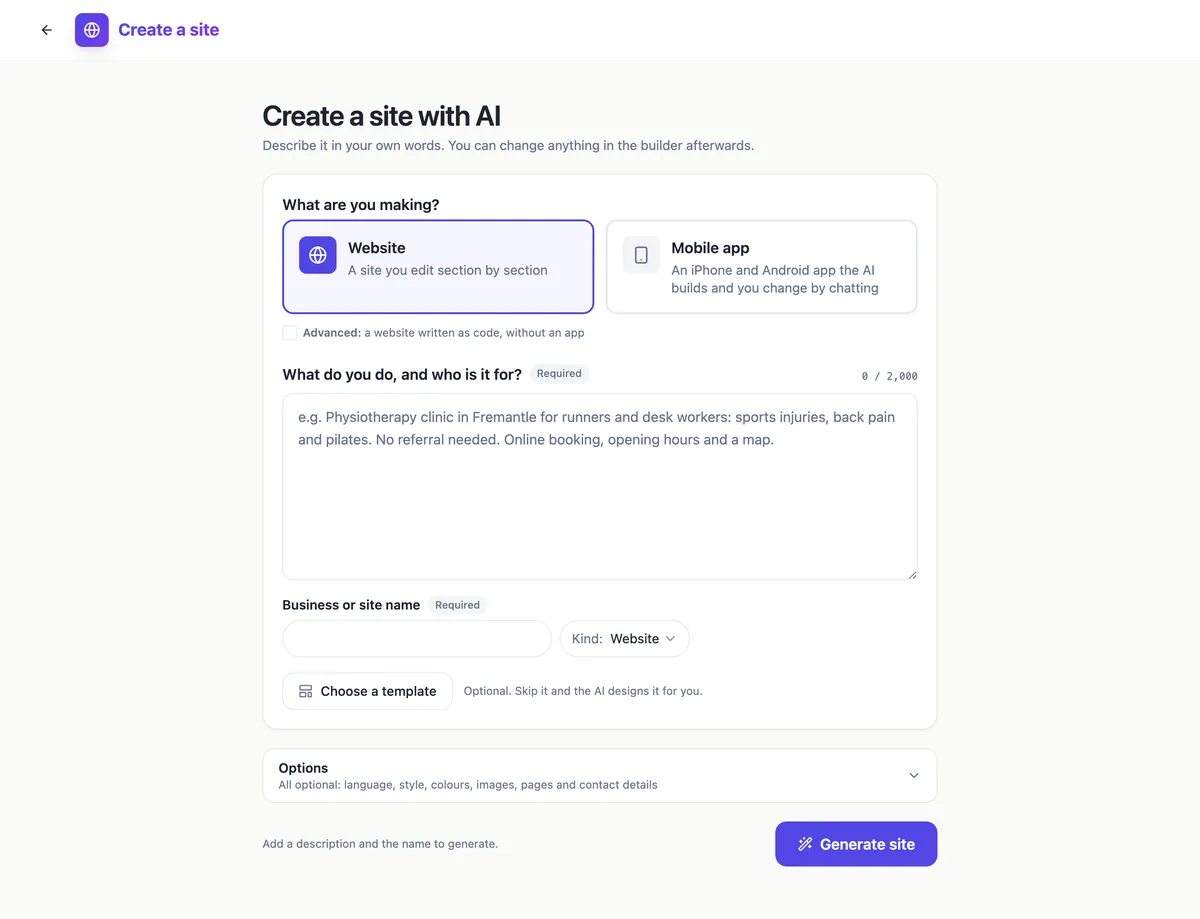
What the AI writes on its own
From your description and the business name, the generator plans the pages, picks a section for each job on each page, writes the headings and body copy, chooses a palette and fonts, and fills image slots with matching stock photos. It always opens with a hero and closes with contact or a call to action, builds the menu from the pages it made, and adds a privacy policy and terms page to every kind of site except link pages. Your own contact details and social links win over anything the model would have written.
What it leaves for you
Team photos, portraits and logos are never filled with stock pictures, because a stranger standing in for your staff is worse than an empty slot. Prices, opening hours and addresses come from what you typed, so anything you leave out shows as a gap you fill in the builder rather than an invented number. If you paste up to three web addresses of an old site, a Google Business listing or a social profile, the generator reads them for services, hours and details before it writes.
Sections, not a blank canvas
Every page is a stack of sections from a library of 28 types and 78 layouts: heroes, services with prices, steps, galleries, reviews, pricing tables, FAQs, team, opening hours, maps, events, link lists, video, newsletter sign-up, contact forms and the store sections. You can swap a section for another layout of the same type, move it, hide it or delete it, and the preview shows the page at phone, tablet and desktop widths. You never drag boxes around, so a page cannot fall apart on a small screen.
From draft to live site
When the draft lands you edit in the builder or ask the AI chat for changes, preview it, then press Publish. The site goes out as static files on a CDN at a free address of the form yourname.onecraft.live, and each publish is kept as a version you can restore. A custom domain can be added on a paid plan. Store, menu and digital shop sites are not generated in this mode yet; their templates open as they are and you fill the products in.
Where a hand built site still wins
A builder that works in sections is quick for the common shape of a small business site, and it is the wrong tool for a site with a custom booking engine, a members area or anything that needs server code, because published sites are static files. If you need custom interactions, Code mode on a paid plan has the AI write a real React project instead, and for anything heavier than that a developer is the honest answer.
How it works, in three steps
Step 1
Describe the business
Say what you do and who it is for in up to 2,000 characters, and type the business or site name. Both are required.
Step 2
Set the options
Optionally pick the kind of site, a template, a brand kit, the language, the tone, a palette, the image source, your old pages and contact details.
Step 3
Generate, then edit
Press Generate site. The draft opens in the builder, where every section, page and colour stays editable before you publish.
Limits worth knowing
- A new site costs 1 credit, whether it is generated, blank or started from a template.
- The free plan keeps 1 site, Starter 3 and Pro 10; plans above Pro have no cap.
- In this mode the AI writes website, landing, link, portfolio, service, nonprofit and event sites; store, menu and digital sites start from their templates.
- Published sites are static files: there is no server code and no database beyond the store tables.
Questions people ask
Do I need to know any code to use it?
No. The section builder is form based: you click a section in the preview, change the words, images and settings in the panel on the right, and the page updates. Code only appears if you choose Code mode on a paid plan, and even there the AI writes it and you edit by chatting, not by typing code into files.
How long does a generated site take?
A Sections site is one structured AI call plus a stock photo search, so it usually lands within a couple of minutes, and the screen shows the stage it is at. If it runs past six minutes the generator offers Check again rather than starting over, so a slow run keeps following the same job instead of starting a new site.
Will the AI make up facts about my business?
It is told to use only what you give it, and your contact details, hours and socials override anything the model writes. It will still write descriptive copy around your facts, so read every section before publishing, especially services and claims. Anything you did not mention, such as prices, is better added by you than left to the draft.
Can I change the design after it is generated?
Yes. The Theme tab switches between 24 palettes in light or dark mode, 16 font pairs, five corner styles and three spacing levels, and a saved brand kit can be applied in one click. Each section can switch to another layout of its type. Nothing is locked because the AI made it.
What does the free plan include?
One site, published at its onecraft.live address with a small Made with OneCraft badge in the footer, and up to 10 publishes an hour. Custom domains, the store, Code mode, the app export and removing the badge need a paid plan. The free plan comes with 150 credits a month, and a new site uses 1 of them.
Does it work for languages other than English?
The generator offers twenty language choices, including Spanish, French, German, Arabic, Hindi, Japanese and Chinese, and writes the copy in the one you pick. The published page sets its language tag and switches to right to left for Arabic. Store and checkout labels are still English, so test a shop page before launch.
Make your own website
The button opens the generator with this use case already described. Change the wording to match yours, generate, then edit anything you like.
Create a website with OneCraftRelated pages
Website SEO settings: what you set and what is done for you
Website SEO settings decide how your site appears in search results and when a link is shared: the title, the description, the small icon and the share image. The rest of technical SEO, such as a sitemap and canonical tags, should simply be right without you touching it.
One page website maker: one scroll, one job
A one page website puts everything a visitor needs on a single scrolling page: what you offer, why to trust you, the details and one clear action. It suits a small offer, a launch or an event, and it falls short once people arrive looking for one specific thing among many.
AI website generator from a prompt: what to write so the draft is right
A website generator reads a prompt the way a designer reads a brief: who the business serves, what it sells, why people trust it and what a visitor should do next. A prompt that answers those four things gets a draft that needs polishing, and one that only names the business gets a generic page.
More finished work of this kind is on the website examples hub.
Written and checked by the OneCraft team. Last checked .