Proposals
Branded proposals from your brand kit
A branded proposal carries your name, logo and colours so the client recognises it as yours before reading a word. Setting the brand once and having every proposal and invoice pick it up is faster and more consistent than restyling each document.
Set up the kit once
Brand kits are made in Settings, on the Brand tab: logo, brand name, website and primary, secondary and accent colours, with up to 20 saved kits and one marked as default. Generate brands can also propose three kits from your website, a description and images. Proposals reads the same kits as the other modules, so a kit made for flyers or decks works here too.
In the generated proposal
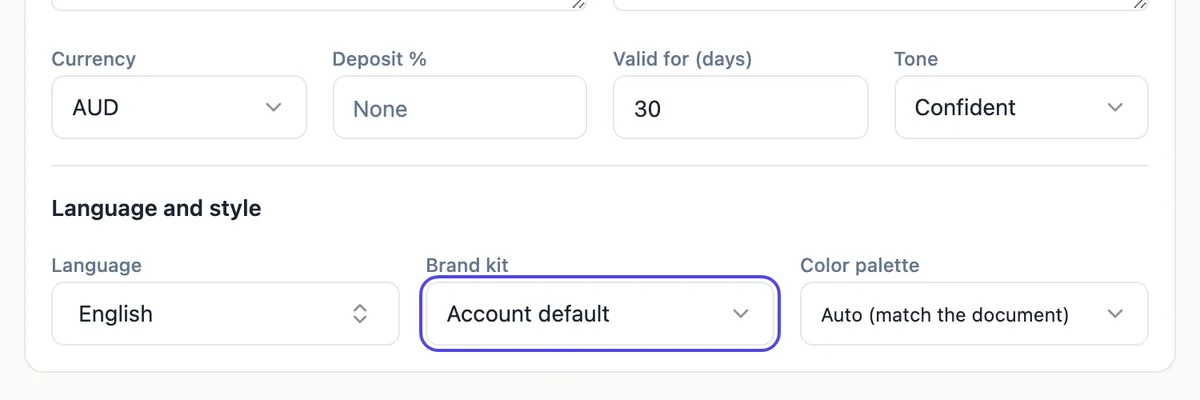
The generator Brand kit field defaults to Account default and can name any saved kit. The chosen kit becomes the sender: its company name, tagline, website and contact go into the letterhead, the About us section is built from the tagline and your brief, and the second signature block reads For followed by your company. When the kit has a palette, it wins over the theme the AI would otherwise pick.
On invoices and the pay page
Invoices use your default kit for the business block: the wordmark or name, the logo, the website, plus your email, phone and city from your profile, and the kit palette maps to the invoice colours. The client pay page and proposal view show the same business block. The default kit name also starts the subject line of proposal emails.
What the kit does not do
The brand kit does not print your ABN; the business block has no tax ID, so add your ABN in the invoice notes or the document. It does not restyle proposals already created; change those with the Theme button. And the kit fonts apply in documents only when the kit has a font pairing, so check headings after generation.
Keeping it consistent
Pick one default kit for the business you send most proposals for, and use a second kit only for a genuinely separate trading name. Check the logo on a white page and in the invoice header, and keep the palette readable, since a very light primary colour can make coloured headings faint.
How it works, in three steps
Step 1
Make or check your kit
In Settings, Brand, add your logo, name, website and colours, and mark the kit as default.
Step 2
Choose it when generating
In the generator options, leave Brand kit on Account default or pick another kit.
Step 3
Check the invoice header
Open an invoice preview to see the business block and colours from your default kit.
The full walkthrough with screenshots is in the guide Send a proposal and get paid.
Limits worth knowing
- Up to 20 saved brand kits per account.
- Invoices and the pay page use the default kit.
- No tax ID in the brand business block; add your ABN to the notes.
- The kit applies when a proposal is generated; existing proposals are restyled with Theme.
Questions people ask
Do I need a brand kit to send proposals?
No. Without one, the generator works from your brief and picks a theme that suits the job, and invoices show a neutral design with your profile details. The subject line of proposal emails then starts with We instead of your business name, which is a good reason to set one up before sending.
Can I use different brands for different proposals?
Yes, in the generator. The Brand kit field can name any saved kit, so a business with two trading names can generate each proposal under the right one. Invoices, the pay page and the email subject use the default kit, so they follow whichever kit is marked default at the time.
Will the AI invent things about my business?
The About us section is built from the kit tagline and your brief, and the prompt forbids inventing history, awards or client names. If the kit has no tagline and the brief says little about you, the section will be short. Add two or three true sentences about your business to the brief for a better result.
Does the brand kit change the fonts?
In the documents flow, a kit with a font pairing from AI generation maps its fonts, and the brand form itself has no font field. Proposals take the kit colours as the palette; check headings after generation and adjust with the Theme button if the fonts are not what you want.
Where does the logo appear?
In the business block of invoices, on the pay page and in the client view of proposals, from your default kit. In generated proposals the sender details go into the letterhead and the signature block. The logo image can be up to 10 MB when uploaded in the Brand settings.
Make your own proposal
The button opens the generator with this use case already described. Change the wording to match yours, generate, then edit anything you like.
Create a proposal with OneCraftRelated pages
A client list for proposals and invoices
A client list for proposals saves typing the same name, email and address into every quote and invoice. It also makes sure the right person gets each email and the right details print on each invoice.
Document theme colours
A theme is a set of colour tokens and two fonts, and every block on the page reads from it. Switching theme restyles the headings, the tables, the charts and the callouts together rather than one at a time.
Stripe invoice payments into your own account
Taking invoice payments through Stripe means the client pays by card on a Stripe hosted checkout page and the money lands in your Stripe account. The invoice should mark itself paid without you checking a bank feed.
More finished work of this kind is on the proposal examples hub.
Sources
Written and checked by the OneCraft team. Last checked .