Classic form
Martial arts registration form with grade, injuries and waiver
A dojo has to know two things before somebody steps on the mat: what they can already do and what their body cannot take. This registration asks both, then treats sparring as a separate consent rather than as something a membership implies, so a new member can start training on the first night without agreeing to be hit.
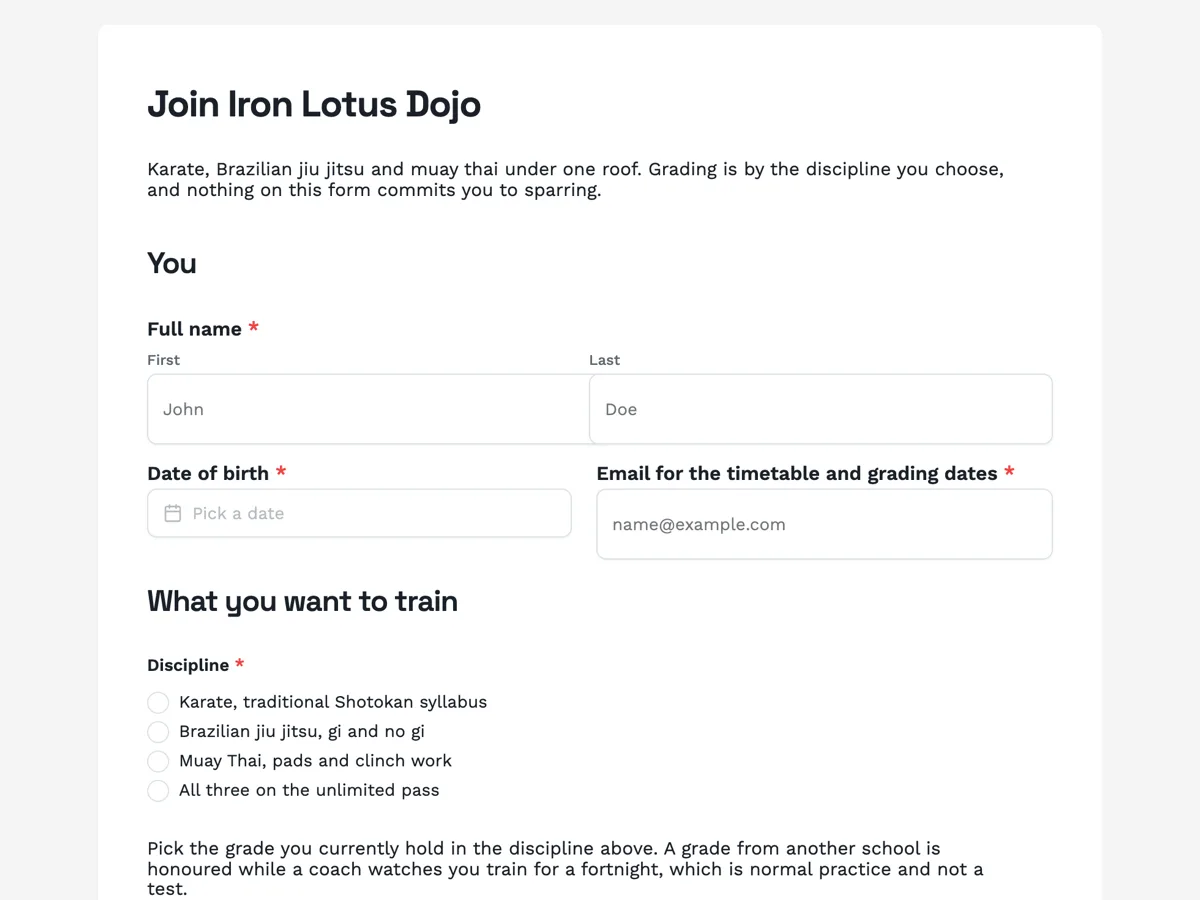
The form itself
A static copy of the finished form, exactly as it renders. Nothing here can be filled in or submitted, so read it as a reference and build your own from the button above.
Every field, and what it collects
The complete field list, in the order respondents meet it.
- Full nameNameRequired
- Date of birthDateRequired
- Email for the timetable and grading datesShort textRequired
- DisciplineSingle choiceRequired
- Options: Karate, traditional Shotokan syllabus · Brazilian jiu jitsu, gi and no gi · Muay Thai, pads and clinch work · All three on the unlimited pass
- Current gradeDropdownRequired
- Options: No grade, starting from the beginning · White belt · Blue or yellow belt · Purple or orange belt · Brown or green belt · Black belt or equivalent · Graded elsewhere, unsure how it maps
- Previous school and how long you trained thereShort text
- Sessions you can makeMultiple choiceRequired
- Options: Weekday mornings 6.15am · Weekday lunchtime 12.30pm · Weekday evenings 6.30pm · Weekday evenings 8.00pm · Saturday morning 9.00am · Sunday open mat 10.00am
- Injuries, surgeries and medical conditionsLong textRequired
- Sparring consentMultiple choice
- Options: I consent to controlled sparring once a coach clears me · I consent to grappling and ground work with a training partner · I would rather sit sparring out for now
- Emergency contact nameShort textRequired
- Emergency contact phoneShort textRequired
- What you are agreeing toMultiple choiceRequired
- Options: I understand that martial arts training carries a risk of injury · The injury and medical answers above are complete and current · I will tell a coach before a session if anything in them changes
- SignatureSignatureRequired
You
What you want to train
Your body
Sparring
Emergency contact
Waiver
Sparring belongs in its own question
Most dojo forms fold sparring into the waiver, which means a beginner signs up for contact on the same tick that acknowledges the risk of a rolled ankle. Splitting it does two things. It gives a nervous adult a way to walk in the door, since the third option says plainly that sitting it out is allowed and that a coach will run drills alongside the round instead. And it gives the coach a column to sort by, so the Tuesday class can be paired without anyone being asked in front of the room whether they want to spar tonight.
Grade, and the option that tells the truth
Belt colours do not map cleanly between schools or between arts, and a purple belt in jiu jitsu is nothing like a purple belt in karate. The dropdown therefore ends with graded elsewhere and unsure how it maps, which is the honest answer for most people walking in from another city. The paragraph above it says what happens next: the grade is honoured while a coach watches for a fortnight. Saying that on the form stops the two conversations a dojo least enjoys, the overclaimed black belt and the sandbagging competitor.
How to adapt this form
A single art school drops the discipline question and expands the grade dropdown into that syllabus in full, which is usually ten or twelve steps rather than seven. A club running a kids programme adds a guardian block above the waiver and changes the sparring question to a parent consent, because a child cannot give it. A competition team adds a weight and a last fight date, and turns the sessions tick list into a training commitment question, since a competitor who can only make Saturdays is not on the team.
What makes this form work
Sparring is a separate consent with an opt out on it
Three options, and the third says sit it out for now. A beginner reading that sentence learns that walking in does not mean being hit, which is the single most common reason an adult never sends the form at all.
The grade dropdown ends with unsure how it maps
Seven options: six covering no grade through black belt, and a last one for anyone graded elsewhere. Belt colours do not translate between arts or schools, so the honest option is the one most people need and the one most forms leave out.
The injury paragraph names injuries rather than asking politely
Old surgeries, a shoulder that comes out, a knee reconstruction, a disc, a concussion history and medication are listed above the box. Asked as do you have any injuries, most people write no. Asked with those six examples in front of them, most people write something useful.
Questions people ask
How many fields should a martial arts registration have?
Thirteen here, eleven required. The injury box and the sessions list carry most of the value, and the rest are short. A dojo that pushes past twenty fields is usually collecting things a coach could ask on the mat in ten seconds, and the cost is the beginner who closes the tab.
Why is the injury question required?
Because a blank injury box and a healthy body look identical in an export, and the difference matters the first time somebody is paired for takedowns. The field asks for what it is, when it happened and what makes it worse, and the paragraph above names the specific injuries that change how a session is run.
Can a registration form take the membership fee?
No. This one records the registration and the thank-you screen says a coach calls first. That call often changes the membership, because somebody who ticked all three disciplines may start on one, and somebody with a reconstructed knee may want the morning class rather than the evening one.
What about members under eighteen?
They need a parent or guardian, which this adult form does not carry. A junior version adds a guardian name, contact and signature above the waiver and rewrites the sparring question as a parent consent. Running one form for both ages is how a dojo ends up with a waiver signed by a fourteen year old.
Should sparring consent be permanent?
No, and the paragraph says so. A member can change the answer by telling a coach, which is how it works in practice anyway. The form records a starting position rather than a permanent setting, and a dojo that treats it as permanent will be wrong about half its members inside three months.
What does the signature on this form do?
It is an inline signature, drawn or typed by the person registering and printed into the response PDF, which is the record a club keeps of the waiver. It is not an emailed signing request. A dojo that needs a countersigned document uses the e-signature field instead, which sends a request by email and only works on a classic form.
Build your own in about a minute
The button below opens the generator with this use case already described. Change the wording to match your own, generate, then edit anything you like.
Make one like thisOther form examples
First aid course registration form with the USI on it
A registered training organisation cannot issue a statement of attainment without a Unique Student Identifier, and the worst time to discover that is at half past eight on a Saturday morning. This registration asks for the USI in the fourth field, with the reason written above it, and collects the support somebody needs before they have to ask for it in a room of strangers.
New patient registration form with Medicare and IRN on it
A new patient form has to produce a file a doctor can safely open, which means a Medicare number with the right IRN, a medicines list that includes the things people forget, and consents that were actually read. This one asks nineteen questions and explains the two that people get wrong most often.
Vaccination clinic registration form with the screening questions
A workplace flu clinic lives or dies on how fast the table moves, and every minute spent asking screening questions is a minute nobody else is being vaccinated. This form asks the nine screening questions before the day, explains what each answer changes, and ends with a four part consent that includes reporting to the register.
Want the steps in the builder? Read Every form field and when to use it, then Design your welcome and thank-you screens. For everything this generator can do, see the form maker.
Written and checked by the OneCraft team. Last checked .