E-signatures · Alternative
An Adobe Sign alternative without the Acrobat bundle
Acrobat Sign now arrives inside an Acrobat for teams licence, so signing is bought with a PDF editor whether or not the editor is wanted. OneCraft signing is part of an account that also writes documents and forms, and this page puts the two feature sets next to each other with both vendors' pages quoted.
Updated , competitor details checked . Adobe, Acrobat and Acrobat Sign are trademarks of their owner. OneCraft is not affiliated with or endorsed by Adobe, and every cell cites a public page or a source file.
Nuwan Madhusanka · Co-founder
3 min read · Published
The short verdict
Acrobat Sign suits an organisation that already needs Acrobat, routes agreements through drag and drop workflow templates, verifies signers by phone or knowledge based questions, or collects payment with the signature. OneCraft signing suits a smaller sender who wants certified output and a verifiable audit trail, and whose documents and forms are already written in the same account.
| Feature | Adobe Acrobat Sign | OneCraft |
|---|---|---|
| Price per licence | Acrobat Standard for teams at US$16.99 a month per licence, Acrobat Pro for teams at US$23.99, Acrobat Studio for teams at US$29.99 checked 2026-09-20 | A free plan at $0 with 100 AI credits a month, then $8, $25 and $125 a month, priced per account rather than per licence |
| Paying up front | Annual prepaid at US$203.88, US$287.88 and US$359.88 a year per licence for Standard, Pro and Studio checked 2026-09-20 | Monthly plans only, metering AI credits shared with documents, slides, flyers, forms and videos; sending for signature is part of the account |
| Where a document to sign comes from | Upload a document that needs to be signed, add the signer's email address and hit send, or collect e-signatures from web form submissions checked 2026-09-20 | Three sources: an uploaded PDF, a document generated in the same account, or a submitted form response, each staged before the envelope is created |
| Field types | Not itemised on the features page, which names electronic signatures, templates, web forms, bulk sending and workflows checked 2026-09-20 | 10 field types: signature, initials, date signed, name, email, title, company, text, checkbox and a structured signature block with Name, Title, Company and Date lines |
| Templates | Agreement templates as reusable PDFs, with reusable e-sign templates and web forms listed on Acrobat Pro checked 2026-09-20 | No reusable templates. Fields are placed on each envelope, or arrive already positioned from a generated document's signature blocks |
| Bulk sending | Mega sign sends a personalised form to every signer with a single click, and bulk sending is listed on Acrobat Pro checked 2026-09-20 | No bulk send. One envelope holds up to 25 recipients and up to 500 fields between them |
| Verifying the signer | Verify signer identity through knowledge based authentication and phone authentication checked 2026-09-20 | 3 methods: the email link alone, an access code shared out of band, or a 6 digit emailed code, with 5 failed attempts locking the recipient for 15 minutes |
| Routing and approvals | An error proof workflow builder where workflow templates are made by drag and drop checked 2026-09-20 | Sequential or parallel signing only. Approver and cc roles exist in the API but no interface creates them, so every recipient is a signer |
| Signing order enforcement | Routing is described through the workflow builder rather than as a separate ordering setting checked 2026-09-20 | A Sign in order switch: on, only the lowest outstanding order is invited and every signer route is blocked out of turn; off, everyone is invited at once |
| Certification level | Automatic record keeping securely stores final signed documents and audit trails; the signing profile is not itemised on the page checked 2026-09-20 | PAdES CMS certified at DocMDP P equals 1 with SigFlags set append only, recorded as PAdES-SHA256-DocMDP on the certificate |
| Signing on a phone | Send, track and manage the entire signing process wherever you are, from your mobile device checked 2026-09-20 | Below 560 pixels the portal switches to compact mode: the document goes read only and typed fields move into a Complete your details panel above it |
| Payment with the signature | Online payments collect signatures and payments in a single transaction checked 2026-09-20 | No payment is collected at signing or anywhere else in the product |
Where Adobe Acrobat Sign is better
Workflows built by drag and drop
Acrobat Sign builds workflow templates visually, so an agreement can route through reviewers and approvers in a fixed path. Here the only routing is sequential or parallel signing. Approver and cc roles exist in the API but nothing in the interface creates them, so an approval desk cannot be modelled at all.
Stronger identity checks
Knowledge based authentication and phone authentication are both named on Adobe's features page. The strongest check here is a six digit code emailed to the signer, backed by a lockout after five failed attempts. When identity genuinely has to be proven, Adobe has tools this product does not.
Templates, web forms and mega sign
Reusable agreement templates, self serve web forms posted to a website, and mega sign to deliver a personalised copy to every signer at once, with templates and bulk sending on the Pro tier. None of those exist here, so repetitive or high volume paperwork is better run in Acrobat.
Payment collected with the signature
Adobe's online payments feature collects signatures and payments in a single transaction. Nothing here takes payment at any point, so a deposit that should land with the signed contract is always a separate invoice and a separate follow up.
The Acrobat editor comes with it
Every plan on the pricing page is an Acrobat licence, so editing, combining and exporting PDFs sits beside the signing. This product edits documents it generated itself and takes uploads as PDFs only, with no PDF editing tools, so an Acrobat licence would still be needed for that work.
Where OneCraft is different
Signing is not bought with a PDF editor
Acrobat Sign is priced as Acrobat Standard, Pro or Studio for teams, per licence. Here sending for signature is part of the account from the free tier upward, and the plans meter AI credits used by the generators rather than counting signing seats.
Ten field types and a real signature block
Signature, initials, date signed, name, email, title, company, text and checkbox, plus a structured signature block whose four line types are Name, Title, Company and Date. The date line is stamped from the signing time rather than typed, and the block height is recomputed so it never clips.
Certification is the default, not a tier
Every completed envelope is PAdES certified at DocMDP level one with append only flags, and the certificate records the algorithm as PAdES-SHA256-DocMDP. If certification fails the envelope is marked failed and the owner emailed rather than an unsealed file going out.
A signing screen that works at phone width
Below 560 pixels the portal switches to compact mode, the document becomes read only and every typed field moves into a panel above it. One drawn signature fills every signature, initials and block spot at once, and a header button steps through each in turn.
A finished example
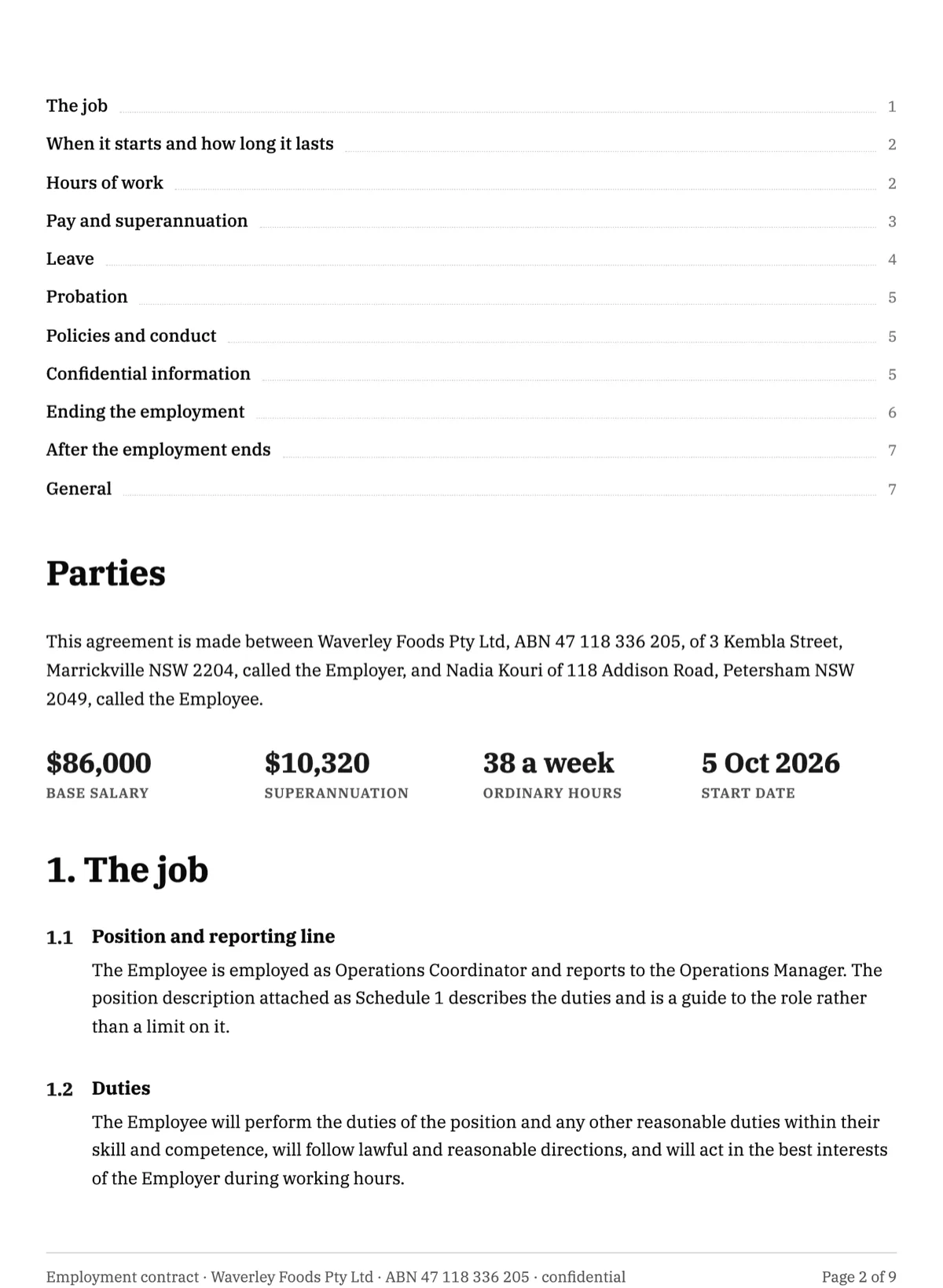 Employment contract e-signatureMade with OneCraft, exactly as the generator and editor left it. Open the page for the full breakdown.
Pricing in plain terms
Adobe's plans page, checked 20 September 2026, prices signing as Acrobat for teams: Standard at US$16.99 a month per licence, Pro at US$23.99 and Studio at US$29.99, or US$203.88, US$287.88 and US$359.88 a year prepaid. Requesting signatures appears on Standard, while web forms, reusable e-sign templates and bulk sending appear on Pro. OneCraft's pricing page lists Free at $0 with 100 AI credits a month, Starter at $8, Pro at $25 and Pro Plus at $125, per account, with signing included from the free tier and no envelope allowance stated.
Moving across
Templates and workflows do not migrate. Moving means uploading the PDF you already send, placing the fields, adding recipients with a verification method each and choosing whether they sign in order. PDFs go up to 25 MB, and rotated or password protected files are refused at upload with the page number or the reason. Completed Acrobat agreements should be downloaded and archived where they are.
What could not be checked
Adobe's site blocks simple automated fetches, so both pages were read through a full browser, and every quoted claim comes from a page that actually rendered. The features page names capabilities without itemising field types or the technical signing profile, so those rows say exactly that. Prices were served in US dollars and the page prices Acrobat licences rather than a standalone signing product.
How the OneCraft side was verified
Each cell names a row in an internal ledger checked against the signing service's source code: the ten field types and the four signature block lines, the 25 recipient and 500 field caps, the three verification methods with their lockout, the sign in order switch and the turn check, the DocMDP certification level and its append only flags, and the compact signer portal below 560 pixels.
Who should stay with Adobe Acrobat Sign
Stay with Acrobat Sign if agreements route through workflow templates, if signers are verified by phone or knowledge based questions, if templates, web forms or mega sign carry your volume, if payment lands with the signature, or if the Acrobat editor is already part of the job. This page is for the sender who needs none of that bundle.
Questions people ask
Do I have to buy a PDF editor to get signing?
Not here. Sending for signature is part of the account from the free plan upward, and the plans meter AI credits used by the document, slide, flyer, form and video generators. Adobe's plans page prices signing as an Acrobat Standard, Pro or Studio licence per user, so the editor comes with it either way.
What field types can be placed on the PDF?
Ten: signature, initials, date signed, name, email, title, company, text, checkbox and a signature block. The block prints Name, Title, Company and Date lines, with the date stamped from the signing time rather than typed. A placed checkbox is typed into rather than ticked, and prints an X when it holds any value.
Can an agreement go to an approver before the signers?
No. Approver and cc roles exist in the API but no part of the interface creates them, so every recipient is a signer. The only routing is the Sign in order switch, which either invites one signer at a time in order or invites everyone at once. Adobe's workflow builder is the answer for approval paths.
How is the signed file protected from changes?
It is certified with a PAdES CMS signature at DocMDP level one, written into the document permissions along with append only flags, so an edit after certification breaks a seal a PDF reader reports. The certificate of completion records the algorithm as PAdES-SHA256-DocMDP when no timestamp token was attached.
Does signing work properly on a phone?
Yes. Below 560 pixels the portal switches to compact mode: the document becomes read only and every typed field moves into a Complete your details panel above it. One drawn signature fills every signature, initials and block position at once, and a header button scrolls through each signature in turn.
Can a client pay when they sign?
No. Signing captures the signature, certifies the PDF and emails every recipient a copy with the certified file attached, but nothing collects money at any point. Adobe's online payments feature takes a signature and a payment in one transaction, which is the right tool when the deposit closes the deal.
Try the signing flow side of OneCraft
The button opens the generator with a starting prompt already filled in. Change the wording to match your own work before you run it.
Send a document for signingMore comparisons
- A DocuSign alternative for small businessOneCraft e-signature as a DocuSign alternative for small business: fields, signing order, identity checks, audit trail and certified PDFs, with the gaps named.
- A Dropbox Sign alternative built around certified PDFsA Dropbox Sign alternative for senders who want certified PDFs and a hash chained audit trail, with templates, bulk send and the API named on their side.
- A Zoho Sign alternative outside the Zoho suiteA Zoho Sign alternative for teams outside the Zoho suite: three identity checks, certified PDFs, a hash chained trail, and where timestamping really stands.
What the module actually does, feature by feature: the E-signature software page, and the e-signatures maker page.
Step by step in the builder: Send a PDF for e-signature, then Add e-signatures with multiple signers.
Written and checked by the OneCraft team. Last checked .