Flyers · Alternative
A Marq alternative for small teams
For a small team that needs good flyers rather than a brand governance system, a Marq alternative can simply write each flyer from a description, and that is what OneCraft does. Marq, formerly Lucidpress, stays the right tool when templates must be locked, data merged into designs and prints ordered centrally.
Updated , competitor details checked . Marq is a trademark of its owner. OneCraft is not affiliated with or endorsed by it.
Indunil Asanka · Co-founder
2 min read · Published
The short verdict
Marq suits organisations where many people customise approved templates: locked brand elements, smart fields, data automation from spreadsheets and CRMs, approvals and print and ship. OneCraft suits small teams where one person needs a finished flyer quickly, written from a sentence, with themes and fonts chosen per design and no locking or data merge.
| Feature | Marq | OneCraft |
|---|---|---|
| Price | Free $0; Pro and Team $10 a month billed yearly or $12 monthly; Enterprise custom checked 2026-09-29 | Free at $0 with 100 credits a month, then Starter $8, Pro $25 and Pro+ $125 a month; generating from your own files starts on Starter |
| Brand control | Template locking, basic on Pro and advanced on Team; brand smart fields on Team checked 2026-09-29 | No template locking; 99 themes, one global font per flyer and custom hex colours, chosen per design |
| Data merge | One custom data automation on Team; CSV, Google Sheets, XML and MLS feeds checked 2026-09-29 | OneCraft has no data merge; each flyer is filled from its own prompt |
| AI fill | AI powered features on Enterprise checked 2026-09-29 | One prompt fills text, image prompts and icons of a design, never inventing prices, dates or addresses |
| Multi page flyers | Not itemised on the pages checked checked 2026-09-29 | Pages are added by hand from the library or blank, and a PDF export includes every page |
| Themes | Smart brand assets on Pro checked 2026-09-29 | 99 themes in the flyer panel, grouped as 42 top picks then more palettes |
| Print and ship on the free plan checked 2026-09-29 | No print service; RGB PDF, PNG and JPG at twice the canvas with no bleed, crop marks or CMYK | |
| Approvals | Custom approval workflow on Enterprise checked 2026-09-29 | No approval workflow; one person edits a flyer at a time |
| Undo and versions | Not itemised on the pages checked checked 2026-09-29 | 50 step undo and redo in the top bar and no version history drawer for flyers |
Where Marq is better
Locked templates
Marq lets a brand owner lock logos, fonts and colours so everyone else can only change what they are meant to. OneCraft has no locking; anyone editing a flyer can change anything on it.
Data automation
Marq fills designs from CSV, Google Sheets, XML and MLS feeds and connects to CRMs, which is how real estate offices produce listing flyers in bulk. OneCraft fills one flyer per prompt.
Print and ship
Marq sends designs to print and ships them, even on the free plan. OneCraft ends at the exported RGB file.
Approvals and roles
Team adds admin and user roles, and Enterprise adds a custom approval workflow, SSO and template analytics. OneCraft has none of that governance.
Where OneCraft is different
The flyer arrives written
Describe the offer and the generator writes the headline, body copy and image prompts into a design. You spend the time checking facts, not moving text boxes.
Multi page flyers by hand
Add pages from the design library or blank, give each page its own size if you need to, and export them together as one PDF. A two page price list is a normal flyer here.
Every size from one design
All 259 designs have native layouts for all 8 sizes, so a counter flyer and its Instagram post come from the same design without stretching.
Nothing to administer
There are no roles, locks or approval steps to set up. For a team of two or three, that is the point; for a franchise network, it is the gap.
A finished example
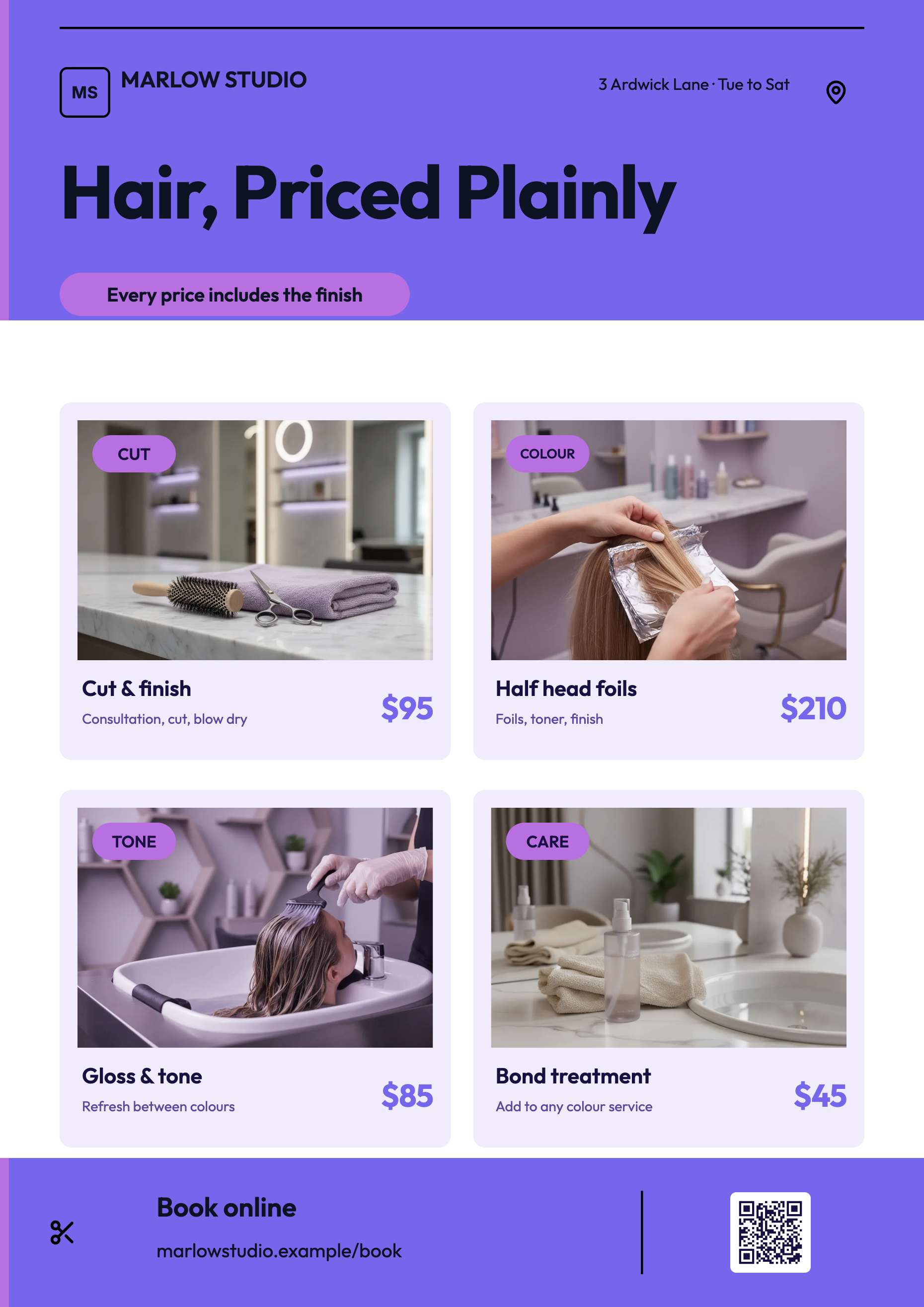 Salon price list flyerMade with OneCraft, exactly as the generator and editor left it. Open the page for the full breakdown.
Pricing in plain terms
Checked 29 September 2026. Marq's pricing page lists Free at $0 with 25 MB of storage, three projects and print and ship; Pro at $12 a month billed monthly or $10 billed yearly with basic template locking; Team at the same price for one user plus a free licence, adding advanced locking and one data automation; and custom Enterprise pricing with AI features, approvals and SSO. OneCraft's pricing page lists Free at $0 with 100 credits a month, Starter at $8 a month with 500 credits, Pro at $25 a month with 1,500 credits, Pro+ at $125 a month with 7,500 credits, and a custom Enterprise plan.
Moving across
Marq templates cannot be imported. For each flyer you use often, export it as a PDF or image and use OneCraft's make a flyer from a PDF or photo route; the text is read and rebuilt in a OneCraft design. Locks, smart fields and data automations have no equivalent, so bulk flyer jobs should stay in Marq.
What could not be checked
Marq's pages checked do not say whether multi page flyers or version history are available on each plan, or how many templates its library holds, so those cells say not itemised. Its former name Lucidpress is taken from its own homepage.
How the OneCraft side was verified
Every OneCraft cell names a row in an internal fact ledger checked against the product's source code: 99 themes in the flyer theme panel, the font scope, hand added pages and the PDF that exports every page, the 50 step undo, and the export pipeline. Locking, data merge, approvals and printing are recorded as absences.
Choosing between them
Marq was built for organisations where a head office designs a template once and dozens of branches customise it within locked limits, often pulling data from a spreadsheet or CRM. OneCraft was built for the opposite case: a salon, a cafe or a small agency where one person needs a finished flyer this afternoon and nobody manages brand permissions. If you are asking who is allowed to change the logo, Marq answers that question and OneCraft does not. If you are asking how to get the flyer written at all, OneCraft answers it faster.
Who should stay with Marq
Stay with Marq if brand compliance across many staff matters, if templates must be locked, if flyers are merged from spreadsheets or a CRM, or if you order prints and approvals through it. OneCraft is for small teams that want to write and lay out flyers fast.
Questions people ask
Is Marq the same as Lucidpress?
Yes. Marq's homepage describes it as formerly Lucidpress. The product kept its focus on brand templating: locked templates, smart fields, data automation and print and ship. Anyone searching for a Lucidpress alternative is comparing against the same product under its current name.
Can I lock parts of a OneCraft flyer?
No. There is no template locking, role or permission on a flyer; whoever edits it can change any text, image, colour or font. For a small team where one person owns the flyers that is rarely a problem. For many staff editing approved templates, Marq's locking is the safer choice.
Can OneCraft fill flyers from a spreadsheet?
No. There is no data merge or CSV import. Each flyer is generated from its own prompt, and you can duplicate pages and edit them by hand. Batches such as one flyer per property listing are exactly what Marq's data automation is built for.
How do I make a two page flyer in OneCraft?
Generate or open a flyer, then add a page from the design library or a blank A4 page. Each page keeps its own size, pages can be duplicated or deleted, and a PDF export includes every page. PNG and JPG export the active page only.
Can I restore an older version of a flyer?
Only through undo. Flyers have a 50 step undo and redo in the top bar and a manual Save button, but no version history drawer. If the generator returned two options, Flyer 1 and Flyer 2 both stay editable, which gives you a second direction to go back to.
Try the flyer side of OneCraft
The button opens the generator with a starting prompt already filled in. Change the wording to match your own work before you run it.
Create a flyer with OneCraftMore comparisons
- A Template.net alternative that fills the templateA Template.net alternative that fills the template for you: OneCraft and Template.net compared on price, catalogue size, AI fill, sizes and export formats.
- An Adobe Express alternative for flyers and postersAn Adobe Express alternative for flyers and posters: OneCraft and Adobe Express compared on price, templates, AI, sizes, themes, print and research posters.
- A Canva alternative for flyersOneCraft as a Canva alternative for flyers: 259 designs in 8 sizes filled from a description, against Canva's library, editor and print service.
What the module actually does, feature by feature: the AI flyer maker page, and the flyers maker page.
Step by step in the builder: Make a multi page flyer, then Change flyer colours and fonts with themes.
Written and checked by the OneCraft team. Last checked .