Flyers · Alternative
A Template.net alternative that fills the template
If you want a smaller set of flyer designs that arrive filled in with your own copy rather than a huge catalogue to search, OneCraft is a Template.net alternative built that way. Template.net remains the pick for catalogue breadth and for templates in Word, Excel, Publisher and other native formats.
Updated , competitor details checked . Template.net is a trademark of its owner. OneCraft is not affiliated with or endorsed by it.
Indunil Asanka · Co-founder
3 min read · Published
The short verdict
Template.net suits people who want the widest catalogue there is, in native file formats they already use, from Word and Excel to Publisher and Illustrator, plus its own AI generators. OneCraft suits people who want a curated flyer design filled with their copy in one pass, two options to pick from, and the same design in 8 sizes.
| Feature | Template.net | OneCraft |
|---|---|---|
| Price | Not published: the Plus and Max prices did not render on the pricing page when checked checked 2026-09-29 | Free at $0 with 100 credits a month, then Starter $8, Pro $25 and Pro+ $125 a month; generating from your own files starts on Starter |
| Catalogue size | "1 million+ AI templates"; over 10,000 free flyer templates checked 2026-09-29 | 259 flyer designs, 1,071 slide templates and 40 A0 poster boards |
| What happens after you pick | Customise online and download, or "enter a prompt" for an AI generated, editable flyer layout checked 2026-09-29 | Generation fills the chosen or suggested design with your copy, image prompts and icons; left blank, it returns 2 designs |
| File formats | Flyer templates in Word, PDF, Google Docs, Publisher, Illustrator, InDesign, PSD, Pages and Outlook checked 2026-09-29 | OneCraft does not offer Word, Excel or Publisher templates; flyers live in its own editor |
| Sizes | A4, A5 and US Letter for the AI flyer generator checked 2026-09-29 | 8 sizes, from A4 portrait and landscape to Instagram, Facebook, LinkedIn and X headers |
| Resize | Not itemised on the pages checked checked 2026-09-29 | All 259 designs have a native variant per size; content carries across by slot |
| Export | PNG, JPG, PDF, SVG or HTML from the AI flyer generator checked 2026-09-29 | PDF, PNG and JPG at twice the canvas; A4 lands at 300 DPI in RGB |
| AI allowance | 5,000 credits a month on Plus and 50,000 on Max checked 2026-09-29 | Credits shared across every module: 150 a month free, 500 on Starter, 1,500 on Pro |
| Editing with AI | An "All in one AI Editor" on Plus checked 2026-09-29 | Flyer chat has two operations, editing a slot value and renaming the flyer; images are changed in the inspector |
Where Template.net is better
Catalogue breadth
Template.net claims over a million templates and more than 10,000 free flyer templates alone. OneCraft has 259 flyer designs. If finding an exact template for a niche occasion matters most, Template.net's catalogue wins by orders of magnitude.
Native office formats
Template.net flyers come in Word, Google Docs, Publisher, Illustrator, InDesign, PSD, Pages and more, and the Plus plan lists Excel templates too. OneCraft flyers exist only in its editor and export as PDF, PNG or JPG.
More export types
Its AI flyer generator downloads PNG, JPG, PDF, SVG and HTML. OneCraft has no SVG or HTML export, and its PDF holds page images, so the text is not selectable.
Beyond flyers
Template.net covers documents, spreadsheets, whiteboards and more under one subscription, with Max listing unlimited image and video generation. OneCraft covers flyers, posters, decks, forms, documents and video, but not spreadsheets.
Where OneCraft is different
Fewer designs, filled for you
OneCraft samples up to 50 designs that fit the size and asks the model to choose one for your subject, then writes your copy into it. You review a finished flyer instead of searching a catalogue.
Two directions per run
Leave the template blank and the run returns two different designs with the same content, kept as Flyer 1 and Flyer 2 and editable separately.
Facts are never invented
The fill rules forbid made up brand names, prices, dates, phone numbers, addresses and statistics, and never write N/A or TBD. A slot without a fact is omitted.
One design across 8 sizes
All 259 designs have a native layout in all 8 sizes, so the same flyer becomes an Instagram post or a Facebook cover by switching size.
A finished example
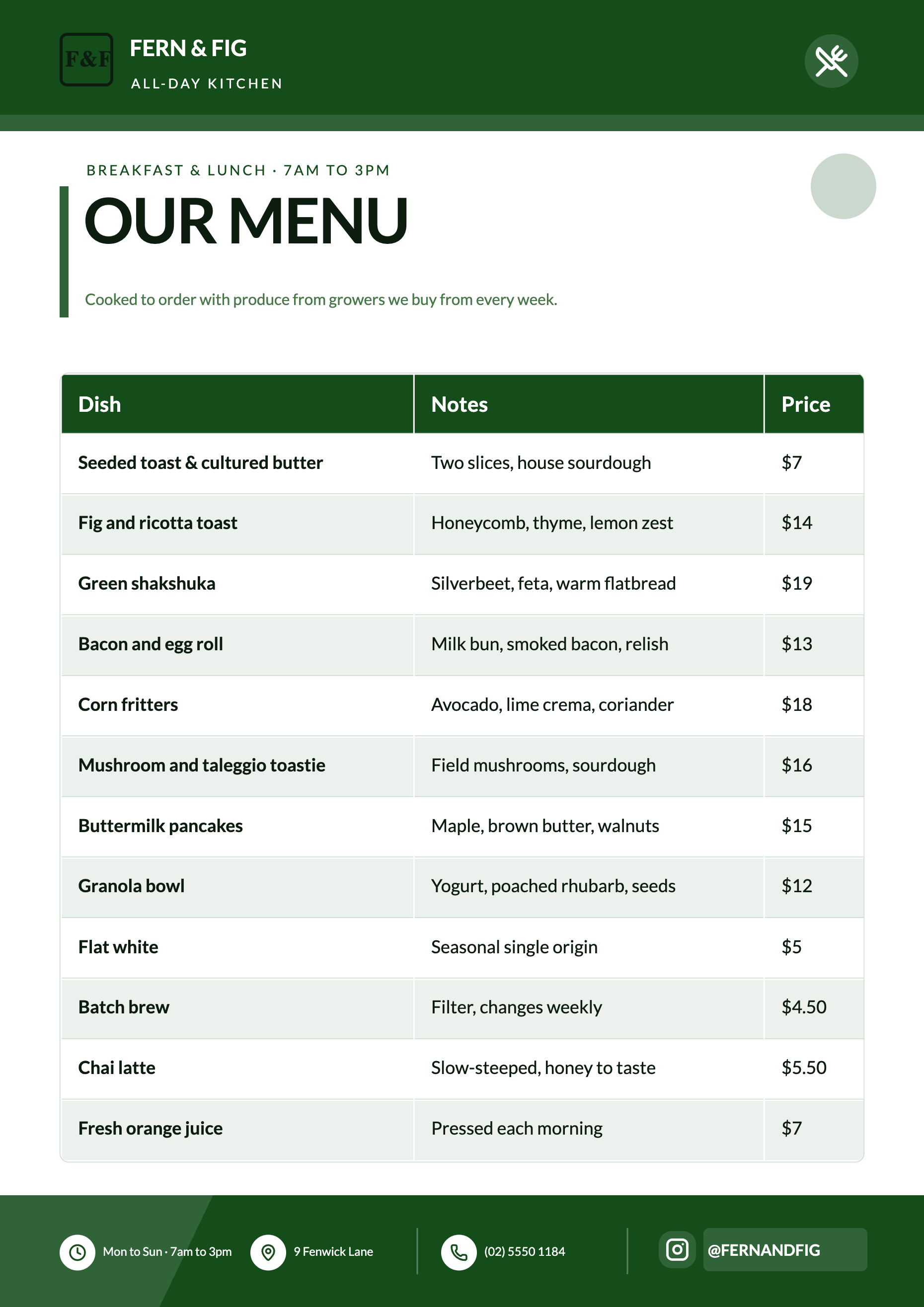 Cafe menu flyerMade with OneCraft, exactly as the generator and editor left it. Open the page for the full breakdown.
Pricing in plain terms
Checked 29 September 2026. Template.net's pricing page showed its Plus and Max plans without prices, which rendered as blank placeholders to the fetch, so no price is quoted here. Plus lists 5,000 credits a month, unlimited AI creations and 100 GB of storage; Max lists 50,000 credits, up to 10 free users and 1 TB. OneCraft's pricing page lists Free at $0 with 100 credits a month, Starter at $8 a month with 500 credits, Pro at $25 a month with 1,500 credits, Pro+ at $125 a month with 7,500 credits, and a custom Enterprise plan.
Moving across
A Template.net download in Word or PDF can go straight into OneCraft's flyer converter: upload the PDF or a photo of the flyer and the generator reads the text and rebuilds it in a OneCraft design. Only the words travel; layout and fonts are replaced by the new design.
What could not be checked
Template.net's plan prices did not render, so the price cell says not published and links the pricing page. Its template counts, one million plus across the site and over 10,000 flyers, are its own claims on the pages checked and are quoted as written.
How the OneCraft side was verified
Every OneCraft cell names a row in an internal fact ledger checked against the product's source code: 259 flyer designs from the template manifest, 1,071 slide templates on disk, the 40 poster files, the 50 design sample in template selection and the two chat operations. Office file formats are recorded as something OneCraft does not offer.
Choosing between them
Template.net is a catalogue first: search a million templates, find the closest match, download it in the format your office already uses and edit it there, or ask its AI generator for a new layout. OneCraft is a generator first: describe the flyer, get one or two finished designs filled with your details, and edit in its own editor. People who hand files to colleagues in Word or Publisher will find Template.net easier to live with. People who never want to search a catalogue, and who export straight to PDF or social sizes, will find OneCraft shorter.
Who should stay with Template.net
Stay with Template.net if you need templates in Word, Excel, Publisher or Adobe formats, if you want the largest catalogue available, or if you export SVG or HTML. OneCraft is narrower: a flyer written into a curated design, in 8 sizes.
Questions people ask
Is Template.net free?
Template.net's flyer page says its flyer templates are free to download and edit, while its Plus and Max plans add credits, AI tools and storage. Their prices did not render when this page was checked. OneCraft's free plan gives 100 credits a month, with generating from your own files on Starter at $8.
Can I get a Word or Publisher version of a OneCraft flyer?
No. OneCraft flyers export as PDF, PNG and JPG only, and the PDF contains page images, so its text is not selectable. If you need to keep editing in Word, Publisher or Google Docs, a Template.net download in that format is the better fit.
How does OneCraft choose a design for my flyer?
It samples up to 50 designs that match your chosen size, within 12% of its aspect ratio, and asks the model to pick the best fit for your subject and layout, preferring variety. Repeat runs therefore surface different designs. You can also pick a template yourself and get one result.
What if my prompt leaves out the price or date?
The generator will not make it up. Prices, dates, phone numbers, addresses and statistics are only written when you supply them, and an optional slot without a fact is left out rather than padded. Add the details to the prompt or type them into the flyer afterwards.
Can I edit a OneCraft flyer by chatting?
Yes, for text. The flyer chat can change the words in any slot and rename the flyer, and it validates every change against the design. It cannot change images, layout, theme or size; those are edited in the inspector and theme panel.
Try the flyer side of OneCraft
The button opens the generator with a starting prompt already filled in. Change the wording to match your own work before you run it.
Create a flyer with OneCraftMore comparisons
- A Marq alternative for small teamsA Marq (Lucidpress) alternative for small teams: OneCraft and Marq compared on price, brand control, template locking, AI fill, multi page flyers and print.
- A VistaCreate alternative for flyersA VistaCreate (Crello) alternative for flyers: OneCraft and VistaCreate compared on price, design from text, animation, sizes, themes, AI images and print.
- A Canva alternative for flyersOneCraft as a Canva alternative for flyers: 259 designs in 8 sizes filled from a description, against Canva's library, editor and print service.
What the module actually does, feature by feature: the AI flyer maker page, and the flyers maker page.
Step by step in the builder: Make a flyer from a PDF or photo, then Choose your flyer template, theme and size.
Written and checked by the OneCraft team. Last checked .