Flyers · Alternative
A VistaCreate alternative for flyers
The best VistaCreate alternative for someone who dreads writing flyer copy is a generator that fills a finished design from a description, and OneCraft is one. VistaCreate, formerly Crello, keeps the lead on template volume, animation, stock media, brand kits and printing through VistaPrint.
Updated , competitor details checked . VistaCreate is a trademark of its owner. OneCraft is not affiliated with or endorsed by it.
Indunil Asanka · Co-founder
3 min read · Published
The short verdict
VistaCreate suits people who browse a very large template and stock library, animate social posts, schedule them, and send designs straight to VistaPrint for printing. OneCraft suits people who want a flyer written and laid out from a sentence, two options to choose between, and native resizing across 8 sizes, without animation or print ordering.
| Feature | VistaCreate | OneCraft |
|---|---|---|
| Price | Starter free; Pro $10 USD a month billed yearly or $13 billed monthly, up to 10 seats checked 2026-09-29 | Free at $0 with 100 credits a month, then Starter $8, Pro $25 and Pro+ $125 a month; generating from your own files starts on Starter |
| Templates | 100K+ free templates on Starter, 200K+ on Pro checked 2026-09-29 | 259 flyer designs, every one authored natively for all 8 canvas sizes |
| Design from text | Generative AI for image and text on Pro; an AI Writer tool checked 2026-09-29 | One prompt fills the text, image prompts and icons of a design, and never invents prices, dates or addresses |
| Animation | "Animate any element on the artboard" checked 2026-09-29 | OneCraft flyers are still images; motion belongs to the separate video module |
| Sizes | Flyer templates are 5x7 inches; a one-click Resizer on Pro checked 2026-09-29 | 8 sizes from A4 portrait and landscape to Instagram, Facebook, LinkedIn and X headers |
| A "Print online" button sends the design to VistaPrint to order checked 2026-09-29 | No print service; PDF, PNG and JPG files at twice the canvas, RGB, with no bleed or crop marks | |
| Themes and brand | One Brand Kit free, unlimited Brand Kits on Pro, with fonts, palettes and logos checked 2026-09-29 | 99 themes in the flyer panel plus a Your brand group from account brand kits, 42 fonts, and a custom hex colour on any text slot |
| AI images | An Image Generator plus Background Remover and Object Remover checked 2026-09-29 | Generated per image slot at one of 8 aspect ratios snapped to the slot; logo slots are never generated |
| Stock media | 1M+ photos, videos and vectors free; 170M+ on Pro checked 2026-09-29 | No stock library to browse; an Unsplash photo is used only when an AI image fails during generation |
| Social scheduling | Social Media Scheduling on the free Starter plan checked 2026-09-29 | OneCraft does not publish or schedule posts |
Where VistaCreate is better
Animated designs
VistaCreate lets you animate any element on the artboard, so a flyer can become a moving social post. OneCraft flyers are still images, and animation means switching to its separate video module.
Print ordering through VistaPrint
VistaCreate's Print online button hands the design to VistaPrint to produce. OneCraft has no print service and its exports carry no bleed or crop marks.
A huge template and stock library
VistaCreate lists 100K+ templates and 1M+ stock assets free, and 200K+ templates and 170M+ assets on Pro. OneCraft's 259 designs and generated images are a curated set, not a catalogue.
Photo editing tools
Background Remover and Object Remover clean up photos inside VistaCreate. OneCraft's image controls are crop, corner radius, frame, fade and shadow; it does not retouch pixels.
Social scheduling and more brand kits on Pro
Unlimited brand kits on Pro and a social scheduler on every plan make VistaCreate a content calendar as well as an editor. OneCraft keeps brand kits in account settings but has no scheduler, so posting is done elsewhere.
Where OneCraft is different
Written, not just styled
OneCraft's generator writes the headline, details and image prompts into a design from your description. The fill rules forbid inventing brand names, prices or dates, so you add those facts in the prompt and nothing false appears.
Two options per run
With no template chosen, a run returns two different designs filled with the same content, kept as Flyer 1 and Flyer 2. You pick a direction instead of hunting for one.
Native variants, not stretched layouts
All 259 designs are authored in all 8 sizes. Switching from A4 to an Instagram story swaps in the story version of the same design and carries the content across by slot.
Posters, decks and forms nearby
The same account generates A0 research posters, presentations, forms and documents, so an event flyer, its sign up form and the talk slides come from one place.
A finished example
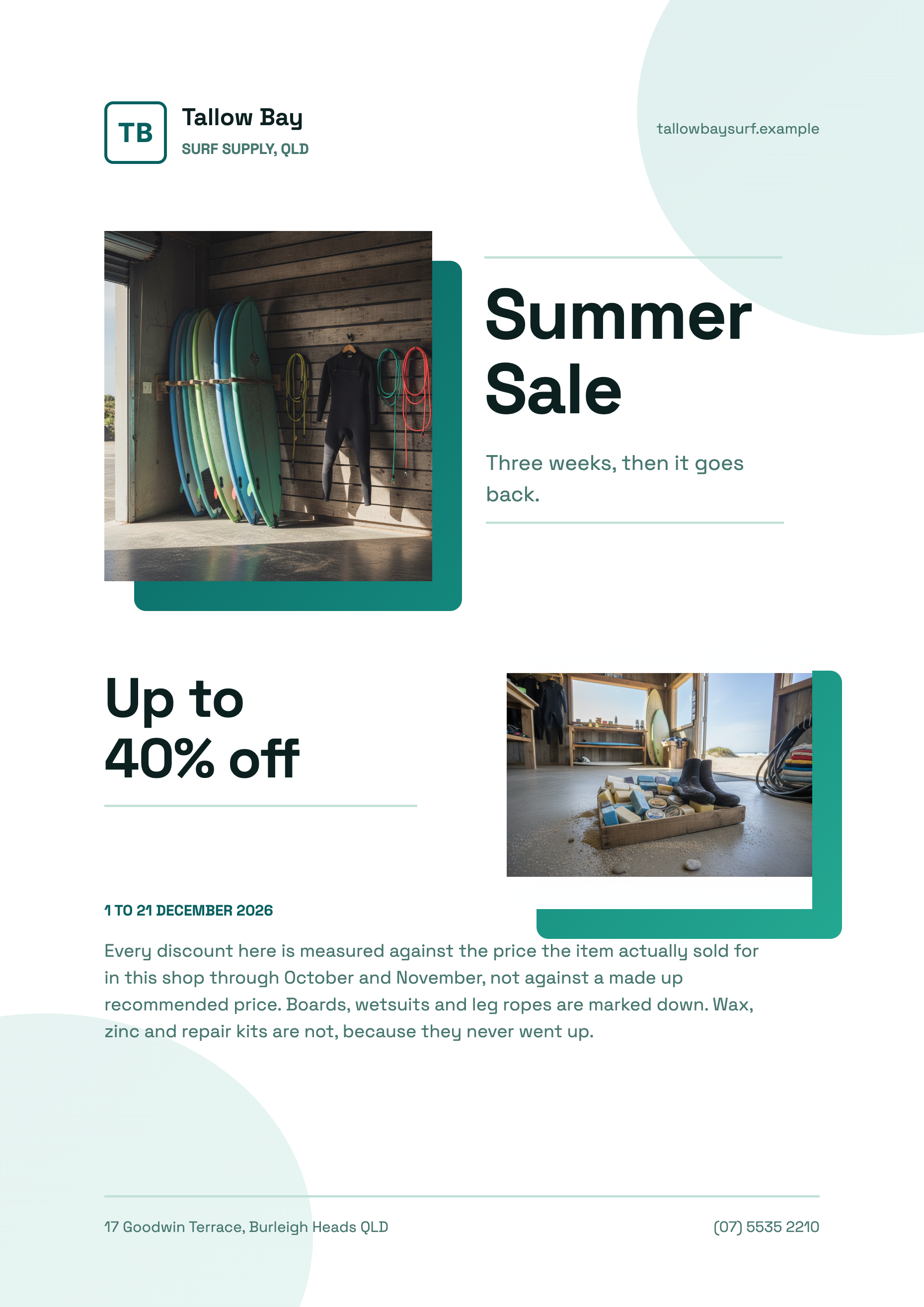 Summer sale flyerMade with OneCraft, exactly as the generator and editor left it. Open the page for the full breakdown.
Pricing in plain terms
Checked 29 September 2026. VistaCreate's plans page lists a free Starter plan with 100K+ templates, one brand kit, 10 GB of storage and social scheduling, and Pro at $10 USD a month billed yearly or $13 billed monthly for up to 10 seats, with 200K+ templates, 170M+ stock assets, unlimited brand kits and generative AI. OneCraft's pricing page lists Free at $0 with 100 credits a month, Starter at $8 a month with 500 credits, Pro at $25 a month with 1,500 credits, Pro+ at $125 a month with 7,500 credits, and a custom Enterprise plan.
Moving across
There is no importer for VistaCreate designs. Download your current flyer as a PDF or image and use OneCraft's make a flyer from a PDF or photo route: the text is read and rebuilt into a OneCraft design. Layout, fonts, colours and animation do not carry over.
What could not be checked
VistaCreate's flyer page does not list its download file formats, and its pages do not say whether VistaPrint prices differ by country, so neither is claimed. The VistaCreate name and its former name Crello are used because people still search for both.
How the OneCraft side was verified
Every OneCraft cell names a row in an internal fact ledger checked against the product's source code: the design count from the template manifest, the 8 canvas sizes, the 99 themes in the flyer theme panel and the export pipeline that renders at twice the canvas in RGB. Animation, printing and scheduling are recorded as things OneCraft flyers do not do.
Choosing between them
Picture a homewares shop running a two week sale. In VistaCreate the owner searches the sale templates, swaps in product photos from the stock library, animates the discount for Instagram and orders a hundred printed copies through VistaPrint. In OneCraft the owner types the offer, the dates and the delivery threshold, picks one of two finished designs, switches it to the story size for Instagram and prints the A4 PDF at the office. The first route has more steps and more polish on motion and print; the second is faster when the words are the hard part.
Who should stay with VistaCreate
Stay with VistaCreate if your flyers need to move, if you order prints through VistaPrint, if you browse a large stock library for every design, or if you schedule social posts from the same tool. OneCraft covers none of those; it writes and lays out still flyers quickly.
Questions people ask
Is VistaCreate the same as Crello?
Yes. Crello was renamed VistaCreate and is now part of the Vista family of products alongside VistaPrint, according to its own announcement. That link is why VistaCreate can send a design straight to VistaPrint for printing. OneCraft has no print partner; you export a PDF, PNG or JPG and take it to a printer yourself.
Can OneCraft make animated flyers?
No. Flyers are still designs exported as PDF, PNG or JPG. OneCraft does make videos in a separate module, where a brief becomes scenes with voiceover and captions, but that is a different artifact from a flyer. VistaCreate can animate a flyer design directly.
Which flyer sizes does OneCraft support?
Eight: A4 portrait, A4 landscape, Instagram post, Instagram story, Facebook post, LinkedIn post, Facebook cover and X header. Each page of a flyer can have its own size, and all 259 designs have a native layout for every one of the eight.
Do I still get a flyer if I leave details out of the prompt?
Yes, but the generator will not invent them. Prices, dates, phone numbers, addresses and statistics are never made up, so a slot you gave no fact for is omitted or left for you to fill. Put the real details in the prompt and they land in the right places.
Can I remove a photo background in OneCraft?
Not in the flyer editor. Image controls are corner radius, soft edges, frame and drop shadow, and uploads are cropped to fill their slot. VistaCreate's Background Remover and Object Remover are genuine advantages if you edit photos as part of making the flyer.
Try the flyer side of OneCraft
The button opens the generator with a starting prompt already filled in. Change the wording to match your own work before you run it.
Create a flyer with OneCraftMore comparisons
- An Adobe Express alternative for flyers and postersAn Adobe Express alternative for flyers and posters: OneCraft and Adobe Express compared on price, templates, AI, sizes, themes, print and research posters.
- A Canva alternative for flyersOneCraft as a Canva alternative for flyers: 259 designs in 8 sizes filled from a description, against Canva's library, editor and print service.
- A PosterMyWall alternative for event flyersA PosterMyWall alternative for event flyers: OneCraft and PosterMyWall compared on price, AI fill, video flyers, sizes, print quality and scheduling.
What the module actually does, feature by feature: the AI flyer maker page, and the flyers maker page.
Step by step in the builder: Create a flyer for Instagram and print, then Change flyer colours and fonts with themes.
Written and checked by the OneCraft team. Last checked .