Flyers · Alternative
A Canva alternative for flyers
Canva is a design editor with an enormous template library and a print shop attached; OneCraft is a generator that writes and lays out a flyer from a sentence, then lets you edit it. They are different tools that produce the same artefact, and this table says which is which.
Updated , competitor details checked . Canva is a trademark of its owner. OneCraft is not affiliated with or endorsed by it.
Nuwan Madhusanka · Co-founder
3 min read · Published · Updated
The short verdict
Canva suits anyone who wants to browse templates, edit freely, collaborate, and order printed flyers with proper bleed from the same tool. OneCraft suits someone who would rather type what the flyer is for and have the copy, layout, images and icons filled in across every size, accepting a far smaller library and no print service.
| Feature | Canva | OneCraft |
|---|---|---|
| Templates | 1M+ professionally designed templates, claimed across the whole product checked 2026-09-02 | 259 distinct flyer designs, every one authored natively for all 8 sizes, 1,813 template files in total |
| Sizes | Standard flyer sizes listed in their FAQ: 8.5x11, 11x17 and 5.5x8.5 inches checked 2026-09-02 | 8 preset canvas sizes at 150 DPI, from A4 portrait and landscape to Instagram, Facebook and X formats |
| AI writing | Magic Write, with 25 uses in total on the free plan and 250 queries a month on paid plans checked 2026-09-02 | Generation fills the text, image prompts and icon names for the whole flyer from one prompt; it never invents prices or dates |
| AI images | Magic Design, an AI design generator for custom on-brand designs checked 2026-09-02 | Generated per image slot at one of 8 aspect ratios snapped to the slot, with an Unsplash fallback |
| Resizing a design | Magic Resize, now Magic Switch, offered as a Canva Pro feature checked 2026-09-02 | All 259 designs have a native variant for all 8 sizes; switching swaps it in and carries content across by slot |
| Print-ready export | PDF Print download with a crop marks and bleed option; Canva adds 0.125 inches of bleed for trimmed products checked 2026-09-02 | PDF, PNG and JPG at twice the canvas, A4 lands at 300 DPI, RGB. There is no bleed, no crop marks and no CMYK |
| Print service | Canva Print with doorstep delivery and a satisfaction guarantee checked 2026-09-02 | OneCraft does not print flyers. You take the exported file to a printer yourself |
| Brand control | Brand Kit with logos, colors, fonts and guidelines, up to 5 brands, part of the Pro bundle checked 2026-09-02 | 99 themes in the panel plus a Your brand group built from your account brand kits (logo and three colours), one global font per flyer with a per slot override, and custom hex on any text slot |
| Elements and photo editing | A photo editor with Magic Eraser, Background Remover, filters and enhancement checked 2026-09-02 | 67 insertable tiles across 13 sections, charts, diagrams, stats and lists included; image styling is crop, frame, fade and shadow |
| Collaboration | Real time editing and comments, per their collaboration pages checked 2026-09-02 | OneCraft does not have collaborative editing; one person edits a flyer at a time |
| QR codes | Not itemised on their flyers page checked 2026-09-02 | 25 of the 259 designs carry a QR slot; a QR cannot be added to a design that has none |
| Multi-page flyers | Not itemised on their flyers page checked 2026-09-02 | Pages are added by hand from the library or blank; generation always returns a single page |
Where Canva is better
The library is in a different league
Canva claims over a million templates and a deep element and photo library behind them. OneCraft has 259 flyer designs and 67 insertable tiles. If browsing until something clicks is how you design, Canva's breadth is the product and OneCraft cannot match it.
Print-ready PDFs with bleed and crop marks
Canva's PDF Print download adds 0.125 inches of bleed and optional crop marks, which is what a commercial printer asks for. OneCraft's exports are RGB with no bleed, no crop marks and no CMYK, stated on this page rather than buried. Anything going to a trim and cut print run is safer built in Canva.
It prints and ships the flyer
Canva Print takes the design to your doorstep with a satisfaction guarantee. OneCraft ends at the exported file, and the walk to the print shop is yours.
Teams can work in it together
Real time editing, comments and a Brand Kit holding up to five brands make Canva a shared workspace. A OneCraft flyer is edited by one person at a time. Brand kits live in account settings and apply their colours and logo when picked as a theme, but there are no brand guidelines, approvals or shared team editing.
Photo editing inside the tool
Magic Eraser, Background Remover, filters and enhancement mean a mediocre photo can be fixed without leaving Canva. OneCraft's image controls are crop, frame, fade and shadow; it does not retouch pixels.
Where OneCraft is different
The flyer is written for you
One prompt fills the headline, body copy, image prompts and icons for a chosen design, and the fill rules forbid inventing brand names, prices, dates or statistics, so an empty slot stays empty rather than gaining a fake fact. Canva's Magic Write drafts text; OneCraft's generator drafts the flyer.
Most designs exist natively in 8 sizes
All 259 designs are authored for every canvas size, so an A4 flyer becomes an Instagram story by swapping to the story variant of the same design, with content carried across by slot.
Two options per run
Leave the template choice blank and a generation returns two different designs filled with the same content, independently editable as Flyer 1 and Flyer 2. Picking between two finished directions is faster than assembling one from a blank canvas.
The launch kit lives in one account
The account that generates the flyer also generates the poster, the pitch deck, the signup form and the promo video, with e-signing included. For a small business, the suite replaces four subscriptions rather than competing with one editor.
A finished example
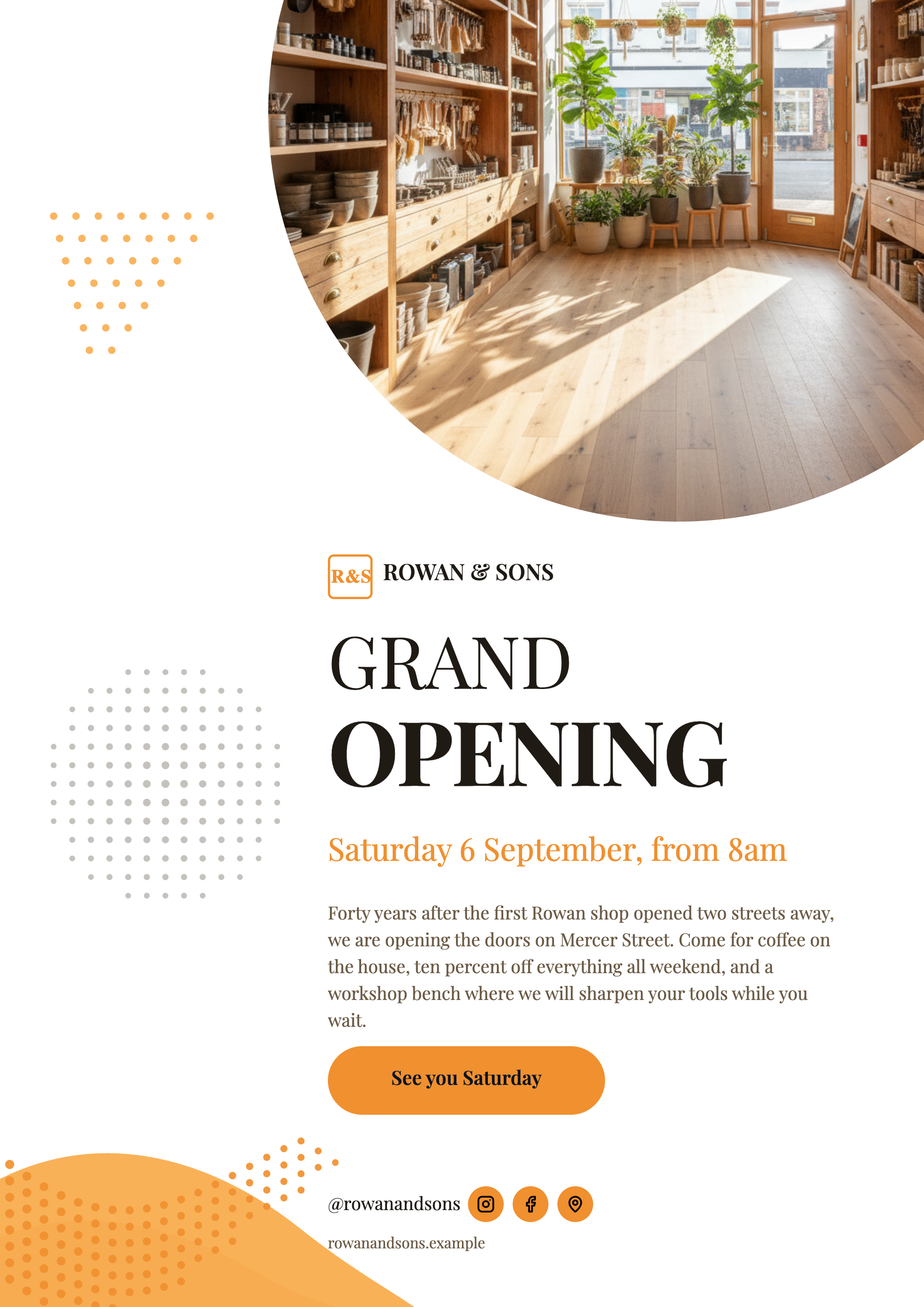 Grand opening flyerMade with OneCraft, exactly as the generator and editor left it. Open the page for the full breakdown.
Pricing in plain terms
Canva's pricing page, checked 2 September 2026, lists Canva Free at US$0, Canva Pro at US$180 a year for one person, and Canva Business at US$250 a year per person, with Magic Switch, Brand Kit and most AI allowances sitting in the paid tiers. OneCraft's pricing page lists Free with 100 AI credits a month, Starter at $8 a month with 500 and Pro at $25 with 1,500; a flyer generation uses about 25 credits, and attaching your own files to a generation needs the Starter plan.
Moving across
A Canva design cannot be imported. What works is the converter for existing flyers: upload a PDF or a photo of the current flyer and the generator reads the text and rebuilds the flyer in a OneCraft design. Nothing visual survives the trip, no fonts, no colours, no layout, only the words, and this page says so rather than implying a clean migration.
What the Canva pages do not state
Canva does not publish a flyer specific template count, so the table quotes its site wide claim of one million plus templates. Its flyers page lists standard flyer sizes in a FAQ without describing a custom size feature, so custom sizing is not claimed in either direction. Bleed behaviour is quoted from Canva's own help page on margins, bleed and crop marks.
How the OneCraft side was verified
Every OneCraft cell names a row in an internal fact ledger verified against the product's source code: the 259 designs and 1,813 files are counted from the template manifest, the export maths of twice the canvas comes from the export worker, and the absences, bleed, CMYK, print service and collaboration, are recorded as absences in the same ledger.
Who should stay with Canva
Stay with Canva if your flyers go to a commercial printer that needs bleed and CMYK, if you order prints from the tool, if a team edits together under a Brand Kit, or if you simply want the biggest possible library. OneCraft trades all of that breadth for generation speed, and the trade only makes sense if writing the flyer is the part you dread.
Questions people ask
Can I import a Canva design into OneCraft?
No. There is no importer, and the converter that accepts a PDF or photo of your existing flyer extracts the text only, then rebuilds it in a OneCraft design. Fonts, colours and layout do not carry over. Treat it as retyping done for you, not as a migration.
Does OneCraft print flyers?
No. Exports are PDF, PNG and JPG files at twice the canvas size, and printing is up to you. Canva Print will produce and deliver the physical flyers, which is a genuine advantage if you would rather not deal with a print shop at all.
Is there bleed or CMYK?
No. OneCraft exports are RGB with no bleed, crop marks or CMYK anywhere in the flyer code. For home printing, office printers and social posts that is irrelevant; for a commercial print run with trimming, it matters, and Canva's PDF Print with bleed is the safer route.
How many flyer templates does OneCraft have?
259 distinct designs, every one authored natively for all 8 canvas sizes, which comes to 1,813 template files. It is a curated set rather than a searchable ocean; the intended workflow is that generation picks a fitting design for you and returns two options when you leave the template blank.
Does a brand kit carry over to every flyer size?
Yes. A brand kit saved in account settings shows up as a Your brand theme in the flyer theme panel, and picking it applies the kit's colours and stamps its logo into the design's logo slots, while the font stays the theme's own. The theme is flyer wide, so a resized page keeps it. Canva Pro's Brand Kit also adds guidelines and holds up to five brands.
Can two people edit a flyer at once?
No. OneCraft has no collaborative editing, comments or presence; one person edits, saves, and someone else can take over afterwards. Canva's real time collaboration is listed plainly in its column, and teams that co-design will feel the difference immediately.
Is OneCraft free to try?
Yes. The free plan includes 100 AI credits a month and a flyer generation uses about 25, so you can produce and edit a few real flyers before paying anything. Attaching your own files to a generation arrives with the Starter plan at $8 a month, and exports on every plan cost about 1 credit per 10 pages.
Try the flyer side of OneCraft
The button opens the generator with a starting prompt already filled in. Change the wording to match your own work before you run it.
Create a flyer with OneCraftMore comparisons
- Canva vs OneCraft for presentationsCanva's presentation editor against OneCraft's AI deck generator: layouts, AI writing, charts, PowerPoint export, presenting and collaboration.
- Gamma vs Beautiful.ai vs OneCraftGamma, Beautiful.ai and OneCraft compared for AI presentations: generation, layouts, editing, PowerPoint export, presenting and pricing.
- A PosterPresentations alternative: generator vs PowerPoint templatesOneCraft's poster generator as a PosterPresentations.com alternative: 40 A0 layouts filled from your abstract, against free PowerPoint templates plus printing.
What the module actually does, feature by feature: the AI flyer maker page.
Step by step in the builder: Choose your flyer template, theme and size, then Make a flyer from a PDF or photo.
Written and checked by the OneCraft team. Last checked .