Posters · Alternative
A PosterPresentations alternative: generator vs PowerPoint templates
PosterPresentations.com gives away PowerPoint templates in every common size and prints the result; the work of writing and placing every block is yours. A poster generator does that work from your abstract or paper, at A0 only, and hands you an editable board in the browser.
Updated , competitor details checked . PosterPresentations.com is a trademark of its owner. OneCraft is not affiliated with or endorsed by it.
Nuwan Madhusanka · Co-founder
3 min read · Published · Updated
The short verdict
PosterPresentations.com suits anyone whose conference names a size other than A0, who wants full PowerPoint control, or who wants the poster printed and shipped by the same company. OneCraft suits a researcher who wants the board written and laid out from the abstract first, and will edit in the browser and print elsewhere.
| Feature | PosterPresentations.com | OneCraft |
|---|---|---|
| Sizes | Templates in many sizes: 36x48, 36x56, 42x60, 48x72 inches and more, plus metric sizes including A0 and A1 checked 2026-09-02 | A0 only: portrait 1656 x 2340 and landscape 2340 x 1656, at a 50 DPI working canvas |
| Layouts | A collection of free PowerPoint research poster templates in .ppt and .pptx checked 2026-09-02 | 40 poster templates, 20 per orientation, each defining its blocks in reading order |
| How content gets in | You download the template and write and place everything yourself in PowerPoint checked 2026-09-02 | Generated from your prompt, or from an attached paper on the Starter plan and up; slot budgets force copy to fit |
| Blocks on the board | Whatever PowerPoint holds; the templates ship with example section placeholders checked 2026-09-02 | Every board has a logo, title, authors, sections and figures; most add protocol, references and stats, ten carry a CONSORT flow, none carries a QR code |
| Figures | Any image, chart or table PowerPoint can place checked 2026-09-02 | Chart figures in 10 chart kinds are generated and editable; the 7 image media figure blocks across the set have no upload control and cannot be filled |
| References | Yours to paste into the template checked 2026-09-02 | Reference blocks are filled by the generator to look complete. Replace them with your real citations before anyone reads the board |
| Export | The template stays a PowerPoint file, which their print service accepts checked 2026-09-02 | PDF, PNG and JPG at twice the canvas, A0 portrait at 3312 x 4680; the PDF embeds a page bitmap, not selectable text |
| Printing | Prints and ships: paper posters at $65 for 36x48, $109 for 42x60, $149 for 48x72, free FedEx Ground, same day dispatch before noon Pacific checked 2026-09-02 | OneCraft does not print posters. You take the exported file to a print shop yourself |
| Editing | Full PowerPoint control over every element checked 2026-09-02 | In browser editing of every block, with undo capped at 50 steps and manual saves as versions |
| Cost to start | Templates are free to download with no account; you pay only if they print it checked 2026-09-02 | A poster generation bills at twice the flyer rate, from a free plan of 100 credits a month |
Where PosterPresentations.com is better
Every size, not only A0
Their template collection covers 36x48, 36x56, 42x60, 48x72, trifold and more, plus metric sizes. OneCraft generates at A0 portrait or landscape and nothing else. If your conference specifies 48x36 inches, their template matches it exactly and OneCraft asks you to scale at print time.
Full PowerPoint control
A template in PowerPoint means exact placement, your institution's fonts, and thirty years of muscle memory. OneCraft's blocks are editable but structured, and pixel perfect nudging of one stray caption is easier in PowerPoint than in any structured editor.
A print service with a known workflow
They print on paper and fabric, quote prices openly on their price guide, ship FedEx Ground free, and dispatch same day for orders before noon Pacific. OneCraft ends at a file. The night before a flight, a company that prints and ships posters for a living is worth a lot.
Free with no account
The templates download without an email address or a signup. OneCraft requires an account, and a poster generation bills at twice the flyer rate. As a zero commitment starting point, the template collection is unbeatable.
Your images anywhere
In PowerPoint, any figure can be your own microscopy image, gel photo or field picture, placed wherever it belongs. In OneCraft, chart figures are generated and editable, but the seven image media figure blocks across the template set cannot be filled with an upload at all, and this page says so because the product's own audit found it.
Where OneCraft is different
The board is written and laid out for you
The generator takes your abstract or attached paper and fills the title, sections, key numbers, protocol and figures into one of 40 layouts, with slot budgets forcing concise copy. The blank template stage, the part that eats an evening, is skipped entirely.
Figures are data, not decoration
Chart figures render from editable data in 10 chart kinds, and ten templates carry a proper CONSORT flow for trial reporting. The chart values and the figures quoted in the text are separate fields, so check that they agree before printing.
Editing happens in the browser
Every block is editable in place with undo up to 50 steps, and themes restyle the whole board at once. There is no QR block, so print a link to your paper in the references or add a QR code at the print shop. No PowerPoint licence, no font packaging, no emailing v7_final between machines.
The talk comes from the same account
The account that generated the poster also generates the slide deck for the talk and the one page handout, from the same paper. For a conference week, that is three artefacts from one upload.
A finished example
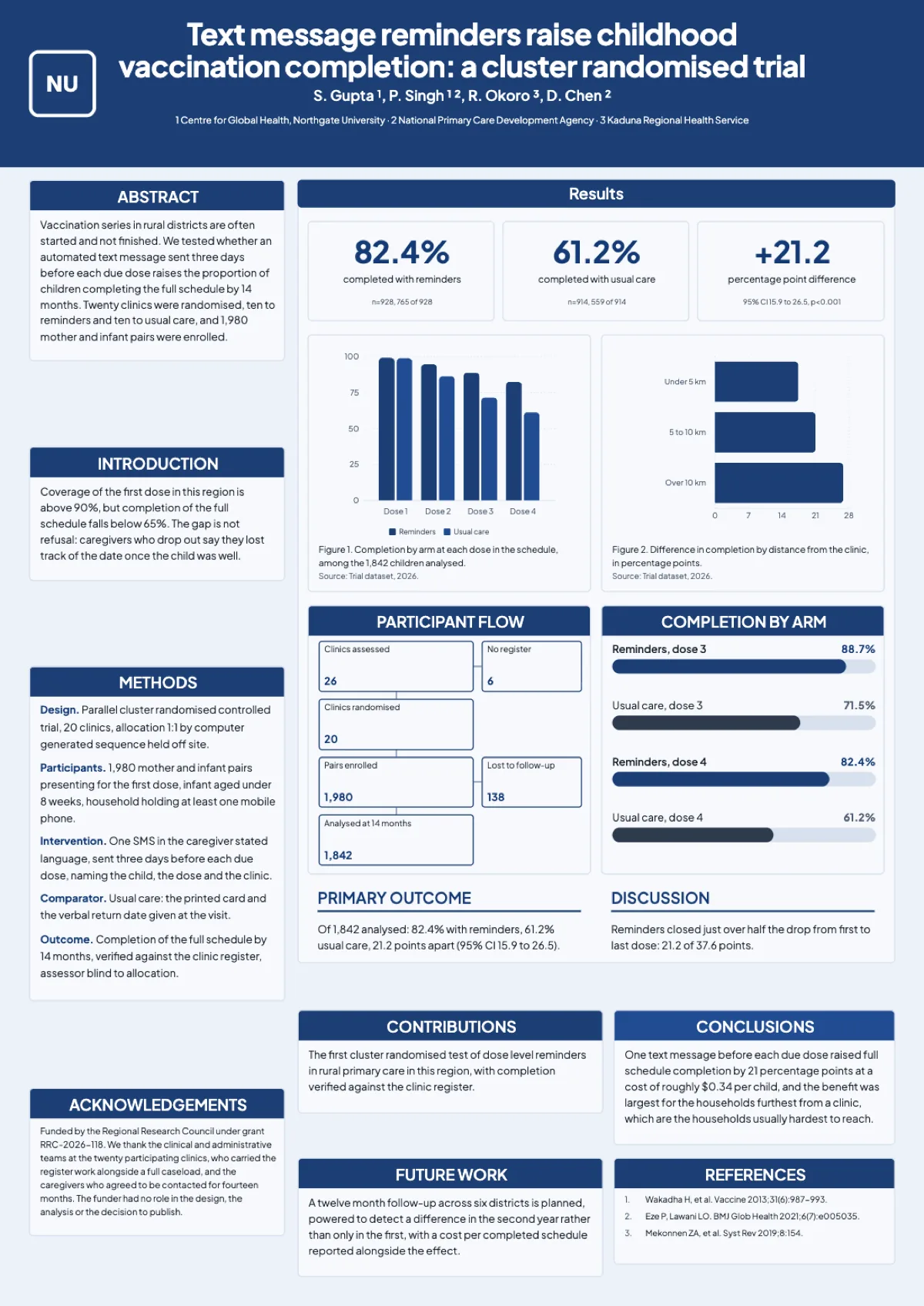 Clinical trial posterMade with OneCraft, exactly as the generator and editor left it. Open the page for the full breakdown.
What to check before you trust a generated poster
Two things, found by the product's own audit and stated here on purpose. First, references: the generator fills every reference slot so the block looks complete, and you must replace them with your real citations before the board is shown. Second, figures: chart figures are real and editable, but the seven image media figure blocks across the template set have no upload control and cannot carry your images. Read every number on the board against your paper before printing, exactly as you would proof a student's draft.
Pricing in plain terms
PosterPresentations.com templates are free with no account, and their price guide, checked 2 September 2026, lists paper printing at $65 for 36x48, $109 for 42x60 and $149 for 48x72, with free FedEx Ground shipping and same day dispatch for orders before noon Pacific. OneCraft's pricing page lists Free with 100 AI credits a month, Starter at $8 and Pro at $25; a poster generation bills at twice the flyer rate, and attaching your paper to the generation needs Starter. Printing costs are yours in either case unless they print it.
Moving across
There is no PowerPoint import and no PowerPoint export; a OneCraft poster starts from your abstract or paper and leaves as a PDF, PNG or JPG. If your department requires an editable .pptx of the final board, the template route is the honest recommendation, because converting a OneCraft export back into PowerPoint gives you a picture, not objects.
How the OneCraft side was verified
Every OneCraft cell names a row in an internal fact ledger counted from the product's source: the 40 templates and their block inventories, the 2x export capture that makes A0 portrait 3312 x 4680, the poster rate of twice a flyer in the billing code, and the audit findings on references and image figures. The uncomfortable rows are printed with the comfortable ones.
Who should stay with PosterPresentations.com
Stay with the template route if your conference requires any size other than A0, if your figures are your own images rather than charts, if you want the same company to print and ship the board, or if PowerPoint control matters more than generation speed. Those are structural limits of the generator, not gaps a workaround fixes.
Questions people ask
Can I make a 36 by 48 inch poster?
Not natively. OneCraft generates at A0 portrait or landscape only. A0 is close to 33 by 47 inches, so many print shops will scale the PDF to 36x48 with modest margins, but if the conference checks dimensions strictly, use a template at the exact size instead.
Can I upload my own figures?
Into image slots that templates provide, yes, but with a hard caveat: the seven image media figure blocks that appear across four of the templates have no upload control and cannot be filled today. Chart figures are the reliable path, since they render from data you can edit block by block.
Are the generated references real?
Treat them as placeholders. The generator fills every reference slot so the board looks finished, and nothing verifies them against real literature. Replace the whole block with your actual citations before the poster is printed or shown; the same caution applies to any AI written bibliography anywhere.
Can I export to PowerPoint?
No. Exports are PDF, PNG and JPG at twice the canvas, and the PDF embeds the board as a page image rather than selectable text. If an editable PowerPoint file is a requirement, PosterPresentations.com templates are PowerPoint from the first click and keep that property forever.
Does OneCraft print the poster?
No. You download the file and deal with a printer yourself. PosterPresentations.com prints on paper and fabric at prices published on its own price guide, ships FedEx Ground free, and dispatches same day before noon Pacific, which is a genuinely useful service the generator does not replace.
Is A0 accepted at conferences in the United States?
Often, but not always: US conferences frequently specify inch sizes like 36x48 or 48x36, and A0 is slightly narrower and taller than 36x48. Check the conference's poster guidelines before committing, and see the questions page comparing A0 with 36x48 and 48x36 for the exact dimensions.
Try the poster side of OneCraft
The button opens the generator with a starting prompt already filled in. Change the wording to match your own work before you run it.
Create a poster with OneCraftMore comparisons
- A Canva alternative for flyersOneCraft as a Canva alternative for flyers: 259 designs in 8 sizes filled from a description, against Canva's library, editor and print service.
- Gamma vs Beautiful.ai vs OneCraftGamma, Beautiful.ai and OneCraft compared for AI presentations: generation, layouts, editing, PowerPoint export, presenting and pricing.
What the module actually does, feature by feature: the AI poster maker page, and the posters maker page.
Step by step in the builder: Choose your template, theme and size, then Add charts and diagrams.
Written and checked by the OneCraft team. Last checked .