Proposals · Compared
PandaDoc vs Proposify, with a third option for small businesses
PandaDoc is a document platform that covers proposals, contracts and quotes with a large template gallery, a content library, catalogues and payments; Proposify is proposal software for sales teams, with a template editor, a content library, approval workflows and CRM sync. Both are built for teams, and OneCraft Proposals is built for one owner who writes, sends and gets paid.
Updated , competitor details checked . PandaDoc and Proposify are trademarks of their respective owners. OneCraft is an unrelated product and claims no affiliation with or endorsement by either.
Nuwan Madhusanka · Co-founder
3 min read · Published
The short verdict
Pick PandaDoc when proposals are one of many document types your team sends and you want contracts, catalogues and payments on one platform. Pick Proposify when proposals are the sales process and managers need approval rules, a content library and Salesforce or HubSpot in sync. Pick OneCraft when one person writes each proposal, wants it drafted from a brief, and needs acceptance to turn straight into invoices with a card pay link.
| Feature | PandaDoc | Proposify | OneCraft |
|---|---|---|---|
| Price | Plans and prices are published on PandaDoc's pricing page and are not restated here checked 2026-09-02 | Plans and prices are published on Proposify's pricing page and are not restated here checked 2026-10-13 | Per account, not per user: Free $0, Starter $8, Pro $25 and Pro+ $125 a month |
| Editor | A drag and drop editor with an AI document assistant and AI data extraction checked 2026-09-02 | Our easy-to-use editor lets you drag and drop text, images, video, tables, and shapes checked 2026-10-13 | A paginated page canvas that reads the same on screen and in the PDF, with the Pricing panel beside it |
| AI | AI data extraction and an AI document assistant are the listed AI features checked 2026-09-02 | Use our embedded AI widget to prompt, write, refine, fix spelling and grammar, condense, and more; an MCP server connects Proposify to Claude checked 2026-10-13 | The AI writes the whole proposal from the brief with one pricing table, after a research step on the client |
| Pricing tables | Interactive pricing tables with line items, units or quantities, discounts and taxes checked 2026-09-02 | Interactive Quoting allows buyers to adjust quantities and options in real-time, with prices stored in a Pricing Library checked 2026-10-13 | Item, Qty, Unit price, Tax, Discount and Amount columns; optional items and client editable quantities; up to 200 items |
| Templates and reusable content | A content library for layouts, snippets and branded assets, and a 1000+ template gallery checked 2026-09-02 | Organize all of your approved proposal content in one place so it's fast and easy for reps to find what they need checked 2026-10-13 | 18 starter templates (12 proposals, 6 quotes) and duplication; no content library |
| Approvals | Approval workflows, listed under the Business plan checked 2026-09-02 | Add conditions that when met require certain roles to get approval before sending to a buyer, including price total and discount percentage checked 2026-10-13 | No approval step |
| CRM | Embedded integrations with HubSpot, Salesforce, Pipedrive and monday.com checked 2026-09-02 | Synchronize your data from Salesforce, HubSpot or another popular CRM checked 2026-10-13 | No CRM connector; a clients list inside Proposals |
| Signing | Legally binding e-signatures meeting ESIGN and eIDAS requirements, with an audit trail and a digital certificate checked 2026-09-02 | Every plan can add signatures to documents to get legal sign-off checked 2026-10-13 | Click acceptance with a drawn signature and a consent box, recorded on a certificate page |
| Tracking | Document tracking that shows who has opened, viewed and signed, with recipient analytics checked 2026-09-02 | Actionable insights on how prospects are interacting with proposals in real time, plus reports on reps and the process checked 2026-10-13 | Opens and time viewed per link; no per section attention and no team reports |
| Payments | Clients can pay as documents are signed, through Stripe, ACH, PayPal and others checked 2026-09-02 | Request payment from your clients right in the proposal and get paid as soon as they sign-off, through Stripe checked 2026-10-13 | Invoices at acceptance with a pay page and Stripe Checkout; reminders on invoices you send |
| Invoices after the deal | Not itemised on the features page checked 2026-09-02 | Connects with CRMs, invoicing software and payment platforms rather than issuing invoices itself on the pages checked checked 2026-10-13 | Deposit and balance invoices or one invoice due in 14 days, numbered, with status, PDF and reminders |
Where PandaDoc is better
More document types
PandaDoc handles contracts, quotes and proposals with a 1000+ template gallery, catalogues and content locking. A business that sends many kinds of documents gets one platform for all of them, where OneCraft Proposals covers proposals, quotes and invoices only.
More ways to be paid
PandaDoc lists Stripe, ACH and PayPal among its payment options at signing. OneCraft takes card payment through Stripe Checkout only, with bank details printed for transfers that you mark paid by hand.
Where Proposify is better
Governance for a sales team
Proposify can require a manager's approval when the total or the discount crosses a line, and locks content with roles and permissions. OneCraft has no approvals and no roles, so it cannot stop a rep from sending a 30% discount.
Reporting on the team
Proposify reports on how prospects engage and on each rep's performance. OneCraft reports per proposal link, opens and viewing time, with nothing rolled up across people.
Where OneCraft is different
Drafted, not just edited
PandaDoc and Proposify put AI inside the editor to help with text. OneCraft writes the full first draft from a brief: sections in a fixed order, one pricing table built from your price hints exactly, and numbered terms.
Invoices without another tool
Acceptance creates the invoices and emails them with pay links; an invoice you send then follows its reminder schedule. Neither competitor page describes issuing and chasing invoices after the deal; both connect to other software for that.
Priced for one person
OneCraft plans are per account and meter credits, starting free with 3 proposals. A sole trader pays the same as a two person studio, which is the opposite of per seat pricing built for sales teams.
A finished example
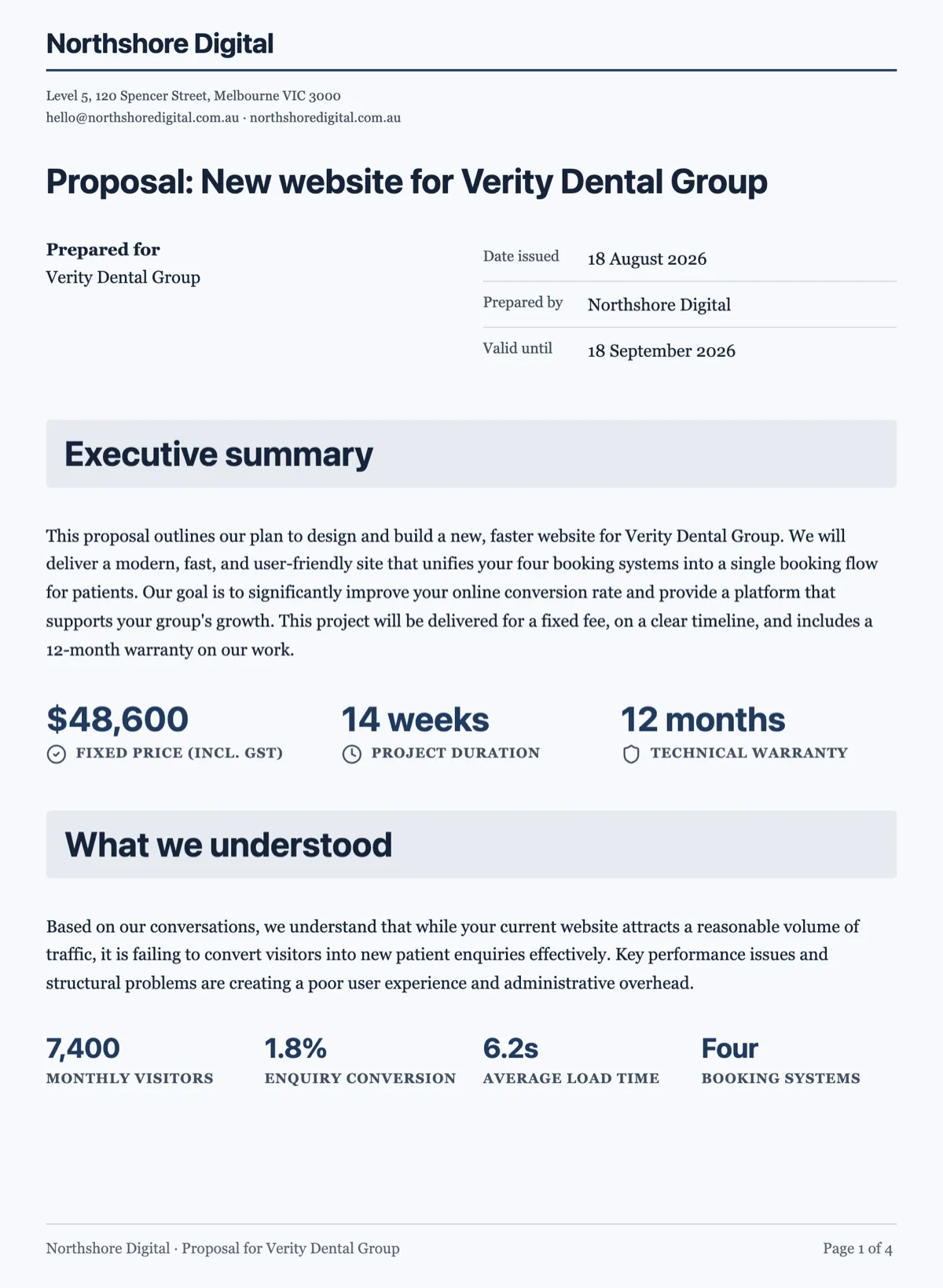 Business proposal template with the fixed fee on page oneMade with OneCraft, exactly as the generator and editor left it. Open the page for the full breakdown.
The short answer
PandaDoc is broader, Proposify is deeper on proposals for teams, and both assume several people send documents under one brand. If you are choosing between them for a sales team, the deciding questions are how many document types you send and whether you need approval rules. If you are a consultant, studio or trade business with one or two people, the more useful question is whether you need either, or whether drafting, acceptance and invoicing in one place covers the job.
Documents against proposals
PandaDoc's features page leads with a document editor, an AI document assistant, AI data extraction, smart content and a product catalogue, which is a document automation platform with proposals as one use. Proposify's pages lead with the template editor, the content library, permissions and reports, which is proposal management for a sales team. OneCraft's scope is smaller than both: a proposal or quote with its pricing, the client's acceptance, and the invoices and payment that follow.
Where the three agree
All three put a priced, interactive document behind a link, record when it is opened, let the buyer choose options or quantities, collect a legally meaningful acceptance and take a Stripe payment. The differences are around the edges: who approves before sending, where the deal record lives, how many payment methods are offered and what happens to the invoice afterwards.
How the columns were checked
Proposify cells quote its proposal software page and pricing page as read on 13 October 2026. PandaDoc's site returned an HTTP 429 error to every request on 13 October 2026, so its cells repeat the quotes taken from its features, integrations, payments, tracking and pricing pages on 2 September 2026, and carry that date. No competitor prices are restated. OneCraft cells cite rows of a ledger built from the product's source code.
Who should stay with PandaDoc or Proposify
Stay with PandaDoc if you send many document types beyond proposals or need PayPal and ACH at signing. Stay with Proposify if managers approve discounts, reps share a content library and deals live in Salesforce or HubSpot. OneCraft is the third option for the owner operator who wants a drafted proposal and an invoiced acceptance.
Questions people ask
Which is better for a small business, PandaDoc or Proposify?
For a small business sending a few proposals a month, the deciding factors are price per user and whether you need extras like approvals or a CRM sync. PandaDoc covers more document types; Proposify is more focused on proposals. If one person does all the sending, a per account tool such as OneCraft avoids paying for features built for teams.
Do PandaDoc and Proposify write proposals with AI?
Both include AI help in the editor. PandaDoc lists an AI document assistant and AI data extraction, and Proposify lists an embedded AI writing widget and a connection to Claude. OneCraft's AI writes the complete first draft from your brief, including the pricing table built from your own figures, which you then edit.
Can all three take payment when the client signs?
Yes, each connects to Stripe. PandaDoc also lists ACH and PayPal. In OneCraft the payment is tied to an invoice created at acceptance, either the deposit invoice due that day or one invoice due in 14 days, and the client pays through Stripe Checkout on your own connected Stripe account.
Which one supports approval workflows?
PandaDoc and Proposify both list approval workflows on their higher plans, and Proposify's can trigger on the total or the discount size. OneCraft has no approval step at all. Whoever holds the account sends, which is fine for an owner operator and a gap for a team with a deal desk.
Do any of them send invoice reminders?
OneCraft does, per invoice: off, gentle, standard or firm, with at most six reminders and at least twenty hours between them. The PandaDoc and Proposify pages checked describe connecting to invoicing and payment platforms rather than issuing and chasing invoices themselves, so reminders would come from your accounting software.
Why are there no prices on this page?
Competitor plans change often, and a stale price is worse than none, so each competitor's price row links to its pricing page instead. OneCraft's own plans are stated because they come from the product's pricing configuration: Free at $0, Starter at $8, Pro at $25 and Pro+ at $125 a month.
Try the proposal side of OneCraft
The button opens the generator with a starting prompt already filled in. Change the wording to match your own work before you run it.
Create a proposal with OneCraftMore comparisons
- A PandaDoc alternative for proposals and quotesOneCraft as a PandaDoc alternative: AI proposals with optional items, tracked links, online acceptance and Stripe pay links, and where PandaDoc is better.
- A Proposify alternative for proposals and quotesA Proposify alternative with AI drafting, optional items, tracked links, online acceptance and Stripe pay links, set against Proposify's per user pricing.
- Qwilr vs Better Proposals, and where OneCraft fitsQwilr vs Better Proposals compared on web page proposals, analytics, signing, payments, approvals and CRM, with OneCraft as the option that drafts and invoices.
What the module actually does, feature by feature: the AI proposal generator page.
Step by step in the builder: Send a proposal and get paid.
Written and checked by the OneCraft team. Last checked .