3 finished designs
Welcome to the team flyer for a joinery's new cabinet maker
A welcome flyer is written for the existing team, not the new person, so it answers the question the team actually has: who is this, what will they do, and what happens in their first month. These three are for Carrow & Sons Joinery, a fictional workshop that puts a one page welcome on the lunchroom wall and in the team chat for every new starter, and they are all about the same cabinet maker.
The 3 designs
The same business laid out three ways, on three templates and three colour themes. Every price, name and time on these was written for this example, so you can judge the layouts on real content rather than placeholder text.
Welcome poster
Welcome Dana Whitlock
Also native at A4 Landscape, Instagram Post, Instagram Story, Facebook Post, LinkedIn Post, Facebook Cover, Twitter Header
Welcome from the MD
A Welcome From Ian Carrow
Also native at A4 Landscape, Instagram Post, Instagram Story, Facebook Post, LinkedIn Post, Facebook Cover, Twitter Header
First four weeks
Dana’s First Four Weeks
Also native at A4 Landscape, Instagram Post, Instagram Story, Facebook Post, LinkedIn Post, Facebook Cover, Twitter Header
What each layout is doing
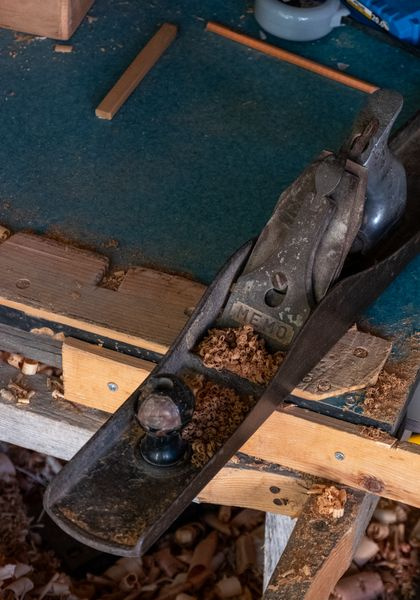
The poster design is a portrait card on a green field, with the wordmark at the top, a large image panel, the name bridging the panel and the field, the role beneath and a welcome pill at the foot. It is the one that goes on the lunchroom wall, and the image slot here holds a hand plane and shavings rather than a face, with the note that a real photo goes in only once the person has agreed. The quote design is a single oversized quotation with an author and a title, which reads well in a chat thread where an image is the whole message. The four weeks design is the operational one, a radial ring with four numbered phases in the corners and the start date in the hub, and it is the version that goes to the team leads rather than to the wall.
How to adapt these
For a remote team, the quote layout is the one to use, because a chat message is where a distributed team actually meets a new colleague, and a 192 character welcome from the person who hired them travels better than a poster nobody will stand in front of. For a new manager, keep the four weeks layout and use the four phases for who they will meet rather than what they will build, since the first month of a management role is introductions. For an intake of six, put the six names on the poster layout and give the four weeks page to the shared induction, so the plan is printed once rather than six times.
What makes these work
The poster says role, team and start date in under 40 words
Dana Whitlock, cabinet maker, kitchens team, welcome to the team, starts Monday 14 September. That is the whole flyer. A welcome notice that runs to a paragraph does not get read on a lunchroom wall, and the three facts a colleague needs are the name, the team and the day the person appears.
The four week plan tells the team what to expect, week by week
Week 1 induction and safety, week 2 shadowing Marco on the Ferris Street kitchen, week 3 a first solo carcass build, week 4 a review with Ian. Everyone on the floor now knows when the new person is watching and when they are working, which is the practical thing a welcome poster can do that a handshake cannot.
The quote is 192 characters from the person who hired her
A welcome is somebody vouching for a new colleague, so the quote design gives the whole page to the managing director doing exactly that: the team she joins, the years she brings, and the job she starts on. Ian Carrow’s name and title under it are what make it a welcome rather than an announcement.
Questions people ask
What goes on a welcome to the team flyer?
The name, the role, the team, the start date and one line of background. The four week plan is a useful extra where a team needs to know when the new person becomes available. What to leave off is anything the person did not volunteer, including where they live, their previous salary and personal details they shared in the interview.
Should I use the new starter’s photo?
Only if they say yes, and ask after they have started rather than in the offer pack, where saying no is harder. None of these three uses a face: the poster design fills its image slot with a workshop object instead. If you do use a photo, the same consent applies to the team chat and any public post, which are different audiences.
What should the rest of the team learn from it?
Three things: what the person is here to do, who they will be working alongside, and when they are actually available for work. The four weeks design covers the third, which is the one a welcome usually leaves out and the one that causes friction when a team lead assigns work to somebody still in induction.
Is a first month plan appropriate on a poster?
On an internal poster, yes. It is a commitment the employer is making in front of the team, which is a good reason to write it carefully and a good reason to keep it. Do not print a plan you cannot honour, and do not put performance targets on it, since an onboarding plan and a probation review are different documents.
Which size works for the team chat?
Facebook Post at 1200 by 630 is native for all three designs, and that aspect ratio previews well in most chat tools without being cropped. Add a page at that size, check the wide layout still carries the name and the start date, and export that page as a PNG, since PNG covers the page you are on.
How do I make one for every new starter quickly?
Duplicate the page in the builder, change the name, the role and the dates, and leave the theme and template alone so the series stays recognisable. Duplicate works per page, so a year of starters can live as pages of one flyer, exported as a PDF when you want the set or as a PNG when you want just the newest one.
Build your own in about a minute
The button below opens the generator with this use case already described. Change the wording to match your own, generate, then edit anything you like.
Make one like thisOther flyer examples
Job vacancy flyer for a freight company hiring drivers
A vacancy flyer without pay is read as a flyer with bad pay, so every one of these prints the range. They are for Ridgeline Freight, a fictional operator that needs six delivery drivers before December and puts flyers in truck stops, TAFE noticeboards and its own yard fence, and all three carry the same four facts: $34 to $38 an hour, Monday to Friday, an MR licence, and apply by 20 November.
Volunteer recruitment flyer for a food relief charity
A volunteer recruitment flyer has to name the roles, the hours and the training, because the person reading it is deciding whether they can fit you into a week that is already full. These three are for Ferngully Food Relief, a fictional charity that packs 900 hampers a week with 60 volunteers and needs 20 more before winter, and all three print the same three facts: the shifts, the induction, and how to sign up.
Recruitment agency flyer for employers, with fee and guarantee
A recruitment agency flyer aimed at employers has to answer the two things a hiring manager fears: how much it costs and what happens if the hire leaves. These three designs for Benchmarra Recruitment, a fictional Sydney NSW agency for permanent roles, print a 15% fee plus GST, a shortlist within 5 days, a promise to place within 21 days or charge nothing, and a 6 month replacement guarantee.
Want the steps in the builder? Read Create a flyer for Instagram and print, then Add or replace images in a flyer. For everything this generator can do, see the flyer maker.
Sources
Written and checked by the OneCraft team. Last checked .