Classic form
Childcare enrolment form that covers the regulation's list in one sitting
The regulations list what an enrolment record must contain, and most centres collect it across three PDFs and a phone call. This form is that list in one sitting, with the authorised pickup table, the immunisation upload and the subsidy numbers, ending in the consents signed once by each parent.
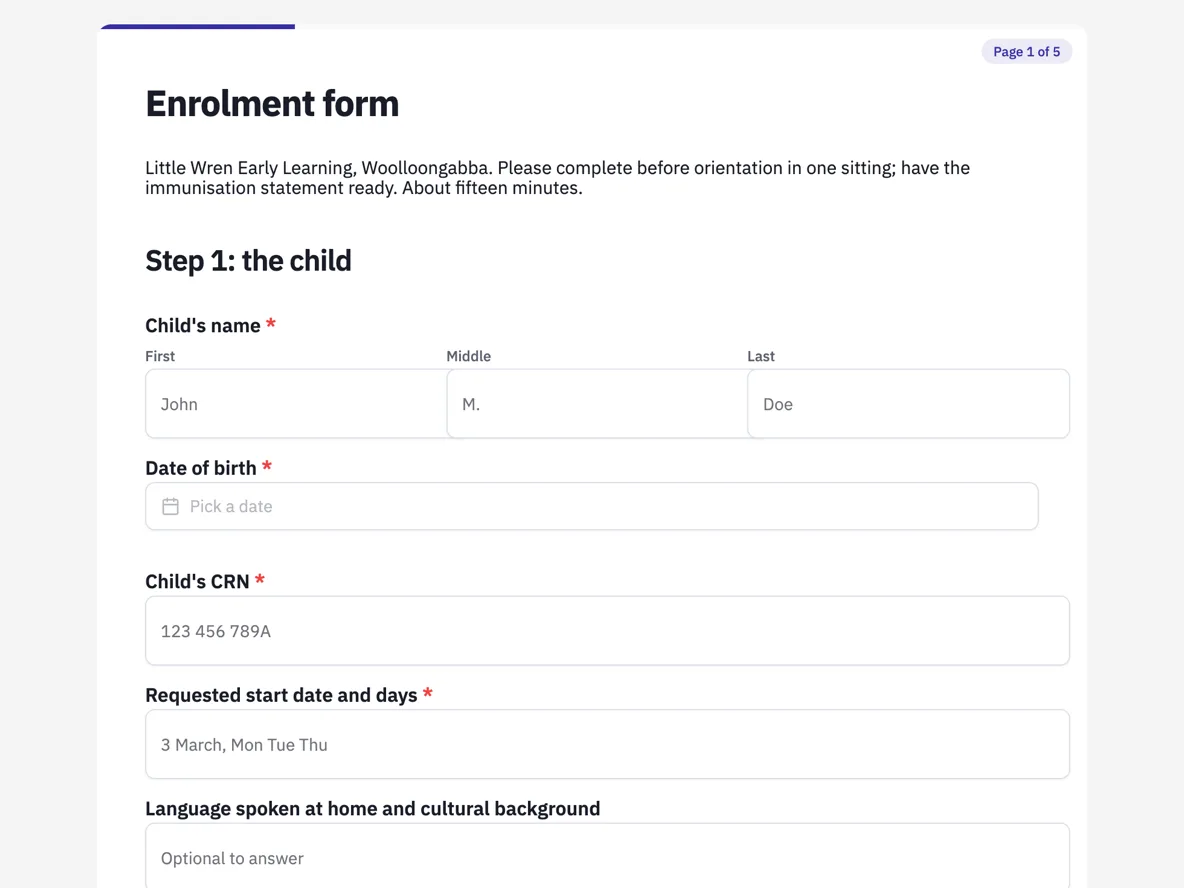
The form itself
A static copy of the finished form, exactly as it renders. Nothing here can be filled in or submitted, so read it as a reference and build your own from the button above.
Every field, and what it collects
The complete field list, in the order respondents meet it.
- Child's nameNameRequired
- Date of birthDateRequired
- Child's CRNShort textRequired
- Requested start date and daysShort textRequired
- Language spoken at home and cultural backgroundShort text
- Parent 1 nameNameRequired
- Parent 1 CRN, mobile and emailShort textRequired
- Parent 1 addressAddressRequired
- Parent 2 name and detailsShort text
- Custody or court orders that affect who may collect the childSingle choiceRequired
- Options: No · Yes, I will give the centre a copy
- Authorised to collect, and emergency contactsTableRequired
- Columns: Name · Relationship · Phone · Authorised to collect?
- Medicare number and the child's referenceShort textRequired
- Doctor and practiceShort textRequired
- Immunisation History StatementFile uploadRequired
- From myGov. Enrolment cannot be confirmed without it.
- Allergies, anaphylaxis or asthmaSingle choiceRequired
- Options: None · Allergy (no action plan needed) · Anaphylaxis (action plan attached) · Asthma (plan attached)
- Medical action planFile upload
- ASCIA or asthma plan, up to 3 files, image or PDF.
- Dietary requirements and other health needsLong text
- I have claimed Child Care Subsidy through myGov and will confirm the Complying Written Arrangement when notifiedSingle choiceRequired
- Options: Yes · Not yet · Not claiming
- I consent to each of the followingMultiple choiceRequired
- Options: Emergency medical treatment and ambulance · Sunscreen application · Photographs for the child's learning record · Excursions with separate notice · Sharing information with the child's school on transition · Fees policy as provided · Nappy and hygiene care · Observation for learning documentation
- Parent 1 signatureSignatureRequired
- Parent 2 signatureSignature
Step 1: the child
Step 2: parents and guardians
Step 3: health
Step 4: subsidy and fees
Step 5: consents
Question banks built on this form
What an enrolment record must contain
The Education and Care Services National Regulations spell out the enrolment record: the child's identity and birth date, the parents and their contact details, who is authorised to collect the child and who to call in an emergency, court orders touching custody or collection, health information including immunisation status and medical management plans, and the string of specific authorisations from medical treatment to excursions. Every step of this form maps to a line of that list, which is why nothing on it is decorative: a director audited against the regulations answers with this one record and its attachments.
How to adapt this form
A family day care educator keeps everything and swaps the centre branding for their scheme's details, since the same regulations reach them. Outside school hours care adds the school name and year level to step one and usually a walking-to-service permission to the consents. A funded kindergarten adds one question about the funded year entitlement. In all versions, resist merging the authorised pickup table into a text box: the yes or no in its last column is the piece of structure the afternoon shift actually uses at the door.
What makes this form work
The pickup table separates collecting from calling
Four fixed rows with name, relationship, phone and an authorised to collect column answered yes or no. The grandmother who should be phoned but must not collect is recorded as exactly that, and the paragraph under the table says why the distinction matters at the door.
Eight consents, eight ticks, each severable
Emergency treatment, sunscreen, photographs, excursions, school transition, fees, hygiene care and observation are separate options in one checklist, so a parent can withhold the photograph consent without withholding sunscreen. The paragraph under it names the one line the centre will always follow up.
The one required upload is the one that blocks enrolment
Plenty of paperwork is nice to have; the Immunisation History Statement is the document without which enrolment cannot be confirmed, so it is the only required file field on the form, capped at one file, image or PDF, straight from myGov.
Questions people ask
What must a childcare enrolment record include?
The regulation's list: the child's details, parents and emergency contacts, who may collect the child, any court orders, health and immunisation information with management plans, and the specific authorisations for medical treatment, excursions and the rest. This form walks that list step by step, and the page above maps each field to its line.
What is a CRN, and why does the centre need two?
A Customer Reference Number from Services Australia. The child has one and the claiming parent has another, and the Child Care Subsidy links the pair. The form asks for both up front because a mistyped CRN is the most common reason a family's subsidy stalls in the first fortnight.
What is a Complying Written Arrangement?
The agreement between the family and the provider that confirms enrolment for CCS purposes, sent after this form and confirmed by the family in myGov. The thank-you screen promises it within three working days, which is the piece of the puzzle the centre controls.
Is the immunisation statement really mandatory?
In most states enrolment cannot proceed without an up to date Immunisation History Statement or a valid exemption, Victoria's No Jab No Play being the strictest form of the rule. That is why the upload is the one required file on the form, one PDF or photo straight from myGov.
Do both parents have to sign?
Two signature fields are provided and the second is optional, which covers single parent families without a workaround. Where court orders affect collection, a yes to the orders question in step two tells the centre to ask for a copy of the orders and talk to the family before the first day, not after an incident at pickup.
Where do the action plans end up?
Uploaded in step three and carried in the response PDF, so the child's file holds the enrolment and the ASCIA or asthma plan together. The allergy question's options name the plan requirement explicitly, so a parent who ticks anaphylaxis knows an action plan is expected with it.
Build your own in about a minute
The button below opens the generator with this use case already described. Change the wording to match your own, generate, then edit anything you like.
Make one like thisOther form examples
Excursion permission form
Consent only counts if the parent had enough information to give it, which is why half of this form is the school telling you about the day before it asks you for anything. The rest is the health picture for one Thursday and the four things parents most often say nobody told them. It is a classic form, because a page of information reads better as a page than as a series of questions.
Rental application form
A rental application form template collects the property and offer, the applicant's identity, their current and previous address, employment and income, references and signed consent to screening. This one is a residential application, one per adult, that takes about ten minutes with identification and payslips to hand. It covers occupants and pets, agent contacts, an employment table, a proof of income upload, two non family references, and a signed consent to a tenancy database and credit check.
Warranty claim form that gets a decision in one reply
Warranty claims stall because the first email has no receipt, no serial and a photo of the wrong side. This form asks for all three before the description, offers repair, replacement or refund as a choice, and tells the customer that the consumer guarantees apply regardless of the warranty card.
Want the steps in the builder? Read Paginate a classic form into steps, then Form builder components. For everything this generator can do, see the form maker.
Written and checked by the OneCraft team. Last checked .