Classic form
Daily site diary form for a construction site
A site diary form is the supervisor's daily record of weather, who was on site, what plant worked, what got done, what held work up and who visited. Written the same day, it becomes the evidence behind variations and delay claims, so this civil version asks for facts and times.
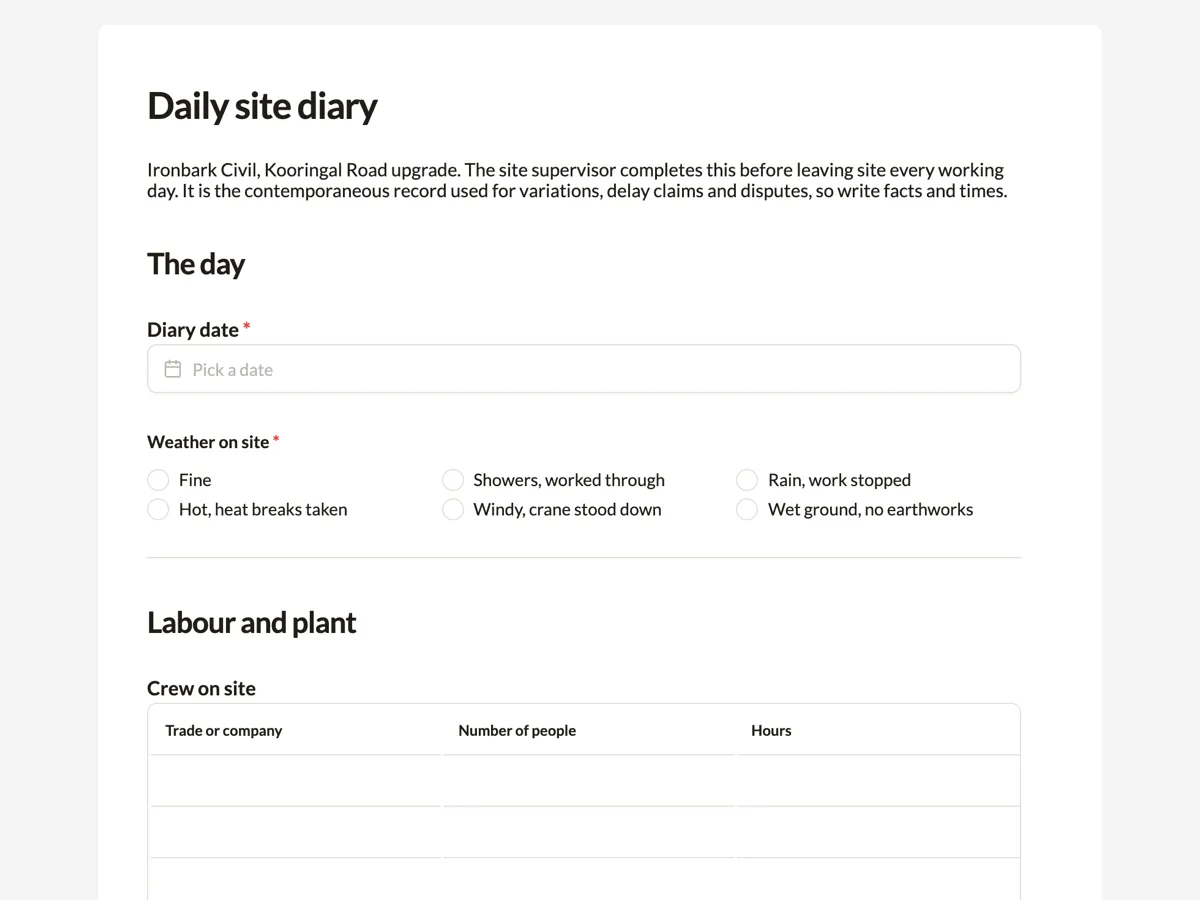
The form itself
A static copy of the finished form, exactly as it renders. Nothing here can be filled in or submitted, so read it as a reference and build your own from the button above.
Every field, and what it collects
The complete field list, in the order respondents meet it.
- Diary dateDateRequired
- Weather on siteSingle choiceRequired
- Options: Fine · Showers, worked through · Rain, work stopped · Hot, heat breaks taken · Windy, crane stood down · Wet ground, no earthworks
- Crew on siteTable
- Columns: Trade or company · Number of people · Hours
- Plant on siteTable
- Columns: Item · Hours worked · Standing or broken down
- Work completed todayLong textRequired
- Delays, instructions and issuesLong text
- VisitorsTable
- Columns: Name · Company · Reason · Time on and off
- Progress photosFile upload
- Up to ten photos of today's work and anything unexpected. They carry the date they were taken.
- Site supervisorSignatureRequired
The day
Labour and plant
Work and delays
What each field on this form collects
The diary date comes first, then the weather as six answers that each say what it did to the work, from fine to wet ground with no earthworks. A five row table lists the crew by trade or company with the number of people and hours. A four row table lists plant with hours worked and whether it was standing or broken down. Two long text boxes record the work completed and the delays, instructions and issues. A three row visitors table, up to ten photos and the supervisor's signature close the day.
A record written on the day
A site diary earns its value months later, when a contractor claims an extension of time for rain or a variation for an unmarked service, and the client asks for proof. Records made at the time carry far more weight than recollections, which is why the intro asks the supervisor to complete it before leaving site and the form stamps the submission time. The placeholder in the delay box shows the level of detail that helps: what was found, where, and the exact times work stopped and resumed.
Weather that says what it did
A diary that records showers says little. A diary that records showers but work continued, or rain and work stopped, answers the question a delay claim turns on. The weather options are written that way. Heat with breaks taken and wind with the crane stood down are there because both reduce productive hours without stopping the site, and a record of them supports a claim for lost time just as well as rain does.
How to adapt this form
A builder on a house site trims the plant table and adds deliveries received. A landscaping contractor adds water used and plant stock installed, which matter for maintenance periods. A project with a principal's representative adds a section for their directions, so instructions given on site are captured word for word.
What makes this form work
Weather with consequences
Six weather options each name the effect on work. The diary answers whether rain stopped the job, which is what an extension of time claim needs.
Standing time for plant
The plant table has a column for standing or broken down. Hired plant standing idle because of a client delay is a cost that can be claimed only if it was written down.
Times in the delay box
The placeholder shows a delay with a start and end time. Supervisors copy the pattern, and the diary records hours lost rather than a vague morning.
Questions people ask
What should be recorded in a site diary?
The date, weather and its effect on work, workers on site by trade, plant and its hours, work completed, delays and their causes, instructions received, visitors, deliveries, safety events and photos. Record facts and times, and write it on the day.
Is a site diary a legal requirement?
Many construction contracts require the contractor to keep daily records, and some building regulators expect records to be kept for certain work. Even when not required, a diary is often the best evidence in a claim or dispute. Check your contract and your state building regulator.
Who should fill in the site diary?
The site supervisor or foreman who was on site all day and saw the work, the weather and the delays. If several supervisors run different areas, each can submit a diary for their area, using the same form so the records line up by date.
Can a site diary be changed after it is submitted?
Submitted responses cannot be edited, by the owner or by the person who submitted them. That is a strength for a diary, since the record cannot be quietly changed later. Corrections go in the next day's diary as a note.
How are the photos stored?
Photos uploaded through the form are stored with the submission. When the diary is saved as a PDF, uploaded images are added as their own pages after the form. Many supervisors also keep the originals on their phone, where the camera records the time and location.
Can the client see the diary?
Only if you share it. Each day can be saved as a PDF and sent, or the responses exported for a monthly report. Some contracts require diaries to be provided on request, so keep them complete and factual from the first day.
Build your own in about a minute
The button below opens the generator with this use case already described. Change the wording to match your own, generate, then edit anything you like.
Make one like thisOther form examples
Data breach report form for the NDB scheme
A data breach report form lets staff report a suspected breach quickly: when it was found, what information and how many people, how it happened, whether it is contained and whether it could cause serious harm. This Australian version explains the Notifiable Data Breaches test in plain words and leaves the assessment to the privacy officer.
Forklift pre start checklist that stops the shift on a fault
A forklift pre start checklist covers the forks, pins, mast and chains, hoses, tyres, fuel or battery, seatbelt and guard, then the horn, lights, alarm, brakes and controls from the seat. This warehouse version holds fifteen items, records the licence number and emails every completed check to the shift lead.
Site safety inspection checklist by area
A site safety inspection checklist walks the whole site by area, from the entry and fencing to traffic, excavations, plant zones, heights, electrics, chemicals, amenities, first aid and services, and turns every problem into an action with an owner. This civil contractor version rates each area and records an overall condition.
Want the steps in the builder? Read Tables for crew and plant, then File each day as a PDF. For everything this generator can do, see the form maker.
Written and checked by the OneCraft team. Last checked .