Classic form
Site safety inspection checklist by area
A site safety inspection checklist walks the whole site by area, from the entry and fencing to traffic, excavations, plant zones, heights, electrics, chemicals, amenities, first aid and services, and turns every problem into an action with an owner. This civil contractor version rates each area and records an overall condition.
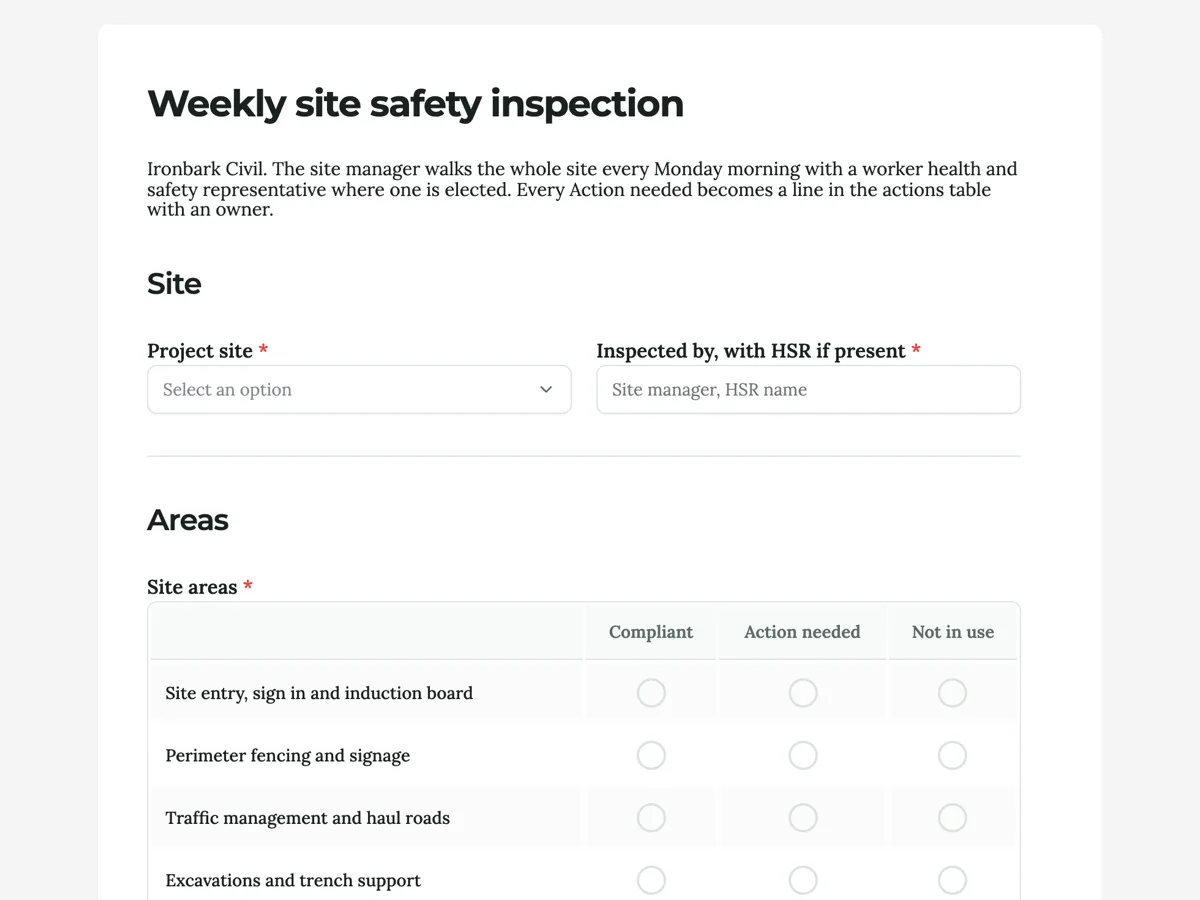
The form itself
A static copy of the finished form, exactly as it renders. Nothing here can be filled in or submitted, so read it as a reference and build your own from the button above.
Every field, and what it collects
The complete field list, in the order respondents meet it.
- Project siteDropdownRequired
- Options: Kooringal Road upgrade · Boundary Rd sewer, stage 2 · Lakeside estate civil works
- Inspected by, with HSR if presentShort textRequired
- Site areasRating gridRequired
- Statements:
- Site entry, sign in and induction board
- Perimeter fencing and signage
- Traffic management and haul roads
- Excavations and trench support
- Mobile plant exclusion zones
- Working at height and edge protection
- Electrical leads and boards
- Hazardous chemicals and SDS
- Housekeeping and access ways
- Amenities and drinking water
- First aid kit and emergency plan
- Overhead and underground services marked
- ActionsTable
- Columns: What needs doing · Owner · Due
- Photos of the issuesFile upload
- Up to eight photos, one per action where possible.
- Overall site conditionSingle choiceRequired
- Options: Good · Some actions · Serious issues, work stopped in an area
- Inspector signatureSignatureRequired
Site
Areas
What each field on this form collects
The project site comes from a list of three, beside a short text for the inspector and the health and safety representative. The grid holds twelve areas in the order a walk usually takes them, from the site entry to services marked, each answered Compliant, Action needed or Not in use. A five row actions table takes what needs doing, the owner and the due date. Up to eight photos follow, then a single choice for the overall site condition and the inspector's signature.
Inspections that end in actions
WorkSafe Victoria's guidance on workplace inspections treats them as a way to find hazards before they hurt someone, which only works if each finding is fixed. A checklist with a long column of ticks and a vague comment at the bottom does not do that. This form pairs the grid with an actions table, and the intro says that every Action needed becomes a line with an owner. The columns are deliberately not Pass and Fail, because an area that needs a barrier moved is not a failed site, and Not in use covers areas such as excavations on a week when none are open.
Walking with the health and safety representative
Where workers have elected a health and safety representative, they have a right to take part in inspections, and walking with them is the easiest way to involve them. The inspector field asks for both names. Representatives often see things a manager does not, because they work in the areas every day. Their presence also means the findings are shared with the crew, which helps the actions get done. A five row table is usually enough for a weekly walk; a site with more issues needs a second form or a longer table.
How to adapt this form
A builder on a residential site replaces traffic and haul roads with scaffolds and the hoist. A factory swaps the areas for production lines, forklifts, guarding and chemical stores. A school maintenance team adds playground equipment, roof access and the asbestos register location.
What makes this form work
Columns that fit a site
Compliant, Action needed or Not in use. Areas are not passed or failed; they either need something done or they do not, and inactive areas are marked as such.
Every action has an owner
Five rows of what needs doing, owner and due date. The inspection produces work for named people, which is what makes the next inspection better.
The representative is named
Inspected by, with HSR if present. The record shows whether workers took part in the inspection, which matters for consultation duties.
Questions people ask
How often should a site safety inspection be done?
Weekly is common on construction sites, with more frequent checks in high risk stages and after events such as storms. Contracts and principal contractor duties may set their own frequency. Daily pre starts and task checks sit underneath the weekly inspection.
Who should carry out a site safety inspection?
The site manager or supervisor, with a health and safety representative where one has been elected, and sometimes a safety advisor. The person needs enough knowledge of the work to recognise hazards. Rotating inspectors between supervisors brings fresh eyes, and each one learns what the others look for.
What areas should a construction site inspection cover?
Site security and signage, traffic, excavations, plant, working at height, electrics, hazardous chemicals, housekeeping, amenities, first aid and emergency arrangements, and services. Add scaffolds, cranes and confined spaces where they exist. This form lists twelve areas for a civil site.
What should happen after the inspection?
Each action is assigned, fixed and closed with the date. Serious issues are fixed before work continues in that area. Actions are shared with the crew and reviewed at the next meeting. The overall condition answer gives managers a quick view across weeks.
Can the actions table hold more than five items?
A table field shows the fixed number of rows set in the builder, five here, and cannot grow while it is being filled in. Increase the row count before publishing if your inspections usually find more, or submit a second form for the extra actions.
Can the inspection be shared with the client?
Each submission can be saved as a PDF with the photos added as pages after the form, which suits a client report. The responses also export to CSV for a monthly summary of site conditions and open actions, which many principal contractors ask for.
Build your own in about a minute
The button below opens the generator with this use case already described. Change the wording to match your own, generate, then edit anything you like.
Make one like thisOther form examples
Toolbox talk form that records what the crew said
A toolbox talk form records the date, topic and presenter, the points covered, who attended, what the crew raised and the actions agreed. This electrical contractor version gives the crew's issues their own box, because that is the part of a toolbox talk that changes anything.
Food safety inspection checklist for a cafe kitchen
A food safety inspection checklist records the fridge, freezer and hot holding temperatures, works through hand washing, storage, labelling, cleaning and sanitising, chemicals, allergens and pests, and notes what was done about each problem. This cafe version is completed daily by the food safety supervisor.
Whistleblower report form, anonymous by default
A whistleblower report form lets someone report misconduct without giving their name: what kind of conduct, what happened, when and where, any evidence and who else knows. This Australian version opens with the legal protections in plain words and keeps contact details optional.
Want the steps in the builder? Read Matrix with custom columns, then Print the actions for the site board. For everything this generator can do, see the form maker.
Written and checked by the OneCraft team. Last checked .