Classic form
Toolbox talk form that records what the crew said
A toolbox talk form records the date, topic and presenter, the points covered, who attended, what the crew raised and the actions agreed. This electrical contractor version gives the crew's issues their own box, because that is the part of a toolbox talk that changes anything.
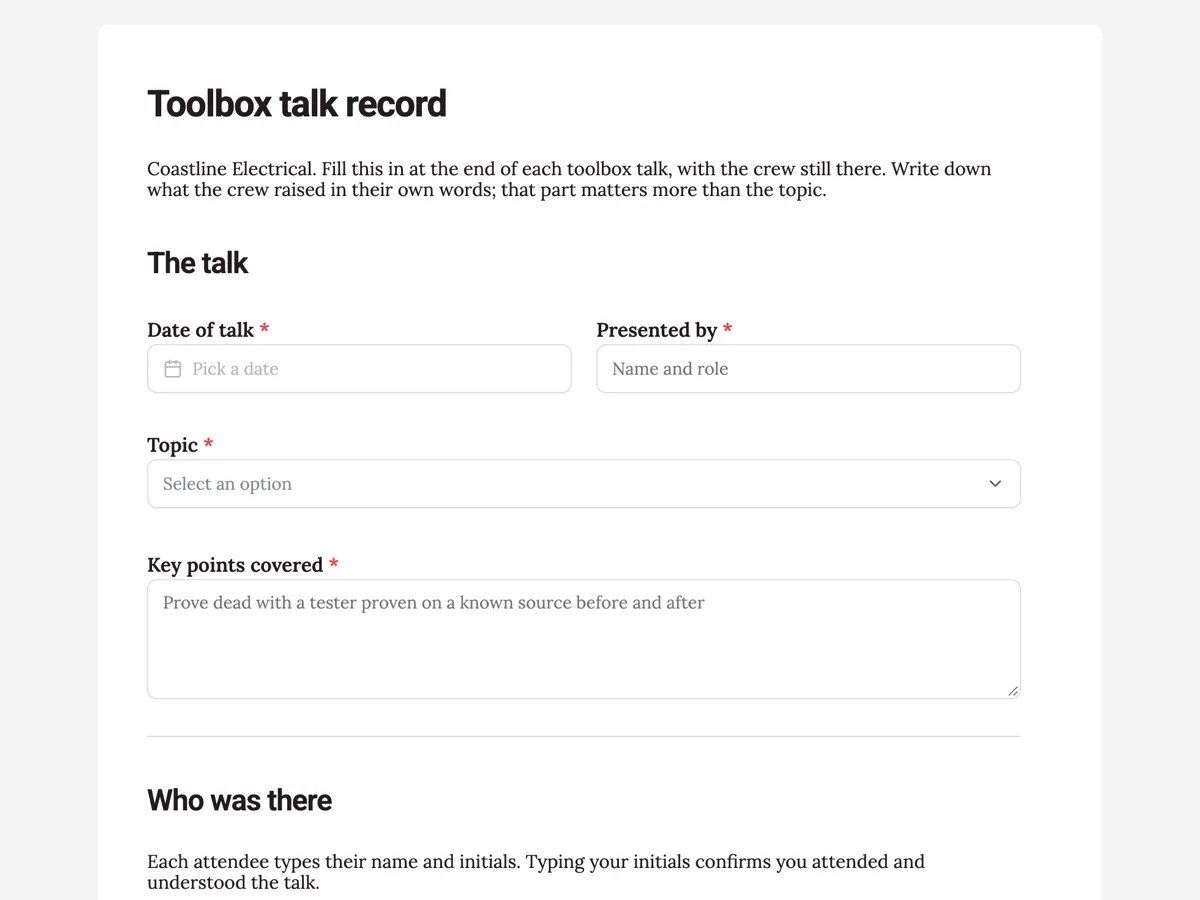
The form itself
A static copy of the finished form, exactly as it renders. Nothing here can be filled in or submitted, so read it as a reference and build your own from the button above.
Every field, and what it collects
The complete field list, in the order respondents meet it.
- Date of talkDateRequired
- Presented byShort textRequired
- TopicDropdownRequired
- Options: Isolation and test before touch · Working in roof spaces in heat · Ladders and platforms · Asbestos in older switchboards · Manual handling of cable drums · Incident or near miss review · Other topic
- Key points coveredLong textRequired
- AttendeesTable
- Columns: Name · Company · Initials
- Issues raised by the crewLong text
- Actions agreedTable
- Columns: Action · Who · By when
- Supervisor signatureSignatureRequired
The talk
Who was there
What the crew raised
What each field on this form collects
Date and presenter share a row. The topic comes from a list of seven common to an electrical crew, from isolation and test before touch to asbestos in older switchboards, plus an incident review and other. A long text takes the key points. A paragraph explains the sign on, then an eight row table takes each attendee's name, company and initials. A long text records the issues the crew raised and a three row table lists the actions agreed with who and by when. The supervisor signs.
Consultation, not a lecture
Under WHS laws, employers must consult workers on health and safety matters that affect them, and a toolbox talk is one of the most common ways that happens on site. WorkSafe Victoria's consultation guidance makes clear that consultation means sharing information, giving workers a chance to have their say and taking their views into account. A record that lists only the topic and the attendees shows that a talk was given. A record that also lists what the crew raised and what was agreed shows that consultation happened.
Typed sign on
An attendee table with a typed name and initials is quicker than passing a phone around for eight drawn signatures, and it still records who was there. The paragraph above the table says what typing initials means, so the meaning is on the record. A table field shows a fixed number of rows that cannot be added to while filling it in, and eight covers a typical crew. A larger crew can use two forms, or the table can be set to more rows before publishing.
How to adapt this form
A cleaning company adds the client site and translates the topic list for a multilingual crew. A farm adds seasonal topics such as harvest machinery and heat. A builder with many subcontractors adds a question about which trades were missing, so the next talk can be repeated for them before they start work in that area.
What makes this form work
The crew's words have a box
Issues raised by the crew is its own long text, with a placeholder showing two real issues. The record captures consultation, not only attendance.
Actions with a name and a date
A three row actions table with who and by when. A cracked tester lead raised at the talk becomes a named job instead of a remark.
Initials explained
The paragraph says typed initials confirm attendance and understanding. The meaning of the sign on is written on the form itself.
Questions people ask
What should be recorded in a toolbox talk?
The date, topic, presenter, the key points, everyone who attended, what the workers raised and the actions agreed with owners and dates. Recording the workers' input is what shows the talk was consultation. Keep the record with your WHS documents.
How often should toolbox talks be held?
Many sites hold them weekly or at the start of each new stage of work, and some hold a short one daily. There is no single required frequency; it should match the risks and how fast the work changes. Hold an extra talk after any incident or near miss, while the details are fresh for everyone.
Do attendees need to sign a toolbox talk record?
A signature or initials is the usual way to show who attended. This form uses typed names and initials in a table, which is quicker on site. The supervisor's drawn signature at the end confirms the record. Your own procedures may ask for more.
Is a toolbox talk enough to meet consultation duties?
It can be one part. Consultation also happens through health and safety representatives, committees and other agreed arrangements. A talk where workers only listen does not meet the duty on its own, which is why this form records their input and the actions.
Can the toolbox talk record be printed?
Yes. Each submission can be saved as a PDF from the responses table and filed with the site documents. The full set can be exported to CSV, with each table exported as a JSON list of its rows in one column.
What if a worker missed the talk?
Brief them before they start work on the topic and record it, either in the next talk's attendee list or by submitting a second record for that worker. Missed talks matter most when the topic is a new hazard on the job.
Build your own in about a minute
The button below opens the generator with this use case already described. Change the wording to match your own, generate, then edit anything you like.
Make one like thisOther form examples
Site safety inspection checklist by area
A site safety inspection checklist walks the whole site by area, from the entry and fencing to traffic, excavations, plant zones, heights, electrics, chemicals, amenities, first aid and services, and turns every problem into an action with an owner. This civil contractor version rates each area and records an overall condition.
Near miss report form that asks for no blame
A near miss report form records something that could have hurt someone but did not: when and where it happened, what nearly happened, how bad it could have been and what was done straight away. This civil contractor version makes the reporter's name optional, because the report matters more than who sent it.
Forklift pre start checklist that stops the shift on a fault
A forklift pre start checklist covers the forks, pins, mast and chains, hoses, tyres, fuel or battery, seatbelt and guard, then the horn, lights, alarm, brakes and controls from the seat. This warehouse version holds fifteen items, records the licence number and emails every completed check to the shift lead.
Want the steps in the builder? Read Tables for attendees and actions, then Keep every talk on file. For everything this generator can do, see the form maker.
Written and checked by the OneCraft team. Last checked .