Classic form
Data breach report form for the NDB scheme
A data breach report form lets staff report a suspected breach quickly: when it was found, what information and how many people, how it happened, whether it is contained and whether it could cause serious harm. This Australian version explains the Notifiable Data Breaches test in plain words and leaves the assessment to the privacy officer.
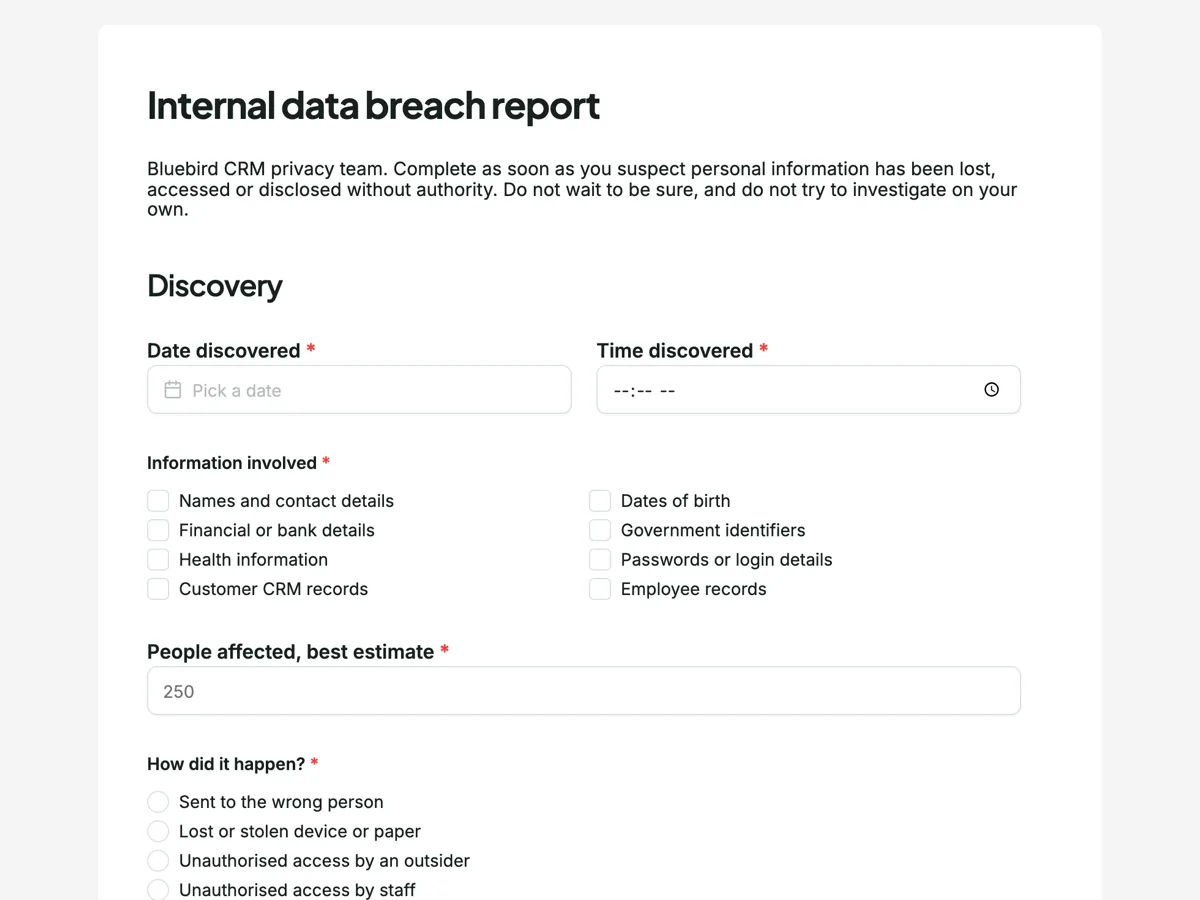
The form itself
A static copy of the finished form, exactly as it renders. Nothing here can be filled in or submitted, so read it as a reference and build your own from the button above.
Every field, and what it collects
The complete field list, in the order respondents meet it.
- Date discoveredDateRequired
- Time discoveredTimeRequired
- Information involvedMultiple choiceRequired
- Options: Names and contact details · Dates of birth · Financial or bank details · Government identifiers · Health information · Passwords or login details · Customer CRM records · Employee records
- People affected, best estimateNumberRequired
- How did it happen?Single choiceRequired
- Options: Sent to the wrong person · Lost or stolen device or paper · Unauthorised access by an outsider · Unauthorised access by staff · System error or misconfiguration
- Is it contained?Single choiceRequired
- Options: Yes, recovered or access closed · Partly · No, still happening or unknown
- Could this cause serious harm to anyone affected?Single choiceRequired
- Options: Likely · Possibly · Unlikely · Not sure
- Who already knowsMultiple choice
- Options: My manager · IT security · The customer whose data it is · Nobody yet
- Your name and teamShort textRequired
- Reporter signatureSignatureRequired
Discovery
Harm and notification
What each field on this form collects
Date and time discovered come first. A required checklist of eight information types follows, from names and contact details to health information and passwords. A number takes the estimated people affected. Two single choices record how it happened, from a misdirected email to a system error, and whether it is contained. A paragraph explains the serious harm test, then the reporter gives their view of likely harm. A checklist records who already knows, and the reporter's name, team and signature close it.
Report first, assess second
Under the Privacy Act, an organisation that suspects an eligible data breach must take reasonable steps to assess it within 30 days, and notify the people affected and the Office of the Australian Information Commissioner if it is likely to cause serious harm. The clock starts when the organisation becomes aware, which in practice means when a staff member notices. That is why the intro says not to wait to be sure and not to investigate alone. The form gives the privacy officer the facts needed to start the assessment the same day.
The serious harm question
Serious harm can be financial, physical, psychological or reputational, and it depends on the kind of information, who has it and whether anything has been done to remove the risk. Health information and identity documents carry more risk than a list of email addresses. The reporter is asked for a view, with a Not sure answer, because they often know things the privacy officer does not, such as who received a misdirected file. The assessment itself stays with the privacy officer, as the paragraph says.
How to adapt this form
A health practice adds the patient record system involved and whether clinical care could be affected. A school adds whether information about children is involved. A business outside Australia replaces the paragraph with the rules that apply to it, such as the UK GDPR's 72 hour reporting rule.
What makes this form work
The test in plain words
The paragraph states the serious harm test in two sentences. Staff answer the harm question knowing what it means, and the privacy officer gets a view that is easy to interpret.
Containment is asked early
Is it contained, with yes, partly or no. A breach still happening needs action in the next hour, and that answer tells the privacy officer which reports to read first.
Who knows already
A checklist of manager, IT security, the customer or nobody. The privacy officer knows who to call and avoids contacting someone who has already been told.
Questions people ask
What is a notifiable data breach in Australia?
Under the Notifiable Data Breaches scheme, an eligible data breach happens when personal information is lost or accessed or disclosed without authority, it is likely to result in serious harm to someone, and the organisation has not been able to prevent that likely harm. Organisations covered by the Privacy Act must then notify affected people and the OAIC.
How long does a business have to assess a breach?
An organisation that suspects an eligible data breach must take reasonable steps to complete an assessment within 30 days. If the breach is eligible, it must notify as soon as practicable. Fast internal reporting gives the assessment the most time, which is the point of this form.
Should staff contact the affected people themselves?
No. The privacy officer decides how and when to notify, so the message is accurate and consistent and nothing is said that makes matters worse. The thank you screen asks reporters to keep evidence and wait. Contact the people affected only when the organisation decides to.
Is a misdirected email a data breach?
It can be, if it contains personal information and goes to someone not authorised to see it. Whether it is notifiable depends on the information and the likely harm. Many breaches reported to the OAIC are human error such as misdirected emails, which is why it is the first cause option.
Can this form be anonymous?
This version asks for the reporter's name, because the privacy officer usually needs to ask follow up questions quickly. A business that wants anonymous reports can make the name optional or use a whistleblower channel for reports about misconduct.
Who receives the report?
The form owner sees every submission in the responses table, and the email alert add-on can send each one to the privacy officer's address as it arrives. Limit access to the responses, since breach reports contain sensitive details.
Build your own in about a minute
The button below opens the generator with this use case already described. Change the wording to match your own, generate, then edit anything you like.
Make one like thisOther form examples
Forklift pre start checklist that stops the shift on a fault
A forklift pre start checklist covers the forks, pins, mast and chains, hoses, tyres, fuel or battery, seatbelt and guard, then the horn, lights, alarm, brakes and controls from the seat. This warehouse version holds fifteen items, records the licence number and emails every completed check to the shift lead.
IT incident report form with a timeline
An IT incident report form records which service failed, how severe it was, when it was detected and how many customers it touched, then a timeline, the root cause, how service came back and what will change. This version is written as a blameless review, so it asks why decisions made sense at the time.
Near miss report form that asks for no blame
A near miss report form records something that could have hurt someone but did not: when and where it happened, what nearly happened, how bad it could have been and what was done straight away. This civil contractor version makes the reporter's name optional, because the report matters more than who sent it.
Want the steps in the builder? Read Alert the privacy officer by email, then Restrict reporting to staff. For everything this generator can do, see the form maker.
Written and checked by the OneCraft team. Last checked .