Classic form
IT incident report form with a timeline
An IT incident report form records which service failed, how severe it was, when it was detected and how many customers it touched, then a timeline, the root cause, how service came back and what will change. This version is written as a blameless review, so it asks why decisions made sense at the time.
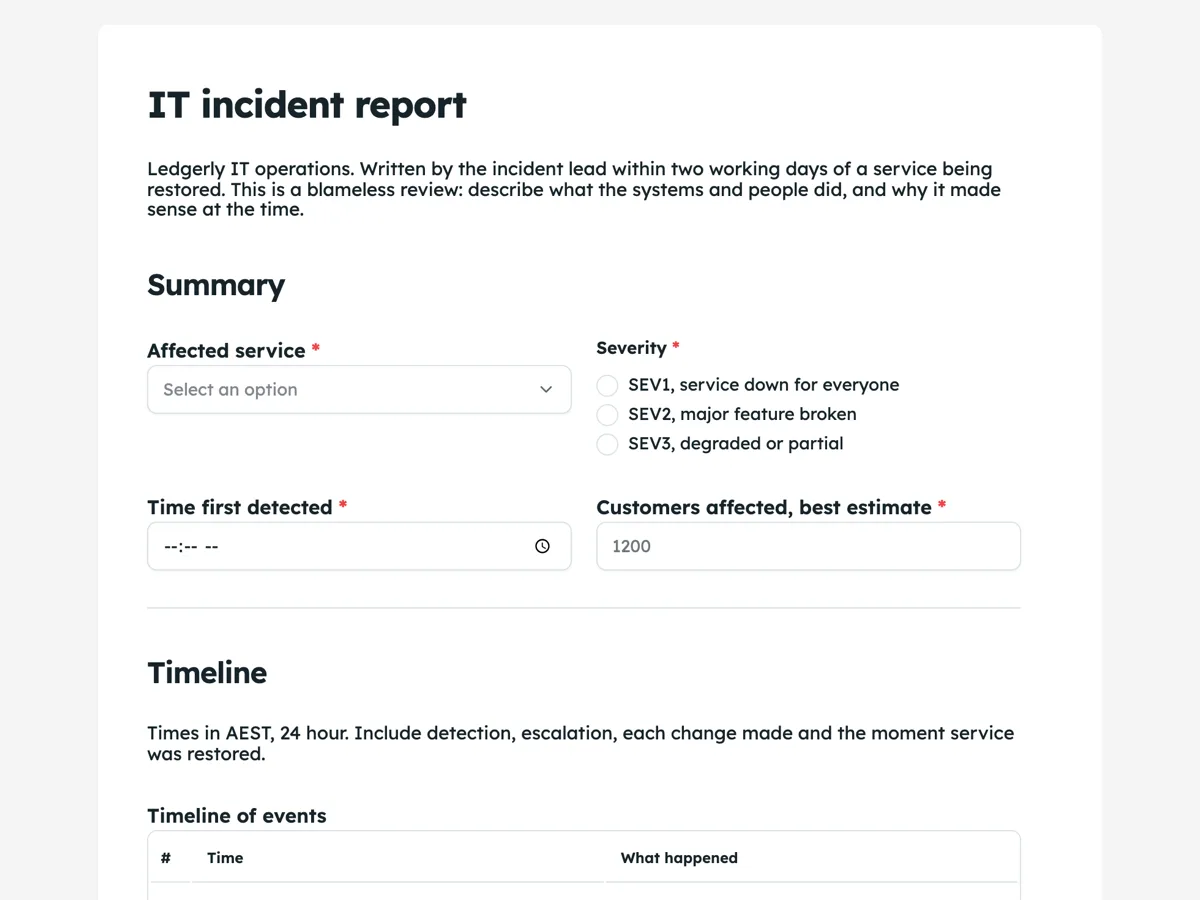
The form itself
A static copy of the finished form, exactly as it renders. Nothing here can be filled in or submitted, so read it as a reference and build your own from the button above.
Every field, and what it collects
The complete field list, in the order respondents meet it.
- Affected serviceDropdownRequired
- Options: Invoicing web app · Payments API · Bank feeds · Email delivery · Mobile app · Internal tools
- SeveritySingle choiceRequired
- Options: SEV1, service down for everyone · SEV2, major feature broken · SEV3, degraded or partial
- Time first detectedTimeRequired
- Customers affected, best estimateNumberRequired
- Timeline of eventsTable
- Columns: Time · What happened
- Root causeLong textRequired
- How service was restoredLong textRequired
- Follow up actionsTable
- Columns: Action · Owner · Due
Summary
Timeline
Cause and fix
What each field on this form collects
The affected service comes from a list of six, beside severity as three plainly described levels. Detection time and an estimate of customers affected sit on one row. A paragraph sets the time zone and what belongs in the timeline, then a six row table takes time and event. Two long text boxes hold the root cause and how service was restored. A four row table lists follow up actions with an owner and a due date. There is no signature: the report is a shared document, not an attestation.
A blameless review
The intro calls this a blameless review and asks why actions made sense at the time. People under pressure make reasonable decisions with the information they have, and a report that names a person as the cause teaches everyone to hide their part next time. NIST's incident response guidance and the UK National Cyber Security Centre's incident management collection both treat lessons learned as a step of the process, and lessons only come from honest accounts. The root cause placeholder models the tone: it describes a gap in a handover, not a person who forgot.
The timeline is the report
Most of what an incident review learns comes from the gaps in its timeline: twenty minutes between the first alert and anyone looking at it, an hour between finding the cause and deploying the fix. The table has six rows, which covers detection, escalation, a few changes and restoration for a typical incident. A table field cannot grow while being filled in, so a long incident can use the root cause box for the rest or be split into two reports for two phases.
How to adapt this form
A school IT team replaces customers with staff and students affected and adds the campus. A managed service provider adds the client and the contract's response targets. A company that must report certain incidents to a regulator adds a question asking whether personal information was involved, which leads to the data breach report.
What makes this form work
Severity in words
SEV1, service down for everyone; SEV2, major feature broken; SEV3, degraded. The labels explain themselves, so two incident leads grade the same outage the same way.
Follow ups have owners
A four row table of action, owner and due turns the review into work. An action with no owner in the export is easy to spot at Thursday's review.
The fix is separate from the cause
Root cause and how service was restored are two boxes. A restart that brought the service back is not the cause, and keeping them apart stops the review ending at the workaround.
Questions people ask
What should an IT incident report include?
The affected service, severity, when it started and was detected, the impact on users, a timeline of detection, escalation, actions and recovery, the root cause, how service was restored, and follow up actions with owners and dates. Some teams add what went well, which helps keep the review blameless.
What is a blameless incident review?
A review that looks for the conditions that made an incident possible rather than a person to blame, on the assumption that people acted reasonably with what they knew. It produces more honest timelines and better fixes. The tone of the form, starting with its intro, sets that expectation.
How soon after an incident should the report be written?
Within a few working days, while logs and memories are fresh, and after service is stable. This company asks for two working days. Large incidents may need a short interim report sooner, especially when customers or regulators are waiting for an explanation.
Should the report be shared with customers?
Many companies publish a shorter customer facing summary for major incidents, without internal names or security detail. This form is the internal report; the summary is written from it. Keep anything that would help an attacker out of the public version.
Can the report go into a ticketing system?
A webhook add-on posts each submission once as JSON to an address you set, with no retry, so a small service can turn the follow ups into tickets. Each submission is also in the responses table and can be exported to CSV.
Does a security incident need a different form?
Security incidents add questions about what data or systems were accessed, containment and evidence, and some must be reported to regulators. If personal information is involved, a data breach assessment applies. Use this form for availability incidents and a breach form alongside it when data is involved.
Build your own in about a minute
The button below opens the generator with this use case already described. Change the wording to match your own, generate, then edit anything you like.
Make one like thisOther form examples
Equipment fault report form for a machine shop
An equipment fault report form tells maintenance which machine is faulty, what is wrong, when it was noticed, how long it has been down, who was running it, whether it is isolated and how urgent it is. This machine shop version adds a photo and sends each report on to the maintenance system.
Data breach report form for the NDB scheme
A data breach report form lets staff report a suspected breach quickly: when it was found, what information and how many people, how it happened, whether it is contained and whether it could cause serious harm. This Australian version explains the Notifiable Data Breaches test in plain words and leaves the assessment to the privacy officer.
Customer complaint form that asks what outcome you want
A customer complaint form identifies the customer, sorts the complaint by type, records what happened and when, whether this is a repeat contact, any evidence, and the outcome the customer wants. This water utility version also states the response time and the right to go to the ombudsman before the customer starts typing.
Want the steps in the builder? Read Table fields for timelines, then Post each report to another tool by webhook. For everything this generator can do, see the form maker.
Sources
Written and checked by the OneCraft team. Last checked .