Classic form
Job offer acceptance form with start date and notice
A job offer acceptance form records the candidate's decision on a specific offer, and if they accept, when they can start, how much notice they owe their current employer and anything they need to raise. This version keeps the decision separate from the employment contract, which follows for signature once the offer is accepted.
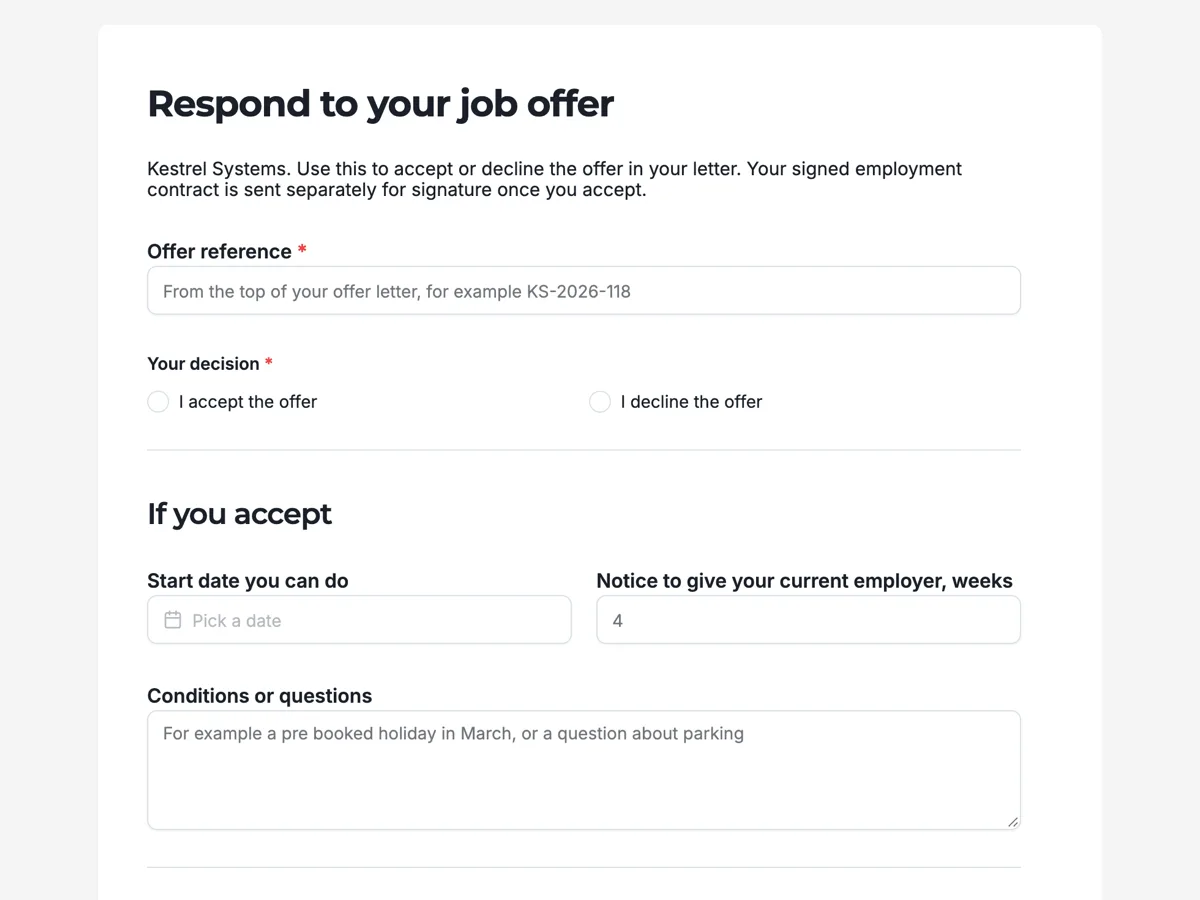
The form itself
A static copy of the finished form, exactly as it renders. Nothing here can be filled in or submitted, so read it as a reference and build your own from the button above.
Every field, and what it collects
The complete field list, in the order respondents meet it.
- Offer referenceShort textRequired
- Your decisionSingle choiceRequired
- Options: I accept the offer · I decline the offer
- Start date you can doDate
- Notice to give your current employer, weeksNumber
- Conditions or questionsLong text
- Your signatureSignatureRequired
If you accept
What each field on this form collects
The offer reference ties the response to one letter. A required choice records accept or decline. If the candidate accepts, they give the start date they can do and the weeks of notice owed to their current employer, side by side, and a long text holds conditions or questions such as a booked holiday. The candidate signs at the end whatever they decide.
A response, not the contract
Accepting an offer and signing an employment contract are different steps. The offer letter sets out the main terms; the contract records them in full, along with the policies and the National Employment Standards in Australia or the written statement of terms the UK requires. This form records the decision and the practical details that decide the start date. The contract follows, and in many businesses it goes out through an e-signature service so it can be signed on a phone. Keeping the steps separate means a candidate can accept quickly while the contract is prepared.
Notice and start dates
Most candidates already have a job, and the notice they owe their current employer decides the earliest start date. Asking for the notice in weeks, beside the start date, lets the hiring manager see whether the two fit. The conditions box catches the things that otherwise surface on day one: a holiday booked months ago, a course that runs on Fridays, a question about parking. A business can only plan around what it knows about before the start date.
How to adapt this form
A hospital adds the registration number and the date of the employment screening checks. A business hiring graduates adds the expected completion date of the degree. A company that relocates new hires adds the moving date and whether relocation support is needed. A business hiring casual staff adds the days and hours the person can work, since that decides the first roster.
What makes this form work
Decline is a real option
Accept or decline are equal choices. A candidate who has taken another job can say so in a minute, and the business can move to the next candidate rather than waiting.
Notice beside the start date
Weeks of notice sit next to the start date. A start date that ignores a four week notice period is obvious before the contract is drafted.
Room for the small things
The conditions box with its holiday and parking example invites the questions that otherwise turn up on the first morning.
Questions people ask
Is accepting a job offer legally binding?
An accepted offer can form a contract, depending on what was offered and accepted. Most businesses follow an accepted offer with a written employment contract that sets out the full terms. Get advice if you need certainty about your situation, especially before resigning from a current job.
How long should a candidate have to respond to an offer?
A few working days is common, enough to discuss it with family and compare other offers. State the deadline in the offer letter. This form does not close by itself, so the hiring manager follows up if no response arrives by the deadline.
Can a candidate negotiate using this form?
The conditions box is the place to raise questions or requests, such as a later start date or a booked holiday. Salary negotiation is usually better done in a conversation before the response is submitted, so the accepted offer reflects what was agreed.
Should the employment contract be signed on this form?
Keep them separate. This form records the decision and practical details. The contract is a longer document signed by both parties, often through an e-signature service, and the business keeps a copy for its records. Separating them lets the candidate accept today while the contract is checked.
How is the form sent to the candidate?
Share the link in the offer email. To keep it from being opened by anyone else, the form can use a secret key that the candidate enters, or be limited to people with an email at a set domain, though candidates usually use personal email.
What if the candidate accepts and then withdraws?
It happens. Ask them to tell the hiring manager directly as soon as they know. A business can keep the response for its records and note the withdrawal. Submitted responses cannot be edited, so a change of mind is recorded as a new message or submission.
Build your own in about a minute
The button below opens the generator with this use case already described. Change the wording to match your own, generate, then edit anything you like.
Make one like thisOther form examples
Interview availability form candidates finish in a minute
An interview availability form asks a candidate which of a set of dated slots they could attend, how they would like to be interviewed, whether they need any adjustments and how to reach them. This conversational version does it in five screens, with a None of these work answer so nobody is forced into a time they cannot make.
Contractor onboarding form for an Australian studio
A contractor onboarding form collects what a business needs before it can pay a contractor: the ABN and GST status, insurance, bank details, the services and the rate, and agreement to the contract terms. This Australian studio version will not pay an invoice until the form and the certificate of currency are on file.
Company car request form for pool vehicles
A company car request form books a pool vehicle for business use: which car, the dates, why it is needed, the driver's licence and history, a fuel card and agreement to the vehicle policy. This version keeps private use off by default, because that is what the logbook and the tax treatment depend on.
Want the steps in the builder? Read Choice, date and signature fields, then Share the form with a secret key. For everything this generator can do, see the form maker.
Written and checked by the OneCraft team. Last checked .