Conversational form
Interview availability form candidates finish in a minute
An interview availability form asks a candidate which of a set of dated slots they could attend, how they would like to be interviewed, whether they need any adjustments and how to reach them. This conversational version does it in five screens, with a None of these work answer so nobody is forced into a time they cannot make.
The form itself
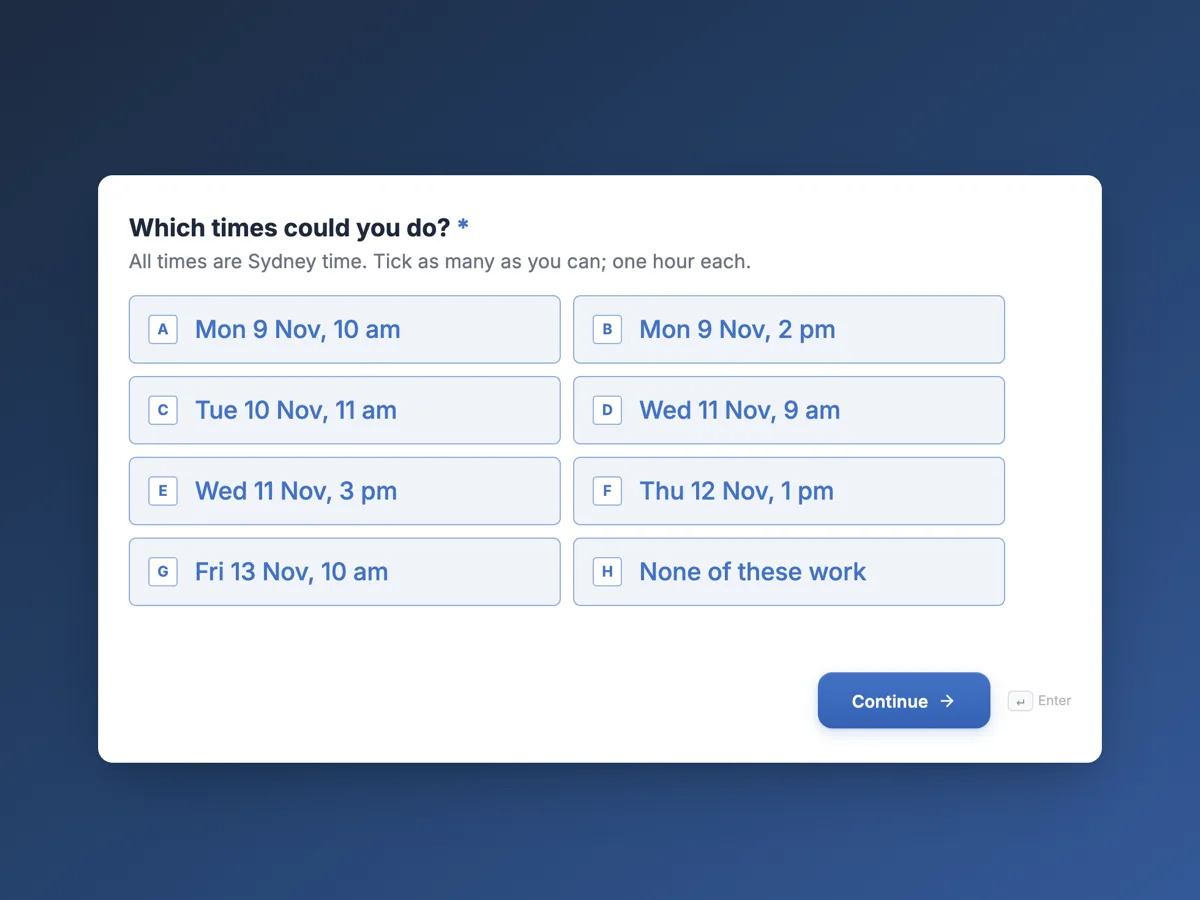
The first screen of the form. A conversational form shows one question per screen, so the remaining screens are listed in the field table below. Nothing here can be filled in or submitted, so read it as a reference and build your own from the button above.
Every field, and what it collects
The complete field list, in the order respondents meet it.
- Which times could you do?Multiple choiceRequired
- All times are Sydney time. Tick as many as you can; one hour each.
- Options: Mon 9 Nov, 10 am · Mon 9 Nov, 2 pm · Tue 10 Nov, 11 am · Wed 11 Nov, 9 am · Wed 11 Nov, 3 pm · Thu 12 Nov, 1 pm · Fri 13 Nov, 10 am · None of these work
- How would you like to be interviewed?Single choiceRequired
- Options: In person at the Alexandria office · Video call · Either is fine
- Is there anything we can do to make the interview work for you?Long text
- Optional. Anything you tell us is only shared with the people arranging the interview.
- Best number to reach youPhoneRequired
- Please confirmMultiple choiceRequired
- Options: I will reply to the confirmation email to lock in the time
What each field on this form collects
The first screen is a checklist of seven dated, one hour slots across a week, with times in Sydney time and an eighth answer for none of these work. The second asks for the interview mode: in person at the office, video, or either. The third is an optional long text for adjustments, with a description saying who sees the answer. The fourth asks for a phone number, which a conversational form records as a phone field. The fifth is a single checkbox confirming the candidate will reply to the confirmation email.
Tick every slot that works
Asking for one preferred time means a second round of emails when the panel cannot make it. Asking for every time that works lets the recruiter find the overlap with the panel in one go. The welcome screen says so, and the checklist has two columns so seven slots fit without scrolling. None of these work is a real answer: the thank you screen promises a call, so a candidate with a clash is not lost. The dates sit in the week of 9 November 2026 and every one is a weekday.
Asking about adjustments
Candidates with a disability or other needs are entitled to fair treatment in recruitment, and anti discrimination law in Australia and equal opportunity rules in other countries expect reasonable adjustments to interviews. Asking openly, with examples such as step free access, extra time or captions, makes it normal to answer. Making the question optional and saying who sees the answer respects the candidate's choice about what to share. The answer goes only to the people arranging the interview, not the panel scoring it.
How to adapt this form
A retailer hiring for many stores adds the store as the first screen and offers slots by store. A university panel adds a screen asking whether the candidate needs travel support. A company running group assessment days replaces the slots with assessment dates and adds dietary requirements for lunch.
What makes this form work
Every workable slot at once
Seven dated slots in a two column checklist. The recruiter matches the candidate against the panel in one pass, instead of trading emails over a single preferred time.
An honest way out
None of these work is an option, and the thank you screen promises a call. Candidates with a clash are not forced to pick a time they will later cancel.
Adjustments asked kindly
The adjustments question is optional, gives examples and says who sees the answer. Candidates can ask for what they need without feeling they are disclosing to the panel.
Questions people ask
How many interview slots should a candidate be offered?
Enough to give real choice across different days and times, usually five to ten over a week. Mornings and afternoons both help, since some candidates are working and can only get away at certain times. Let them tick every slot that works.
Should the form ask about reasonable adjustments?
Yes. Asking openly makes it easier for candidates to request what they need, such as access, extra time or interpreters. Keep it optional and limit who sees the answer. Equal opportunity and disability discrimination laws expect employers to make reasonable adjustments.
Why is the phone question a phone field here?
A conversational form supports email and phone fields. On a classic form those two field types do not render on the published form, so a classic version of this form would use a short text field for the phone number instead, with a placeholder showing the format.
Does the form book the interview automatically?
No. It collects availability. The recruiter checks the panel's calendars and sends a confirmation, which is why the last screen asks the candidate to reply to it. An email alert can send each response to the recruiter as it arrives.
Can the form show times in the candidate's time zone?
Not automatically. The slots are written as text, so they show exactly what you type. This form states Sydney time in the description. For candidates in other time zones, add the time zone to every option or ask them to call.
Can the slots be updated for each role?
Yes. Edit the options in the builder and publish an update; the link stays the same. Old responses keep the slots they were submitted with, so the recruiter can still read them correctly. Remove slots that have passed before sending the link to the next candidate.
Build your own in about a minute
The button below opens the generator with this use case already described. Change the wording to match your own, generate, then edit anything you like.
Make one like thisOther form examples
Job offer acceptance form with start date and notice
A job offer acceptance form records the candidate's decision on a specific offer, and if they accept, when they can start, how much notice they owe their current employer and anything they need to raise. This version keeps the decision separate from the employment contract, which follows for signature once the offer is accepted.
Employee referral form with candidate consent
An employee referral form lets staff put forward someone they know for an open role: which role, the candidate's details, how they know each other, a CV, why the candidate fits and whether they have agreed. This version will not contact a candidate who has not agreed, which protects both the candidate and the referrer.
Flexible working request form for Australian employees
A flexible working request form records which eligible ground applies, what change the employee wants, the proposed pattern, when it should start and for how long, and how the work will be covered. This Australian version lists the grounds from the Fair Work Act and states the 21 day written reply rule up front.
Want the steps in the builder? Read Build a conversational form, then Write the welcome and thank you screens. For everything this generator can do, see the form maker.
Written and checked by the OneCraft team. Last checked .