Classic form
Employee referral form with candidate consent
An employee referral form lets staff put forward someone they know for an open role: which role, the candidate's details, how they know each other, a CV, why the candidate fits and whether they have agreed. This version will not contact a candidate who has not agreed, which protects both the candidate and the referrer.
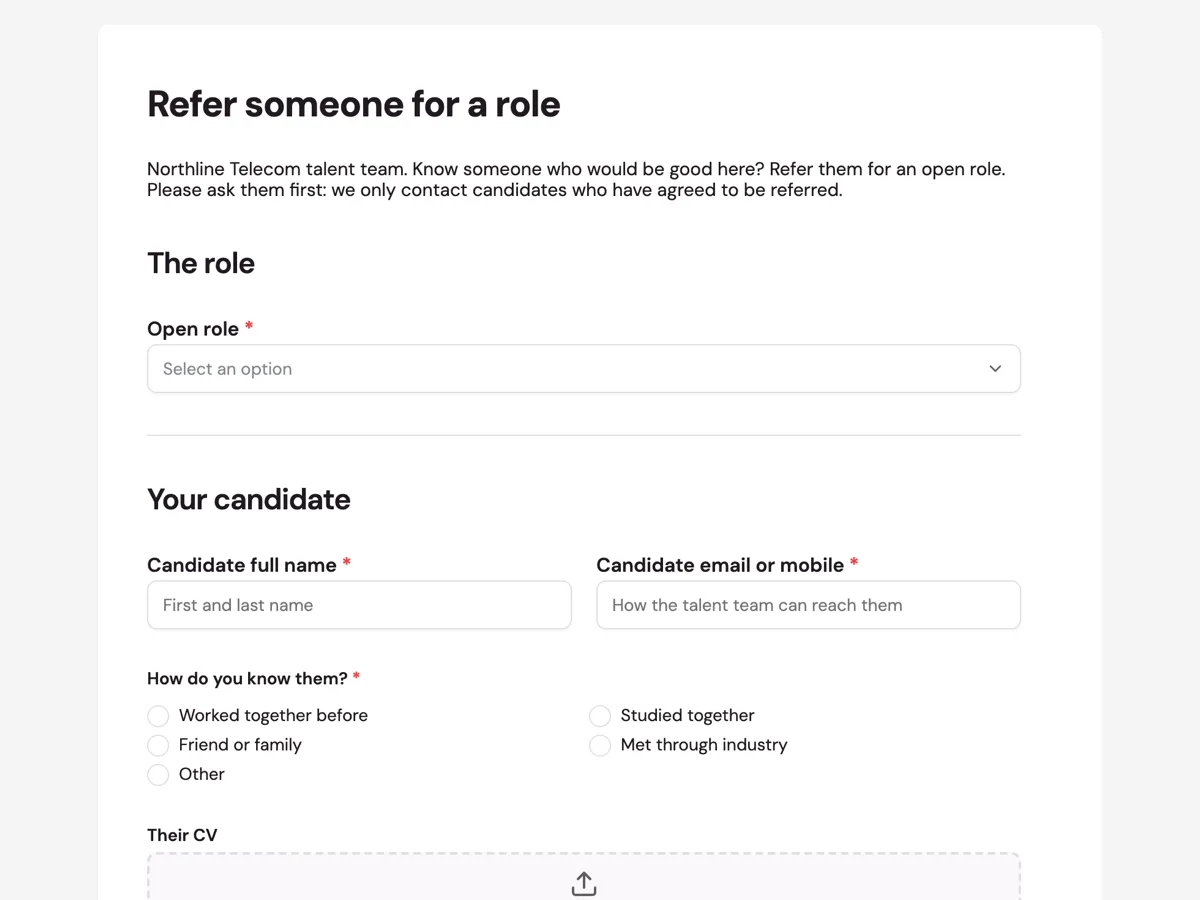
The form itself
A static copy of the finished form, exactly as it renders. Nothing here can be filled in or submitted, so read it as a reference and build your own from the button above.
Every field, and what it collects
The complete field list, in the order respondents meet it.
- Open roleDropdownRequired
- Options: Network engineer, Sydney · Field technician, Newcastle · Customer support lead · Data analyst · Graduate program 2027
- Candidate full nameShort textRequired
- Candidate email or mobileShort textRequired
- How do you know them?Single choiceRequired
- Options: Worked together before · Studied together · Friend or family · Met through industry · Other
- Their CVFile upload
- PDF preferred. Ask your candidate for their latest CV rather than using an old one.
- Why would they be good in this role?Long textRequired
- Has your candidate agreed to be referred?Single choiceRequired
- Options: Yes, they agreed · Not yet
- Your staff IDShort textRequired
The role
Your candidate
What each field on this form collects
The open role comes from a list of five current vacancies. The candidate's name and a contact share a row. A single choice records how the referrer knows them, from worked together to met through industry. An upload takes the CV, a long text asks why the candidate would be good, and a required question asks whether they agreed to be referred. The referrer's staff ID closes the form so the bonus can be paid.
Consent before contact
A referral passes someone's personal details to a business they may never have dealt with. Asking whether the candidate agreed protects them from an unexpected call and protects the referrer from an awkward conversation later. It is also good privacy practice: personal information should be collected fairly, and ideally from the person it is about. If the answer is not yet, the talent team asks the referrer to check with the candidate first, rather than contacting them cold.
Evidence, not endorsement
Referred candidates are often good hires because the referrer has seen their work. The question asks what the referrer has seen them do, not only who they are, which gives the talent team something to assess. The relationship question has a fair purpose too. Equal opportunity guidance, such as the EEOC's on prohibited employment practices in the United States, warns that relying heavily on referrals from a narrow group can reproduce that group, so knowing how referrals arrive helps a business check its hiring is open to everyone.
How to adapt this form
A hospital adds the candidate's professional registration and the ward. A retail chain replaces roles with stores and adds availability. A business without a referral bonus removes the staff ID and asks for the referrer's name instead, so the talent team can thank them. A company hiring in several countries adds the candidate's location and work rights.
What makes this form work
Consent is a required question
Has your candidate agreed to be referred is required, and the intro says candidates are only contacted if they agreed. It sets the rule before the referrer starts typing.
What you have seen them do
The placeholder asks for what the referrer has seen, not who the candidate is. The talent team gets evidence of work, which is what makes referrals useful.
The bonus rule is stated
The thank you screen says the bonus is paid when the candidate passes probation. Referrers know the rule without having to ask the talent team.
Questions people ask
What should an employee referral form include?
The role, the candidate's name and contact, how the referrer knows them, a CV, why they would suit the role, confirmation that the candidate agreed to be referred and the referrer's details. Keep it short, so staff refer people while the vacancy is still open.
Do candidates need to agree to be referred?
It is good practice and protects their privacy, since the referral passes their details to the business. This form asks the referrer to confirm the candidate agreed, and the talent team does not make contact until they have. A cold call from an unknown company rarely goes well.
Are referral bonuses common?
Many businesses pay a bonus when a referred candidate is hired and stays for a set period, often the end of probation. The amount and the rules should be written down and applied the same way for everyone. This form records the staff ID so payroll can pay it.
Can referrals reduce diversity?
They can if most hires come from referrals and staff mostly refer people like themselves. Tracking how candidates are found and keeping roles advertised openly helps. The relationship question on this form gives the talent team that data, so it can see whether referrals are widening or narrowing the pool of candidates.
Who sees the referral?
The form owner, usually the talent team, sees every submission, and an email alert can send each one to a recruiting inbox. Limit access to the responses, since they include the candidate's contact details and CV, and delete the details of candidates who are not hired once the role is filled.
Will the referrer be told the outcome?
This business tells the referrer whether the candidate moves to interview, without sharing assessment details, which belong to the candidate. The thank you screen says so. Decide your own rule and state it on the form so expectations are clear.
Build your own in about a minute
The button below opens the generator with this use case already described. Change the wording to match your own, generate, then edit anything you like.
Make one like thisOther form examples
Employee goal setting form with three measured goals
An employee goal setting form records a small number of goals for a set period, how each will be measured, when it is due, how the goals connect to team priorities, what support is needed and when progress will be checked. This version limits each employee to three goals and asks both employee and manager to sign.
Employee resignation form with notice and last day
An employee resignation form is a written resignation: the last day, how much notice is being given, a handover contact, the property to return and where to send final documents. This small cafe version keeps the reason for leaving optional and thanks the employee rather than asking them to justify leaving.
Employee details change form for address, name and contacts
An employee details change form lets staff tell HR what has changed in one place: their address, legal name, emergency contact or mobile, with evidence for a name change and the date it applies from. This version asks staff to tick what changed first, so they fill in only the sections they need.
Want the steps in the builder? Read Generate a referral form, then Email each referral to the talent team. For everything this generator can do, see the form maker.
Written and checked by the OneCraft team. Last checked .