Classic form
Employee details change form for address, name and contacts
An employee details change form lets staff tell HR what has changed in one place: their address, legal name, emergency contact or mobile, with evidence for a name change and the date it applies from. This version asks staff to tick what changed first, so they fill in only the sections they need.
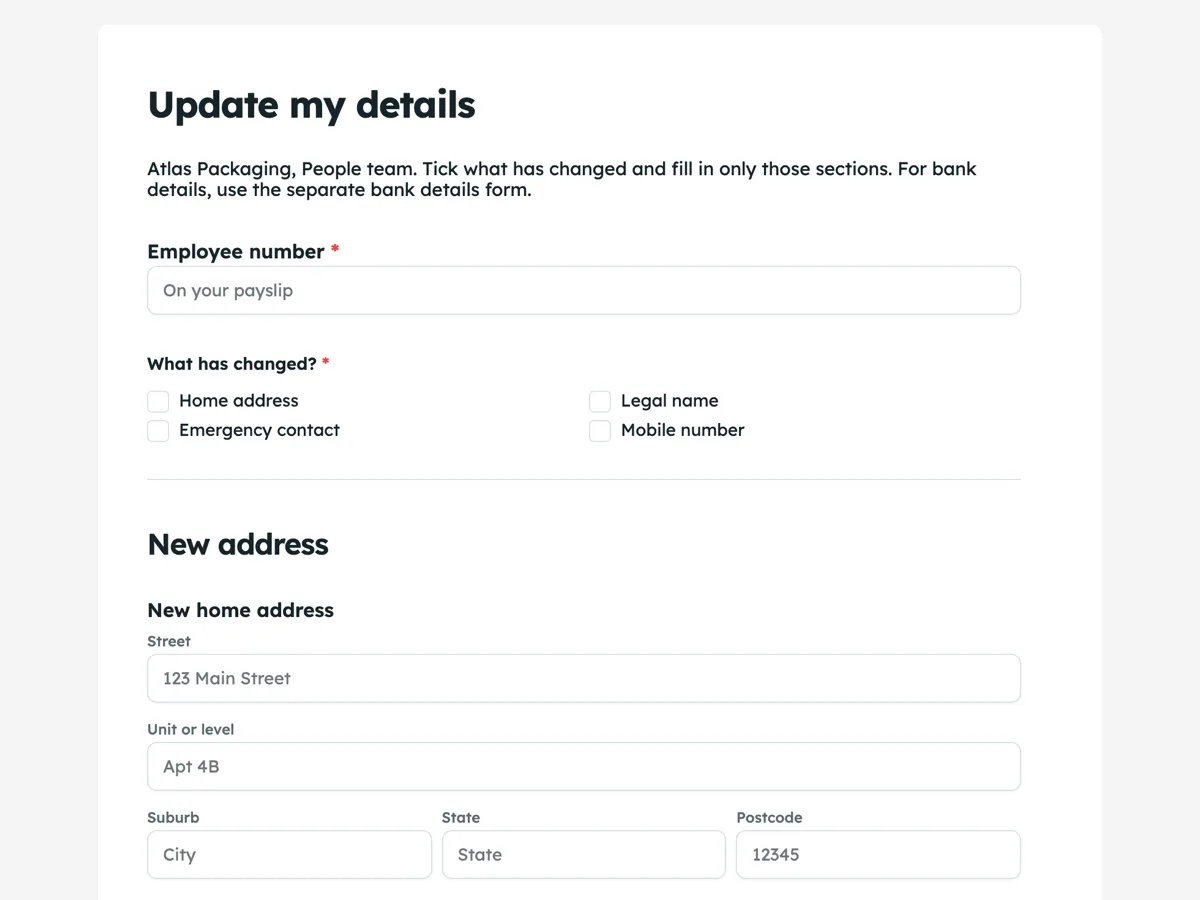
The form itself
A static copy of the finished form, exactly as it renders. Nothing here can be filled in or submitted, so read it as a reference and build your own from the button above.
Every field, and what it collects
The complete field list, in the order respondents meet it.
- Employee numberShort textRequired
- What has changed?Multiple choiceRequired
- Options: Home address · Legal name · Emergency contact · Mobile number
- New home addressAddress
- New legal nameShort text
- Evidence of the name changeFile upload
- A marriage certificate, change of name certificate or new ID, as a PDF or photo.
- Emergency contact name and relationshipShort text
- Emergency contact phoneShort text
- Your new mobileShort text
- Change applies fromDateRequired
- Your signatureSignatureRequired
New address
New name
Contacts
What each field on this form collects
The employee number identifies the record. A required checklist asks what has changed: home address, legal name, emergency contact or mobile. Each change has its own section: an address block with street, unit, suburb, state and postcode; a new legal name with an upload for evidence; the emergency contact's name, relationship and phone; and a new mobile. A required date says when the change applies, and the employee signs.
Tick first, then fill in
A classic form cannot show or hide sections based on an answer, so every section is always on screen. The checklist at the top does a different job: it tells the People team which sections to read, and the intro tells staff to fill in only those. That keeps the form honest about what it can do, and a reviewer reading a response never has to guess whether an empty address block means no change or a forgotten field. The bank details form is kept separate on purpose, because changes to bank details attract scams and need a call back.
Personal information about staff
Addresses, names and emergency contacts are personal information. In Australia, employee records held by a private employer are partly exempt from the Privacy Act, but the Office of the Australian Information Commissioner notes the limits of that exemption, and good practice is to collect only what is needed and keep it secure. The emergency contact is someone else's information, given by the employee, so it should be used only for emergencies. Restricting the form to signed in staff and limiting who can see responses both help.
How to adapt this form
A business with a uniform policy adds sizes. A company that pays allowances for travel adds the distance from the new address to the usual workplace. A school adds a working with children check number and its expiry, which also changes over time. A business with staff overseas adds the country and a postal format that suits it, since the address block is set up for Australian addresses.
What makes this form work
A checklist routes the reader
Four tick boxes say what changed. The People team reads only those sections, and an empty section never looks like a missing answer.
Evidence for a name change
An upload takes a marriage certificate, change of name certificate or new ID. Payroll and super records need the legal name, and the evidence is on the same record.
A date it applies from
A required date stops a move next month being applied today. Address changes that affect tax, travel or allowances depend on the date.
Questions people ask
What details should employees keep up to date?
Their legal name, home address, phone number, emergency contact and bank and tax details. Some roles add licences, registrations or checks with expiry dates. Ask staff to update details as they change, and remind everyone once a year to check their record.
Why is the bank details form separate?
Changes to bank details are a common target for payment redirection scams, so they need a separate form and a call back to a number already on file before payroll acts. Keeping them off this general form makes that check harder to skip.
Does an employee need to prove a name change?
Most employers ask for evidence before changing payroll and super records, since those must match the employee's legal name and tax file details. A marriage certificate, change of name certificate or updated ID is usually enough. Return or delete copies once recorded.
Can the form show only the section that applies?
Not on a classic form: logic that shows or hides fields is not available. This form uses a checklist at the top so staff and reviewers know which sections matter. A conversational form can jump between screens, but it cannot hide fields either.
Who can see the responses?
The form owner and anyone they share the responses with. Limit access to the People team, since the records include addresses and contacts. Requiring staff to sign in to submit stops anyone outside the business changing an employee's record.
How quickly is the record updated?
That depends on the business. This one promises three working days, set on the thank you screen. A name change can take longer if IT accounts and payroll records need updating too. Tell staff the timeframe so they do not submit twice.
Build your own in about a minute
The button below opens the generator with this use case already described. Change the wording to match your own, generate, then edit anything you like.
Make one like thisOther form examples
Employee resignation form with notice and last day
An employee resignation form is a written resignation: the last day, how much notice is being given, a handover contact, the property to return and where to send final documents. This small cafe version keeps the reason for leaving optional and thanks the employee rather than asking them to justify leaving.
Employee referral form with candidate consent
An employee referral form lets staff put forward someone they know for an open role: which role, the candidate's details, how they know each other, a CV, why the candidate fits and whether they have agreed. This version will not contact a candidate who has not agreed, which protects both the candidate and the referrer.
One on one meeting form with rolling actions
A one on one meeting form records what a manager and a team member covered: recent wins, blockers, how the person is going, their development, actions with owners and dates, and when they meet next. This agency version is written by the team member, and its actions table rolls forward from meeting to meeting.
Want the steps in the builder? Read Address and upload fields, then Require staff to sign in. For everything this generator can do, see the form maker.
Written and checked by the OneCraft team. Last checked .