Classic form
Employee goal setting form with three measured goals
An employee goal setting form records a small number of goals for a set period, how each will be measured, when it is due, how the goals connect to team priorities, what support is needed and when progress will be checked. This version limits each employee to three goals and asks both employee and manager to sign.
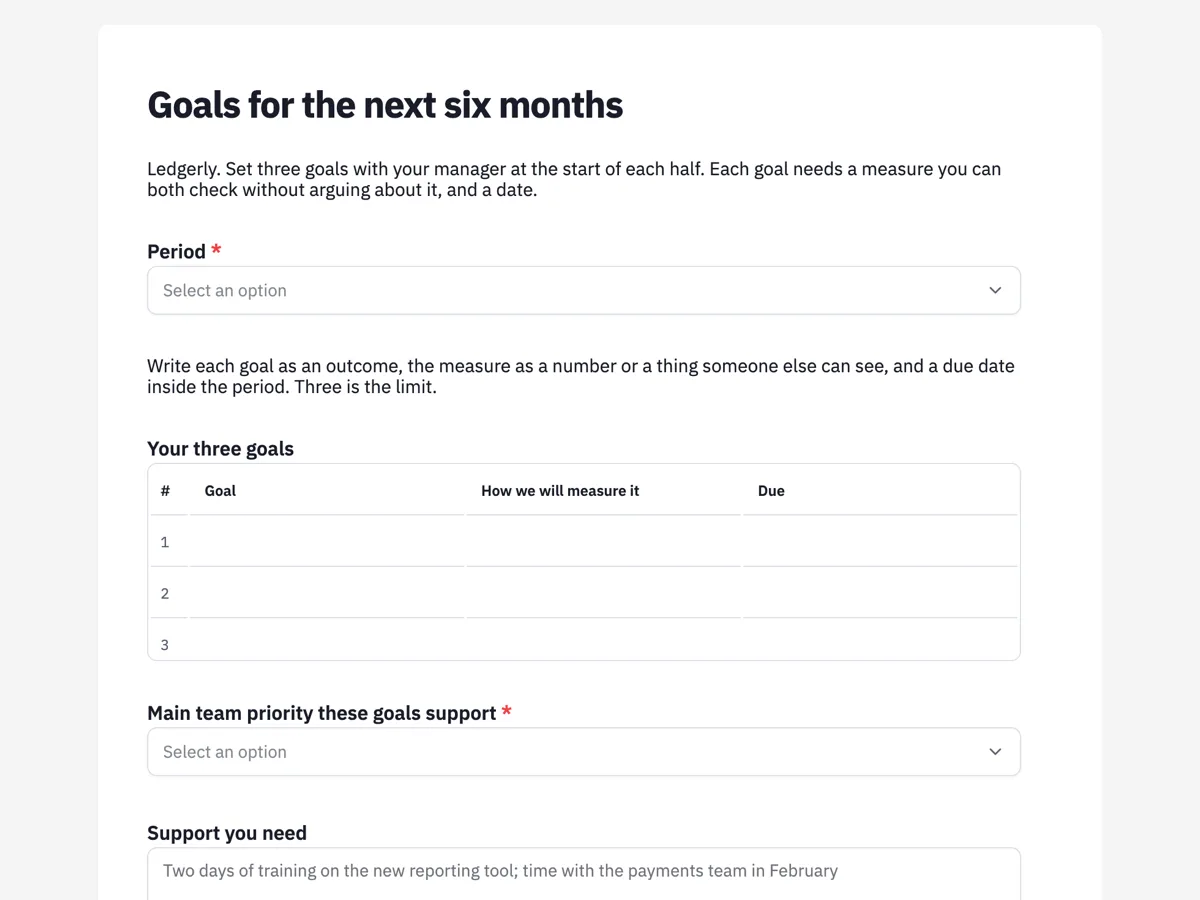
The form itself
A static copy of the finished form, exactly as it renders. Nothing here can be filled in or submitted, so read it as a reference and build your own from the button above.
Every field, and what it collects
The complete field list, in the order respondents meet it.
- PeriodDropdownRequired
- Options: January to June 2027 · July to December 2026
- Your three goalsTable
- Columns: Goal · How we will measure it · Due
- Main team priority these goals supportDropdownRequired
- Options: Faster onboarding for new customers · Fewer support tickets per customer · Bank feed reliability · Growing the accountant partner channel
- Support you needLong text
- Mid point checkDateRequired
- EmployeeSignatureRequired
- ManagerSignatureRequired
What each field on this form collects
The period is a dropdown of the current and next half year. A paragraph explains how to write a goal, then a numbered table of three rows takes each goal, its measure and its due date. A dropdown asks which team priority the goals support, from a list of four. A long text records the support needed, a required date sets the mid point check, and the employee and manager sign side by side.
Three goals, each with a measure
Goal setting research, going back to Locke and Latham's work on goal setting theory, finds that specific, challenging goals with feedback lead to better performance than vague goals such as do your best. The practical lesson is to keep goals few and measurable. A table of exactly three rows enforces the first: a table field shows the rows set in the form and cannot grow. The paragraph does the second, asking for a measure as a number or something another person can see, so the end of period conversation is about evidence rather than impressions.
The mid point check
Goals set in January and reviewed in June are often forgotten in March. A required mid point date puts a conversation in the middle of the period, and the thank you screen asks the employee to say early if a goal stops making sense. That matters because priorities change, and a goal that no longer fits should be changed openly rather than quietly missed. Fair Work guidance on managing performance stresses clear expectations and regular feedback, which this form builds in.
How to adapt this form
A sales team replaces the priorities with territory targets and adds a quota field. A school adds a professional learning goal and links to the teaching standards. A business that sets goals yearly changes the period list and adds a second check date. A team new to goal setting can add one example goal in the paragraph, written in the style it wants, so the first round of goals comes back measurable.
What makes this form work
The table stops at three
Three numbered rows of goal, measure and due date. The form cannot hold a fourth goal, which keeps attention on the few that matter most.
Measures someone else can see
The paragraph asks for a number or something another person can check. That turns the review into a look at evidence rather than a debate.
One priority per person
A single team priority from a list of four. Everyone's goals can be grouped by priority in the export, showing where the team's effort is going.
Questions people ask
How many goals should an employee have?
Few enough to focus on, often three to five for a period, and many teams choose three. More goals spread effort thinly and make reviews harder. This form allows exactly three, through a table with a fixed number of rows.
What makes a good goal?
A specific outcome, a measure that someone else can check, a due date and a link to what the team needs. Research on goal setting supports specific and challenging goals with regular feedback. Avoid goals that describe activity, such as attend meetings, rather than results.
Should employees set their own goals?
Goals usually work best when set together: the employee proposes, the manager adjusts to team needs, and both agree. This form has two signatures to show the goals were agreed rather than handed down. Agreement makes the review fairer for both.
What happens at the mid point check?
Employee and manager look at progress against each measure, discuss what is blocking progress and decide whether any goal needs changing. The check is short and happens on the date recorded on this form, so it does not get lost.
Can goals be changed during the period?
Yes, by agreement, especially when priorities shift. Submitted responses cannot be edited, so a changed set of goals is saved as a new submission with both signatures. The history then shows what changed and when, which helps at the review if a goal was dropped for a good reason.
How do goals connect to performance reviews?
The goals and their measures become one input to the end of period review, along with behaviour and development. Exported to CSV, the responses give the manager each employee's goals, measures and dates in one place before review meetings, with the goals table in a single column.
Build your own in about a minute
The button below opens the generator with this use case already described. Change the wording to match your own, generate, then edit anything you like.
Make one like thisOther form examples
One on one meeting form with rolling actions
A one on one meeting form records what a manager and a team member covered: recent wins, blockers, how the person is going, their development, actions with owners and dates, and when they meet next. This agency version is written by the team member, and its actions table rolls forward from meeting to meeting.
Employee details change form for address, name and contacts
An employee details change form lets staff tell HR what has changed in one place: their address, legal name, emergency contact or mobile, with evidence for a name change and the date it applies from. This version asks staff to tick what changed first, so they fill in only the sections they need.
Parental leave form for Australian employees
A parental leave form records the expected birth or placement date, the leave start and end dates, how the employee will be paid while away and how they would like to stay in touch and come back. This Australian version follows the Fair Work notice rules and separates government Parental Leave Pay from the employer's own paid leave.
Want the steps in the builder? Read A three row goals table, then Pull goals up for the review. For everything this generator can do, see the form maker.
Written and checked by the OneCraft team. Last checked .