Classic form
Scaffold inspection checklist with the four triggers
A scaffold inspection checklist records why the inspection is happening, checks the base, standards, ledgers, bracing, ties, decks and edge protection, and updates the scaffold tag. This builder version also takes elevation photos and the inspector's licence number.
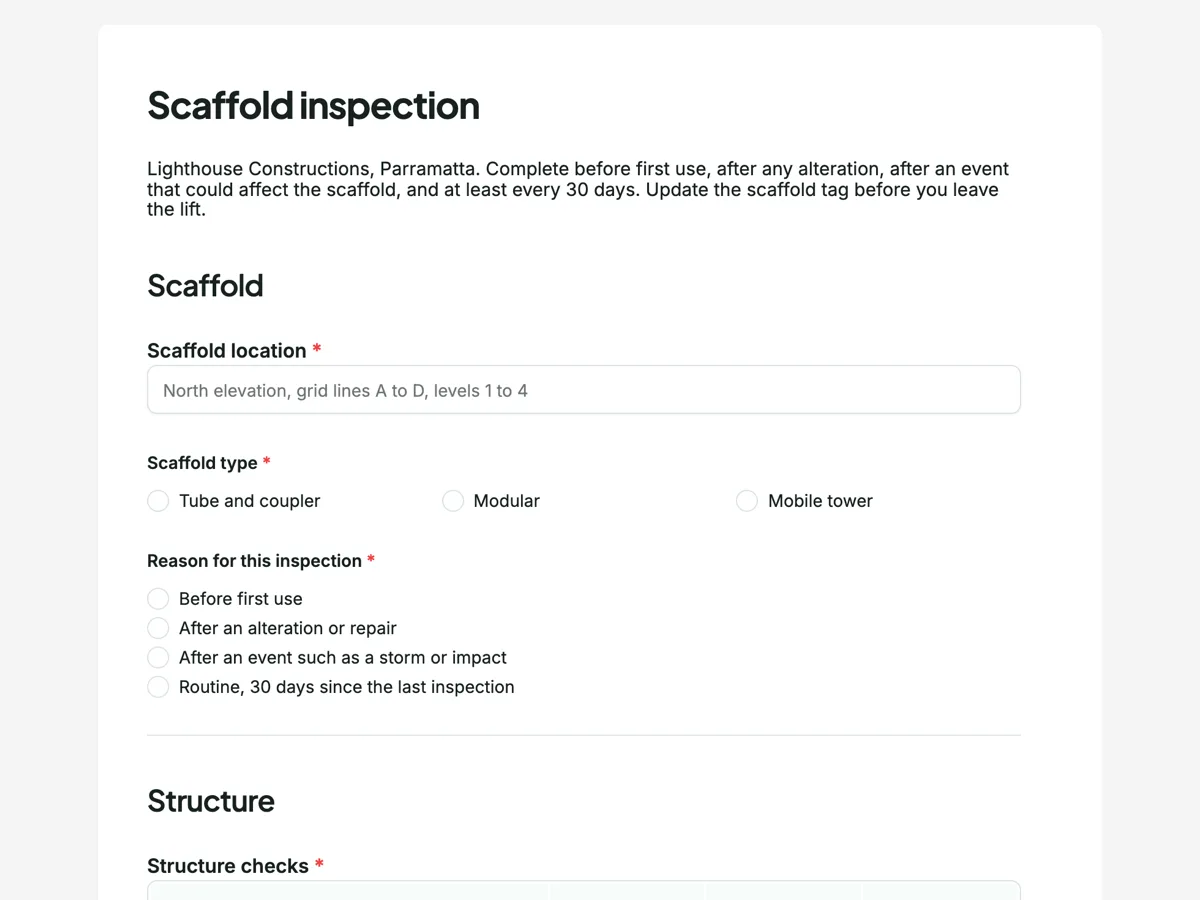
The form itself
A static copy of the finished form, exactly as it renders. Nothing here can be filled in or submitted, so read it as a reference and build your own from the button above.
Every field, and what it collects
The complete field list, in the order respondents meet it.
- Scaffold locationShort textRequired
- Scaffold typeSingle choiceRequired
- Options: Tube and coupler · Modular · Mobile tower
- Reason for this inspectionSingle choiceRequired
- Options: Before first use · After an alteration or repair · After an event such as a storm or impact · Routine, 30 days since the last inspection
- Structure checksRating gridRequired
- Statements:
- Base plates and sole boards
- Standards plumb
- Ledgers and transoms
- Bracing complete
- Ties at the right spacing
- Planks or decks secured
- Toe boards
- Edge protectionRating gridRequired
- Statements:
- Guardrails
- Mid rails
- Access ladder or stair
- Containment screens or mesh
- Scaffold tag updated?Single choiceRequired
- Options: Yes, safe to use · Yes, unsafe, do not use
- Photos of the scaffoldFile upload
- Up to six photos. One of each elevation and one of anything that failed.
- Inspector scaffolding licence numberShort textRequired
- InspectorSignatureRequired
Scaffold
Structure
Edges and access
What each field on this form collects
The location is free text so it can name an elevation and grid lines, then the scaffold type and the reason for the inspection are single choices. The structure grid has seven rows: base plates and sole boards, standards plumb, ledgers and transoms, bracing, ties, decks secured and toe boards. The edge protection grid has four: guardrails, mid rails, access ladder or stair, and containment screens. A single choice records what the tag now says. A file upload takes up to six images, a short text holds the inspector's licence number, and the inspector signs.
The four triggers for a scaffold inspection
Under the model WHS Regulations, a scaffold from which a person or object could fall four metres or more must be inspected by a competent person before first use, after repair or alteration, after an event likely to affect its stability, and at least every 30 days. The reason question lists those four triggers word for word, so every record shows which one applied. A storm, a truck clipping a standard or a tie removed by another trade are the events that matter. WorkSafe Victoria's scaffolding pages and its alerts on scaffold collapses and falls from incomplete scaffolds make the same point from the other side.
The scaffold tag
The tag at each access point is what workers read before climbing. It says whether the scaffold is safe to use, who inspected it and when. The form does not replace the tag; it asks whether the tag was updated and what it now says, so the paper record at the access point and the digital record agree. When the answer is unsafe, the thank you screen tells the inspector to barricade the access point until the scaffolder fixes the fault and a new inspection passes.
How to adapt this form
A painting contractor working from mobile towers drops ties and containment screens and adds rows for castor locks and outriggers. A scaffold hire company adds the hand over certificate number and the client's site contact. A builder with several scaffolds on one job adds a dropdown of scaffold numbers so the responses table can be filtered per scaffold.
What makes this form work
The trigger is recorded
Before first use, after alteration, after an event, or routine at 30 days. Knowing which trigger applied tells a site manager whether the storm last Tuesday was followed by an inspection.
The tag and the form agree
The tag question has two answers, safe to use or unsafe, do not use. The person reading the responses sees exactly what the worker at the access point saw on the tag.
Photos of each elevation
The upload takes up to six images, one per elevation and one per fault. A later dispute over whether a tie was in place on a given day is settled by a dated photo.
Questions people ask
How often must a scaffold be inspected in Australia?
Under the model WHS Regulations, a scaffold from which a person or thing could fall four metres or more is inspected before first use, after repair or alteration, after an event likely to affect it, and at least every 30 days. Lower scaffolds still need checking under the general duty. State rules mirror the model regulations; check yours.
Who can inspect a scaffold over 4 metres?
A competent person, which for scaffolding work usually means someone holding the relevant scaffolding high risk work licence class for the type of scaffold. Erecting, altering and dismantling scaffolds above four metres is high risk work. The form records the licence number so the record shows who signed off.
What goes on a scaffold tag?
Whether the scaffold is safe or unsafe to use, the date and the inspector's name and signature, and often the load rating of the decks. Tags are fixed at each access point. They are updated at every inspection, which is why this form asks whether the tag was updated before the inspector left.
Can the photos be printed with the inspection?
Each submission can be saved as a PDF from the responses table. Images uploaded through a file upload field are added as their own pages after the form, scaled to fit, so the PDF holds the answers and the elevation photos together for the site file.
Should a mobile tower use the same checklist?
Most rows apply, but a tower adds castor brakes, outriggers or stabilisers and the height to base ratio, and it has no ties. Select Mobile tower as the type and mark ties N/A, or build a short tower version of this form for crews that only use towers.
Build your own in about a minute
The button below opens the generator with this use case already described. Change the wording to match your own, generate, then edit anything you like.
Make one like thisOther form examples
Test and tag checklist and register entry
A test and tag checklist records the site, environment, appliance and class, a visual inspection of the cord, plug and casing, the earth continuity and insulation resistance readings, and the next due date. Submitted once per appliance, the entries become the register a client asks for.
Safety harness inspection checklist
A harness inspection checklist works along the webbing and stitching, then the D rings, buckles, adjusters, fall indicator and labels, and records whether the harness stays in service. This version for an access hire company also records the serial, manufacture date and the last six monthly inspection.
AED inspection checklist for the monthly check
An AED inspection checklist confirms the status indicator shows ready, the pads are sealed and in date, the battery is in date, and the cabinet, sign and rescue kit are where people expect them. This leisure centre version also photographs the status screen each month.
Want the steps in the builder? Read File upload and grid fields, then Print the inspection for the site file. For everything this generator can do, see the form maker.
Written and checked by the OneCraft team. Last checked .