Classic form
Security incident report form for event security
A security incident report form records what kind of incident it was, when and where, who was involved, what happened in order, whether police came and anyone was hurt, and where the CCTV is. This event security version also takes photos and the attending officer's signature.
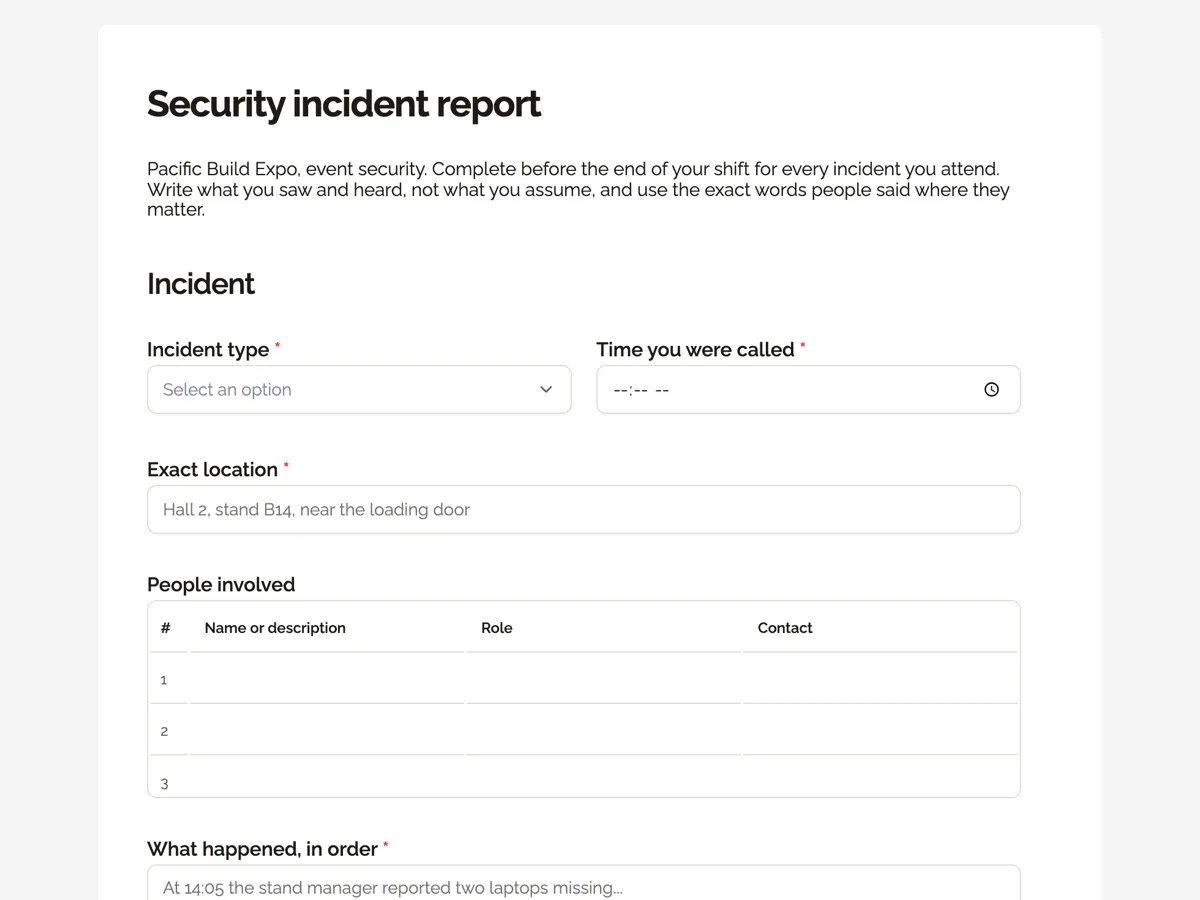
The form itself
A static copy of the finished form, exactly as it renders. Nothing here can be filled in or submitted, so read it as a reference and build your own from the button above.
Every field, and what it collects
The complete field list, in the order respondents meet it.
- Incident typeDropdownRequired
- Options: Theft from a stand · Aggressive or threatening person · Assault · Trespass after hours · Lost child or vulnerable person · Damage to property · Suspicious item
- Time you were calledTimeRequired
- Exact locationShort textRequired
- People involvedTable
- Columns: Name or description · Role · Contact
- What happened, in orderLong textRequired
- Police called?Single choiceRequired
- Options: No · Yes, attended · Yes, report by phone
- Anyone injured?Single choiceRequired
- Options: No · Yes, first aid given · Yes, ambulance
- CCTV camera and time referenceShort text
- PhotosFile upload
- Up to six photos of damage, the scene or a seized item. No photos of injured people.
- Officer signatureSignatureRequired
Incident
Follow up
What each field on this form collects
Incident type comes from seven options an expo sees, from theft from a stand to a suspicious item, beside the time the officer was called. The exact location is free text so it can name a hall, a stand and a door. A three row table lists the people involved by name or description, role and contact. A long text takes what happened in order. Two single choices record police and injuries. A short text holds the CCTV camera and time range, then up to six photos and the officer's signature.
Facts, in order, in the words people used
A security report may be read by police, insurers, a venue owner and a court. The intro asks officers to write what they saw and heard rather than what they assume, and to quote exact words where they matter, because threats and admissions are judged on the words used. The placeholder for the description starts with a time for the same reason: a timeline is easier to check against CCTV and other statements than a paragraph of impressions. WorkSafe Victoria's pages on aggression and violence at work also describe recording incidents as part of managing the risk to staff.
CCTV references before the footage is overwritten
Most event CCTV systems keep footage for a limited time before recording over it. A report that says the cameras saw it is far less useful than one that names camera 2-07 between 13:58 and 14:10, because the control room can export exactly that clip before it disappears. The field is optional, since not every incident is on camera, but its placeholder shows the format the control room needs.
How to adapt this form
A shopping centre adds the store name and the loss value for theft. A hospital security team adds the ward and whether a code was called. A residential building adds the unit number and whether the strata manager was told.
What makes this form work
A timeline placeholder
The description box opens with an example that starts with a time. Officers copy the pattern, and the reports come back as sequences of events that can be checked.
People in a table
Name or description, role and contact for three people. A witness whose phone number is missing is obvious in a table and easy to miss in a paragraph.
Camera and time range
A CCTV reference with a camera number and a time window tells the control room exactly which clip to save before it is overwritten.
Questions people ask
What should a security incident report include?
The type of incident, date, time and exact location, everyone involved with descriptions and contacts, what happened in order with exact words where relevant, actions taken, police and ambulance involvement, injuries, property, CCTV references and the officer's name and signature. Write it during or soon after the shift.
How soon should a security report be written?
Before the end of the shift, while memory is fresh. Details such as times, descriptions and exact words fade quickly, and a report written days later is easier to challenge. The form records the submission time, which shows how soon after the incident it was written.
Should photos of injured people be taken?
This form asks officers not to. Photographing injured people raises privacy and dignity issues and is usually left to police and medical staff. Photos of the scene, damage and seized items are useful and are what the upload is for.
Who can see security incident reports?
Only the form owner and anyone they share the responses with. Reports often include personal information, so keep access limited and follow privacy law when sharing them with police, insurers or venue managers. The form can be restricted so only signed in officers can submit.
Can the report be printed for police?
Yes. Each submission can be saved as a PDF from the responses table, and uploaded photos are added as pages after the form. Police may still ask the officer for a formal signed statement, which is a separate document written with them.
What if an officer was involved in the incident?
The officer still writes their own report of what they saw and did, and the security manager may ask another officer or the supervisor to report separately. Never let two officers write a joint report of a use of force incident, because independent accounts carry more weight.
Build your own in about a minute
The button below opens the generator with this use case already described. Change the wording to match your own, generate, then edit anything you like.
Make one like thisOther form examples
Daily vehicle inspection checklist with 20 items
A vehicle inspection checklist walks the driver around the car and then inside it: tyres, wheels, lights, glass, wipers, mirrors, horn, seatbelts, brakes, warning lights, fluids, body, doors and safety kit. This fleet version marks each of 20 items OK or Fault and ends with a plain safe to drive question.
Vehicle accident report form for a company fleet
A vehicle accident report form records the company vehicle and driver, when and where it happened, the other parties and their insurers, whether police attended and anyone was hurt, and the damage with photos. This fleet version also takes a hand drawn sketch of the scene, which insurers ask for more often than anything else.
Equipment fault report form for a machine shop
An equipment fault report form tells maintenance which machine is faulty, what is wrong, when it was noticed, how long it has been down, who was running it, whether it is isolated and how urgent it is. This machine shop version adds a photo and sends each report on to the maintenance system.
Want the steps in the builder? Read Table and upload fields, then Limit reports to your officers. For everything this generator can do, see the form maker.
Written and checked by the OneCraft team. Last checked .