Proposals
E sign a proposal when a click is not enough
E signing a proposal means the client signs through a signing service that checks who they are and certifies the signed file. It suits contracts and larger jobs where a typed name and a tick box feel too light for either side.
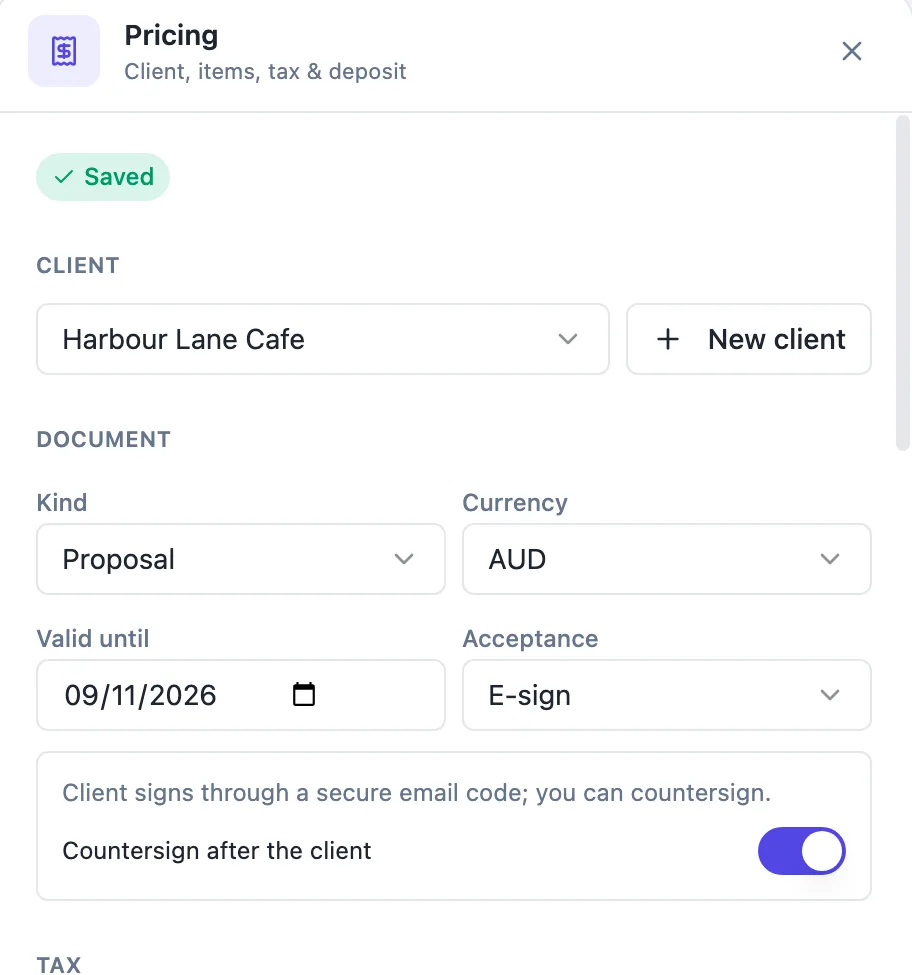
Turning it on
Acceptance in the Pricing panel has two modes, Click to accept and E-sign. Choosing E-sign shows a note that the client signs through a secure email code, and a Countersign after the client switch. The setting travels with the version you send, so changing it later only affects proposals you send after the change. Proposals made from templates, from the generator or blank start in click mode.
The document needs signature blocks
E-sign places signatures into the document, so the proposal must contain a signature block for the client, and a second one for you when countersigning. The client takes the block whose role reads like client, customer or accepted for, otherwise the first block. Sending an e-sign proposal without the blocks is refused with a message, so you find out before the client does.
What the client does
In the client view the main button reads Accept and sign. The dialog asks for the name and the consent, without a signature pad. After confirming, the client sees Check your email to sign, and a signing email arrives from the e-sign service. They open it, confirm the code sent to their email address and sign in the document. The activity page shows Awaiting signature from while this is under way.
When signing completes
When every signer has signed, the proposal is accepted exactly as a click acceptance would be: the status changes, the invoices are created and emailed, and you are notified. The certified signed PDF from the signing service is stored with the acceptance. If the signing is declined, voided or expires, the client can accept again and a fresh signing request is made.
Click or e-sign
Click acceptance is quicker and is recorded with a drawn or typed signature, a consent sentence, the time, the IP address, the browser and a content hash. E-sign adds an identity check by email code, your own countersignature if you want it, and a certified PDF from the signing service. For a small quote, click is usually enough; for a contract with real money and obligations on both sides, e-sign is the more formal record.
How it works, in three steps
Step 1
Add signature blocks
Make sure the document has a signature block for the client, and one for you if you will countersign.
Step 2
Set Acceptance to E-sign
In the Pricing panel choose E-sign, and turn on Countersign after the client if you will sign too.
Step 3
Send as usual
Send the proposal. The client presses Accept and sign and completes the signing from the email.
The full walkthrough with screenshots is in the guide Send a proposal and get paid.
Limits worth knowing
- The document must contain a signature block per signer.
- The client confirms a code sent to their email; there is no SMS or ID document check.
- One countersigner at most: you, as signer 2.
- A second accept is refused while a signing request is in flight.
Questions people ask
How does the client prove who they are?
The signing email asks the client to confirm a code sent to their email address before they can sign, so the signature is tied to control of that inbox. That is stronger than a click, where anyone holding the link can type a name. There is no SMS code or identity document check in this flow.
What if the client declines in the signing service?
The e-sign status on the activity page shows declined, and the proposal is not accepted. Because the signing ended, the client can open the proposal link and accept again, which removes the stale record and starts a new signing request. The same applies when a request is voided or expires.
Do I need a separate e-sign subscription?
No. The proposal hands the signing to the platform e-sign service behind the scenes, and the signing email comes from it. You set the mode in the Pricing panel; there is nothing to set up separately. The signed PDF is stored with the proposal acceptance and the envelope can be opened from the activity page.
Can I switch to e-sign after sending?
Change the mode and send again. The setting belongs to each sent version, so the client must use the new link, and links to the old click mode version can no longer accept once a newer version is sent. Remember to add the signature blocks before sending, or the send is refused.
Is e-sign better than click to accept?
It is more formal, not always better. E-sign adds an email code check, a countersignature and a certified PDF, at the cost of an extra step for the client. A homeowner accepting a small repair quote is better served by a click. A business signing a six figure contract may expect a formal signing request.
Make your own proposal
The button opens the generator with this use case already described. Change the wording to match yours, generate, then edit anything you like.
Create a proposal with OneCraftRelated pages
Countersign a proposal so both parties have signed
Countersigning a proposal means you sign it after the client has, so the agreement carries both signatures. It turns a one sided acceptance into a document both parties have put their names to, which some clients and many contracts expect.
Accept a proposal online in one dialog
Accepting a proposal online should take the client a minute: confirm what they are buying, put their name to it and agree to the terms. The record of that moment needs to be strong enough to rely on later.
The proposal acceptance certificate, field by field
A proposal acceptance certificate is the page that proves an offer was accepted: by whom, when, from where and for exactly what. It is added to the PDF of the accepted proposal so the offer and its acceptance travel together.
More finished work of this kind is on the proposal examples hub.
Written and checked by the OneCraft team. Last checked .