Flyers · Compared
Canva vs Adobe Express for flyers, with a third option
For flyers, Canva and Adobe Express are close: both offer huge template libraries, AI generation, one click resizing and print ordering, and both keep resize and brand kits on paid plans. Canva gives more print controls and templates; Adobe Express gives more fonts and stock on Premium for less a month. OneCraft is a third column that fills a flyer design from one written description.
Updated , competitor details checked . Canva and Adobe Express are trademarks of their owners. OneCraft is not affiliated with or endorsed by either.
Indunil Asanka · Co-founder
3 min read · Published
The short verdict
Canva suits people who want the largest template and stock library, print ready PDFs with bleed and crop marks, and brand kits shared across a team. Adobe Express suits people who want Adobe Fonts, Adobe Stock and generative credits at a lower monthly Premium price, plus a social post scheduler. OneCraft suits people who would rather describe the flyer than design it, and get the same content laid out across eight sizes.
| Feature | Canva | Adobe Express | OneCraft |
|---|---|---|---|
| Pricing | Free US$0; Pro US$144 a year for one person; Business US$250 a year per person; Enterprise by quote checked 2026-10-05 | Free US$0; Premium US$9.99 a month billed monthly; Teams US$4.99 a month per licence in the first year, then US$7.99 checked 2026-10-05 | Free $0 with 100 credits a month, Starter $8, Pro $25 and Pro+ $125 a month |
| Templates | 1.6M+ templates on Free and 3.6M+ including premium on Pro, across all design types checked 2026-10-05 | 100,000+ static and video templates on Free; all premium templates on Premium checked 2026-10-05 | 259 flyer designs, every one authored natively for all 8 sizes |
| AI fill from a description | Magic Design generates a collection of designs from a written prompt checked 2026-10-05 | You type it. Adobe Express generates it checked 2026-10-05 | One prompt fills the text, image prompts and icons of a design; leaving the template blank returns 2 options, and prices and dates are never invented |
| Sizes and resizing | Magic Resize on Pro, Business and Enterprise; not on Free checked 2026-10-05 | One-click Resize on Premium and Teams; not on Free checked 2026-10-05 | 8 sizes from A4 to an X header; a design with a native variant swaps it in and content carries across by slot |
| Print output | PDF Print with crop marks and 0.125 inch bleed; CMYK colours advised for print orders checked 2026-10-05 | Download JPG, PNG or PDF, and order printed flyers delivered in the US, UK, Australia or Canada checked 2026-10-05 | PDF, PNG and JPG at twice the canvas, so A4 lands at 300 DPI, in RGB, with no bleed, no crop marks and no CMYK |
| Stock media | 4.7M+ photos, videos, graphics and audio on Free; 141M+ premium on Pro checked 2026-10-05 | 1M+ Adobe Stock assets on Free; 200M+ on Premium checked 2026-10-05 | No browsable stock library; generation falls back to an Unsplash photo when an AI image fails |
| AI images | Up to 20 standard or premium AI uses on Free; 10x more on Pro checked 2026-10-05 | Free daily generations; 250 generative credits a month on Premium checked 2026-10-05 | Generated per image slot at one of 8 aspect ratios matched to the slot, with no text rendered into the image |
| Brand kit | 1 Brand Kit with 3 colours on Free, 5 on Pro, 100 with approvals on Business checked 2026-10-05 | Brand kits on Premium; Teams adds controls checked 2026-10-05 | Account brand kits appear as a Your brand group in the theme panel; a flyer takes the palette and the logo fills its logo slots |
Where Canva is better
Print files a printer expects
Canva's PDF Print adds crop marks and a 0.125 inch bleed, and its help page advises CMYK colours for print. OneCraft exports RGB with no bleed and no crop marks, so a commercial printer may ask for changes.
The biggest library
Canva lists 3.6 million templates and 141 million premium stock items on Pro. OneCraft has 259 flyer designs and no stock browser, so finding a ready look for a niche topic is easier in Canva.
Brand kits for teams
Business plans hold 100 brand kits with approvals, so a team can lock a look across many people. OneCraft brand kits are per account, with no approval step.
Where Adobe Express is better
Adobe Fonts and Stock
Premium includes more than 30,000 Adobe Fonts and more than 200 million Adobe Stock assets for US$9.99 a month. OneCraft flyers offer 42 fonts and generated or uploaded images only.
Scheduling the post
Adobe Express includes a content scheduler for social posts, three accounts per network on Premium. OneCraft exports files; you post them yourself.
Animated flyers
An animated Adobe Express flyer downloads as an MP4. OneCraft flyers export as PDF, PNG or JPG only.
Where OneCraft is different
Copy written into the design
The generator fills every text slot to its length budget from your description, rewriting long copy shorter rather than cutting it off, and leaves an optional slot empty instead of inventing a price or a date.
Sizes designed, not stretched
All 259 designs were drawn natively for all eight sizes, so moving from A4 to an Instagram story swaps in a layout made for that shape and carries the content across by slot.
Charts and diagrams on a flyer
The add items panel holds 67 tiles, including 10 chart kinds and 12 diagrams, for a flyer that has to show numbers as well as an offer.
A finished example
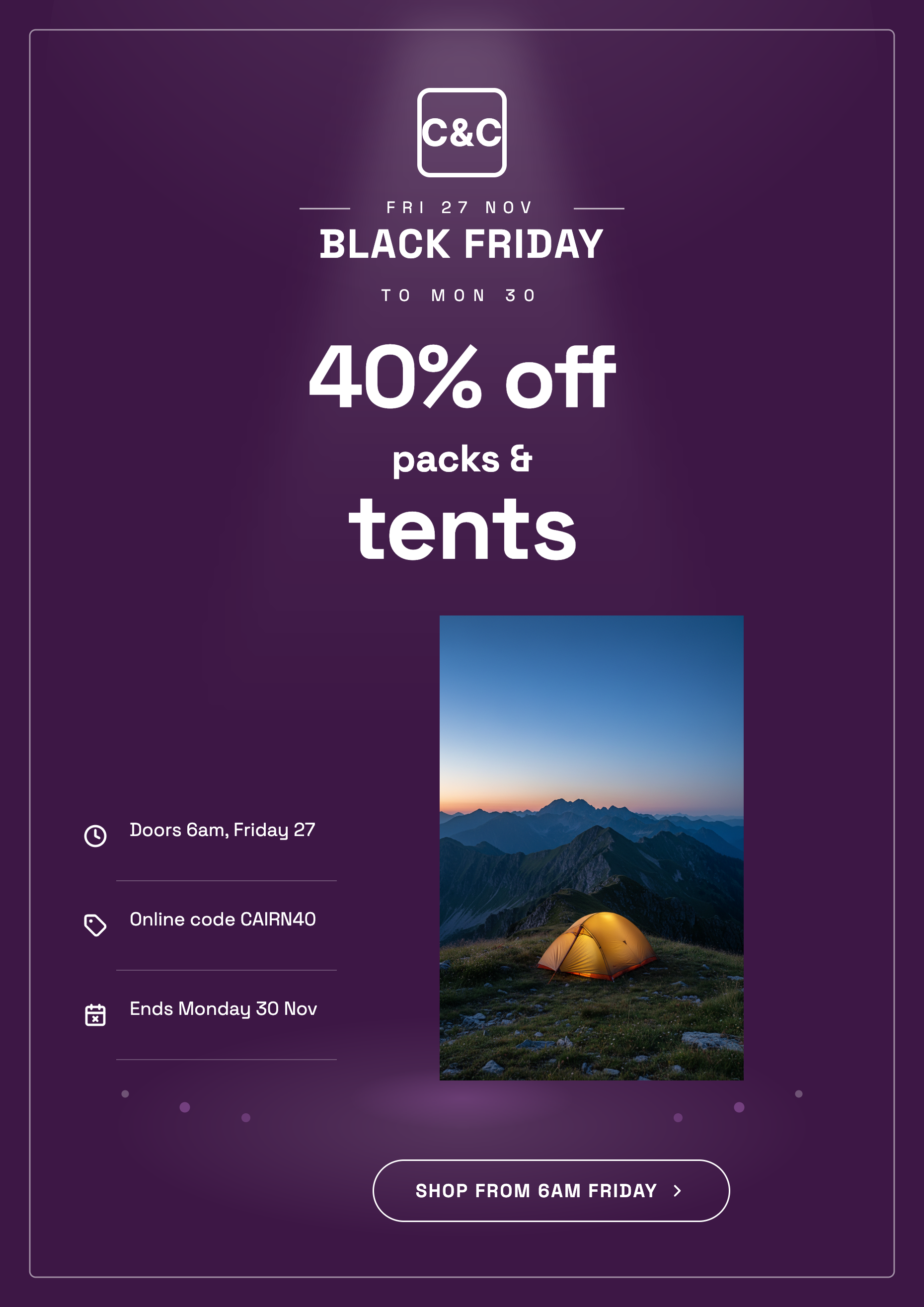 Black Friday flyerMade with OneCraft, exactly as the generator and editor left it. Open the page for the full breakdown.
Pricing in plain terms
Checked 5 October 2026. Canva lists Free at US$0, Pro at US$144 a year for one person, Business at US$250 a year per person and Enterprise by quote. Adobe Express lists Free at US$0, Premium at US$9.99 a month with no annual commitment, and Teams at US$4.99 a month per licence for the first year, then US$7.99. OneCraft lists Free at $0 with 100 credits a month, Starter at $8, Pro at $25 and Pro+ at $125. Generating from your own files starts on Starter, and every export is charged credits by page count.
Choosing between Canva and Adobe Express
Start with where the flyer ends up. For a print shop, Canva's PDF Print with bleed and crop marks saves a round trip. For social posts, Adobe Express adds a scheduler and animated MP4 flyers. Then weigh libraries: Canva has more templates, Adobe Express more fonts and stock on Premium for less a month. Resizing is a paid feature on both, and Canva's free brand kit holds three colours only, so the free plans suit one off flyers in a single size.
Where a third option fits
OneCraft suits the person who knows the offer but not the layout: describe the sale, the dates and the address, pick a size, and get two filled designs to choose from. It gives up a big template library, stock browsing, print bleed and scheduling. For a flyer headed to a commercial press, export the PNG and check the printer's bleed rules first.
What could not be checked
Neither competitor's pages state how many designs one prompt returns, and Canva's pricing page does not count templates for flyers alone, so the template cells count every design type. Prices are quoted in US dollars as served to this check. Every OneCraft cell names a row in an internal fact ledger checked against the product's source code.
Who should stay with Canva or Adobe Express
Stay with Canva if you send flyers to a commercial printer, want the largest template and stock library or manage brand kits across a team. Stay with Adobe Express if you rely on Adobe Fonts and Stock, schedule social posts or animate flyers. OneCraft fits a flyer described in words and needed in several sizes.
Questions people ask
Is Canva or Adobe Express cheaper for flyers?
On the pages checked, Adobe Express Premium is US$9.99 a month billed monthly, about US$120 a year, and Canva Pro is US$144 a year for one person. Both free plans make flyers but leave out one click resizing, so the right price depends on how many sizes and brands you need.
Which gives a better file for a print shop?
Canva, on the pages checked. Its PDF Print download adds crop marks and a 0.125 inch bleed. Adobe Express downloads PDF, JPG or PNG and can print and deliver flyers itself in four countries. OneCraft exports RGB files at 300 DPI for A4 with no bleed or crop marks, so ask your printer whether that suits the job.
Can I turn one flyer into an Instagram post with each tool?
Yes, with paid plans on Canva and Adobe Express, which keep Magic Resize and one click Resize off the free tier. In OneCraft the size picker changes the active page: all 259 designs have their own variant for each of the eight sizes.
Does OneCraft have stock photos like Canva and Adobe Express?
Not as a library you browse. Images are generated for each image slot, or you upload JPEG, PNG, WebP or GIF files up to 10 MB. When an AI image fails during generation, the flyer falls back to an Unsplash stock photo, and if that fails the slot keeps its placeholder.
Can I put a QR code on a flyer in each tool?
In OneCraft, only on a design that ships a QR slot: 25 of the 259 designs carry one, some in certain sizes only, and there is no QR tile to add one elsewhere. You type the link or upload a QR image. Check the competitors' own element libraries for their QR options.
Try the flyer side of OneCraft
The button opens the generator with a starting prompt already filled in. Change the wording to match your own work before you run it.
Create a flyer with OneCraftMore comparisons
- A Canva alternative for flyersOneCraft as a Canva alternative for flyers: 259 designs in 8 sizes filled from a description, against Canva's library, editor and print service.
- An Adobe Express alternative for flyers and postersAn Adobe Express alternative for flyers and posters: OneCraft and Adobe Express compared on price, templates, AI, sizes, themes, print and research posters.
- A VistaCreate alternative for flyersA VistaCreate (Crello) alternative for flyers: OneCraft and VistaCreate compared on price, design from text, animation, sizes, themes, AI images and print.
What the module actually does, feature by feature: the AI flyer maker page, and the flyers maker page.
Step by step in the builder: Resize one flyer for every social size, then Create a flyer for Instagram and print.
Written and checked by the OneCraft team. Last checked .