E-signatures · Compared
DocuSign vs Adobe Sign, with a small team option
DocuSign vs Adobe Sign comes down to how you buy: DocuSign sells signing on its own with envelope allowances per plan, while Adobe Acrobat Sign now comes inside Acrobat for teams licences with a PDF editor attached. Both carry templates, bulk sending, an API and strong signer checks; a third column shows what a smaller tool offers and where it falls short.
Updated , competitor details checked . DocuSign, Adobe, Acrobat and Acrobat Sign are trademarks of their owners. OneCraft is not affiliated with or endorsed by either, and every cell cites a public page checked on the date shown or a named ledger row.
Nuwan Madhusanka · Co-founder
3 min read · Published
The short verdict
DocuSign suits organisations that treat signing as its own system: the widest identity checks, serial and parallel routing, published compliance reports and an API, priced by envelope allowance. Adobe Acrobat Sign suits teams that already live in Acrobat and Microsoft 365 and want signing bundled with a PDF editor. Enterprise needs stay with either; OneCraft only fits a small team signing a modest number of agreements.
| Feature | DocuSign | Adobe Acrobat Sign | OneCraft |
|---|---|---|---|
| Price | Personal A$15 a month or A$180 a year; Standard A$37 and Business Pro A$59 per user a month, as served in AUD checked 2026-09-29 | Acrobat Standard for teams US$16.99, Pro for teams US$23.99 and Studio for teams US$29.99 per licence a month checked 2026-09-29 | Free at $0 with 100 AI credits a month, then Starter $8, Pro $25 and Pro+ $125, per account rather than per user |
| Envelope caps | Personal 5 envelopes a month; Standard and Business Pro 100 envelopes per user per year checked 2026-09-29 | No transaction limit stated on the plans page checked 2026-09-29 | No envelope allowance stated on any plan; each envelope holds up to 25 recipients and 500 fields |
| Verifying the signer | One time passcodes by SMS, government ID checks, and knowledge based questions checked 2026-09-29 | Knowledge based and phone authentication checked 2026-09-29 | 3 methods: the email link alone, an access code shared out of band, or a 6 digit emailed code; no SMS, ID or knowledge based checks |
| Templates | Reusable templates on every plan, shared templates from Standard, locked templates and PowerForms on Business Pro checked 2026-09-29 | PDFs stored as reusable agreement templates checked 2026-09-29 | No templates. Fields are placed per envelope, or arrive positioned from a generated document's signature blocks |
| Bulk sending | Bulk Send imports a list of signers and gives each a unique copy, on Business Pro checked 2026-09-29 | Mega Sign sends personalised agreements to many signers in one action checked 2026-09-29 | No bulk send; one envelope at a time, or one per submitted form response |
| API | Published REST and SOAP APIs checked 2026-09-29 | API access for integrating signing into custom applications checked 2026-09-29 | No public API. Documents and forms in the same account create envelopes through an internal handover |
| Routing | Serial, parallel and mixed sequencing across multiple users checked 2026-09-29 | A drag and drop workflow builder for templates checked 2026-09-29 | A Sign in order switch: on, one signer at a time with out of turn signing blocked; off, everyone at once. Every recipient is a signer |
| Compliance certifications | ISO 27001:2022, SOC 1 Type 2 and SOC 2 Type 2 reports, PCI DSS, with HIPAA and 21 CFR Part 11 named checked 2026-09-29 | Described as meeting demanding global and industry specific regulations checked 2026-09-29 | No certification list published. Signed PDFs are PAdES certified at DocMDP P=1; RFC 3161 timestamping is off by default |
| Evidence after signing | Every signed document comes with a certificate of completion checked 2026-09-29 | Automatic archiving of signed documents with audit trails checked 2026-09-29 | 18 event types in a hash chained log verified on screen, and a three section certificate of completion |
| Reminders and expiry | Automated reminders and deadline notifications that expire untouched documents checked 2026-09-29 | Real time notifications and reminders checked 2026-09-29 | No automatic reminders, and a fixed 30 day expiry that no setting changes |
| Mobile | An app for iOS, iPad and Android to create, tag, send and sign checked 2026-09-29 | Send, track and manage signing from a mobile device checked 2026-09-29 | No app. Below 560 pixels the signer portal becomes a compact page with typed fields above a read only document |
| Payment at signing | Payment collection during signing on Business Pro and up checked 2026-09-29 | Signatures and payments combined in a single transaction checked 2026-09-29 | No payment collection at signing or anywhere else |
Where DocuSign is better
The deepest identity checks
DocuSign lists SMS passcodes, government ID verification and knowledge based questions. Adobe names knowledge based and phone authentication. OneCraft stops at an emailed code or a shared access code, which is fine for a lease renewal and not for a regulated onboarding.
Routing and a published compliance record
Serial, parallel and mixed routing, plus ISO 27001:2022, SOC 1 and SOC 2 Type 2 reports, PCI DSS, HIPAA and 21 CFR Part 11 named on its trust page. A procurement questionnaire that asks for these has a ready answer with DocuSign and none from OneCraft.
Signing as a standalone product
DocuSign sells signing on its own, with a Personal plan for five envelopes a month and per user plans above it. A team that wants signing without paying for a PDF editor it will not use can buy exactly that, with reminders, templates and an API included.
Where Adobe Acrobat Sign is better
Signing bundled with the PDF editor
Acrobat for teams licences include e-signatures with PDF editing, so a team already paying for Acrobat gets signing without another vendor. Standard for teams starts at US$16.99 per licence a month. OneCraft does not edit existing PDFs; it places fields on them.
Working inside Microsoft 365
Adobe lets senders send and sign PDFs without leaving Word, Teams, Salesforce or Workday. OneCraft has no integrations of that kind: an envelope starts in its own app, from an upload, a generated document or a form response.
Web forms and Mega Sign
Self serve web forms posted on a site collect signatures on demand, and Mega Sign sends one agreement to many signers in a single action. OneCraft can sign a form response, but it has no bulk send, so a policy acknowledgement across a staff list is one envelope per person.
Where OneCraft is different
No envelope meter
No OneCraft plan states an envelope allowance, where DocuSign's Standard plan allows 100 envelopes per user per year. The limits are per envelope instead: 25 recipients and 500 fields. For a small team sending a few agreements a week, that removes the counting.
An audit log you can verify on screen
Every event is sealed with a hash of the one before, and the envelope page reports Hash chain verified or the event where it broke. The certificate of completion prints the envelope, each signer's verification method, time, IP address and consent, and every event in UTC.
The contract can be written in the same account
An employment contract generated from a brief carries each signature block party into the envelope as a recipient, with Name, Title, Company and Date lines becoming their own fields. Nothing is exported and uploaded again in between.
A finished example
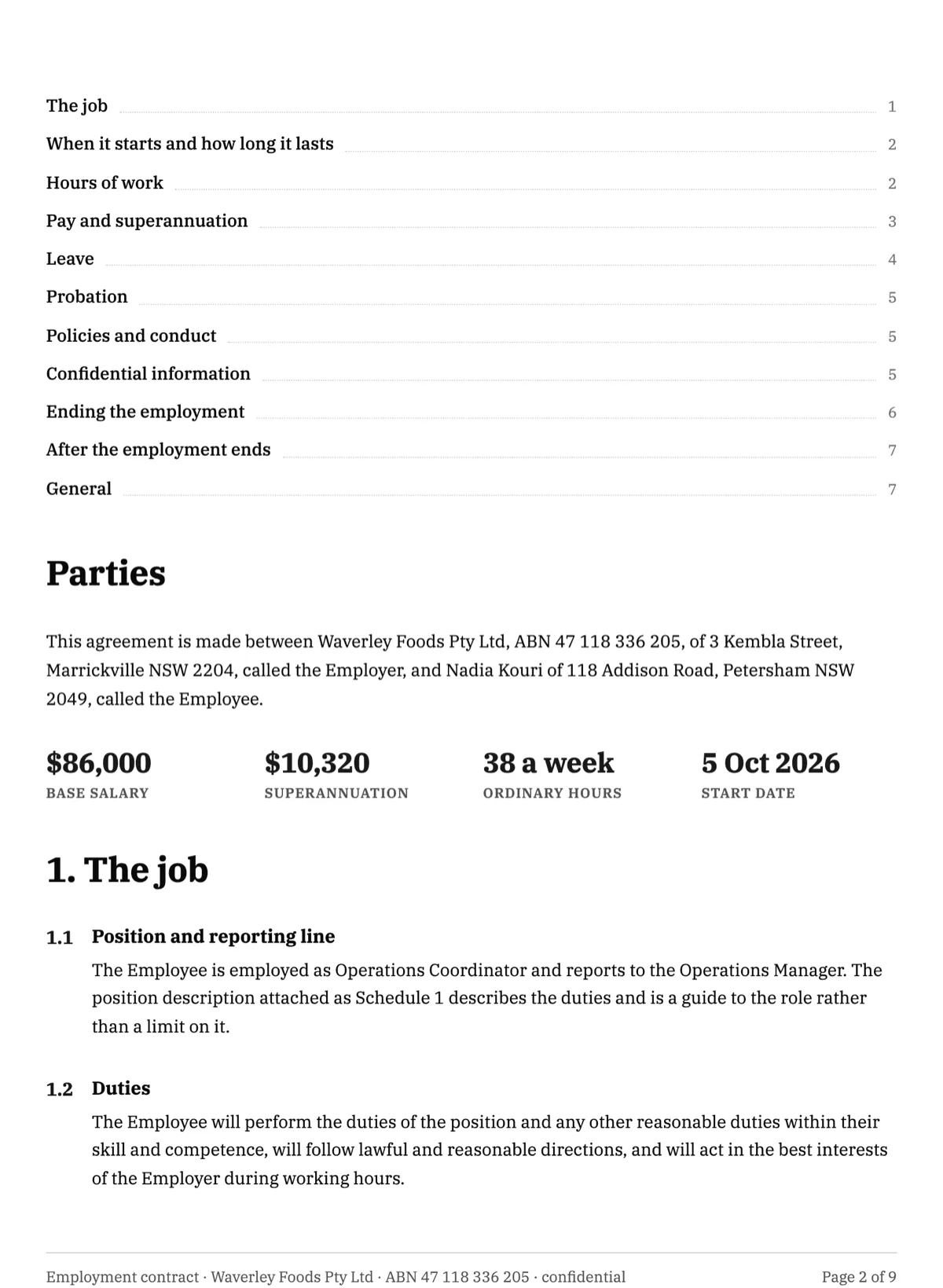 Employment contract e-signatureMade with OneCraft, exactly as the generator and editor left it. Open the page for the full breakdown.
Pricing in plain terms
DocuSign's pricing page, checked 29 September 2026, served Australian dollars: Personal at A$15 a month or A$180 a year for five envelopes a month, Standard at A$37 and Business Pro at A$59 per user a month, each with 100 envelopes per user per year, and Enhanced plans on request. Adobe's plans page lists Acrobat Standard for teams at US$16.99, Pro for teams at US$23.99 and Studio for teams at US$29.99 per licence a month, with signing inside each Acrobat plan. OneCraft lists Free at $0 with 100 credits a month, Starter at $8, Pro at $25 and Pro+ at $125, per account.
Choosing between the two
The deciding question is usually what else you need. If signing is the system, with routing rules, identity checks, bulk sends and an API feeding other software, DocuSign is built around that and says so with its compliance reports. If PDF work is the daily job and signing is one step in it, an Acrobat for teams licence covers both, and the Microsoft 365 integration keeps senders in Word and Teams. Both have templates, reminders, mobile apps and payment collection, so those rarely decide it.
Where a small team option fits, and where it does not
OneCraft signing has no templates, no API, no bulk send, no automatic reminders and a fixed 30 day expiry, and signed PDFs are certified but carry no RFC 3161 timestamp at present. Those are real gaps for any team sending at volume. What it does offer is certified output with a checkable event chain, three signer checks with a lockout after five failed attempts, and documents or form responses that become envelopes without an upload, priced per account with no envelope meter.
What could not be checked
DocuSign's pricing page served Australian dollars from this region, and the prices are quoted as served. Adobe's pages block simple automated requests; they were read through a full browser fetch on the date shown, and the plans page does not state a transaction limit, so that cell says so rather than assuming one. OneCraft cells each name a row in an internal ledger checked against the signing service's source code.
Who should stay with DocuSign or Adobe Acrobat Sign
Stay with DocuSign if you need SMS or government ID checks, complex routing, an API, published SOC and ISO reports or payment at signing. Stay with Adobe Acrobat Sign if your team already pays for Acrobat and works in Microsoft 365. Both are the right answer for enterprise and regulated work; OneCraft is for a small team whose gaps are listed above and acceptable.
Questions people ask
Is DocuSign or Adobe Sign cheaper for one person?
It depends on volume. DocuSign Personal was A$15 a month for five envelopes a month when checked, served in Australian dollars. Adobe bundles signing into Acrobat plans, so the cheapest teams licence was US$16.99 a month with a PDF editor included. OneCraft's free plan lists sending documents for signature, with paid plans from $8 a month per account.
Which one checks a signer's identity more strictly?
DocuSign lists the widest set on its features page: SMS one time passcodes, government ID verification and knowledge based questions. Adobe names knowledge based and phone authentication. OneCraft offers an emailed link, a shared access code or a six digit emailed code, with five failed attempts locking the recipient for fifteen minutes.
Do both keep a certificate of completion?
DocuSign states that every signed document comes with a certificate of completion, and Adobe describes automatic archiving with audit trails. OneCraft writes a three section certificate for every completed envelope, with the envelope details and document hashes, one block per signer, and the full event log, offered as a separate download.
Can a small team avoid envelope limits?
DocuSign's Standard and Business Pro plans allow 100 envelopes per user per year, and Personal allows five a month. Adobe's plans page does not state a transaction limit. OneCraft states no envelope allowance on any plan, but it also lacks templates, bulk send and reminders, which are the tools that make high volume practical.
Which one should a regulated business choose?
DocuSign or Adobe, not OneCraft. DocuSign publishes ISO 27001, SOC 1 and SOC 2 Type 2 reports and names HIPAA and 21 CFR Part 11 on its trust page, and Adobe describes compliance with industry specific regulations. OneCraft publishes no certification list, even though its signed PDFs are certified and its audit log is hash chained.
Does either let me write the contract as well?
Not as a generator. Adobe's Acrobat plans edit existing PDFs, and DocuSign signs documents you bring. OneCraft can generate the contract from a brief in the same account, and each party in its signature blocks becomes a recipient with fields already placed, which is the main reason a small team might add it.
Try the signing flow side of OneCraft
The button opens the generator with a starting prompt already filled in. Change the wording to match your own work before you run it.
Send a document for signingMore comparisons
- A DocuSign alternative for small businessOneCraft e-signature as a DocuSign alternative for small business: fields, signing order, identity checks, audit trail and certified PDFs, with the gaps named.
- An Adobe Sign alternative without the Acrobat bundleAn Adobe Sign alternative for teams that do not need Acrobat: 10 field types, three identity checks, certified PDFs, and the workflows Acrobat keeps.
- A Signaturely alternative with a verified audit trailA Signaturely alternative compared row by row: pricing checked today, a hash chained audit trail, three signer checks, a lockout, and the templates it lacks.
What the module actually does, feature by feature: the E-signature software page, and the e-signatures maker page.
Step by step in the builder: Send a PDF for e-signature, then Add e-signatures with multiple signers.
Written and checked by the OneCraft team. Last checked .