E-signatures · Alternative
A Signaturely alternative with a verified audit trail
A Signaturely alternative is worth it when the evidence behind a signature matters more than templates and team seats. Signaturely is a simple, low cost signing tool with templates and team management; OneCraft signing keeps an 18 event, hash chained audit log, offers three identity checks per signer and certifies the finished PDF.
Updated , competitor details checked . Signaturely is a trademark of its owner. OneCraft is not affiliated with or endorsed by it, and every cell cites a public page or a named row in a fact ledger checked against source code.
Nuwan Madhusanka · Co-founder
4 min read · Published
The short verdict
Signaturely suits a solo sender or a small team that reuses the same agreements, wants shared templates, bulk send and automatic reminders, and prices by the seat. OneCraft suits a sender who wants each envelope to carry stronger evidence: a verifiable event chain, a certificate of completion, a choice of signer checks and a certified PDF, with the document often written in the same account.
| Feature | Signaturely | OneCraft |
|---|---|---|
| Entry price | Personal at $25 a month, or $240 a year, with 5 signature requests a month and 1 template checked 2026-09-29 | Free at $0 with 100 AI credits a month, then Starter $8, Pro $25 and Pro+ $125 a month, priced per account; sending documents for signature is listed on the free plan |
| Team plan | Business at $50 per user a month, or $480 per user a year, with unlimited requests and templates, team management and custom branding checked 2026-09-29 | No per seat signing plan and no envelope allowance stated; one envelope holds up to 25 recipients and 500 fields |
| Free use | A trial with unlimited documents, then a free account that sends 1 document a month, per the pricing FAQ checked 2026-09-29 | The free plan lists sending documents for signature; what it meters is AI generation credits, not envelopes |
| Templates | Create templates once, share them with the team and send again and again checked 2026-09-29 | No reusable templates. Fields are placed on each envelope, or arrive positioned from a generated document's signature blocks |
| Audit trail | Audit log and history on both plans; the FAQ says IP address, location data, name and email are captured with a chain of custody checked 2026-09-29 | 18 event types in a hash chained log, each row sealing the one before, with the envelope page reporting Hash chain verified or the event where it broke |
| Certificate of completion | Not named on the pricing or how it works pages, which describe a legal audit log rather than a separate certificate checked 2026-09-29 | An A4 certificate in three sections: the envelope with both document hashes, one block per signer, and the full event log, offered as its own download |
| Verifying the signer | No identity check beyond the emailed request is named on the how it works page checked 2026-09-29 | 3 methods per recipient: the email link alone, an access code of at least 4 characters, or a 6 digit emailed code that expires in 10 minutes |
| Failed attempts | Not stated on the how it works page checked 2026-09-29 | 5 failed attempts lock that recipient for 15 minutes, counted with compare and set so parallel guesses cannot skip the counter |
| Expiry | Not stated on the pricing or how it works pages checked 2026-09-29 | Fixed at 30 days from creation with no setting to change it; an expired link returns This signing request has expired |
| Reminders | If someone has not signed yet, they get an automatic reminder checked 2026-09-29 | No automatic reminders. A manual resend rotates the recipient token so the old link dies, and records a resent event |
| Bulk send and API | Bulk send to thousands of signees at once; the API sits on separate plans at $49, $99 and $199 a month checked 2026-09-29 | No bulk send and no public API; envelopes come from an upload, a generated document or a form response |
| Certified file | The FAQ says the signature is a real digital signature that is legally binding; the signing profile is not itemised checked 2026-09-29 | PAdES CMS certification at DocMDP P=1; if certification fails the envelope is marked failed rather than an unsealed PDF being sent. RFC 3161 timestamping is off |
Where Signaturely is better
Templates you build once
Signaturely lets a sender save a document as a template and share it with the team, one template on Personal and unlimited on Business. There are no signing templates here at all, so a permission slip or a tenancy notice sent every week is prepared from its PDF each time.
Team roles and branding
The Business plan adds team management with admin or member access and custom business branding on the signing experience. Signing here has no team roles and no branded signer page, so a company that wants its logo on the request and a manager overseeing staff senders should weigh that plainly.
Reminders that chase for you
An unsigned request gets an automatic reminder. Here a nudge is a manual resend, which rotates the signing link so the previous email stops working. For a handful of envelopes that is workable, and for dozens a week it is real work.
Bulk send and an API
Signaturely sends one contract to thousands of signees at the same time and sells an API with embedded signing on its Platinum and Titanium plans. There is no bulk send and no public API here, so a policy sent to a whole staff list is one envelope per person.
Where OneCraft is different
An audit log that proves it was not edited
Every event row stores a sha256 hash over its own content and the previous row's hash, with keys sorted so reordering cannot change it. The envelope page walks the chain and shows Hash chain verified, or the exact event number where it breaks. Updates to the log are blocked in the database.
A choice of signer checks, with a lockout
Each recipient can sign from the email link alone, with an access code you share separately, or with a six digit code emailed at signing time. Access codes are stored as salted scrypt hashes, and five wrong attempts lock that recipient for fifteen minutes.
A certificate that stands on its own
The certificate of completion lists the envelope id, timings, algorithm and both document hashes, then each signer's verification method, signing time, IP address and consent, then every event with a UTC timestamp. It downloads separately and can be appended to the signed PDF before certification.
The document can be written first
A permission slip or notice generated in the same account carries its signature block parties into the envelope as recipients, with Name, Title, Company and Date lines becoming their own fields. A form response with an e-signature component becomes an envelope too.
A finished example
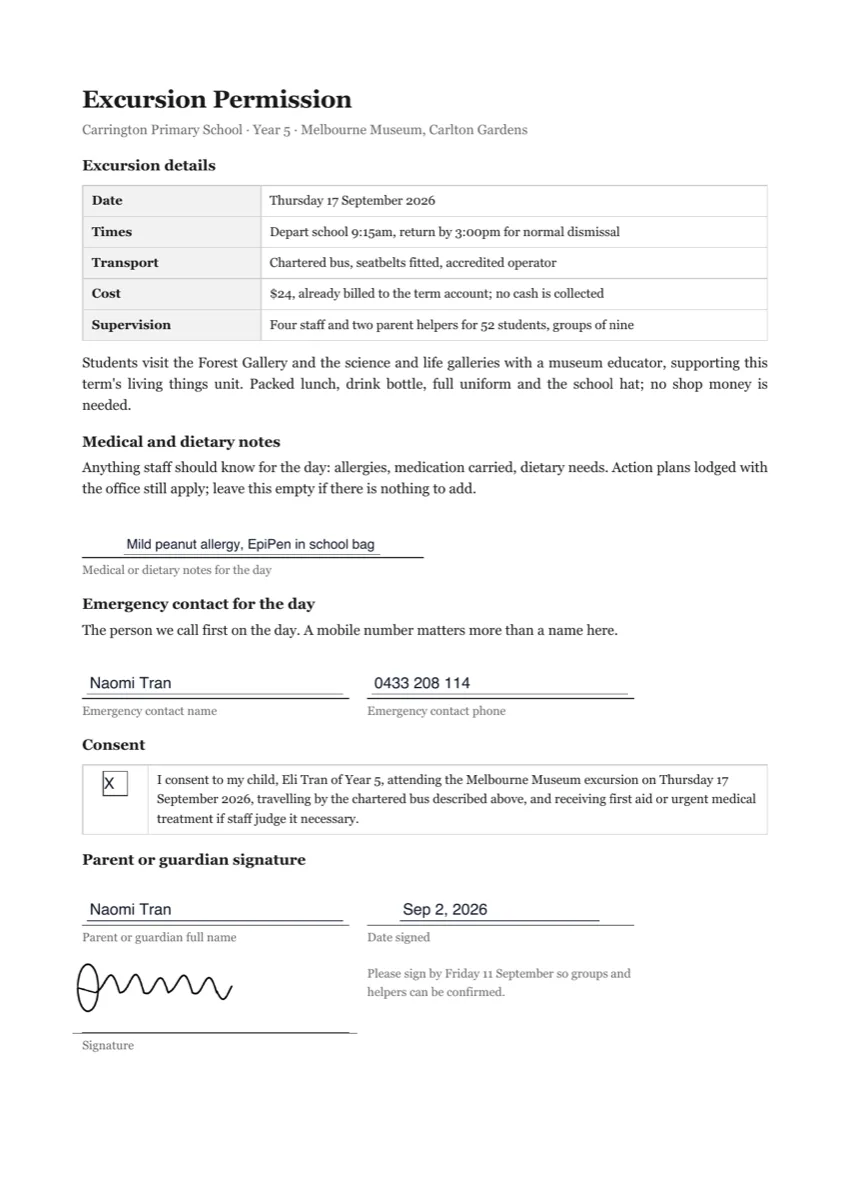 Permission slip e-signatureMade with OneCraft, exactly as the generator and editor left it. Open the page for the full breakdown.
Pricing in plain terms
Signaturely's pricing page, checked 29 September 2026, lists two plans. Personal is $25 a month or $240 a year with five signature requests a month and one template. Business is $50 per user a month or $480 per user a year with unlimited requests and templates, team management and custom branding. The FAQ adds that after the trial a free account sends one document a month, and the API is sold separately from $49 a month. OneCraft lists Free at $0 with 100 credits a month, Starter at $8, Pro at $25 and Pro+ at $125, per account, with no envelope count on any plan.
What an audit trail has to prove
Electronic signature law in most places, the US ESIGN Act among them, cares less about the drawn image than about showing who signed, when, and that the record was not changed afterwards. An audit log answers the first two. The third needs something that makes tampering visible, which is why each OneCraft event row is sealed into the next, why the signed PDF is certified so any later edit breaks a seal a PDF reader reports, and why the certificate prints hashes of the file as sent and as stamped. Those two hashes are not a checksum of the downloaded file, so they are not meant for comparing against it.
Moving across
Signaturely templates do not transfer. Moving means uploading the PDF you already send, up to 25 MB, placing fields for each signer, choosing a verification method per recipient and deciding whether they sign in order. Rotated or password protected PDFs are refused at upload with the reason. Every envelope expires 30 days after it is created, and no setting changes that, so an agreement that routinely sits unsigned for longer needs resending.
What could not be checked
Signaturely's public pages name an audit log, reminders, sign order, bulk send, templates and the type, draw or upload signature, but they do not describe signer authentication, attempt limits, expiry dates or a certificate document. Those cells say so rather than assuming an absence elsewhere on their site. Prices were served in US dollars. The OneCraft cells each name a row in an internal ledger checked against the signing service's source code.
Who should stay with Signaturely
Stay with Signaturely if saved templates, team management, bulk sending, automatic reminders or an API are how your signing runs day to day, or if a branded signer experience matters to your clients. Moving is worth it when a dispute is the risk you plan for and each envelope needs an event chain, signer checks and a certificate behind it.
Questions people ask
Does OneCraft have signing templates like Signaturely?
No. There is no template library for signing. Each envelope starts from an uploaded PDF, a generated document or a form response, and fields are placed per envelope. A generated document does arrive with its signature fields already positioned from its signature blocks, which covers some of the time a template would save, but a fixed agreement sent weekly is still prepared each time.
How can a signer's identity be checked?
Three ways, chosen per recipient: the emailed link alone, an access code of at least four characters that you share with them separately, or a six digit code emailed when they open the link, valid for ten minutes and usable once. At most five codes can be requested in ten minutes, and five failed attempts lock that recipient for fifteen minutes.
What happens if a signature request is never signed?
Every envelope expires thirty days after it is created. A nightly sweep marks outstanding recipients and the envelope as expired and records an expired event, and the link then returns a message saying the signing request has expired. The date cannot be extended in the app, so the answer to a late signer is a fresh envelope.
Can a signer upload an image of their signature?
No. The signing pad offers draw, with touch support, and type, which renders the typed name in a script font and saves it as an image. Signaturely also accepts an uploaded signature image. One drawn or typed signature fills every signature, initials and signature block spot for that signer at once.
Is the finished PDF timestamped by a trusted authority?
Not at present. The code for RFC 3161 timestamping is complete, but no timestamp authority is configured in the deployed service, so signed PDFs carry the PAdES certification without a timestamp token. The certificate of completion shows this: its algorithm line reads PAdES-SHA256-DocMDP without the words with RFC 3161 timestamp.
Who gets a copy when everyone has signed?
Every recipient and the sender receive a completion email with the certified PDF attached. The certificate of completion is always written as its own file for download, and it is added to the end of the signed PDF only if the sender ticked the include certificate option before sending, because the file cannot change after certification.
Try the signing flow side of OneCraft
The button opens the generator with a starting prompt already filled in. Change the wording to match your own work before you run it.
Send a document for signingMore comparisons
- A SignWell alternative with built in document generationA SignWell alternative where the document is written first and then signed: certified PDFs, three identity checks, and the templates and API SignWell includes.
- A DocuSign alternative for small businessOneCraft e-signature as a DocuSign alternative for small business: fields, signing order, identity checks, audit trail and certified PDFs, with the gaps named.
- A Dropbox Sign alternative built around certified PDFsA Dropbox Sign alternative for senders who want certified PDFs and a hash chained audit trail, with templates, bulk send and the API named on their side.
What the module actually does, feature by feature: the E-signature software page, and the e-signatures maker page.
Step by step in the builder: Send a PDF for e-signature, then Add e-signatures with multiple signers.
Written and checked by the OneCraft team. Last checked .