E-signatures · Alternative
A SignWell alternative with built in document generation
SignWell is a straightforward signing tool with a free plan, templates, bulk send and an API on every tier. OneCraft signing starts a step earlier: the agreement is usually written in the same account, and its signature blocks become the envelope, which is the difference this page exists to draw.
Updated , competitor details checked . SignWell is a trademark of its owner. OneCraft is not affiliated with or endorsed by it, and every cell cites a public page or a source file.
Nuwan Madhusanka · Co-founder
3 min read · Published
The short verdict
SignWell suits a sender who wants signing on its own, cheaply, with templates, reminders and an API from the first paid tier and a free plan to test on. OneCraft suits a sender whose agreement has to be written as well as signed, and who wants the finished PDF certified with a hash chained audit trail and a certificate of completion behind it.
| Feature | SignWell | OneCraft |
|---|---|---|
| Free plan caps | Free at $0 with 3 documents a month, 1 template, 1 sender and the API included checked 2026-09-20 | A free plan at $0 with 100 AI credits a month, enough for about 3 AI projects, and no envelope allowance stated on any plan |
| Paid entry price | Light at $10 a month billed yearly or $12 billed monthly, with unlimited documents, 5 templates per sender and 1 sender included checked 2026-09-20 | Starter at $8 a month with 500 AI credits, Pro at $25 with 1,500 and Pro Plus at $125 with 7,500, priced per account rather than per sender |
| Templates | 1 template on Free, 5 per sender on Light and unlimited on Business, with extra senders charged separately checked 2026-09-20 | No templates. Fields are placed on each envelope, or arrive already positioned from a generated document's signature blocks |
| Writing the document first | Not offered. The product signs documents you already have, with drag and drop fields, embedded signing and embedded template editing checked 2026-09-20 | A document generated in the same account carries each signature block party into the envelope as a recipient, with the harvested boxes scaled from the rendered page |
| Signing a form response | Not named on the electronic signature page, which lists templates, reminders, audit trail, API, bulk send and tracking checked 2026-09-20 | A submitted form response becomes one envelope, one recipient per e-signature component, and a replayed message is a no-op |
| Verifying the signer | Specific authentication methods are not named on the electronic signature page checked 2026-09-20 | 3 methods per recipient: the email link alone, an access code of at least 4 characters, or a 6 digit emailed code valid for 10 minutes and redeemable once |
| Audit evidence | An audit trail is listed among the core features, alongside real time status tracking and a document tracking dashboard checked 2026-09-20 | 18 audit event types in a hash chained log, each row sealing the one before, with the envelope page reporting whether the chain verifies |
| Certificate after completion | Not named separately on the electronic signature page, which lists an audit trail rather than a certificate document checked 2026-09-20 | A certificate of completion in three sections: the envelope with both document hashes, a block per signer, and the full event log, offered as its own download |
| Certification of the file | Compliance is claimed with the ESIGN Act, UETA and eIDAS, with SOC 2 Type II, HIPAA and GDPR readiness; the signing profile is not itemised checked 2026-09-20 | PAdES CMS certified at DocMDP P equals 1, and a certification failure marks the envelope failed and emails the owner rather than releasing an unsealed file |
| Reminders | Automatic and manual reminders are listed among the core features checked 2026-09-20 | No automatic reminders. Resend rotates the recipient token so the old link dies, resets viewed state, clears any lockout and records a resent event |
| Bulk send and API | Bulk send on every plan and a REST API included on every plan, with 15 free API documents a month on Light and 25 on Business checked 2026-09-20 | No bulk send and no public API. One envelope holds up to 25 recipients and up to 500 fields between them |
| Signing order | Not named on the electronic signature page among the listed features checked 2026-09-20 | A Sign in order switch: on, only the lowest outstanding order is invited and out of turn signing is blocked; off, everyone is invited at once |
Where SignWell is better
Templates on every plan
One template on the free plan, five per sender on Light and unlimited on Business. There are no templates here at all, so a standard agreement is prepared from its PDF each time. For a sender who reuses the same paperwork, that is the clearest reason to stay with SignWell.
An API included from the free plan
SignWell's REST API is on every tier, with 15 free API documents a month on Light and 25 on Business, plus embedded signing, embedded sending, embedded template editing and webhook notifications. There is no public API here, so signing cannot be embedded in a product or triggered by another system.
Bulk send
Bulk send is listed on every SignWell plan, including the free one. Nothing here sends a document to a list, so a cohort of new starters or a policy acknowledgement across a team is one envelope at a time, each prepared and sent by hand.
Reminders that chase for you
Automatic and manual reminders are both core features there. Here there are no automatic reminders: a nudge is a manual resend, which rotates the signing link so the previous email stops working. For a handful of envelopes that is workable, and at volume it is not.
A published compliance list
Their page claims ESIGN, UETA and eIDAS compliance alongside SOC 2 Type II, HIPAA compliance and GDPR readiness. No equivalent certification list is published here, so a procurement questionnaire that asks for SOC 2 or HIPAA is a real reason to weigh the two differently.
Where OneCraft is different
The agreement can be written in the same account
A document generated from a brief carries its signature block parties into the envelope automatically, one party per signer, with the signature area becoming a signature field and Name, Title, Company and Date lines becoming their own field types. Nothing is exported and re-uploaded.
A submitted form can be signed
A form response with an e-signature component produces one envelope per submission, one recipient per component, with the harvested boxes scaled to the rendered page. The response row records the envelope, so a replayed message does nothing rather than sending twice.
Certified output, not only compliant output
The completed PDF is PAdES certified at DocMDP level one, so a later edit breaks a seal any PDF reader reports. Certification is required by default: if it fails, the envelope is marked failed and the owner is emailed rather than an unsealed file being sent.
A certificate that stands on its own
Three sections cover the envelope with its identifier, timings, algorithm and both document hashes, then each signer with verification method, signing time, IP address and consent version, then the full event log with timestamps. It downloads separately or is appended to the signed PDF.
A finished example
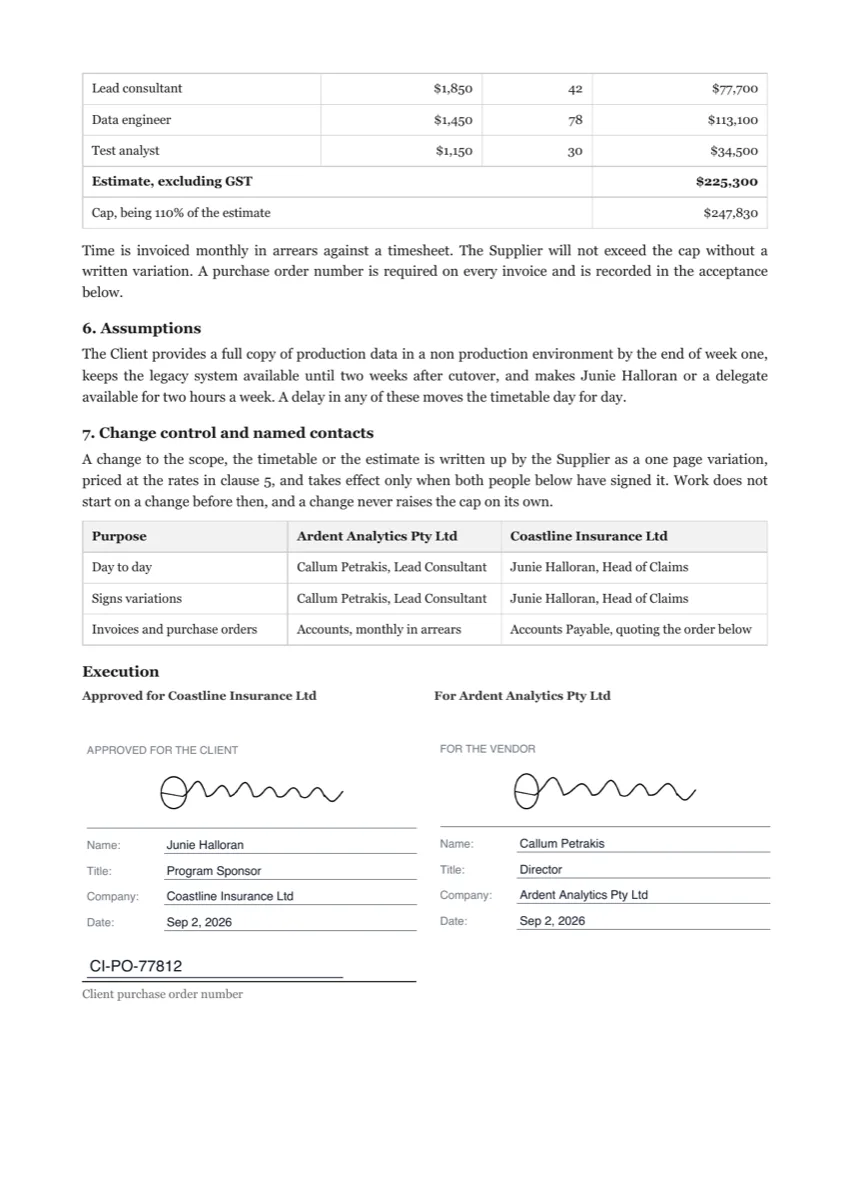 Statement of work e-signatureMade with OneCraft, exactly as the generator and editor left it. Open the page for the full breakdown.
Pricing in plain terms
SignWell's pricing page, checked 20 September 2026, lists Free at $0 with three documents a month, one template and one sender; Light at $10 a month billed yearly or $12 monthly with unlimited documents and five templates per sender; Business at $30 yearly or $36 monthly with unlimited templates and three senders; and Enterprise on request. Extra senders are charged per seat. OneCraft's pricing page lists Free at $0 with 100 AI credits a month, Starter at $8, Pro at $25 and Pro Plus at $125, priced per account, with no envelope allowance stated on any plan.
Moving across
Templates do not migrate. Moving means uploading the PDF you already send, placing the fields, adding recipients with a verification method each, and choosing whether they sign in order. PDFs go up to 25 MB, and rotated or password protected files are refused at upload with the reason. The alternative route is to stop uploading altogether and generate the agreement here, so its signature blocks become the envelope.
What could not be checked
SignWell's electronic signature page names templates, reminders, audit trail, API, bulk send, embedded signing and tracking, but it does not name signer authentication methods, in person signing, a signing order setting or a separate certificate document, so those rows say exactly that rather than assuming an absence elsewhere on their site. Prices were served in US dollars.
How the OneCraft side was verified
Each cell names a row in an internal ledger checked against the source code of the signing service and the two handovers into it: the 25 recipient and 500 field caps, the three verification methods, the resend behaviour that rotates the token, the eighteen event hash chain, the certificate of completion, the DocMDP certification level, and the document and form handovers that create envelopes without an upload.
Who should stay with SignWell
Stay with SignWell if templates, bulk send, an API or automatic reminders are how your signing actually works, or if a published SOC 2 and HIPAA position is a buying requirement. This page is for the sender whose agreement is written first, in the same account, and whose priority is certified output and evidence rather than volume tooling.
Questions people ask
Can I write the agreement here as well as sign it?
Yes, and that is the main reason this comparison exists. A document generated from a brief carries its signature block parties into the envelope as recipients, with the signature area becoming a signature field and the Name, Title, Company and Date lines becoming their own field types. Nothing is exported and re-uploaded in between.
How many documents can be sent for free?
No envelope allowance is published on any plan, including the free one, so sending for signature is part of the account rather than a counted item. What the free plan meters is 100 AI credits a month for generation. SignWell's free plan allows three documents a month with one template and one sender.
Is there an API?
No public API exists. Envelopes are created in the app from an uploaded PDF, or automatically from a generated document or a submitted form response through an internal handover that never crosses the public gateway. SignWell includes a REST API on every plan with embedded signing and webhooks, which is the right answer for a product integration.
What identity checks can I put on a signer?
Three: the emailed link on its own, an access code of at least four characters that you share with the signer separately, or a six digit code emailed at signing time that expires in ten minutes. Access codes are stored as salted scrypt hashes, and five failed attempts lock that recipient for fifteen minutes.
Will signers be reminded automatically?
No. There are no scheduled reminders. Pressing resend rotates that recipient's token so the earlier email stops working, resets their viewed state, clears any lockout, sets a fresh token expiry and records a resent event. It is refused once the recipient has already signed or declined.
What does certification add over a plain signature?
The finished PDF carries a PAdES CMS signature certified at DocMDP level one, written into the document permissions, so an edit after certification breaks a seal a standard reader reports. It is not optional: if certification fails the envelope is marked failed and the owner emailed, rather than an unsealed file going out.
Try the signing flow side of OneCraft
The button opens the generator with a starting prompt already filled in. Change the wording to match your own work before you run it.
Send a document for signingMore comparisons
- A Dropbox Sign alternative built around certified PDFsA Dropbox Sign alternative for senders who want certified PDFs and a hash chained audit trail, with templates, bulk send and the API named on their side.
- A signNow alternative for small teamsA signNow alternative for small teams: 25 recipients an envelope, three identity checks, a certificate of completion, and the templates and bulk send it lacks.
- A PandaDoc alternative for proposals and quotesOneCraft as a PandaDoc alternative: AI proposals with optional items, tracked links, online acceptance and Stripe pay links, and where PandaDoc is better.
What the module actually does, feature by feature: the E-signature software page, and the e-signatures maker page.
Step by step in the builder: Create a document with AI, then Send a PDF for e-signature.
Written and checked by the OneCraft team. Last checked .