E-signatures · Alternative
A signNow alternative for small teams
signNow is built for volume: reusable templates, kiosk mode signing and bulk invites to a thousand recipients at a time. OneCraft signing is built for a sender with a few agreements a month who wants the finished PDF certified and the evidence behind it verifiable, and the table below names every trade that involves.
Updated , competitor details checked . signNow and airSlate are trademarks of their owner. OneCraft is not affiliated with or endorsed by them, and every cell cites a public page or a source file.
Nuwan Madhusanka · Co-founder
3 min read · Published
The short verdict
signNow suits a team sending the same agreement to many people, collecting signatures on a tablet at a counter, or wiring signing into another system through its API. OneCraft signing suits a small team sending a handful of envelopes a month that wants certified output, a hash chained audit trail and a certificate of completion without a per seat contract around it.
| Feature | signNow | OneCraft |
|---|---|---|
| Price per user | Not published in the page as served. The pricing page loads its plans in JavaScript and returns no plan names or prices to a direct fetch checked 2026-09-20 | A free plan at $0 with 100 AI credits a month, then $8, $25 and $125 a month, priced per account rather than per signer seat |
| Recipients per document | Not itemised on the features page, which names adding multiple signers and assigning their roles in the editor checked 2026-09-20 | Up to 25 recipients per envelope, each with their own colour, verification method and place in the signing order |
| Fields per document | Not itemised on the features page, which names adding fillable fields and reusable templates with conditional fields checked 2026-09-20 | Up to 500 fields per envelope across 10 field types, validated against the stored page sizes so an off page field is rejected |
| Reusable templates | Create Reusable Templates, with reusable templates carrying conditional fields checked 2026-09-20 | No templates. Each envelope is prepared from its own PDF, or arrives laid out from a document generated in the same account |
| Bulk send | Bulk Send takes a CSV of recipients, maps columns to personalisation fields and supports up to 1,000 recipients per batch with automated reminders checked 2026-09-20 | No bulk send and no CSV import of recipients. One envelope carries its own recipients |
| Signing order | Set the Signing Order for Secure eSignatures, and add signers in the editor and assign their roles checked 2026-09-20 | A Sign in order switch per envelope. On, only the lowest outstanding order is invited and every signer route is blocked out of turn; off, everyone is invited at once |
| Signer verification | Phone call authentication and dual factor authentication are named among the security and authentication features checked 2026-09-20 | 3 methods: the email link alone, an access code of at least 4 characters shared out of band, or a 6 digit emailed code valid for 10 minutes |
| Evidence after completion | Secure Files With Unique Document IDs and industry leading compliance are the named evidence features checked 2026-09-20 | A certificate of completion in three sections: envelope with both document hashes and the algorithm, one block per signer, then the full event log |
| Certification of the file | The technical signing profile is not itemised on the features page checked 2026-09-20 | PAdES CMS certified at DocMDP P equals 1, and a certification failure marks the envelope failed and emails the owner instead of releasing an unsealed file |
| In-person signing | Kiosk mode on iPad and on iPhone to collect signatures in person checked 2026-09-20 | The owner hosts an in person session when it is that recipient's turn, the emailed check is waived for it, and an in person started event is written to the log |
| Expiry and reminders | Automated reminders are described for bulk invites; a sender set expiry date is not itemised on the features page checked 2026-09-20 | Fixed at 30 days from creation with no setting to change it, swept nightly. There are no automatic reminders; resend rotates the link and kills the old one |
| API and file intake | Integrations and API are named features, and Word documents can be imported to signNow checked 2026-09-20 | No public API, and PDF only at up to 25 MB; rotated or password protected PDFs are refused at upload with the reason |
Where signNow is better
Templates with conditional fields
signNow saves reusable templates and lets fields appear conditionally, so a standard agreement is prepared once and sent forever. Nothing here reuses a prepared envelope, and the ten field types are always shown. A team sending the same paperwork weekly will feel that difference every single time.
Bulk send to a thousand people
A CSV of recipients, columns mapped to personalisation fields, up to a thousand recipients per batch, with automated reminders and progress tracking. There is no bulk send and no recipient import here at all, so a cohort of new starters or a policy rollout means one envelope at a time.
Phone based identity checks
Phone call authentication and dual factor authentication sit among signNow's named security features. The strongest check here is a six digit code emailed to the signer, so anything that needs a phone channel or a second device is genuinely better verified there.
Kiosk mode on a tablet
signNow turns an iPad or iPhone into a kiosk for collecting signatures at a counter. In person signing here is hosted by the owner from their own session on their own device, one recipient at a time and only when it is that recipient's turn, which is a narrower tool.
An API and Word import
Integrations and an API are named features, and Word documents can be imported directly. There is no public API here, and intake is PDF only at up to 25 MB, so a Word agreement has to be exported first and nothing can be triggered from another system.
Where OneCraft is different
Caps that are stated, not guessed
Twenty five recipients and five hundred fields per envelope, each field validated against the stored page sizes so an off page box is rejected before sending. Every non cc recipient must also carry at least one signature, initials or signature block field before the envelope can go out.
A certificate written for a dispute
Three sections: the envelope with its identifier, timings, signer count, certification algorithm and both document hashes; one block per signer with verification method, signing time, IP address and consent version; then the full event log. It downloads separately or can be appended to the signed PDF.
The log cannot be quietly rewritten
Eighteen event types, each row hashed over sorted keys and chained to the one before, with the envelope page reporting either a verified chain or the sequence number where it broke. A database trigger refuses updates to those rows outright.
Signing starts where the document was made
An envelope begins from an uploaded PDF, a generated document or a submitted form response in the same account. A document's signature block parties become recipients automatically, and a form response creates one envelope per submission without anything being re-uploaded.
A finished example
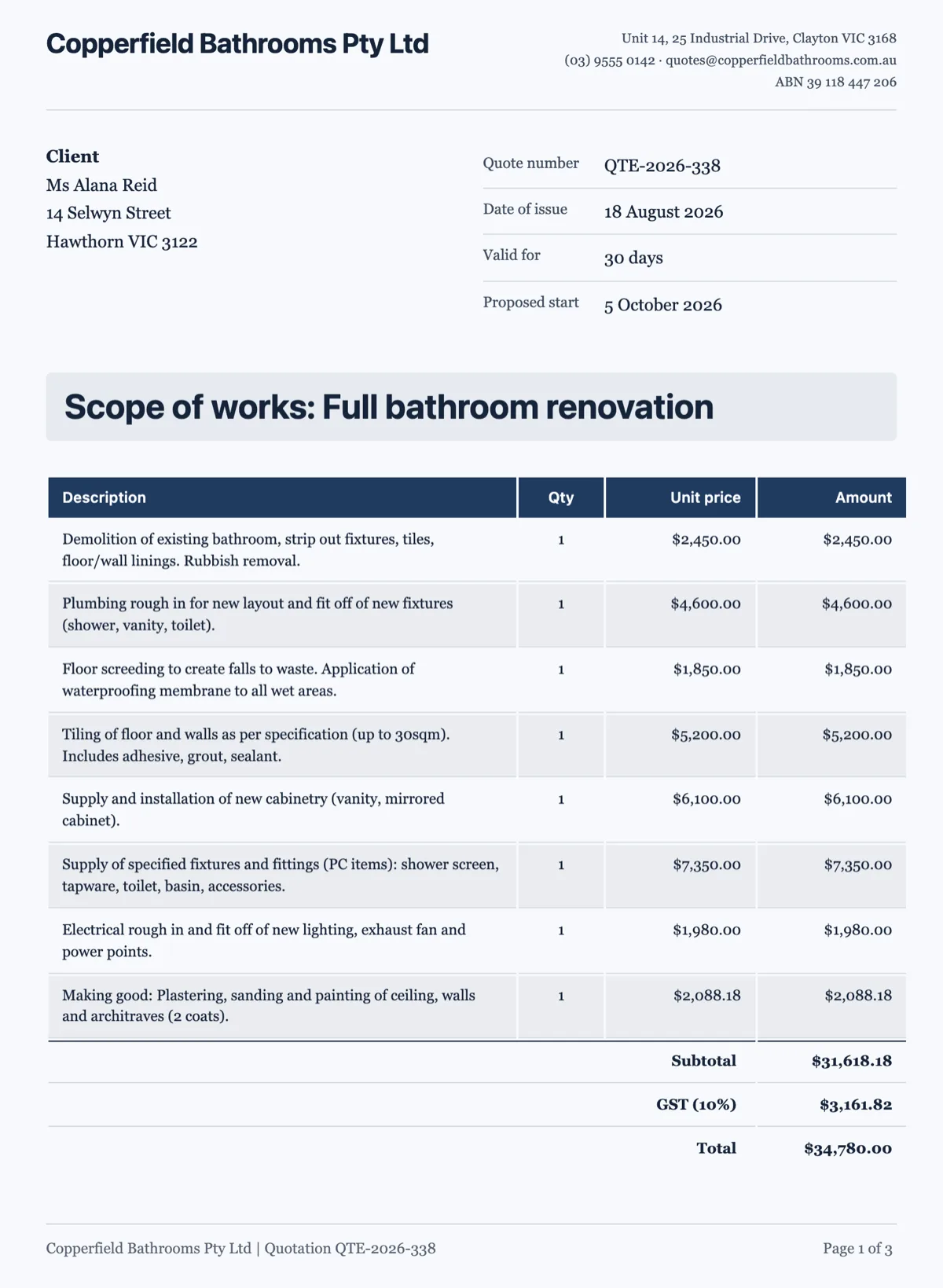 Sign a quote onlineMade with OneCraft, exactly as the generator and editor left it. Open the page for the full breakdown.
Pricing in plain terms
signNow's pricing could not be quoted. The pricing page linked from their site renders its plan cards in JavaScript, and a direct fetch on 20 September 2026 returned a page shell with no plan names, prices or limits in it, so the price row says not published and links that page rather than guessing a figure from elsewhere. OneCraft's pricing page lists Free at $0 with 100 AI credits a month, Starter at $8, Pro at $25 and Pro Plus at $125, priced per account, with no envelope allowance stated on any plan and signing included from the free tier.
Moving across
Templates do not migrate, because there is nothing here to receive them. Moving means uploading the PDF you already send, placing fields, adding recipients with a verification method each, and choosing whether they sign in order. Word originals need exporting to PDF first, and rotated or password protected files are refused at upload with the page number or the reason given.
What could not be checked
Besides the prices, signNow's features pages name capabilities without stating limits, so the recipient cap, field cap, expiry behaviour and signing profile rows all say what the page does say rather than assuming parity. The bulk send figures, a thousand recipients per batch and CSV column mapping, come from their own bulk send feature page.
How the OneCraft side was verified
Every cell names a row in an internal ledger checked against the signing service's source code: the 25 recipient and 500 field caps, the ten field types, the three verification methods, the sign in order switch and the turn check behind it, the 30 day expiry and its nightly sweep, the eighteen event hash chain, the certificate of completion and the DocMDP certification level.
Who should stay with signNow
Stay with signNow if templates and bulk send carry your volume, if signers are verified by phone, if a tablet at a counter collects signatures, or if an API and Word import are part of the process. What is offered instead here is stated caps, certified output and a certificate of completion that stands on its own.
Questions people ask
Why is there no price in the signNow column?
Because their pricing page did not serve one. It renders plan cards in JavaScript, and a direct fetch on 20 September 2026 returned a page shell with no plan names or prices in it. Rather than repeat a figure from a review site, the row says not published and links the page so the current price can be read there.
How many people can sign one envelope?
Up to 25 recipients, with up to 500 fields between them. Each recipient gets a colour, a verification method and a position in the signing order. With Sign in order on, only the next signer is invited and anyone signing out of turn is blocked; with it off, everyone is invited at once.
Can I send the same agreement to fifty people at once?
No. There is no bulk send and no CSV import of recipients, so fifty people means fifty envelopes prepared one at a time. signNow maps a CSV to personalisation fields and sends up to a thousand in a batch, which is the right tool for an onboarding cohort or a policy rollout.
Can I choose my own expiry date?
No. Every envelope expires 30 days after it is created. A nightly sweep marks outstanding recipients expired and the link then returns a clear expiry message. The update route will accept a future date but nothing in the app ever sends one, so 30 days is what every envelope gets.
Are reminders sent automatically?
No. Chasing a signer is a manual resend, which rotates that recipient's token so the old link stops working, resets their viewed state, clears any lockout and records a resent event. It is refused once the recipient has signed or declined. For a few envelopes a month that is workable; at volume it is not.
What does the certificate of completion actually contain?
Three sections. The envelope block lists its identifier, when it was sent and completed, the signer count, the certification algorithm and the document hashes as sent and when fully signed. Each signer gets a block with verification method, signing time, IP address and consent. The event log then lists every event with its timestamp.
Try the signing flow side of OneCraft
The button opens the generator with a starting prompt already filled in. Change the wording to match your own work before you run it.
Send a document for signingMore comparisons
- A Dropbox Sign alternative built around certified PDFsA Dropbox Sign alternative for senders who want certified PDFs and a hash chained audit trail, with templates, bulk send and the API named on their side.
- A DocuSign alternative for small businessOneCraft e-signature as a DocuSign alternative for small business: fields, signing order, identity checks, audit trail and certified PDFs, with the gaps named.
- A Xodo Sign alternative for signing documentsA Xodo Sign alternative for signing: in person sessions, three identity checks, certified PDFs and a hash chained trail, with templates and the API named.
What the module actually does, feature by feature: the E-signature software page, and the e-signatures maker page.
Step by step in the builder: Send a PDF for e-signature, then Add e-signatures with multiple signers.
Written and checked by the OneCraft team. Last checked .