Forms · Alternative
A forms.app alternative for forms that end in a PDF
forms.app packs a lot into a free plan with unlimited responses: 30 plus field types, conditional logic, e-signatures, payments and auto scoring, capped at 5 forms and 10 MB of storage. A switch is worth a look mainly when the answer must become a document, a fillable PDF or a certified signing envelope, rather than a row in a results table.
Updated , competitor details checked . forms.app is a trademark of its owner. OneCraft is not affiliated with forms.app and has no endorsement from it.
Indunil Asanka · Co-founder
2 min read · Published
The short verdict
forms.app is the better value for forms that take payments, score quizzes, branch with logic or need hidden fields and multilingual versions, and its free plan covers unlimited responses on up to 5 forms. OneCraft is better when the output matters: a response PDF laid out to match the paper form, a fillable PDF, or a certified signed document with a certificate of completion.
| Feature | forms.app | OneCraft |
|---|---|---|
| Free plan | 0 cost forever: unlimited responses, all 30+ field types, conditional logic, e-signatures, up to 5 forms and 10 MB file storage checked 2026-10-21 | Free at $0 with 100 credits a month, about 3 AI projects |
| Paid plans | Basic 16 EUR a month billed annually or 24 EUR monthly; Pro 24 or 34 EUR; Premium 49 or 68 EUR checked 2026-10-21 | Starter $8, Pro $25 and Pro+ $125 a month |
| Form count | 5 forms on Free, 25 on Basic, unlimited on Pro and Premium checked 2026-10-21 | No form count printed on the pricing page |
| Payments | Unlimited payments listed on every plan checked 2026-10-21 | No payment component |
| Quizzes and scoring | Auto scoring on every plan checked 2026-10-21 | No scoring or correct answers |
| Logic | Conditional logic on every plan, with hidden fields and prefilling through URL checked 2026-10-21 | Jump rules on conversational forms only; no hidden fields |
| File uploads | File upload size 10 MB on Free, 100 MB on Basic and Pro, 1 GB on Premium checked 2026-10-21 | Up to 100 MB a file, 1 to 10 files per field, images and PDF only, on every plan |
| Respondent notifications | Respondent notifications listed under notifications checked 2026-10-21 | No email to the respondent |
| AI creation | AI form creator, PDF to form importer and response summaries checked 2026-10-21 | A generator taking a prompt of up to 10,000 characters, or a PDF or photo on paid plans |
| PDF output | Branded PDFs listed among advanced features checked 2026-10-21 | Response PDF on every plan and a fillable PDF export from Starter |
| Signing | E-signatures on the free plan checked 2026-10-21 | Inline signature plus an e-signing add-on with a certificate of completion |
Where forms.app is better
More free for small form counts
Unlimited responses, all field types, logic, e-signatures and payments on a free plan is generous, provided you stay within 5 forms and 10 MB of storage. OneCraft's free plan keeps fillable PDF export and file attachments for paid plans.
Payments, quizzes and product baskets
forms.app takes payments, auto scores quizzes and builds a product basket for simple ordering. OneCraft forms do none of these.
Hidden fields, URL prefill and multilingual forms
Marketers can pass campaign data in hidden fields and prefill answers from a link, and one form can serve several languages. OneCraft has no hidden fields or prefill, and writes one language per form.
Partial responses and drop off analysis
Higher plans capture partial responses and show where people quit. OneCraft stores nothing until submit and has no drop off analytics.
Where OneCraft is different
The paper version is designed, not generated
A dedicated PDF layout editor shapes how each response prints, and the same form exports as a fillable PDF from Starter. Rental agencies, clinics and schools that still file paper get a document that looks intended.
Signing that produces evidence
The e-signing add-on sends a response to its signers and finishes with a certified PDF that cannot be edited without breaking it, plus a certificate listing each signer's verification, IP address and document hashes.
Every plan gets the same upload size
Uploads accept up to 100 MB per file on every plan, so an applicant can upload a scanned ID or payslips without the plan deciding the limit.
A finished example
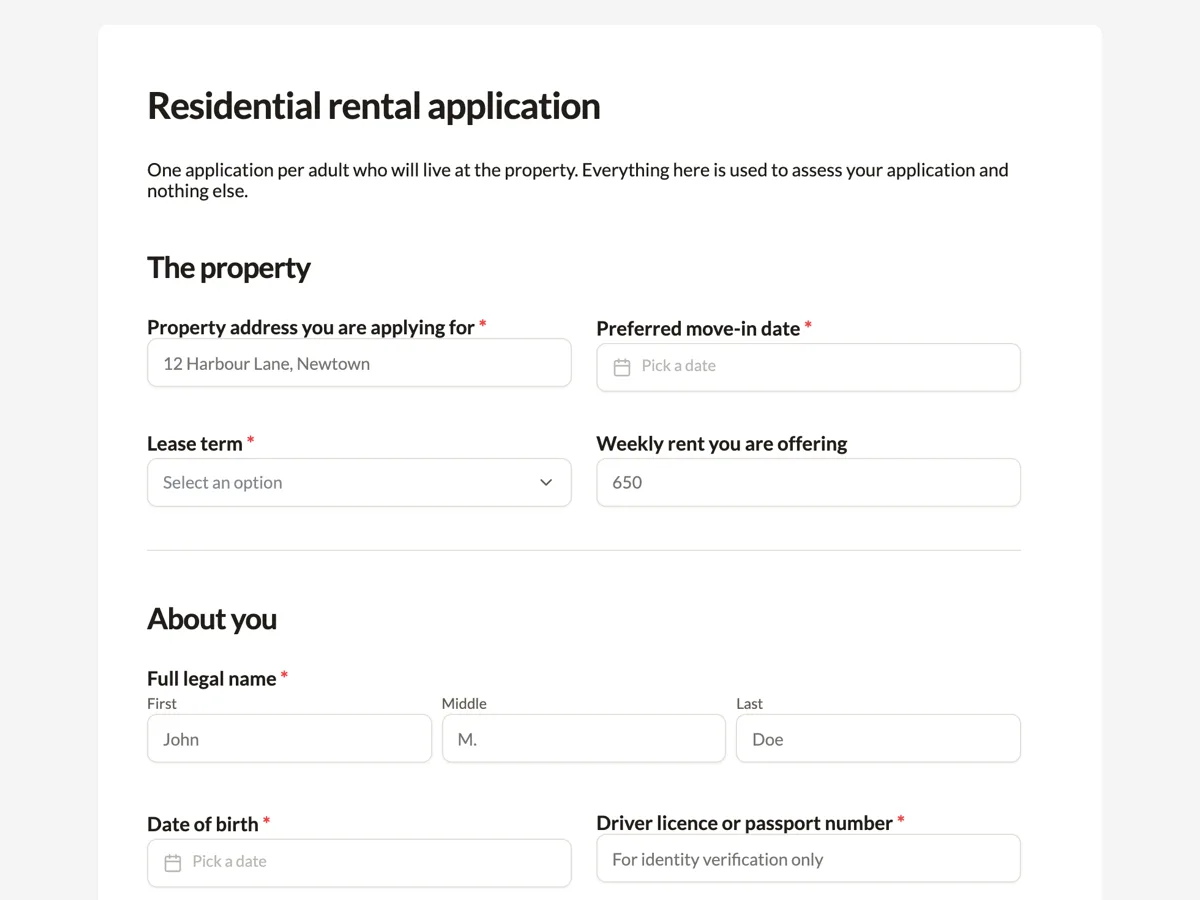 Rental application formMade with OneCraft, exactly as the generator and editor left it. Open the page for the full breakdown.
Pricing in plain terms
forms.app's pricing page, read on 21 October 2026 and priced in euros for the visitor's region, lists a free plan at 0 EUR with unlimited responses, 5 forms and 10 MB of storage; Basic at 16 EUR a month billed annually or 24 EUR monthly with 25 forms and 10 GB; Pro at 24 or 34 EUR with unlimited forms and 100 GB; and Premium at 49 or 68 EUR with 1 TB and partial responses. A seasonal banner advertised up to 60% off yearly plans for a limited time. OneCraft lists $0, $8, $25 and $125 US dollars a month for 100, 500, 1,500 and 7,500 AI credits.
From an application to a signed file
A rental application shows the difference. On OneCraft the form collects addresses, income, references and ID uploads; the response PDF adds the uploaded images as pages after the form; and with the e-signing add-on the applicant signs the declaration in an envelope whose certificate records when and from where they signed. forms.app collects a signature in the form itself, which is enough when no audit trail is required.
What will not carry over
Payment fields, quiz scoring, hidden fields, URL prefill, multilingual versions and option level logic have no counterpart here. Export your responses from forms.app first; new responses export to CSV with one column per field.
Sources
forms.app facts come from its pricing page and home page as read on 21 October 2026. OneCraft facts come from an internal ledger checked against the product's source.
Who should stay with forms.app
Stay with forms.app if your forms take payments, score quizzes, rely on hidden fields or URL prefill, or need one form in several languages. Those are absent here, and the free plan there covers them at no cost.
Questions people ask
Is forms.app free?
Yes. Its pricing page lists a free plan with unlimited responses, all field types, conditional logic, e-signatures and payments, limited to 5 forms and 10 MB of file storage. Paid plans in euros raise the form count and storage. The free plan carries forms.app branding.
Why are forms.app prices shown in euros?
The pricing page read on 21 October 2026 showed euro amounts for the visitor's region. Other regions may see another currency, so check the page from your own location before comparing with OneCraft's US dollar prices. Exchange rates move, so compare on the day you buy.
Can OneCraft import a PDF form?
On a paid plan you can attach a PDF or a photo of a paper form to the generator, and it rebuilds the questions. A PDF is read for its fields and key points rather than copied word for word, so check every label before publishing.
Can applicants upload large scans?
Yes. A OneCraft file upload field accepts up to 100 MB per file on any plan, with 1 to 10 files per field, limited to images and PDF. forms.app's limit depends on the plan, from 10 MB on Free to 1 GB on Premium.
Does either tool score a quiz?
forms.app lists auto scoring on every plan. OneCraft does not score answers or mark them right or wrong, so quizzes with results belong on forms.app. OneCraft can still collect quiz style answers for a teacher to mark by hand from the CSV, but it never shows a score or a result screen, so learners get no instant feedback.
Try the form side of OneCraft
The button opens the generator with a starting prompt already filled in. Change the wording to match your own work before you run it.
Create a form with OneCraftMore comparisons
- A Jotform alternative for forms, PDFs and signingOneCraft as a Jotform alternative: classic and conversational forms, fillable PDFs, e-signature and AI generation, with Jotform's breadth stated honestly.
- A Tally alternative for forms with PDFs and e-signatureA Tally alternative for forms that end in a PDF or signed document: free plan, logic, payments and design compared, with Tally prices read 21 October 2026.
- A Formaloo alternative for designed forms and signed PDFsA Formaloo alternative for designed forms and signed PDFs: free plan, logic, payments, databases and pricing compared, with Formaloo read on 21 October 2026.
What the module actually does, feature by feature: the AI form builder page, and the forms maker page.
Step by step in the builder: Convert a paper form to a web form, then Send a document for e-signature.
Written and checked by the OneCraft team. Last checked .