Forms · Alternative
A Tally alternative for forms with PDFs and e-signature
Tally gives away more on its free plan than almost any form builder: unlimited forms and submissions, logic, calculations, payments, signatures and file uploads. A move away from Tally rarely makes sense on price. It makes sense when the work starts after submit, when the answer has to become a fillable PDF, a printed record or a signing envelope with an audit trail.
Updated , competitor details checked . Tally is a trademark of Tally BV. OneCraft is unaffiliated with Tally BV and has no endorsement from it.
Nuwan Madhusanka · Co-founder
3 min read · Published
The short verdict
Tally wins on free features: logic, calculations, payments, signatures and unlimited submissions without paying. OneCraft wins on what follows the submission: a PDF laid out to match a paper record, a fillable PDF, and a response sent out for certified signing, plus a form generated from a description or a photo of the paper version.
| Feature | Tally | OneCraft |
|---|---|---|
| Free plan | Unlimited forms and submissions free, within fair usage guidelines checked 2026-10-21 | Free at $0 with 100 credits a month, about 3 AI projects |
| Paid plans | Pro at $24 a month and Business at $74 a month, paid monthly checked 2026-10-21 | Starter $8, Pro $25 and Pro+ $125 a month |
| Logic and calculations | Conditional logic and calculations on the free plan, plus answer piping checked 2026-10-21 | Jump rules on conversational forms only; no calculations or piping |
| Payments | Collect payments listed on the free plan checked 2026-10-21 | No payment component |
| Signatures | Collect signatures listed on the free plan checked 2026-10-21 | An inline signature, plus an e-signing add-on with an audit trail and certificate |
| File uploads | File uploads on the free plan, with a 10 MB per file limit removed on Pro checked 2026-10-21 | 1 to 10 files per field, images and PDF only, up to 100 MB each on every plan |
| Respondent email | Pro sends tailored emails to yourself and respondents checked 2026-10-21 | No email to the respondent; one owner alert per submission |
| Partial submissions | Pro captures unfinished responses before submit checked 2026-10-21 | Nothing is stored before submit |
| Custom CSS | Pro allows custom CSS checked 2026-10-21 | No custom CSS; themes and a theme builder only |
| Fillable PDF | Not listed on the pricing page checked checked 2026-10-21 | Fillable PDF export from the Starter plan; blank template PDF free |
| Building from a file | Not listed on the pricing page checked checked 2026-10-21 | 5 attachments of 10 MB each, including PDF and photos, on paid plans |
Where Tally is better
The free plan is generous
Unlimited forms and submissions, logic, calculations, payments, signatures, uploads, webhooks and integrations with Google Sheets, Notion and Airtable, all free within fair use. OneCraft's free plan offers 100 AI credits a month and keeps fillable PDF export and file attachments for paid plans.
Logic, calculations and piping for free
Tally pipes earlier answers into later questions and calculates totals on its free plan. OneCraft cannot pipe or calculate, and its jumps work only on conversational forms.
Payments inside the form
Tally lists collecting payments on its free plan. No OneCraft form takes payment, so paid workshop bookings and orders belong on Tally.
Respondent emails and partial submissions on Pro
For $24 a month Tally emails respondents, captures unfinished submissions and adds version history. OneCraft does none of these.
Where OneCraft is different
Paper and signatures as first class
The response PDF is laid out in its own editor on a 20 pixel grid, a fillable PDF exports from Starter, and the e-signing add-on routes a response to its signers with a hash chained audit trail. Studios, clinics and schools that file signed forms get the document they need.
A form from a photo of the old one
On a paid plan, attach a PDF or a photo of a paper form and the generator rebuilds it with sections, field types and a theme. Tally's document style editor is fast, but you still type every question.
A designed look without CSS
37 themes, 22 palettes, 24 background patterns and 10 welcome layouts give a form its look without writing CSS, which Tally reserves for its Pro plan.
A finished example
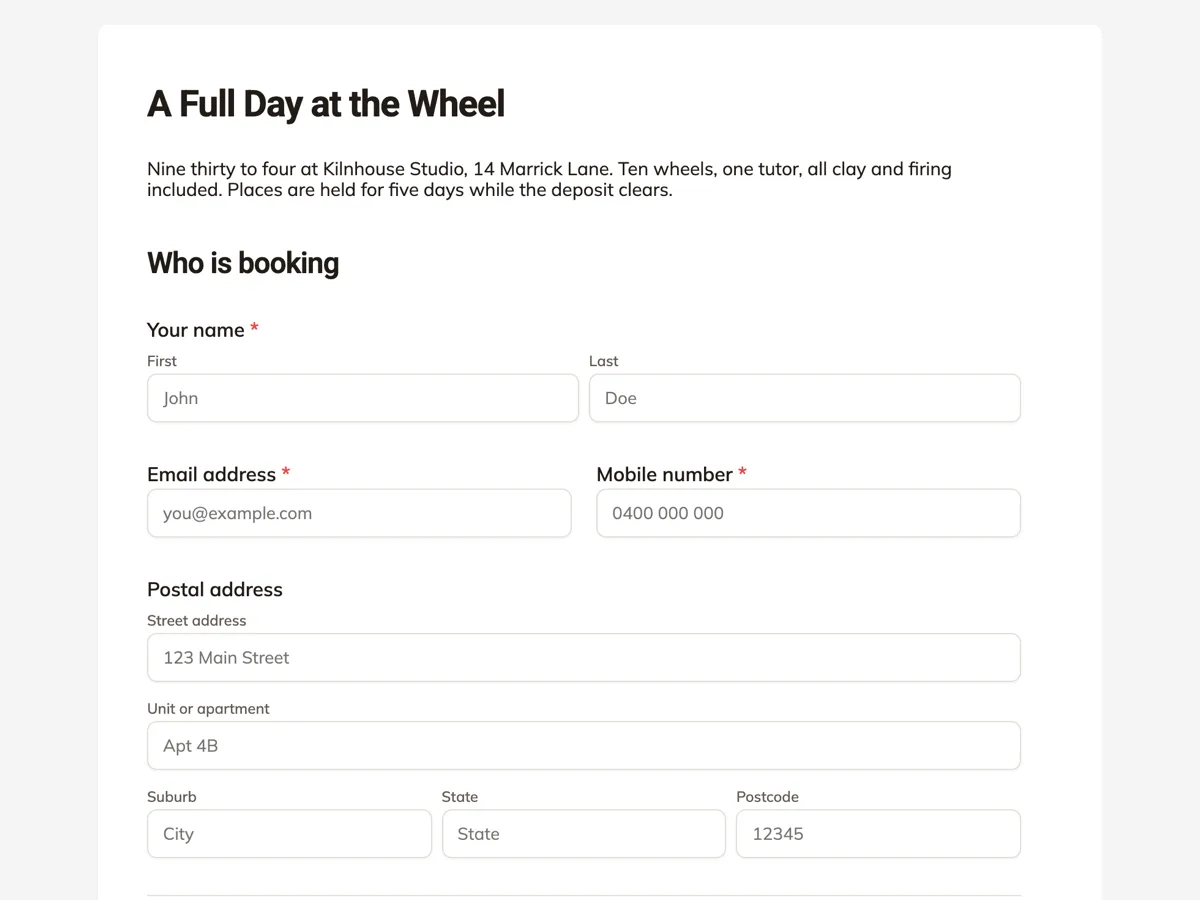 Workshop registration formMade with OneCraft, exactly as the generator and editor left it. Open the page for the full breakdown.
Pricing in plain terms
Tally's pricing page, read on 21 October 2026, lists unlimited forms and submissions free within its fair usage guidelines, Pro at $24 a month and Business at $74 a month when paid monthly, with two months off for yearly payment. Pro removes branding, adds custom domains, collaboration, partial submissions, custom CSS, respondent emails and removes the 10 MB upload limit; Business adds data retention controls and email verification. OneCraft lists $0, $8, $25 and $125 a month for 100, 500, 1,500 and 7,500 AI credits.
From response to signed PDF
With the e-signing add-on enabled on a classic form, each submitted response becomes its own envelope: one recipient per e-signature component, signers notified by email, and a certified PDF and a certificate of completion when everyone has signed. Without the add-on, the inline signature pad captures a drawn or typed signature that prints into the response PDF. Tally collects signatures inside the form; what differs is the envelope, the audit trail and the certified file after it.
Moving a Tally form
There is no Tally importer. Take a screenshot or export a PDF of the form, attach it to the generator on a paid plan, and check the rebuilt fields. Logic beyond simple jumps, calculations and payment blocks will not come across, and existing responses stay in Tally, where you can export them.
Where the facts come from
Tally's figures are from its pricing page and home page as read on 21 October 2026. OneCraft's are from an internal ledger read from the product source.
Who should stay with Tally
Stay with Tally if you are happy on its free plan and your forms do not need a PDF or a signature afterwards. Its logic, calculations and payments cost nothing there, and OneCraft does not offer them at any price.
Questions people ask
Is there a Tally alternative with e-signature workflows?
Tally collects signatures in the form itself. OneCraft adds an envelope after submit: the e-signing add-on emails the response to its signers, records each step in a hash chained audit trail drawn from 18 event types, and produces a certified PDF with a certificate of completion.
Can Tally export fillable PDFs?
Tally's pricing page checked on 21 October 2026 does not list fillable PDF export. OneCraft exports a fillable PDF of any form from the Starter plan and a blank template PDF on every plan, laid out in a dedicated PDF editor.
Is Tally free?
Yes, within its fair usage guidelines: unlimited forms and submissions with logic, calculations, payments, signatures and uploads included. Pro at $24 a month adds branding removal, partial submissions, respondent emails and larger uploads. Business at $74 a month adds data retention controls and email verification. For most small forms the free plan is enough.
Which is better for a paid workshop booking?
Tally, because it collects payments in the form and OneCraft does not. A OneCraft booking form can collect the details and a signed acknowledgement, but payment would have to happen separately, for example through an invoice. Some studios keep payment on Tally and the signed rules form on another tool.
Does the generator understand a handwritten form?
On a paid plan you can attach a photo of a paper form, and the attachment is read and used to rebuild the questions. Clear, well lit photos work best. The result is a draft, so check every label and option before publishing.
Try the form side of OneCraft
The button opens the generator with a starting prompt already filled in. Change the wording to match your own work before you run it.
Create a form with OneCraftMore comparisons
- Tally vs Typeform vs OneCraftTally, Typeform and OneCraft compared for conversational forms: price and caps, fields, logic, design, PDFs and signing, with where each one wins.
- A Typeform alternative, compared honestlyOneCraft as a Typeform alternative for conversational forms: what matches, what does not, where Typeform stays ahead, and both public pricing pages quoted.
- A Google Forms alternative: what you gain, what you give upOneCraft as a Google Forms alternative: themes, welcome screens, fillable PDFs, e-signature and AI generation, against the Sheets link you give up.
What the module actually does, feature by feature: the AI form builder page, and the forms maker page.
Step by step in the builder: Convert a paper form to a web form, then Shape the PDF version of your form.
Written and checked by the OneCraft team. Last checked .