Forms · Alternative
A Formsite alternative for forms and signed PDFs
Formsite prices by how many results each form collects, links forms together with workflow logic, and hands signing off to DocuSign. The alternative here generates the form from a description, arranges its PDF in a layout editor, and does the signing itself with a certified file and an audit trail at the end.
Updated , competitor details checked . Formsite is a trademark of its owner, as is DocuSign. OneCraft is unaffiliated with both and claims no endorsement.
Nuwan Madhusanka · Co-founder
3 min read · Published · Updated
The short verdict
Formsite fits an organisation that runs a chain of related forms, takes payment on an order form and already uses DocuSign for signatures, and that can plan around a results per form limit. OneCraft fits a smaller operation that wants the form drafted by AI, its PDF designed deliberately, and the signature handled in the same account.
| Feature | Formsite | OneCraft |
|---|---|---|
| Entry price | Personal at $21 a month or $249.95 yearly, with 5 forms, 500 results per form and 500MB of file space checked 2026-09-20 | Free at $0 with 100 AI credits a month; the blank template PDF has no plan gate and the fillable PDF export opens at Starter, $8 a month |
| Higher tiers | Professional $34 a month or $399.95 yearly with 10 forms and 1,000 results per form; Business $59 or $699.95 with 25 forms, 2,500 results and one sub-user; Business Plus $84 or $999.95 with 100 forms, 10,000 results and five sub-users; Enterprise $209 or $2499.95 with 1,000 forms, 50,000 results and twenty sub-users checked 2026-09-20 | Pro $25 and Pro+ $125 a month for 1,500 and 7,500 AI credits. Nothing is counted per form or per result, and no sub-user tier exists |
| Starting point | Get started quickly with a new template, with templates catered to a specific industry, all mobile responsive and easily customizable checked 2026-09-20 | A description of up to 10,000 characters generates the fields, sections, welcome screen and theme, with the language typed freely from 32 suggestions |
| Workflow | Link related forms with workflow logic, with unlimited workflows listed from the Business plan checked 2026-09-20 | No workflow and no form chaining. A webhook posts each submission once with a ten second timeout and no retry, and an email alert goes to one address |
| Payments | Collect payments with Stripe order forms, with PayPal Business, Authorize.net and Braintree also named checked 2026-09-20 | No payment component and no gateway. A form collects information only |
| Signing | DocuSign integration made easy, so signatures are handled by a separate signing account checked 2026-09-20 | Signing is built in: each submitted response becomes an envelope with its own recipients, identity checks and an 18 event hash chained trail, ending in a PAdES certified PDF |
| Logic | Multi-page forms with logic, so pages and questions respond to answers checked 2026-09-20 | Jump rules on conversational forms only. A classic form can be paginated into steps, but every respondent still sees every question |
| Results as documents | View and share results as PDFs in Formsite's format or your own, and merge form results into a Microsoft Word document checked 2026-09-20 | A response PDF designed in a dedicated layout editor on a twenty pixel grid, generated through a queue and polled for up to five minutes. There is no Word output |
| One question at a time | Not offered as a form type on the pages checked; forms are multi-page instead checked 2026-09-20 | A conversational form type with 25 components and 25 themes of its own, including recorded audio and video answers |
| Components | Items are described by name rather than counted on the features page checked 2026-09-20 | 41 component types, as a 36 item classic toolkit and a 25 item conversational one, including matrix, table, address and fill in the blank |
| Uploads | File space is metered per plan, from 500MB on Personal to 10GB on Enterprise checked 2026-09-20 | A file upload field takes 1 to 10 files of 1 to 100 MB each, with two allowed type switches only: images and PDF |
| Appearance | Templates are described as easily customizable, without a theme count on the pages checked checked 2026-09-20 | 37 themes with 22 colour palettes, 24 background patterns and 23 font pairs, plus 10 welcome layouts and 4 thank-you layouts |
Where Formsite is better
Forms that hand off to other forms
Workflow logic links related Formsite forms so an application can move through stages, with unlimited workflows from the Business plan. There is no equivalent here at all. Each form stands alone, and anything resembling a multi stage process has to be assembled by a person or by code listening on a webhook.
Order forms that take the money
Stripe order forms are a documented Formsite feature, with PayPal Business, Authorize.net and Braintree named alongside. No form here charges anyone. For a property manager taking an application fee or a club taking a deposit, that gap has to be filled with a separate payment link and manual reconciliation.
A ready made template for the industry
Formsite's template gallery is organised by industry, which is genuinely faster than writing a brief when a standard form already exists. Generation is the answer here, and it is good at producing a sensible first draft, but it is still a draft that someone has to read carefully before it collects real data.
An established signing integration
DocuSign is the default in many industries, and Formsite connects to it directly, so signed documents land in the account the business already audits. Signing here is built in and certified, which is convenient, but it is not the signing provider a landlord's agency or a lender may already require.
Where OneCraft is different
Nothing is counted per form
Formsite meters results per form, from 500 on the Personal plan to 50,000 on Enterprise, and caps the number of forms too. The published plans here count AI credits only, so an application form that suddenly attracts a thousand submissions in a week does not change the bill, and neither does building the tenth form this month.
The PDF is designed, not dumped
The response PDF has its own editor working on a twenty pixel grid, so a tenancy application can print in the order an agency reads it rather than in the order the questions were asked. A blank template PDF downloads with no plan gate for applicants who still want to fill it in by hand.
Signing finishes inside the same account
With the add-on on, a submitted application becomes a signing envelope with up to 25 recipients, verification by email link, access code or six digit code, an append only trail of 18 event types chained by hash, and a PAdES certified PDF with a certificate of completion listing hashes, IP addresses and consent timestamps.
Two form types share one builder
Classic forms carry the design blocks, the e-signature component and the table and chart blocks. Conversational forms ask one question at a time with their own 25 components and 25 themes, and add recorded audio and video answers. Both are generated from the same prompt box.
A finished example
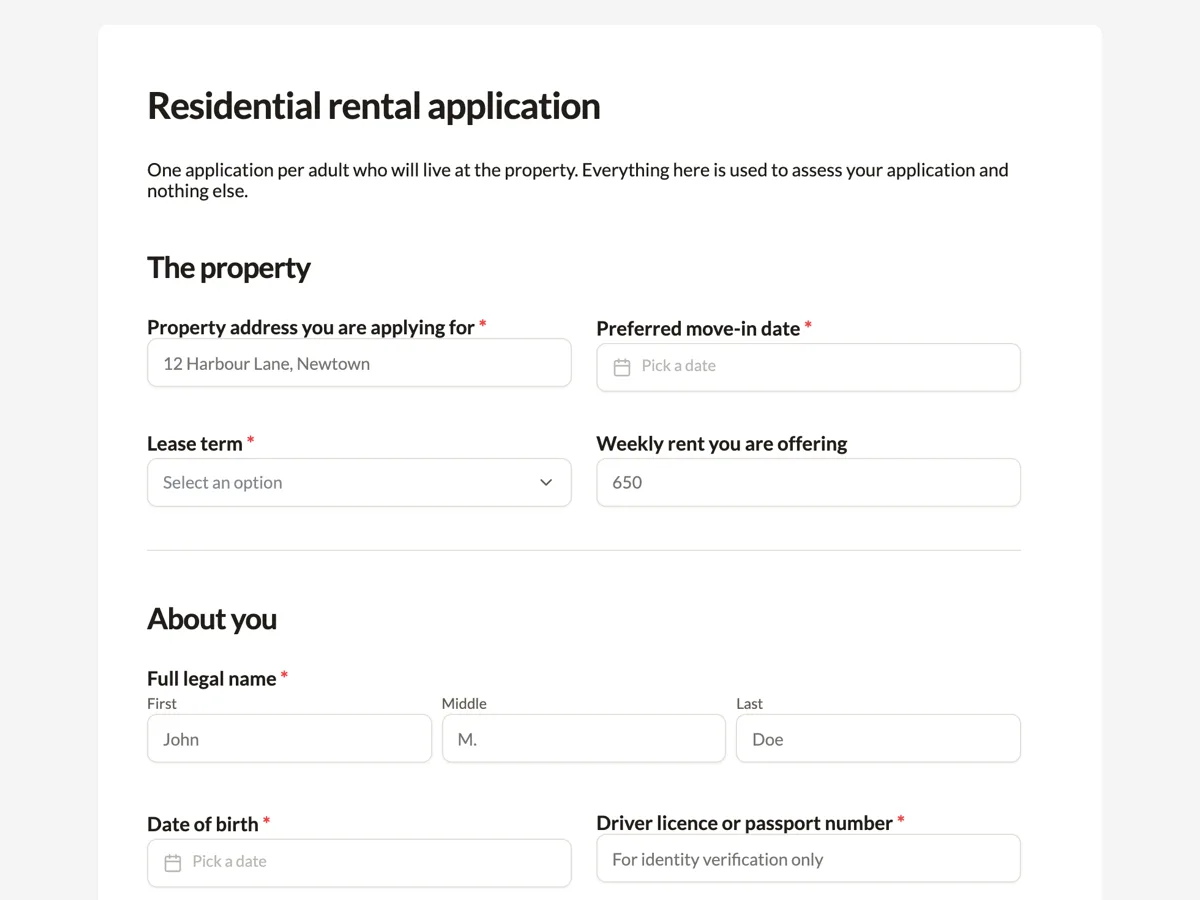 Rental application formMade with OneCraft, exactly as the generator and editor left it. Open the page for the full breakdown.
Per form limits against per account credits
Formsite's pricing on 20 September 2026 runs from Personal at $21 a month, or $249.95 for the year, with 5 forms and 500 results per form, through Professional at $34 or $399.95, Business at $59 or $699.95, Business Plus at $84 or $999.95, to Enterprise at $209 a month or $2499.95 yearly with 1,000 forms, 50,000 results per form, 10GB of file space and twenty sub-users. Every tier meters both forms and results. OneCraft lists $0, $8, $25 and $125 a month against 150, 500, 1,500 and 7,500 AI credits and prints no limit on forms, results or storage. An agency running three high volume forms is billed very differently under the two models, and the crossover point is worth calculating before switching either way.
Moving an application form across
A single self contained form moves well. Export it to PDF, attach the file to the generator on a paid plan, and check the rebuilt fields for required flags, option lists and upload rules, remembering that only images and PDFs can be collected here. What does not move is the workflow: a Formsite chain of linked forms has no target, and neither does a Stripe order step or a DocuSign connection. Download the results before closing the account, because nothing is carried over automatically.
The limits of the comparison
Formsite does not publish a template count, a component count or a theme count on the pages read for this page, and HIPAA is not described there either, so no claim about a compliance tier appears in the table. Quotes are taken from the features, pricing and templates pages on the date above and trimmed to the claim itself. Anything changed since then will not be reflected, which is why every cell carries its own check date.
Checking the right hand column
The OneCraft figures come from an internal ledger read out of the product source, including 41 component types across two toolkits, the twenty pixel grid the PDF layout editor works on, the five minute polling ceiling on PDF generation, the two allowed upload type switches, and the eighteen audited events behind a certified signature. Absences are ledger entries too, so the no answers on payments and workflow, and the limit of jump rules to conversational forms, are verified statements rather than gaps in research.
Who should stay with Formsite
Stay with Formsite if forms hand off to each other through workflow logic, if an order form has to take payment, if DocuSign is the required signing provider, or if the template library is what makes the work fast. None of those are matched here.
Questions people ask
Is there a limit on results per form?
No result limit is printed on the pricing page. Plans meter AI generation credits, from 150 a month on the free plan to 7,500 on the largest listed tier. Formsite meters results per form, starting at 500 on its Personal plan, so a high volume form is the clearest reason to compare the two models carefully.
Can one form hand off to another?
No. There is no workflow feature and no way to chain forms, so a multi stage application has to be a single longer form or a manual process. Formsite links related forms with workflow logic and lists unlimited workflows from its Business plan, which is the right tool for staged approvals.
How is a response turned into a PDF?
Through a dedicated layout editor that places the fields on a twenty pixel grid, so the printed record can follow the order a reader expects. Generation is queued and polled for up to five minutes. A blank template PDF of the same form downloads without any plan gate for people who prefer paper.
Does signing need a separate DocuSign account?
No. Signing is part of the product. Turning on the add-on converts each submitted response into an envelope, with up to 25 recipients, identity checks, a hash chained trail of 18 event types and a PAdES certified PDF. If an agency is contractually required to use DocuSign, Formsite's integration remains the better answer.
What file types can an applicant upload?
Images and PDFs only. Those are the two switches available on the upload field, and nothing else can be permitted. Each field accepts between 1 and 10 files at up to 100 MB each. Documents supplied as spreadsheets or word processor files have to be converted before they can be submitted.
Can questions be hidden when they do not apply?
Only partly. A conversational form has a Logic tab where an answer can jump the respondent ahead or end the form early. A classic form has no logic: it can be paginated into steps, or laid out in a single column or free flow, but its questions do not change. Formsite offers multi-page forms with logic, which is the honest reason to stay for a branching application.
Try the form side of OneCraft
The button opens the generator with a starting prompt already filled in. Change the wording to match your own work before you run it.
Create a form with OneCraftMore comparisons
- A Formstack alternative for forms, PDFs and signingA Formstack alternative for AI built forms, fillable PDFs and certified signing, with Formstack's workflow and Salesforce strengths stated plainly.
- A 123FormBuilder alternative with AI form generationA 123FormBuilder alternative that generates forms from a description or a PDF, with fillable PDF export and certified signing, against integrations and quizzes.
- A Wufoo alternative with conversational formsA Wufoo alternative with AI written forms, 37 themes and a one question at a time mode, set against Wufoo's entry limits, reports and payment providers.
What the module actually does, feature by feature: the AI form builder page, and the forms maker page.
Step by step in the builder: Shape the PDF version of your form, then The form builder components.
Written and checked by the OneCraft team. Last checked .