Forms · Alternative
A Formstack alternative for forms, PDFs and signing
Formstack sells a form as the front door of an enterprise process: approvals behind it, documents generated from the data, records pushed into Salesforce. This page puts that beside a smaller product where the form is written by AI from a description, exported as a fillable PDF and sent out for certified signing, and it names the Formstack pieces that have no counterpart here.
Updated , competitor details checked . Formstack is a trademark of its owner. OneCraft is not affiliated with Formstack and is not endorsed by it.
Nuwan Madhusanka · Co-founder
4 min read · Published · Updated
The short verdict
Formstack fits an organisation that needs sign-off steps, generated paperwork and Salesforce records behind the form, and can carry a three figure monthly bill per builder seat. OneCraft fits a small team that wants the form itself written by AI, exported as a fillable PDF and signed with a certificate, and has no workflow engine to replace.
| Feature | Formstack | OneCraft |
|---|---|---|
| Starting price | Forms at $99 a month, or $83 a month paid annually, with 1 Builder user, 25 forms, 1,000 submissions per form and 2GB storage checked 2026-09-20 | A free plan at $0 with 100 AI credits a month; the fillable PDF export opens on the Starter plan and a blank template PDF has no plan gate |
| The tier above | Suite at $299 a month, or $250 a month paid annually, with 3 Builder users, 100 forms, 5,000 submissions per form, 10GB storage and unlimited eSignatures checked 2026-09-20 | Paid plans are $8, $25 and $125 a month and meter AI credits rather than builder seats; generator attachments are a paid plan feature and a free account is shown an upgrade modal |
| Form kinds | Create custom forms more efficiently using powerful, secure AI-technology, described as touchless form creation checked 2026-09-20 | Classic and conversational forms from one builder, each with its own toolkit and themes |
| Fields available | Not itemised as a count on the features page checked 2026-09-20 | 41 component types in total, offered as a 36 component classic toolkit and a 25 component conversational one |
| Conditional logic | Create smart online forms that react to the user's input, showing or hiding fields to personalize the form experience checked 2026-09-20 | Jump rules on conversational forms only, which skip ahead or end the form. No field is shown or hidden by an answer |
| Approval steps | Create approval workflows that help you collect necessary sign-off, document next steps, and efficiently manage initiatives checked 2026-09-20 | No approval workflow. A submission lands in the responses table, and automation is a webhook fired once with no retry plus an email alert to one address |
| Documents from the data | Document templates in DOCX, PPTX, PDF or CSV, populated dynamically from connected systems such as Salesforce, HubSpot and SharePoint checked 2026-09-20 | A fillable PDF arranged in the form's own PDF layout editor, queued through a message queue and polled for up to 5 minutes |
| Signing | Formstack Sign delivers documents by SMS or email and returns a comprehensive audit trail with each signed document that logs all document activity checked 2026-09-20 | An e-signing add-on turns one submitted response into one envelope, with a recipient per e-signature component and a PAdES certified completed PDF |
| Salesforce | Salesforce-native forms that map fields into Salesforce to create new records or upsert existing ones, with several objects updated from one submission checked 2026-09-20 | No CRM sync of any kind. The four add-ons are e-signing, webhooks, email alerts and a redirect |
| Health data | Forms for HIPAA Compliant Organizations, described as easy, HIPAA-friendly data collection checked 2026-09-20 | No healthcare compliance claim is made. Access control is four types: public, secret key, login required and domain restricted |
| Look of the form | Style your forms with professional branding using a simple Theme Editor, or access CSS tools for advanced styling checked 2026-09-20 | 37 themes, 12 classic and 25 conversational, with 22 colour palettes, 24 background patterns and 23 font pairs |
| Starting a form | Hit the ground running with an intuitive AI-powered template generator for forms or documents checked 2026-09-20 | A prompt of up to 10,000 characters, and on a paid plan up to 5 attachments of 10 MB each, so an old PDF or a photo of the paper version can be the starting point |
Where Formstack is better
Sign-off steps live inside the product
Formstack's features page sells approval workflows that collect sign-off and document the next step. A purchase request or a leave form can route to a manager and wait there. In OneCraft a submission has exactly one destination, the responses table, and anything resembling routing has to be built outside the product from the webhook payload.
Salesforce is a first class target
The Salesforce integration page describes Salesforce-native forms that create or upsert records, with several objects updated from a single submission, and signed documents synced back. Nothing comparable exists here. A OneCraft form can post JSON to a URL once, and whatever reads that URL is yours to write and maintain.
HIPAA is addressed directly
Formstack's features page carries a section headed Forms for HIPAA Compliant Organizations and describes HIPAA-friendly data collection. OneCraft makes no healthcare compliance claim at all, so a clinic with obligations under US health privacy law has a concrete reason to stay where those claims are made and contracted.
Documents in Word and PowerPoint shapes
Formstack Documents merges collected data into DOCX, PPTX, PDF or CSV templates and delivers them onward. The OneCraft equivalent is narrower: the form's own response PDF, a blank template PDF and, from Starter, a fillable PDF export, shaped in a layout editor. There is no Word or PowerPoint output from a form response.
Logic that changes the form as it is filled
Showing and hiding fields based on an answer is standard in Formstack and absent here. A conversational form can only jump past questions, and a long classic form asks everyone everything, which is workable for intake and registration and awkward for branching eligibility questionnaires. That single gap decides a good number of comparisons before price is discussed.
Where OneCraft is different
The first draft is generated, not dragged
A description of up to 10,000 characters produces fields, sections, a welcome screen and a theme in one pass, as an async job with a five minute ceiling. On a paid plan the description can be replaced by an attachment: the clinic's existing PDF, or a photograph of the paper form on the counter.
Price is metered in credits, not seats
Plans run at $0, $8, $25 and $125 a month and what they buy is AI generation credits, from 150 a month to 7,500. There is no builder seat count to add up before a second person can edit, and the published pricing page lists no per form submission ceiling.
The same login makes four other things
Documents, presentations, flyers and promotional videos come out of the same account as the form, so a clinic that needs an intake form, a waiting room flyer and a policy document is not buying three subscriptions. Formstack is a deeper product in forms and a narrower one across formats.
Signing is a certified PDF, not a pasted image
When the e-signing add-on is on, a submitted response becomes an envelope with one recipient per e-signature component. The completed file carries a PAdES certification, and the event log behind it is a hash chained trail of 18 event types with a certificate of completion built from it.
A finished example
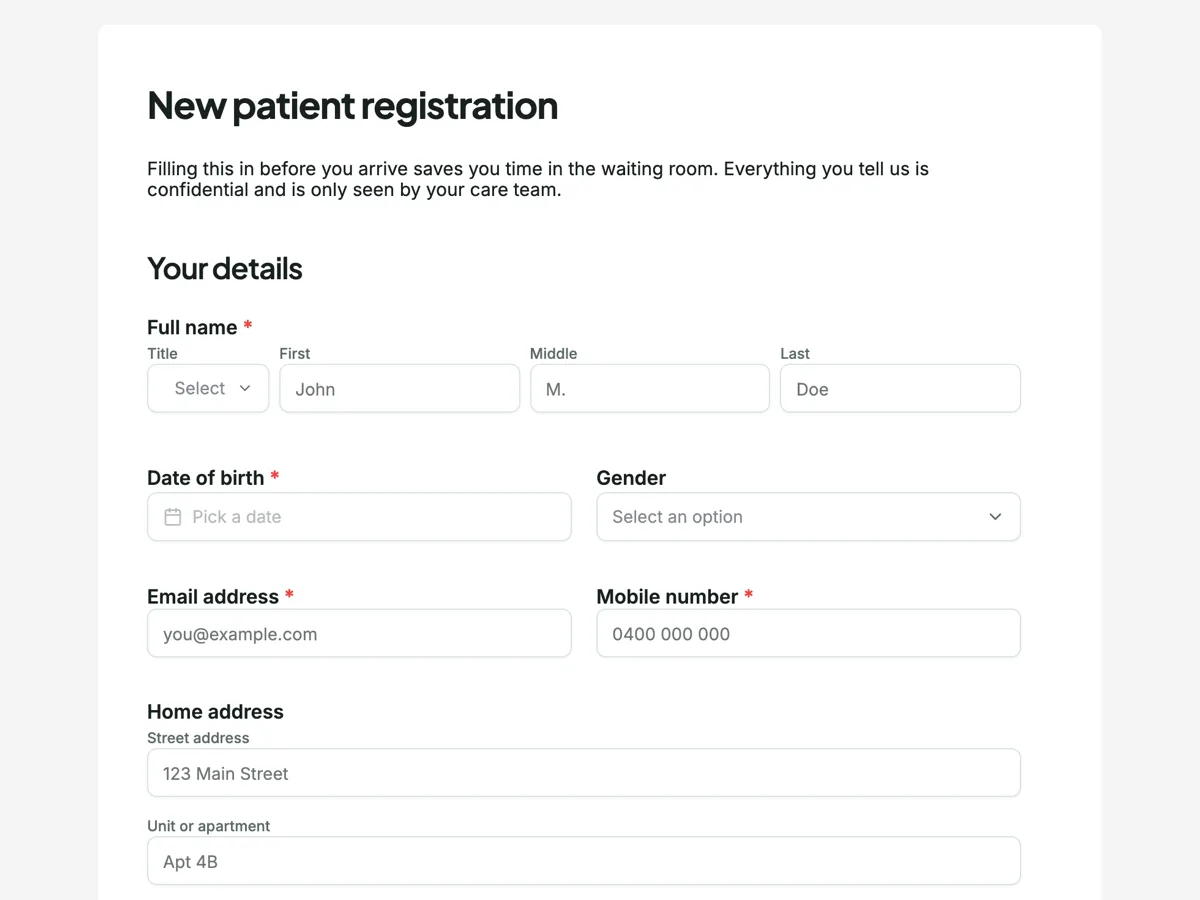 Patient intake formMade with OneCraft, exactly as the generator and editor left it. Open the page for the full breakdown.
What each price list actually buys
Formstack's pricing page on 20 September 2026 opens at $99 a month for the Forms plan, $83 a month if the year is paid up front, and that buys one builder user, 25 forms, 1,000 submissions per form and 2GB of storage. The Suite plan at $299, or $250 annually, raises it to three builder users, 100 forms, 5,000 submissions per form and unlimited eSignatures, with Salesforce and Enterprise quoted on request. OneCraft's published plans are $0, $8, $25 and $125 a month, and the unit they meter is AI generation credits, 150 on the free plan and 7,500 on the largest listed tier. So the two products bill on different things: one counts the people building and the submissions arriving, the other counts how often a machine writes something for you.
Moving an existing Formstack form across
There is no import path between the two products. The practical route is the PDF one: print or export the Formstack form to PDF, attach it to the generator on a paid plan, and let it rebuild the fields as a new form. Expect to re-check required flags, option lists and anything that relied on hidden fields, because logic does not survive a trip that the target product cannot express. Submissions stay behind in Formstack, so export them before the account closes. A form that depends on approvals or a Salesforce write is not a migration candidate at all.
What could not be verified
Formstack does not publish a template count on its template gallery, and the features page does not print an integration count, so neither number appears in the table above. The healthcare page reached on the same day carried a webinar title about HIPAA rather than the terms of a business associate agreement, so this page quotes only the HIPAA wording that appears on the features page and makes no statement about what is contracted. Submission limits are quoted per form, as the pricing page words them, not per account.
How the OneCraft column was checked
Each OneCraft cell points at a row in an internal ledger that was read out of the product source: the 41 component types, the 36 and 25 item toolkits, the 8,000 character prompt ceiling, the five attachments of 10 MB, the four access types, the webhook that fires once with a ten second timeout and no retry. Absences are ledger entries too, which is why this page states that logic stops at conversational jump rules and that there is no approval step and no CRM sync instead of describing them as coming later. Prices come from the published pricing page and nothing else.
Who should stay with Formstack
Stay with Formstack if approvals sit behind the form, if the data has to reach Salesforce records, if the organisation works under HIPAA obligations, or if the form has to change shape as it is filled. None of those exist in OneCraft, and a cheaper builder with AI generation does not substitute for any of them.
Questions people ask
Is there a cheaper Formstack plan than the one quoted here?
The published pricing page on 20 September 2026 starts at $99 a month for Forms, or $83 a month when the year is paid up front. Salesforce and Enterprise solutions are quoted on request rather than listed, so a smaller figure is possible through sales but is not published anywhere a visitor can read it.
Can a form hide questions that do not apply?
Not in place. A conversational form can jump ahead or end early on an answer, set in its Logic tab, but no field is ever shown or hidden, and a classic form has no logic at all. Formstack shows and hides fields based on answers. For eligibility screening or branching intake, that difference matters more than price, and it is the most common reason to stay.
Does a response become a PDF?
Yes. A submitted response can be exported as a PDF, and the layout is arranged in a dedicated PDF editor rather than taken as it falls. A blank template PDF has no plan gate, while the fillable PDF export opens on the Starter plan. Generation is queued and polled for up to five minutes.
How does signing work without a separate signing product?
The e-signing add-on converts each submitted response into one signing envelope, creating a recipient for every e-signature component on the form. The signer verifies by email link, access code or a six digit code, the trail records 18 event types in a hash chain, and the finished PDF is PAdES certified with a certificate of completion available beside it.
Can data reach Salesforce or another CRM?
No. There is no CRM integration. The available add-ons are e-signing, webhooks, email alerts and a redirect after submission. The webhook posts the response as JSON once, with a ten second timeout, no retry and no redirect following, so any CRM write has to be built and hosted by you.
Is OneCraft suitable for patient forms?
It collects the data and controls who reaches the form through four access types, but no healthcare compliance claim is made anywhere in the product or its pricing. Formstack publishes HIPAA wording on its features page. A practice with legal obligations should choose on those terms rather than on the form builder alone.
Try the form side of OneCraft
The button opens the generator with a starting prompt already filled in. Change the wording to match your own work before you run it.
Create a form with OneCraftMore comparisons
- A Jotform alternative for forms, PDFs and signingOneCraft as a Jotform alternative: classic and conversational forms, fillable PDFs, e-signature and AI generation, with Jotform's breadth stated honestly.
- A Formsite alternative for forms and signed PDFsA Formsite alternative that writes the form from a description, lays out its PDF and signs it with a certificate, against Formsite's workflow and result limits.
- A Wufoo alternative with conversational formsA Wufoo alternative with AI written forms, 37 themes and a one question at a time mode, set against Wufoo's entry limits, reports and payment providers.
What the module actually does, feature by feature: the AI form builder page, and the forms maker page.
Step by step in the builder: Create a form with AI, then Shape the PDF version of your form.
Written and checked by the OneCraft team. Last checked .