Forms · Alternative
A Wufoo alternative with conversational forms
Wufoo has been building simple, dependable forms since long before AI had anything to do with it, and prices them by how many entries arrive each month. The alternative here writes the form from a description, offers a one question at a time mode as a separate form type, and meters generation rather than responses.
Updated , competitor details checked . Wufoo is a trademark of its owner. OneCraft is a separate product with no affiliation to Wufoo and no endorsement from it.
Nuwan Madhusanka · Co-founder
4 min read · Published · Updated
The short verdict
Wufoo suits anyone who wants a plain form that works, reports built in, and a payment provider attached, and who can live with a monthly entry limit on every tier. OneCraft suits someone who would rather describe the form than assemble it, wants a one question at a time version without switching products, and needs the answers as a fillable or signed PDF.
| Feature | Wufoo | OneCraft |
|---|---|---|
| Free plan | $0 with 5 forms, 100 entries a month and one user checked 2026-09-20 | $0 with 100 AI credits a month and no cap printed on forms or entries; exports are described as limited on that tier |
| Paid tiers | Starter $16.25 a month or $195 a year with 10 forms and 1,000 entries a month; Professional $33.25 or $399 with unlimited forms, 5,000 entries and five users; Advanced $83.25 or $999 with 25,000 entries and twenty users; Ultimate $210.25 or $2,523 with 200,000 entries and sixty users checked 2026-09-20 | Starter $8, Pro $25 and Pro+ $125 a month, buying 500, 1,500 and 7,500 AI credits; the fillable PDF export opens at Starter, and the response PDF has no plan gate |
| Storage | 1GB on Starter, 5GB on Professional, 10GB on Advanced and 20GB on Ultimate checked 2026-09-20 | No storage tier is printed. A file upload field takes 1 to 10 files of 1 to 100 MB each, with images and PDF as the only two type switches |
| Design | Use or customize one of the ready-to-go themes, or design your own checked 2026-09-20 | 37 themes, 12 classic and 25 conversational, with 22 colour palettes, 24 background patterns and 23 font pairs |
| Reporting | Out-of-the-box reports, or build your own custom report right in your account checked 2026-09-20 | A responses table and a CSV export with one column per field; composite fields such as matrix and address are joined into that single column, not expanded |
| Payments | Hook up your form with one of many popular payment providers and get paid checked 2026-09-20 | No payment component and no provider integration |
| Rules | Set rules that personalize respondents form-filling experience checked 2026-09-20 | Jump rules on conversational forms only. Every component on a classic form appears for every respondent |
| One question at a time | Not offered as a form type on the features page checked 2026-09-20 | A conversational form type with its own 25 component toolkit and 25 themes, including recorded audio and video answers |
| Writing the form | An award-winning drag and drop form builder, with AI generation not described on the features page checked 2026-09-20 | A prompt of up to 10,000 characters builds fields, sections, welcome screen and theme; attachments of up to five files at 10 MB each are a paid plan feature |
| Uploads | Collect all types of files through your form and access them whenever you need to checked 2026-09-20 | Images and PDF only, as two switches on the field. Other extensions cannot be permitted, and each field accepts up to 10 files |
| PDF output | Not published as a form output on the features page checked 2026-09-20 | A blank template PDF with no plan gate, a fillable PDF export from Starter up, and a PDF of each response, arranged in a dedicated layout editor |
| Signing | Not published as a feature on the pages checked checked 2026-09-20 | An e-signature component on classic forms, and an add-on that sends each submitted response out as a certified signing envelope |
Where Wufoo is better
Reports come with the product
Wufoo ships out of the box reports and a custom report builder inside the account, so entries turn into something readable without another tool. Here the answers sit in a responses table and a CSV export, and any chart of them is made somewhere else. For a club or a committee that reviews results monthly, that is a real convenience gap.
Payments are a configuration, not a rebuild
Attaching a payment provider to a Wufoo form is an ordinary setup step. No OneCraft form takes money under any circumstances, so a contest with an entry fee or a class with a deposit needs a separate payment link and a manual match between two lists.
Rules keep long forms short
Wufoo rules personalise what a respondent sees as they answer. With logic limited to jump rules on conversational forms, a long classic form here asks everything of everybody, which is fine for a straightforward entry form and poor for anything that branches by category, membership status or eligibility.
Any file type is accepted
Wufoo describes collecting all types of files through a form. Uploads here are restricted to two switches, images and PDF, with nothing else permitted. A competition asking for a spreadsheet, a design file or a zip archive cannot collect it, and that limit is not configurable.
Where OneCraft is different
The form is described, then edited
Up to 10,000 characters of description produce the fields, the sections, the welcome screen and a theme in a single generation. Assembling by hand is still available and mostly gets used for corrections. On a paid plan an attachment replaces the description, so last year's PDF entry form can seed this year's.
One question at a time is a separate type
Conversational forms are not a skin over a classic form. They carry 25 components, 25 themes of their own, and answer kinds a classic form does not have, including recorded audio and video. Photo and inline signature render there as well; only the e-signature component, which starts a certified signing envelope, is classic only.
Entries are not the billing unit
The published plans meter AI credits, 150 a month free through to 7,500 on the largest listed tier, and print no entry limit. A form that suddenly attracts ten thousand responses does not move an account up a tier, while an account generating a new form every day will notice the ceiling.
Paper and signatures are part of the same flow
A blank template PDF downloads without a plan gate for anyone still collecting on paper, a fillable PDF export opens on the Starter plan, the filled response renders through a layout editor, and the signing add-on turns a submission into an envelope with identity checks, an 18 event hash chained trail and a PAdES certified file.
A finished example
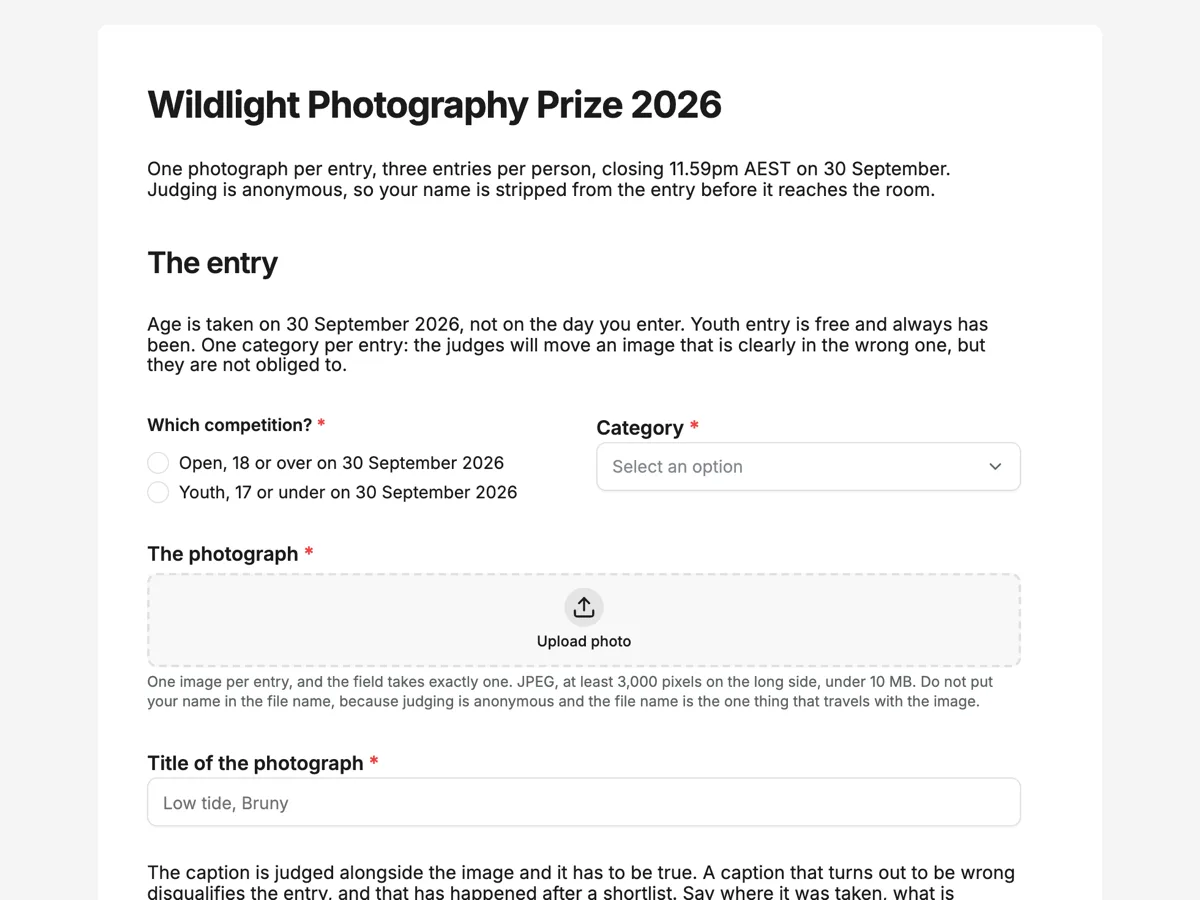 Competition entry formMade with OneCraft, exactly as the generator and editor left it. Open the page for the full breakdown.
Entries per month against credits per month
Wufoo's pricing page on 20 September 2026 runs from a free plan with 5 forms and 100 entries a month to Ultimate at $210.25 a month, or $2,523 for the year, with 200,000 entries and sixty users. In between sit Starter at $16.25 or $195 with 1,000 entries, Professional at $33.25 or $399 with 5,000 entries and five users, and Advanced at $83.25 or $999 with 25,000 entries and twenty users. Storage climbs from 1GB to 20GB across those tiers. OneCraft lists $0, $8, $25 and $125 a month against 150, 500, 1,500 and 7,500 AI credits, with no entry ceiling and no storage tier printed. The sensible way to choose is to guess the busiest month: high response volume favours the credit model, high form turnover favours the entry model.
What a rebuild looks like
Wufoo forms are mostly plain, which makes them good candidates for the PDF route. Print or export the form, attach the file to the generator on a paid plan, then check the rebuilt version for required flags, option lists and anything that was a rule. Rules do not come across, so rebuild simple branching as jump rules in a conversational form, split the form in two, or leave it where it is. Entries stay in Wufoo, so export them before the account lapses, and remember that reports do not come across in any form.
The limits of what was checked
Wufoo does not publish a component count, a template count or a PDF output on its features page, and the pages read for this comparison do not describe an AI form generator or an e-signature product, so those rows say not published rather than asserting that nothing exists. Quotes are trimmed to the claim itself and taken from the features and pricing pages on the date above. Prices are the monthly and annual figures as listed, in US dollars.
How the other column was built
The OneCraft entries all trace to an internal ledger compiled from the product source: 41 component types across two toolkits, 37 themes, the 20 pixel grid the PDF layout editor works on, a file upload field limited to images and PDF, a CSV export that keeps one column per field and joins composite answers rather than splitting them, and a signing trail of 18 event types. Where the ledger records an absence it is stated as one, which is why payments, rules and reports appear as no rather than as coming soon.
Who should stay with Wufoo
Stay with Wufoo if built in reports are how results get read, if the form has to take payment, if rules are what keeps it short, or if respondents upload file types other than images and PDFs. Those four are plain absences here rather than differences of degree.
Questions people ask
Is there a free plan with no entry limit?
The free plan costs nothing and includes 100 AI credits a month, with exports described as limited, and the pricing page prints no entry ceiling. Wufoo's free plan is capped at 5 forms and 100 entries a month. For a high volume form with a simple structure, that difference can be the whole argument.
Can results be charted without exporting them?
No. Results appear in a responses table and download as CSV, with one column per field and composite answers such as matrix or address joined into that column rather than split across several. Wufoo includes out of the box and custom reports, so charts and summaries are built where the data already lives.
What does the conversational mode change for a respondent?
It presents one question at a time with its own themes and components, which suits phones and long forms. It supports recorded audio and video answers, a profile screen and a table. Photo and inline signature fields work there too, while the e-signature component that sends a certified envelope is kept to classic forms.
Can respondents upload a spreadsheet or a zip file?
No. The file upload field exposes exactly two allowed type switches, images and PDF, and nothing else can be permitted. Each field takes between 1 and 10 files at up to 100 MB each. Wufoo describes collecting all types of files, so mixed media submissions are better handled there.
How does a form get signed?
A classic form can carry an e-signature component, and turning on the add-on sends each submitted response out as a signing envelope. The signer is verified by email link, access code or a six digit code, every step is recorded in a hash chained trail, and the finished PDF is PAdES certified with a certificate of completion beside it.
Does an old Wufoo form import directly?
There is no importer. The workable path is to export the form as a PDF and attach it to the generator on a paid plan, which reads the questions and rebuilds them. Styling and any rules are lost, so expect to re-check required flags and option lists before publishing the new version.
Try the form side of OneCraft
The button opens the generator with a starting prompt already filled in. Change the wording to match your own work before you run it.
Create a form with OneCraftMore comparisons
- A Google Forms alternative: what you gain, what you give upOneCraft as a Google Forms alternative: themes, welcome screens, fillable PDFs, e-signature and AI generation, against the Sheets link you give up.
- A Cognito Forms alternative for forms and PDFsA Cognito Forms alternative for AI written forms, response PDFs and certified signing, with the repeating sections, calculations and payments gap stated.
- A 123FormBuilder alternative with AI form generationA 123FormBuilder alternative that generates forms from a description or a PDF, with fillable PDF export and certified signing, against integrations and quizzes.
What the module actually does, feature by feature: the AI form builder page, and the forms maker page.
Step by step in the builder: Build your own form theme, then Publish updates without breaking your live link.
Written and checked by the OneCraft team. Last checked .