Forms · Alternative
A Cognito Forms alternative for forms and PDFs
Cognito Forms is built for forms that behave like small applications: sections that repeat, fields that calculate, payments at the end and documents generated from the result. The comparison here is with a product that writes the form from a description and turns the answers into a fillable or signed PDF, and that does none of the repeating, calculating or charging.
Updated , competitor details checked . Cognito Forms is a trademark of its owner. OneCraft is an unrelated product and claims no affiliation or endorsement.
Nuwan Madhusanka · Co-founder
3 min read · Published · Updated
The short verdict
Cognito Forms is the stronger choice for expense claims, order forms and anything where a section repeats, a total is calculated or a card is charged, at a price that starts free and tops out at $174 a month. OneCraft is for teams whose forms are questionnaires, and whose real work starts when the answers need to become a PDF somebody signs.
| Feature | Cognito Forms | OneCraft |
|---|---|---|
| Free plan | Individual at no cost with 100 entries a month, unlimited forms and one user checked 2026-09-20 | Free at $0 with 100 AI credits a month, described as about three AI projects, and no entry ceiling printed on the pricing page |
| Paid tiers | Pro $24 a month with 2,000 entries and two users; Team $49 with 10,000 entries, five users and five guests; Enterprise $174 with unlimited entries, twenty users and twenty guests checked 2026-09-20 | Starter $8, Pro $25 and Pro+ $125 a month for 500, 1,500 and 7,500 AI credits; a free account cannot attach files to the generator |
| Repeating sections | Repeating Sections and Tables, listed among the data collection features checked 2026-09-20 | A table component draws exactly the number of rows it was set to and has no add row control, so a respondent cannot extend it |
| Calculations | Format numbers for calculations, dates and times, and add values to dropdowns checked 2026-09-20 | No calculated fields. A number field validates a minimum and a maximum and stores what was typed |
| Payments | Accept online payments directly through your forms, using Square, Stripe or PayPal checked 2026-09-20 | No payment component and no gateway of any kind |
| Documents from responses | Automatically generate custom documents leveraging data collected from your forms checked 2026-09-20 | A response PDF arranged in the form's own PDF layout editor, queued through a message queue and polled for up to five minutes |
| Signatures | Capture electronic signatures, and collect file uploads, using the drag and drop form builder checked 2026-09-20 | An inline signature drawn or typed by the respondent and printed into the response PDF, plus an add-on that sends the response out as a certified signing envelope |
| Conditional behaviour | Actions that conditionally send email notifications based on the submission checked 2026-09-20 | No conditional sending. The email alert goes to one fixed address on every submission |
| Security tiers | Data Encryption is listed under security and compliance, and HIPAA Compliance is listed on the Enterprise plan at $174 a month checked 2026-09-20 | No compliance tier is offered. Access to a form is one of four types: public, secret key, login required or domain restricted |
| Writing the form | Not published as an AI feature on the pages checked checked 2026-09-20 | A description of up to 10,000 characters generates the fields, sections, welcome screen and theme in one pass, as a job with a five minute ceiling |
| Appearance | Not itemised as a theme count on the pages checked checked 2026-09-20 | 37 themes, 22 colour palettes, 24 background patterns and 23 font pairs, plus 10 welcome layouts and 4 thank-you layouts |
| Components | Form fields are listed by name rather than counted on the features page checked 2026-09-20 | 41 component types, offered as 36 in the classic toolkit and 25 in the conversational one, including matrix, address, full name and fill in the blank |
Where Cognito Forms is better
Sections that repeat as many times as needed
Repeating sections are the reason many people choose Cognito Forms. Three expense lines or eleven, five passengers or one, the form grows with the answer. The table component here draws a fixed number of rows decided when the form was built, with no control for adding another, so a claim with more lines than rows simply will not fit.
Fields that do arithmetic
Cognito Forms formats numbers for calculations and totals them as the form is filled. Nothing here computes anything. Quantities, rates, subtotals and tax are collected as typed values, and the arithmetic waits for whoever opens the CSV, which rules out order forms and quotes that must show a total before submission.
Card payments inside the form
Square, Stripe and PayPal are wired straight into a Cognito form, so the same page that collects the order collects the money. No OneCraft form takes payment at all. For registrations with a fee or product orders, that absence decides the comparison before anything else is weighed.
A compliance tier exists
HIPAA Compliance is listed on the Enterprise plan at $174 a month, alongside data encryption under security and compliance. OneCraft publishes no compliance tier and makes no such claim, so an organisation with a regulatory obligation has nothing here to point an auditor at.
Where OneCraft is different
The draft arrives written
A description of up to 10,000 characters produces the whole form, fields, sections, welcome screen and theme, as a background job with a five minute ceiling. On a paid plan the description can be swapped for an attachment, so an existing PDF or a photo of the paper claim sheet becomes the starting point instead.
Answers have a deliberate paper form
The response PDF is not a dump of the submitted values. It is laid out in a dedicated PDF editor with a 20 pixel grid, so the finished document can match the shape of the paper record it replaces, and a blank template PDF downloads without a plan gate for anyone still collecting on a clipboard.
Two form types in one builder
Classic and conversational forms are separate types, 36 components against 25, with 12 and 25 themes respectively. The conversational side carries recorded audio and video answers and a profile screen; the classic side carries the design blocks, the e-signature component and the chart and table blocks.
Signing continues past the submit button
With the add-on enabled, each submitted response becomes a signing envelope with its own recipients, an identity check of email link, access code or six digit code, an 18 event hash chained trail, and a PAdES certified PDF with a separate certificate of completion.
A finished example
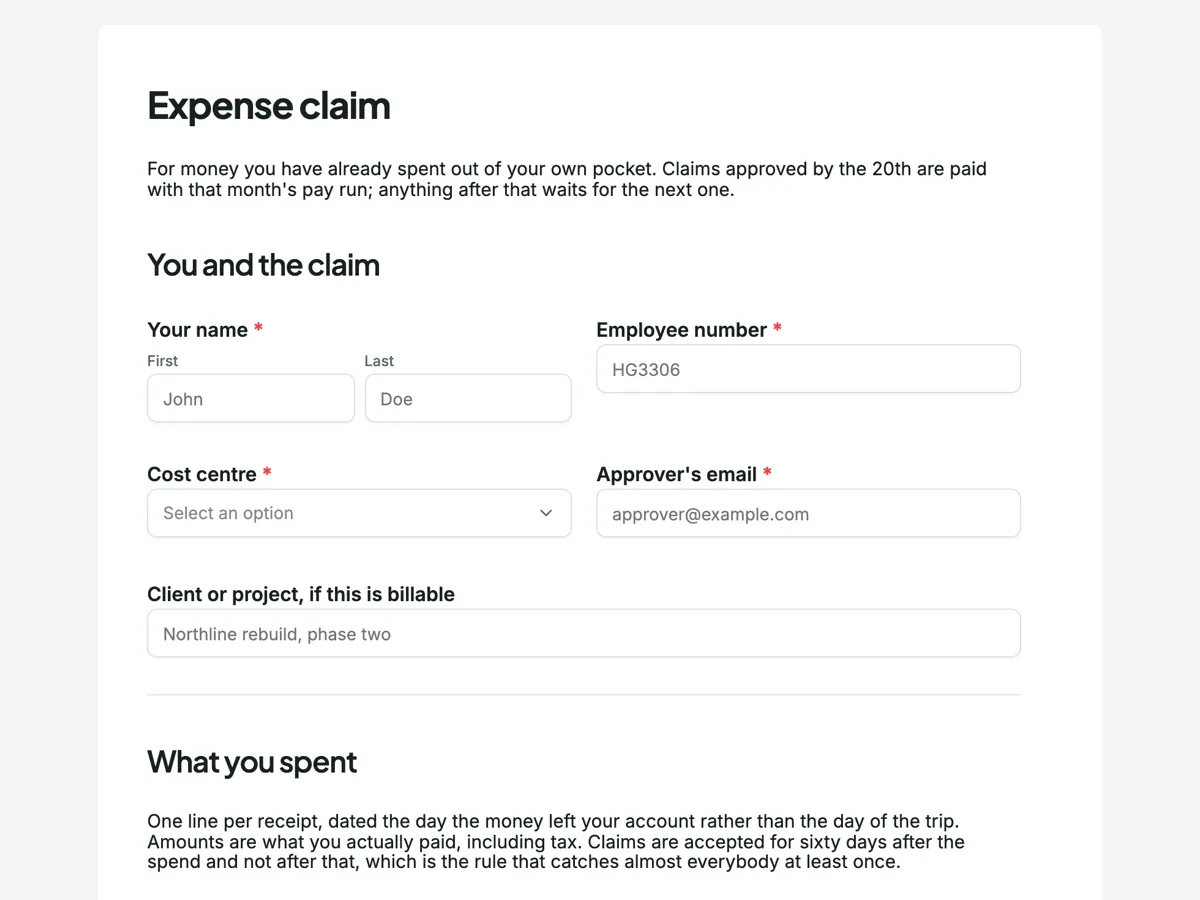 Expense claim formMade with OneCraft, exactly as the generator and editor left it. Open the page for the full breakdown.
Entry limits against credit limits
Cognito Forms prices by entries. On 20 September 2026 the free Individual plan allows 100 entries a month with one user, Pro is $24 a month for 2,000 entries and two users, Team is $49 for 10,000 entries with five users and five guests, and Enterprise is $174 for unlimited entries with twenty users and twenty guests. OneCraft prices by generation: $0, $8, $25 and $125 a month for 150, 500, 1,500 and 7,500 AI credits, with nothing printed about how many people may answer a form. A single busy form can cost a Cognito account real money as it grows and costs nothing extra here, while an agency spinning up new forms every week hits the credit ceiling here and never notices it there.
Which forms can actually move
A questionnaire moves without drama. An expense claim, an order form or a booking that relies on repeating sections and calculated totals does not, because neither capability exists on the other side. The nearest approximation is a table component with a fixed number of rows plus arithmetic done after export, and that is worse, not equivalent. Export the entries to CSV before closing an account, since nothing transfers automatically, and rebuild the form from its PDF through the generator rather than by hand.
What the pages did not say
The Cognito Forms features page names fields by category rather than counting them, does not state a theme count, and does not describe an AI form generator, so those cells read as not published instead of guessing at a number. Payment gateway names, the repeating sections wording and the document generation claim are quoted from that page as written on the date above. Plan figures come from the pricing page on the same day.
The basis for the right hand column
Every OneCraft claim above maps to a line in an internal ledger read out of the product source, including the fixed row behaviour of the table component, which draws the number of rows it was configured with and offers no add row control. The ledger records absences with the same care as features, so the no answers on calculations, payments and repeating sections are checked statements rather than omissions, and none of them describe planned work.
Who should stay with Cognito Forms
Stay with Cognito Forms if a section of the form repeats, if a total has to be calculated while somebody types, if the form takes payment, or if a HIPAA tier is a requirement. Each of those is a plain absence here, and a fixed row table is not a substitute for a repeating section.
Questions people ask
Is there any equivalent of a repeating section?
Only a table component with a fixed number of rows. It draws exactly the rows it was configured with, every cell a plain text input, and offers no control for adding another. A claim or order with more lines than rows cannot be completed, so forms that grow with the answer need Cognito Forms.
Can a total be shown before the form is submitted?
No. Nothing is calculated in the browser or on submission. Numbers can be validated against a minimum and a maximum, and that is the limit of the arithmetic. Totals, tax and scored questionnaires have to be worked out after the responses are exported.
Can a response become a PDF automatically?
Yes. A submitted response renders to a PDF whose layout is arranged in a dedicated editor on a twenty pixel grid, and generation is queued and polled for up to five minutes. A blank template PDF is available with no plan gate, while the fillable PDF export opens on the Starter plan.
How do signatures compare?
Both products capture a signature on the form. The difference is afterwards: here an add-on turns the submitted response into a signing envelope with identity verification, a hash chained trail of 18 event types and a PAdES certified PDF, which is closer to a dedicated signing product than to a signature image stored with the entry.
Is a HIPAA plan available?
No. Cognito Forms lists HIPAA Compliance on its $174 Enterprise tier. OneCraft publishes no compliance tier and makes no healthcare claim anywhere. What it does offer is four access types, public, secret key, login required and domain restricted, which control who reaches the form but say nothing about regulatory obligations.
How many people can use one account?
The pricing page counts AI credits rather than users or guests, so there is no seat licence to buy and no guest role to configure. Cognito Forms counts both, from one user on the free plan to twenty users and twenty guests on Enterprise, which is the clearer model for a team that needs separate logins.
Try the form side of OneCraft
The button opens the generator with a starting prompt already filled in. Change the wording to match your own work before you run it.
Create a form with OneCraftMore comparisons
- A Wufoo alternative with conversational formsA Wufoo alternative with AI written forms, 37 themes and a one question at a time mode, set against Wufoo's entry limits, reports and payment providers.
- A Zoho Forms alternative with AI and e-signatureA Zoho Forms alternative for teams outside the Zoho suite: AI written forms, fillable PDFs and certified signing, with approvals and offline mobile compared.
- A Jotform alternative for forms, PDFs and signingOneCraft as a Jotform alternative: classic and conversational forms, fillable PDFs, e-signature and AI generation, with Jotform's breadth stated honestly.
What the module actually does, feature by feature: the AI form builder page, and the forms maker page.
Step by step in the builder: The form builder components, then View, export and manage your responses.
Written and checked by the OneCraft team. Last checked .