Forms · Alternative
A Zoho Forms alternative with AI and e-signature
Zoho Forms is strongest as a component of the Zoho suite: submissions route through multilevel approvals, records land in Zoho CRM, and field staff collect data offline in the mobile app. This comparison is for teams with no Zoho subscription behind them, who want the form written by AI and the completed answers turned into a certified, signed PDF.
Updated , competitor details checked . Zoho, Zoho Forms and Zoho CRM are trademarks of their owner. OneCraft is an independent product with no affiliation to Zoho.
Nuwan Madhusanka · Co-founder
3 min read · Published · Updated
The short verdict
Zoho Forms makes sense for an organisation already inside the Zoho suite, or one that needs approvals, offline collection on a phone and leads landing in a CRM without writing any code. OneCraft makes sense for a team with none of that, whose problem is drafting the form quickly and getting a signed, certified PDF out the other end.
| Feature | Zoho Forms | OneCraft |
|---|---|---|
| Price | Not published in the page content when it was fetched on the date shown; the plan table lists features without price text checked 2026-09-20 | Free at $0 with 100 AI credits a month, then Starter $8, Pro $25 and Pro+ $125 for 500, 1,500 and 7,500 credits |
| Plan limits | Free with 3 forms, 500 submissions a month and one user; paid tiers list unlimited forms with 10,000, 25,000, 75,000 and 150,000 submissions a month and 1, 10, 25 and 100 users checked 2026-09-20 | No form count, submission cap or user count is printed. What is metered is AI generation, and what is controlled is access: public, secret key, login required or domain restricted |
| Approvals | A hierarchical or multilevel approval system to review, approve or reject form submissions and automate subsequent workflows checked 2026-09-20 | No approval step of any kind. A submission goes to the responses table, and the only outward signals are one webhook and one email alert |
| Offline collection | Create forms and collect data with the offline mobile forms software even when you are in a poor connectivity zone, on iOS and Android checked 2026-09-20 | No mobile app and no offline mode. A form is a web page that needs a connection, though a blank template PDF can be printed for collection on paper |
| Payments | Collect secure online payments by connecting your forms with popular payment gateways and processors checked 2026-09-20 | No payment component and no gateway integration |
| Signatures | Capture handwritten signatures on the go to approve requests, complete agreements and finalize transactions checked 2026-09-20 | An inline signature drawn or typed into the response PDF, plus an add-on that sends the response out as an envelope ending in a PAdES certified PDF with a certificate of completion |
| Conditional rules | Create dynamic forms that display relevant questions based on previous responses checked 2026-09-20 | Jump rules on conversational forms only. Every question on a classic form is shown to every respondent |
| CRM | Capture leads, update records, trigger workflows and keep your sales pipeline moving automatically with Zoho CRM checked 2026-09-20 | No CRM connector. One webhook posts the response as JSON once, with a ten second timeout, no retry and private addresses blocked |
| Appearance | Make your forms functional and beautiful with customization and themes, without a theme count on the page checked 2026-09-20 | 37 themes, 12 classic and 25 conversational, with 22 colour palettes, 24 background patterns and 23 font pairs |
| Writing the form | Not published as an AI generation feature on the pages checked checked 2026-09-20 | A prompt of up to 10,000 characters, with up to five attachments of 10 MB each on a paid plan, producing fields, sections, welcome screen and theme in one pass |
| Response as a document | Not published as a response PDF designer on the pages checked checked 2026-09-20 | A filled response PDF on every plan, arranged in a dedicated layout editor, generated through a queue and polled for up to five minutes |
| One question at a time | Not offered as a separate form type on the pages checked checked 2026-09-20 | A conversational form type with its own 25 component toolkit, including recorded audio and video answers and a combined profile screen |
Where Zoho Forms is better
Submissions can be approved before they count
A hierarchical or multilevel approval system reviews, approves or rejects submissions and triggers what happens next. A leave request can wait for a manager inside the product. Here a submission is final the moment it is sent, and any sign off has to happen in email or in another system entirely.
Field staff can work without signal
The Zoho Forms mobile app collects data offline and syncs when the connection returns, which matters on a site inspection, a farm or a remote clinic. There is no mobile app here and no offline mode. The closest substitute is printing the blank template PDF and typing the answers in later.
The suite does the integration work
Leads, records and workflows flow into Zoho CRM without any code, and the rest of the Zoho tools are equally close. The only outbound channel here is a webhook that posts once with a ten second timeout and no retry, so anything resembling a pipeline is something you build and maintain yourself.
Questions adapt as they are answered
Dynamic forms that show relevant questions based on previous answers keep long forms manageable. With only jump rules on conversational forms, a classic form here shows everything to everybody, which is workable for a leave request and poor for anything that branches by department, contract type or eligibility.
Where OneCraft is different
No suite required
The account stands alone. A free plan costs nothing, includes 100 AI credits a month and needs no other subscription, and nothing assumes a CRM, a mail product or an admin console behind it. For a business that has deliberately avoided a suite, that independence is the point.
Signing is certified, not just captured
A handwritten signature captured on a device is an image. The add-on here produces an envelope with identity verification by email link, access code or six digit code, an append only trail of 18 event types chained by hash, and a PAdES certified PDF with its own certificate of completion listing hashes, IP addresses and consent timestamps.
The first draft is generated
Up to 10,000 characters of description produce the questions, sections, welcome screen and theme in one generation, in the language asked for. On a paid plan an attachment can stand in for the description, so an existing PDF form or a photograph of a printed one becomes the starting point.
The same account makes the rest of the paperwork
Documents, presentations, flyers and promotional videos come from the same login, so the engineering firm collecting leave requests can also draft its policy document and its site safety flyer without another subscription. Zoho answers that with a much larger suite, at suite scale and suite cost.
A finished example
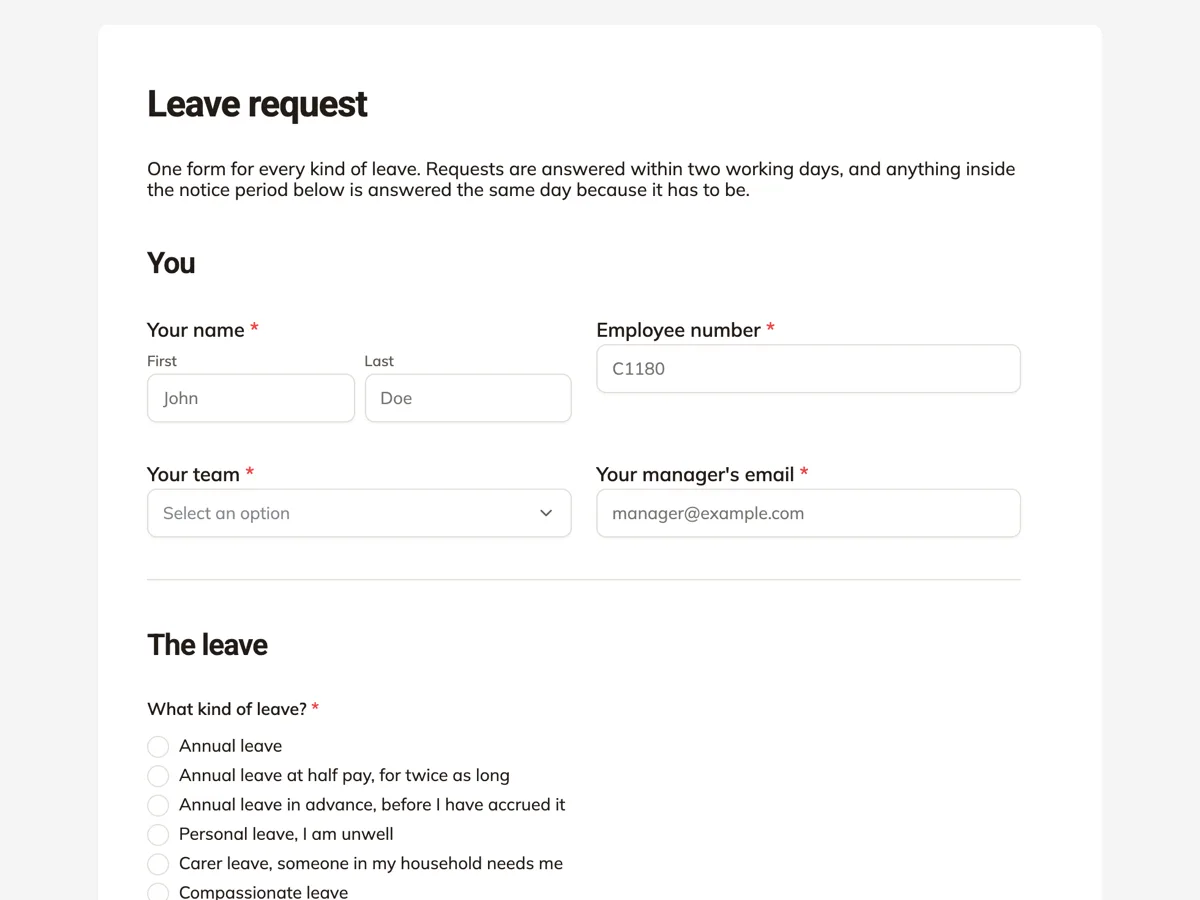 Leave request formMade with OneCraft, exactly as the generator and editor left it. Open the page for the full breakdown.
What the pricing page did and did not show
The Zoho Forms pricing page was read on 20 September 2026 and its plan table listed limits without price text in the content returned: a free plan with 3 forms, 500 submissions a month and one user, then paid tiers with unlimited forms and 10,000, 25,000, 75,000 and 150,000 submissions a month, at 1, 10, 25 and 100 users. Approvals appear from the third tier, offline mobile forms and e-signature on the highest. Because no figure was published in what was fetched, this page does not state a Zoho price at all rather than guessing one. OneCraft's own plans are $0, $8, $25 and $125 a month for 150, 500, 1,500 and 7,500 AI credits, with no submission ceiling printed.
Which parts of a Zoho form can move
A plain questionnaire moves cleanly through the PDF route: export the form, attach it to the generator on a paid plan, and check the rebuilt fields. What cannot move is the part of the form that is really a workflow. Approvals have no destination. A CRM write has to become a webhook and a small service of your own. Offline collection has no equivalent at all, so any team using the mobile app in the field should treat this comparison as academic and stay where they are.
How the claims were sourced
Zoho claims are quoted from its features page, its mobile forms page and its pricing page on the date above, trimmed to the claim itself. Where the pages do not describe something, such as AI generation of a whole form, a response level PDF designer or a one question at a time layout, the table says not published rather than asserting the feature is missing. Nothing here is taken from a review site or a third party comparison.
Behind the OneCraft column
Each entry traces to an internal ledger compiled by reading the product source: 41 component types, 37 themes, an 8,000 character prompt ceiling, five attachments of 10 MB on a paid plan, four access types, a webhook that fires once with a ten second timeout and blocks private addresses, and a signing flow whose audit trail carries 18 event types in a verifiable hash chain. The absences, including approvals and payments, are recorded the same way, as is logic that stops at conversational jump rules.
Who should stay with Zoho Forms
Stay with Zoho Forms if submissions need approval before they count, if data is collected offline on a phone, if records must reach Zoho CRM, or if questions that show or hide on an answer keep the form short. All four are absent here, and the webhook is not a substitute for suite integration.
Questions people ask
Can a manager approve a submission before it is processed?
No. There is no approval workflow, so every submission is final when it arrives and sits in the responses table. Zoho Forms offers a hierarchical or multilevel approval system that can approve or reject a submission and trigger what follows. If sign off is part of the process, that is the deciding difference.
Is there a mobile app for collecting responses offline?
No. Forms are web pages and need a connection. The nearest workaround is downloading the blank template PDF, which has no plan gate, collecting on paper and entering the answers afterwards. Zoho Forms has iOS and Android apps that collect offline and sync when signal returns.
How does the signing compare with capturing a signature on a phone?
A captured signature is an image stored with the entry. The add-on here builds a signing envelope: the signer is verified by email link, access code or a six digit code, every event is written to a hash chained trail of 18 types, and the finished PDF is PAdES certified with a certificate of completion beside it.
Can form data reach a CRM?
Only through a webhook that you receive yourself. It posts the response once as JSON, keyed by field label and by field id, with a ten second timeout, no retry and no redirect following, and it refuses private network addresses. Zoho Forms writes into Zoho CRM directly, with no code in between.
Does the generator work in languages other than English?
Yes. The language is typed freely with 32 suggestions offered, and the generated questions, sections and screens come back in that language. The prompt itself can run to 10,000 characters, which is enough to describe a long form with its option lists spelled out.
Is there a limit on how many people can fill a form?
No submission ceiling is printed on the pricing page, and plans meter AI generation credits instead. Zoho Forms caps submissions per month by tier, from 500 on the free plan upward. For a high volume intake form, that difference matters more than any feature comparison in the table.
Try the form side of OneCraft
The button opens the generator with a starting prompt already filled in. Change the wording to match your own work before you run it.
Create a form with OneCraftMore comparisons
- A Cognito Forms alternative for forms and PDFsA Cognito Forms alternative for AI written forms, response PDFs and certified signing, with the repeating sections, calculations and payments gap stated.
- A Formsite alternative for forms and signed PDFsA Formsite alternative that writes the form from a description, lays out its PDF and signs it with a certificate, against Formsite's workflow and result limits.
- A Microsoft Forms alternative outside Microsoft 365A Microsoft Forms alternative for people without a 365 subscription: AI written forms, 37 themes, conversational mode, fillable PDFs and certified signing.
What the module actually does, feature by feature: the AI form builder page, and the forms maker page.
Step by step in the builder: Automate your form with add-ons, then View, export and manage your responses.
Written and checked by the OneCraft team. Last checked .