Presentations · Alternative
A Plus AI alternative outside PowerPoint and Slides
A Plus AI alternative suits someone who does not live in PowerPoint or Google Slides and wants a complete deck from a brief without installing an add-in. Plus AI works inside both apps with brand templates and native PPTX; OneCraft is a standalone editor with 1,071 layouts, an AI assistant, saved versions and editable PowerPoint export.
Updated , competitor details checked . Plus AI is a trademark of its owner, and PowerPoint and Google Slides are trademarks of theirs. OneCraft is not affiliated with or endorsed by any of them, and every cell cites a public page or a named ledger row.
Indunil Asanka · Co-founder
3 min read · Published
The short verdict
Plus AI suits people who already build decks in PowerPoint or Google Slides and want AI inside that app, with company templates, brand presets and an API on higher tiers. OneCraft suits people who would rather generate, restyle, present and record in one standalone editor, starting on a free plan, and send PowerPoint out at the end.
| Feature | Plus AI | OneCraft |
|---|---|---|
| Pricing | Basic $10, Pro $20, Team $30 and Max $200 per user a month billed annually; $15, $25, $40 and $240 billed monthly; a 7 day trial with a card checked 2026-09-29 | Free at $0 with 100 credits a month and decks capped at 6 slides; Starter $8, Pro $25 and Pro+ $125 a month, per account |
| AI credits | 1,500, 3,000 and 6,000 credits a month on Basic, Pro and Team, unlimited on Max; tasks typically use 40 to 170 credits checked 2026-09-29 | 150, 500, 1,500 and 7,500 credits a month, shared with documents, flyers, forms and videos |
| Add-in or standalone | An assistant that works directly inside PowerPoint and Google Slides, one subscription covering both checked 2026-09-29 | A standalone browser editor on a 1920 by 1080 canvas; nothing runs inside PowerPoint or Google Slides |
| Editable PowerPoint | Native PPTX, with charts and tables fully editable in Google Slides and PowerPoint checked 2026-09-29 | Editable PPTX on paid plans with native text, lists, images, tables and charts; diagrams and maps stay pictures with native text labels |
| Templates | Hundreds of layouts and designer templates, with custom templates from your own slide masters on Enterprise checked 2026-09-29 | 1,071 slide templates across 26 roles; no import of your own slide masters |
| AI edit operations | Insert single slides, rewrite text, and remix any slide into a chosen design checked 2026-09-29 | 9 operations: add, delete and move slides, update a slot, swap template or theme, set the title, redo a slide and generate an image, applied from a preview |
| Version history | Not stated on the pricing or home page; decks live in the host app checked 2026-09-29 | The history drawer lists 50 saved versions, each previewable read only and restorable as a new version |
| Starting from a file | Upload a PDF, Word document, PowerPoint or text file; document uploads and 100K+ character prompts from Pro checked 2026-09-29 | Up to 5 PDF, text or image files of 25 MB each on paid plans; Word and PowerPoint files are not accepted |
| Brand | Custom branding with logo, colours and fonts, saved presets and custom AI instructions on Team checked 2026-09-29 | A logo or text mark top right on the first slide or all slides, over 99 themes and 42 fonts |
| AI images | AI image generation from Pro, with advanced image models on Team checked 2026-09-29 | Generated images snapped to 8 aspect ratios, with profile and logo slots never auto-filled; failed images fall back to stock photos |
| API | An API that creates native PowerPoint slides, plus Zapier and an MCP server checked 2026-09-29 | No API; decks are generated from the app |
| Presenting | Decks are presented in PowerPoint or Google Slides, where Plus AI runs checked 2026-09-29 | Its own present mode with notes pop-out, pen and spotlight, and WebM recording up to 4K on paid plans |
Where Plus AI is better
It works inside PowerPoint
Plus AI adds generation, rewriting and remixing to PowerPoint and Google Slides, so the deck never leaves the file your company already uses, with its masters and comments intact. OneCraft cannot edit inside PowerPoint; its decks reach PowerPoint only through export.
Your own templates and slide masters
Team adds brand logo, colours and fonts, shared presets and custom instructions, and Enterprise converts your organisation's real slides and masters into templates. OneCraft offers its own 1,071 layouts and 99 themes only; your corporate master cannot be loaded.
More ways in
Plus AI accepts Word and PowerPoint files as sources and prompts of more than 100,000 characters from Pro. OneCraft takes 10,000 characters of prompt plus PDF, text and image attachments, and refuses .docx and .pptx.
An API and a SOC 2 report
Plus AI offers an API for native PowerPoint slides, a Zapier connection and an MCP server, and states SOC 2 Type II compliance. OneCraft has no deck API and publishes no compliance report.
Where OneCraft is different
A free plan that keeps working
OneCraft's free plan renews 100 credits every month and exports decks of up to 6 slides to PDF. Plus AI offers a 7 day trial with 1,000 credits that needs a card and converts to a paid plan when it ends.
Decks built from slide roles
The generator assigns each slide a role, metrics, comparison, timeline, pricing and 22 more, and picks a layout from that role's family. For a QBR that means revenue and margin figures can land on one of 31 metrics layouts without manual formatting.
History and presenting in the same tool
Fifty saved versions sit in a drawer to preview or restore, the assistant's changes arrive as previews, and present mode has a notes pop-out, pen and spotlight tools and recording. None of it depends on a host app.
A finished example
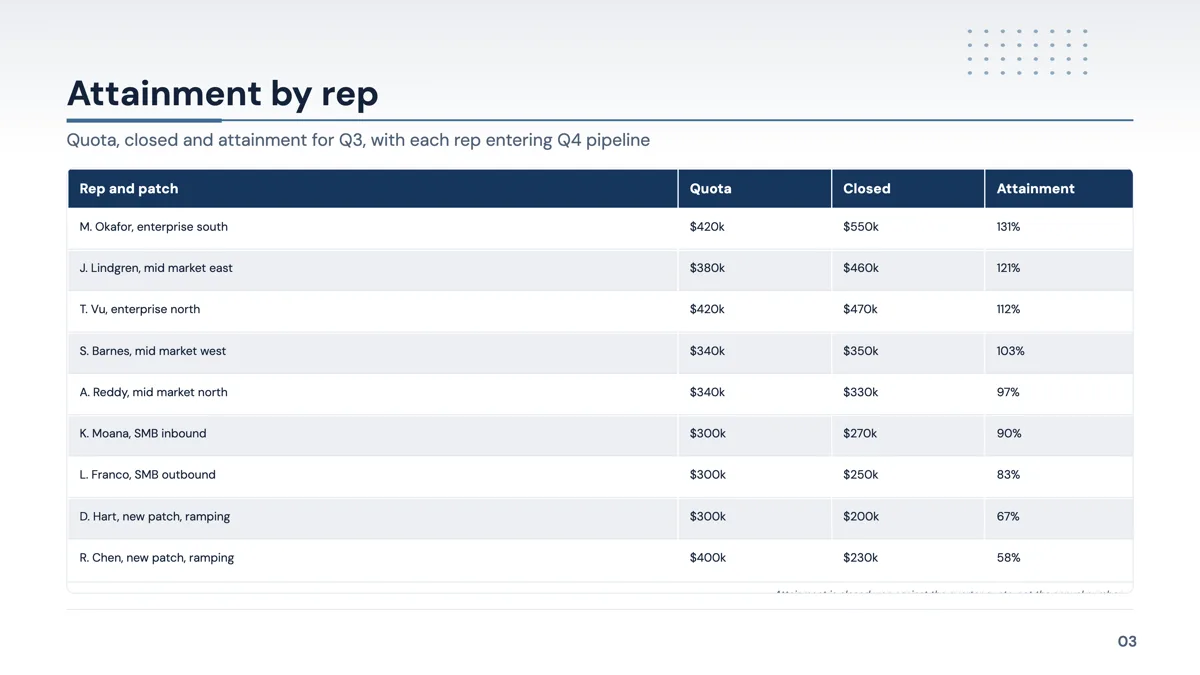 Sales QBR deck for a team of nine, quarter by quarterMade with OneCraft, exactly as the generator and editor left it. Open the page for the full breakdown.
Pricing in plain terms
Plus AI's pricing page, checked 29 September 2026, lists Basic at $10 per user a month billed annually or $15 monthly with 1,500 credits, Pro at $20 or $25 with 3,000, Team at $30 or $40 with 6,000 and branding, and Max at $200 or $240 with unlimited credits. Every paid plan starts with a 7 day trial carrying 1,000 credits, and a card is required. OneCraft lists Free at $0 with 100 credits a month, Starter at $8, Pro at $25 and Pro+ at $125, per account.
Add-in or standalone, in practice
An add-in inherits everything its host does: your masters, your file storage, co-editing and PowerPoint's own presenter view. A standalone editor has to supply those itself, and OneCraft supplies some, like versions and present mode, and not others, like comments and custom masters. The trade is the structure: a deck generated into named slide roles, restyled by swapping layouts, which a host app's free canvas does not enforce.
Moving across
Nothing needs migrating, because Plus AI decks are ordinary PowerPoint or Google Slides files. To rebuild one in OneCraft, save it as PDF and attach it on a paid plan, or paste its outline into the prompt, and expect a new deck in OneCraft's layouts. Going the other way, the editable PPTX export opens in PowerPoint with text, tables and charts editable.
What could not be checked
Plus AI's pages do not state how version history works beyond the host app or give a layout count, so those cells say so. Prices were served in US dollars. OneCraft cells each name a row in an internal ledger checked against the slide editor's, exporter's and generator's source code.
Who should stay with Plus AI
Stay with Plus AI if your decks must stay in PowerPoint or Google Slides, on your company's own masters, or if you need an API, Word and PowerPoint uploads, or a SOC 2 report. OneCraft suits someone who prefers a standalone editor with a free plan and uses PowerPoint only as the final format.
Questions people ask
Can I use my company's PowerPoint template in OneCraft?
No. OneCraft decks use its own 1,071 layouts and 99 themes, and there is no way to import a slide master or a .potx file. A logo or text mark can be added to the first slide or every slide. Plus AI's Enterprise plan converts an organisation's own slides and masters into templates.
Will the PowerPoint file be editable?
The editable PPTX export, on paid plans, writes text, lists, images and tables as native PowerPoint objects and turns 9 of 10 chart kinds into real charts. Diagram, matrix, Gantt, flowchart and map artwork stays a picture, but its labels become text boxes. The plain PowerPoint export is one image per slide.
Are speaker notes included in the PowerPoint export?
No. Notes are stored per slide and used in present mode and its pop-out window, but neither PDF nor either PowerPoint export carries them. If notes need to travel with the file, add them in PowerPoint after export, or keep presenting from OneCraft where they are available.
What if an AI image comes out wrong?
Ask the assistant to generate a new image for that slot, or upload your own JPEG, PNG, WebP or GIF. Images smaller than 60 percent of the slot's target size are rejected automatically and replaced with a stock photo, with the photographer and source page recorded. Profile and logo slots are never filled automatically.
Can I undo something the AI assistant did?
Yes, in two ways. The assistant's changes only land when you apply its preview, and after that the editor's undo goes back up to 50 steps. For larger reversals, open version history, preview an earlier saved version and restore it, which creates a new version rather than overwriting.
Try the presentation side of OneCraft
The button opens the generator with a starting prompt already filled in. Change the wording to match your own work before you run it.
Create a presentation with OneCraftMore comparisons
- A SlidesAI alternative that is not a Google add-onA SlidesAI alternative that runs in its own editor: a longer prompt limit, 1,071 layouts, 99 themes, chat edits and PowerPoint export, next to SlidesAI's plans.
- A PowerPoint Designer alternative for whole decksA PowerPoint Designer alternative that lays out a whole deck from a brief, swaps layouts and themes with content kept, and exports editable PPTX back.
- A Gamma alternative for AI presentations you can editA Gamma alternative for AI decks that leave as editable PowerPoint: fixed 1920 by 1080 slides, 1,071 layouts, 9 chat edits, and the web features Gamma keeps.
What the module actually does, feature by feature: the AI presentation maker page, and the presentations maker page.
Step by step in the builder: Export a presentation to PowerPoint or PDF, then Undo changes and restore an earlier version.
Written and checked by the OneCraft team. Last checked .