Presentations · Alternative
A PowerPoint Designer alternative for whole decks
A PowerPoint Designer alternative helps when you need a whole deck laid out, not one slide at a time. Designer suggests layouts for the slide you are on, inside PowerPoint and bundled with Microsoft 365; OneCraft writes and lays out every slide from a brief, lets you swap layouts and themes with content kept, and exports editable PowerPoint.
Updated , competitor details checked . Microsoft, PowerPoint, Microsoft 365 and Copilot are trademarks of Microsoft Corporation. OneCraft is not affiliated with or endorsed by Microsoft, and every cell cites a public page or a named ledger row.
Indunil Asanka · Co-founder
3 min read · Published
The short verdict
PowerPoint Designer suits anyone already building slides in PowerPoint who wants better layouts for the slide in front of them, at no extra cost on Microsoft 365 or PowerPoint for the web. OneCraft suits someone starting from a brief who wants every slide written and laid out in one pass, then restyled by swapping layouts and sent back to PowerPoint as an editable file.
| Feature | PowerPoint Designer | OneCraft |
|---|---|---|
| Cost | A subscriber only feature on desktop PowerPoint, and available to everyone on PowerPoint for the web checked 2026-09-29 | Free at $0 with 100 credits a month and decks capped at 6 slides; Starter $8, Pro $25 and Pro+ $125 a month |
| Microsoft 365 price | Personal $9.99 a month or $99.99 a year, Family $12.99 or $129.99, Premium $19.99 or $199.99, all including PowerPoint checked 2026-09-29 | Per account plans whose credits also cover documents, flyers, forms and videos |
| Scope | Design ideas for the current slide, matching its content to professionally designed layouts checked 2026-09-29 | The whole deck, 3 to 20 slides, written and laid out from a brief of up to 10,000 characters |
| Writing the content | Designer arranges what is on the slide; drafting a presentation from a prompt is Copilot in PowerPoint, in Agent Mode checked 2026-09-29 | Outline and copy generated together, grounded by one web search and one page fetch per deck |
| Layouts | Suggestions for pictures, charts and tables, lists and timelines turned into SmartArt, and illustrations from the Microsoft 365 icon library checked 2026-09-29 | 1,071 templates in 26 roles, including 67 timeline, 63 process and 18 checklist layouts |
| Swapping layout with content kept | Pick another idea from the pane or go back to the original design; Ctrl+Z undoes a design change checked 2026-09-29 | Swap to any template in the role; content re-keys by box, per box styling survives, and unmatched content is parked and restored on the way back |
| Theme | On a new blank deck, a title slide photo and a recommended colour scheme so all slides fit together checked 2026-09-29 | 99 themes in the picker, 42 fonts and 15 background layouts; one change restyles every slide |
| Back into PowerPoint | Native: Designer works inside PowerPoint for Microsoft 365, Mac, the web, iPad and Android tablets checked 2026-09-29 | Editable PPTX on paid plans with native text, lists, images, tables and 9 of 10 chart kinds; speaker notes are not exported |
| Requirements | Optional connected experiences must be on, and an organisation can turn Designer off checked 2026-09-29 | A signed in browser; the generator's prompt survives the sign in bounce |
| Charts | Design ideas for charts already on the slide checked 2026-09-29 | 10 chart kinds, from bar and line to radar, waterfall and waffle |
| Presenting | PowerPoint's Presenter View shows notes and the next slide on your own screen checked 2026-09-29 | Notes pop-out window, pen, highlighter and spotlight, and WebM recording up to 4K on paid plans |
| AI edits across the deck | Designer changes the selected slide from its Design Suggestions pane checked 2026-09-29 | An assistant that can add, delete or move slides, swap template or theme, or redo a slide, shown as a preview first |
Where PowerPoint Designer is better
It is already inside PowerPoint
Designer runs in the PowerPoint you already use, on desktop, Mac, the web and tablets, so nothing is exported or re-imported and every PowerPoint feature stays available. OneCraft reaches PowerPoint only through its export, and edits made there do not come back.
Included in what you pay for
Design Suggestions are included for Microsoft 365 subscribers on desktop and available to everyone on PowerPoint for the web. If you already pay for Microsoft 365, there is nothing extra to buy.
Whole deck drafting through Copilot
Microsoft's own answer to a whole deck is Copilot in PowerPoint, which drafts a presentation from a prompt and lets you refine it in chat, where your subscription includes it. That keeps generation inside PowerPoint too, which OneCraft cannot do.
Your organisation's templates
PowerPoint works with your company's own templates and masters. OneCraft decks use its own layouts and themes, and a corporate master cannot be loaded.
Where OneCraft is different
The deck, not the slide
Designer improves the slide in front of you. OneCraft decides the whole sequence: a role for each slide, cover, agenda, content, checklist, closing, and a layout from that role, so a 12 slide training deck arrives structured rather than slide by slide.
Swaps that keep your content
Moving a slide to another layout re-keys its content by box and keeps styling you changed. Content that has no box in the new layout is parked, and it comes back if you swap back, so trying layouts costs nothing.
A clean hand-off back to PowerPoint
The editable PPTX keeps text, lists, images and tables as PowerPoint objects and nine chart kinds as real charts, so the deck can be finished in PowerPoint, where Designer can still suggest layouts slide by slide.
A finished example
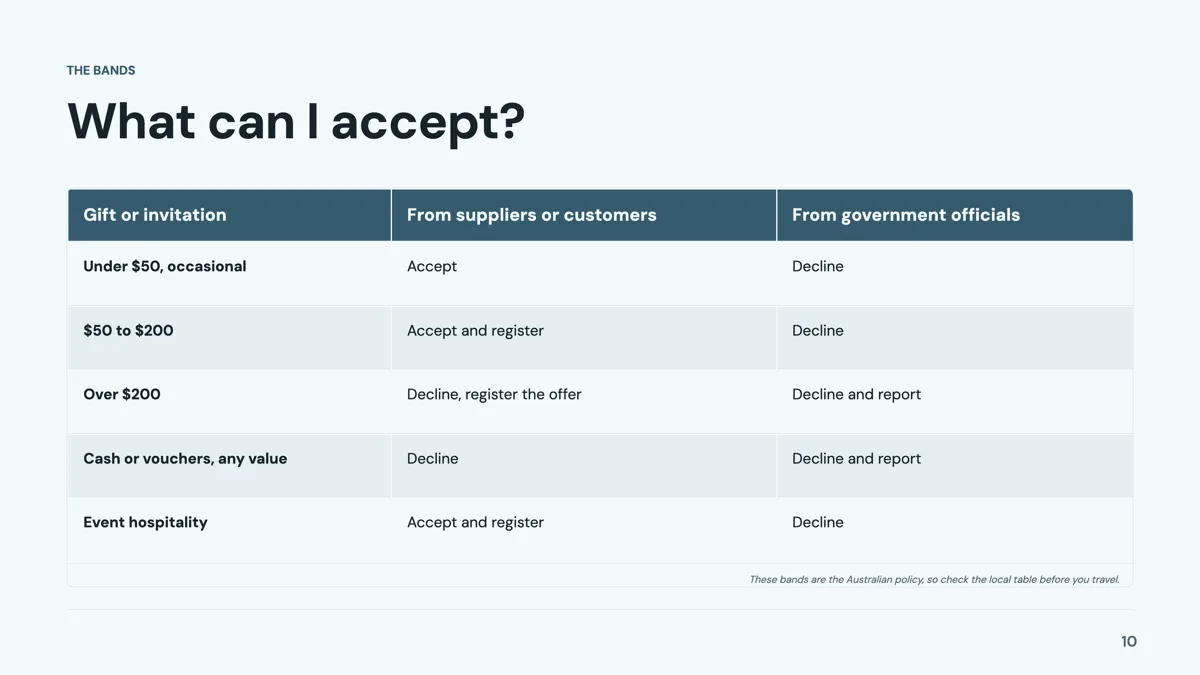 Compliance training presentation that teaches with scenariosMade with OneCraft, exactly as the generator and editor left it. Open the page for the full breakdown.
Cost in plain terms
Designer has no price of its own. Microsoft's support article, checked 29 September 2026, calls Design Suggestions a subscriber only feature on desktop PowerPoint and says they are available to everyone on PowerPoint for the web. Microsoft's plan page lists Microsoft 365 Personal at $9.99 a month or $99.99 a year, Family at $12.99 or $129.99 and Premium at $19.99 or $199.99, each including PowerPoint. OneCraft lists Free at $0 with 100 credits a month, Starter at $8, Pro at $25 and Pro+ at $125.
Using both
The two fit together more than they compete. Generate a deck in OneCraft from a brief, export the editable PPTX on a paid plan, open it in PowerPoint and let Designer or your own hand finish individual slides. The export writes native text boxes and charts, so PowerPoint treats the content as its own. What does not travel is anything OneCraft keeps outside the slide: speaker notes, versions and the assistant's chat.
Moving across
OneCraft cannot import a .pptx, so a deck already half built in PowerPoint is carried across as text: save it as PDF and attach it on a paid plan, or paste its outline into the prompt. The generator lays out a new deck in its own layouts. The PDF export from OneCraft is page images with no selectable text, so the editable PPTX is the format to return to PowerPoint.
What could not be checked
Microsoft's pages do not list how many layouts Designer can suggest or say which plans include Copilot's whole deck drafting in detail, so those cells quote only what the pages state. Prices were served in US dollars. OneCraft cells each name a row in an internal ledger checked against the slide editor's and exporter's source code.
Who should stay with PowerPoint Designer
Stay with PowerPoint Designer if your slides are mostly written and you only want better layouts, if you must use your company's template, or if Copilot in PowerPoint is already part of your plan. OneCraft suits a starting point of a brief rather than slides, and a first full draft you then finish in PowerPoint.
Questions people ask
Why is the Design Suggestions button missing in my PowerPoint?
Microsoft's support article lists the usual causes: desktop Designer needs a Microsoft 365 subscription, optional connected experiences must be turned on, and an organisation's administrator may have switched it off. PowerPoint for the web offers design suggestions to everyone. If none of those can change, a separate tool that lays out the whole deck is the workaround.
Can OneCraft redesign a deck I already made in PowerPoint?
Not directly, because there is no PowerPoint import. Save the deck as PDF and attach it on a paid plan, or paste the outline, and the generator builds a new deck from its text in OneCraft's layouts. Images and custom formatting from the original are not carried over.
Will a OneCraft deck open cleanly in PowerPoint?
The editable PPTX export is built for that: text, lists, images and tables are native objects, and nine of the ten chart kinds are real PowerPoint charts. Diagrams, maps, Gantt charts and flowcharts arrive as pictures with their labels as text boxes. Speaker notes are not included and need adding in PowerPoint.
Can I change the design of every slide at once?
Yes. Choosing one of the 99 themes restyles the whole deck, and the assistant can swap the theme on request. Layouts change per slide, by swapping to another template in the same role, and each slide's colour mode can be cycled between spectrum, matching, outline and dark.
How many slides can be laid out at once?
The generator produces 3 to 20 slides in one run, with a cap of 6 on the free plan. More slides can be added afterwards in the editor or by asking the assistant to add one. A deck longer than 20 slides is built by generating the core and extending it this way, one slide at a time.
Try the presentation side of OneCraft
The button opens the generator with a starting prompt already filled in. Change the wording to match your own work before you run it.
Create a presentation with OneCraftMore comparisons
- A Plus AI alternative outside PowerPoint and SlidesA Plus AI alternative that works outside PowerPoint and Google Slides: a free plan, 1,071 layouts, 9 AI edits, 50 saved versions and editable PPTX export.
- A Google Slides alternative with AI decks and slide rolesA Google Slides alternative that writes a whole deck from a brief into 1,071 role based layouts, with presenting tools, PPTX export and its gaps.
- Canva vs OneCraft for presentationsCanva's presentation editor against OneCraft's AI deck generator: layouts, AI writing, charts, PowerPoint export, presenting and collaboration.
What the module actually does, feature by feature: the AI presentation maker page, and the presentations maker page.
Step by step in the builder: Add, reorder and restructure slides, then Export a presentation to PowerPoint or PDF.
Sources
Written and checked by the OneCraft team. Last checked .