Videos · Alternative
A Synthesia alternative for tutorials and promos
Synthesia is built around a presenter avatar reading a script, with a large avatar and language catalogue behind it. OneCraft makes tutorial videos from your screenshots and promos from a brief, with an avatar only in its UGC mode, so it is an alternative for the training and marketing work, not for the avatar itself.
Updated , competitor details checked . Synthesia is a trademark of its owner. OneCraft is not affiliated with or endorsed by it.
Nuwan Madhusanka · Co-founder
3 min read · Published · Updated
The short verdict
Synthesia suits teams whose videos are a presenter speaking to camera, especially L&D teams delivering into an LMS in many languages. OneCraft suits people making short tutorials from screenshots and promos from a brief, who want the matching deck, handbook and sign up form from the same account and do not need an avatar catalogue.
| Feature | Synthesia | OneCraft |
|---|---|---|
| Avatars | 240+ AI avatars, with personal avatars from 3 on the Starter plan checked 2026-09-02 | One generated creator persona, at most 3 talking scenes, only in UGC mode on the Pro plan and up |
| Languages and voices | 160+ languages on their features page; the homepage claims 1000+ AI voices checked 2026-09-02 | Google Chirp3-HD voices with 56 mapped locales, four styles across two genders, picked from the brief's language |
| Screen recording | AI Screen Recorder that transcribes your voiceover, removes pauses and lets you fix mistakes checked 2026-09-02 | Still frames only, one per press of Capture step. No motion recording is ever processed |
| Tutorial pacing | Not stated as a fixed rule on their features page checked 2026-09-02 | 5 to 9 seconds a step with 10 to 25 narrated words, click points, and zoom at 1.5x or 2.1x; the instructional voice is forced |
| Translating a finished video | 1-click translation into 80+ languages, and AI dubbing into 140+ languages with lip-sync checked 2026-09-02 | OneCraft does not translate a finished video. You generate again with the other language in the brief |
| SCORM and LMS delivery | SCORM 1.2 or 2004 export, available on their Enterprise plans only checked 2026-09-02 | OneCraft does not have SCORM export. Exports are MP4 files and a live share link |
| Collaboration | Live collaboration, marked as an Enterprise feature on their features page checked 2026-09-02 | OneCraft does not have live collaboration. The share link plays the video read only in the browser |
| Brand | Brand kits that apply your colors, fonts and logos, marked Enterprise checked 2026-09-02 | A watermark from your wordmark or logo URL, 88 colour palettes, 27 fonts, and account brand kits offered as a Your brand theme, on every plan |
| Video allowance | Free plan: 10 minutes of video a month; Starter: 120 minutes a year on annual billing checked 2026-09-02 | About 20 credits per video generation; videos target 10, 18 or 30 seconds, with a long video budgeted at 6 to 12 scenes |
| What the product is built around | A presenter avatar reading your script, with translation, dubbing and LMS delivery around it checked 2026-09-02 | Three video types, promotional, tutorial and UGC, composed as scenes from 52 named roles |
Where Synthesia is better
The avatar catalogue
Synthesia's features page claims more than 240 AI avatars, plus personal avatars of yourself from three on the Starter plan. OneCraft has exactly one generated persona, capped at three talking scenes, and only in UGC mode on Pro. If the video is a presenter to camera, that is Synthesia's home ground.
Lip-synced translation
Synthesia offers one click translation into more than 80 languages and dubbing into more than 140 with preserved voice and lip-sync, per their own pages. OneCraft cannot translate a finished video at all; the only path is generating again with the other language in the brief.
SCORM and LMS integration
Synthesia exports SCORM 1.2 and 2004 packages on Enterprise plans, and the package updates when the video is replaced. OneCraft has no SCORM export and no LMS integration, which rules it out for compliance training delivered through an LMS.
Motion screen recording
Synthesia's AI Screen Recorder captures real screen motion and cleans up the voiceover. OneCraft's screen capture takes still frames only, one per press, and animates attention with zooms and click ripples. Stills are enough for step by step tutorials but they are not a recording.
Where OneCraft is different
Tutorials are built from your screenshots
You capture stills of the real product, mark a click point on each, pick a zoom level, and the video plays a cursor glide, a click ripple and a one second camera ease per step, at 5 to 9 seconds a step. The instructional voice is enforced, so a tutorial never sounds like an ad.
Promos come from a brief, not a script read
A promo is composed scene by scene from 52 named roles with layouts, charts, maps and your product images, rather than a presenter reading the script. Narration runs 5 to 8 words a scene, and captions follow the narration, lighting each word as it is spoken.
A UGC persona for ads
UGC mode generates one consistent creator persona from a description, gives it a voice, and animates up to three talking scenes in a video under 30 seconds. It is aimed at ad creative, not training, and it needs the Pro plan.
The rest of the training pack comes with it
The same account generates the training deck, the employee handbook and the feedback form, so a course launch is one tool rather than four. Synthesia makes videos; OneCraft makes the video and the collateral around it.
A finished example
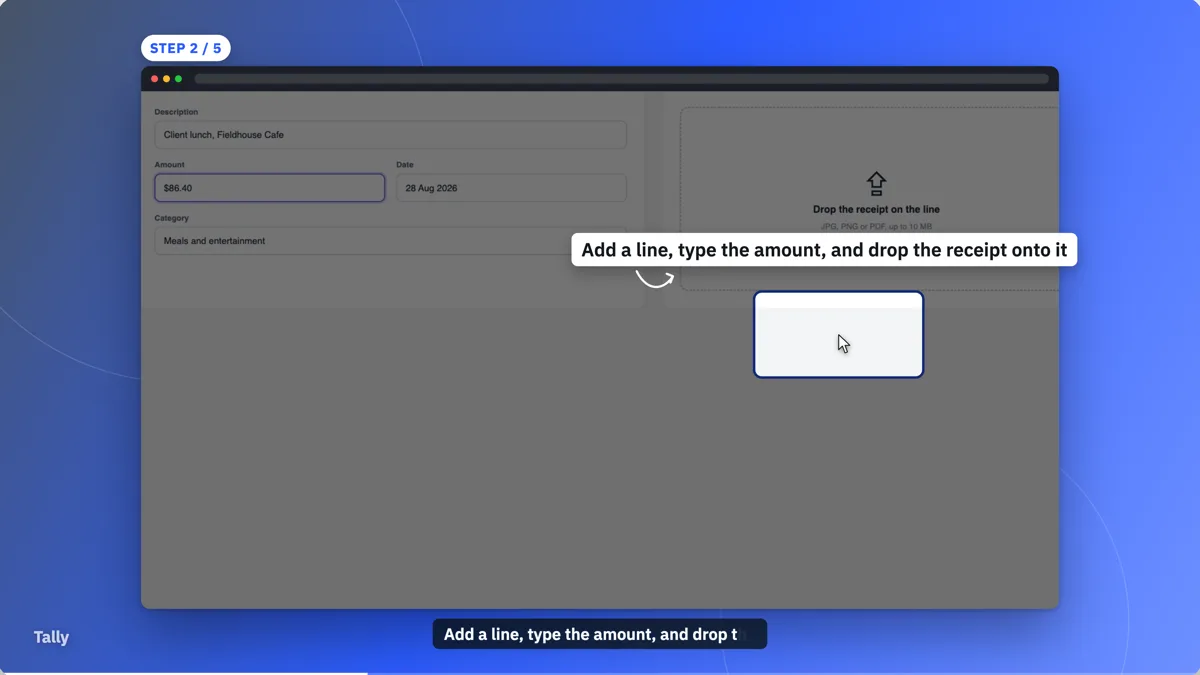 How-to video exampleMade with OneCraft, exactly as the generator and editor left it. Open the page for the full breakdown.
Pricing in plain terms
Synthesia's pricing page, checked 2 September 2026, lists a free plan with 10 minutes of video a month, Starter at $29 a month billed monthly or $18 a month billed yearly, and Creator at $89 a month billed monthly or $64 a month billed yearly, with minutes and avatar counts rising by plan. OneCraft's pricing page lists Free with 100 credits a month, Starter at $8 a month with 500 credits, and Pro at $25 a month with 1,500 credits. Tutorial videos need the Starter plan and UGC videos need Pro; a video generation uses about 20 credits.
Moving across
There is no importer for Synthesia projects. Scripts move easily, though: paste the script into the OneCraft brief and say what kind of video it is, and the director rewrites it into scenes with narration at the right length per scene. Screenshots for a tutorial are captured fresh from your product, which most teams treat as a chance to update them anyway.
What the Synthesia pages do not state
Synthesia's public template count is not stated on any public page checked, so no number appears here. Their language counts differ by page, 160+ on the features page, 80+ for one click translation and 140+ for dubbing, so each is quoted against the page that carries it. Plan gates for collaboration and brand kits are quoted as the features page marks them, which is Enterprise.
How the OneCraft side was verified
Every OneCraft cell names a row in an internal fact ledger checked against the product's source code: the 56 mapped voice locales, the still frame screen capture, the 5 to 9 second tutorial step rule, the three talking scene cap in UGC mode. Absences, SCORM, translation, live collaboration and motion recording, are written as absences rather than softened.
Who should stay with Synthesia
Stay with Synthesia if your videos are presenter led, if you deliver training through an LMS and need SCORM, if you localise one video into many languages with lip-sync, or if live collaboration matters to your team. OneCraft has none of those, and this page is not pretending otherwise.
Questions people ask
Does OneCraft have avatars?
One. UGC mode generates a single creator persona from your description and animates it for up to three talking scenes in a video under 30 seconds, on the Pro plan and up. There is no avatar catalogue, no custom avatar of yourself, and no presenter mode for tutorials or promos.
Can I make training videos with OneCraft?
Yes, as the tutorial video type on the Starter plan and up. You capture still screenshots of the product, mark click points and zoom levels, and the generator writes instructional narration at 10 to 25 words a step. What you do not get is an avatar presenter or SCORM packaging.
Does OneCraft record my screen?
It captures still frames, one per press of the capture button or the space bar, from a desktop browser. No motion video is recorded or processed. The motion in the finished tutorial comes from cursor glides, click ripples and camera zooms applied to those stills.
Can I export SCORM from OneCraft?
No. Exports are MP4 files at 1080p, or 4K on the Starter plan and up, plus a live share link that plays in the browser. If your training must land in an LMS as a SCORM package, Synthesia offers that on its Enterprise plans and OneCraft does not offer it at all.
Which languages can the voiceover speak?
56 languages have a mapped Chirp3-HD locale, with four voice styles across two genders. Malay and Filipino fall back to an older voice family, and a Persian brief gets no voiceover at all even though the text is written in Persian. Tutorials always get the instructional style.
Can I translate a finished OneCraft video?
No. There is no dubbing and no lip-sync translation. The honest path is to run the generation again with the other language set in the brief, which rewrites the narration and captions in that language and uses credits again. For many language variants of one video, Synthesia is the stronger tool.
Try the video side of OneCraft
The button opens the generator with a starting prompt already filled in. Change the wording to match your own work before you run it.
Create a video with OneCraftMore comparisons
- An InVideo alternative for promo videosOneCraft as an InVideo alternative for promo, tutorial and UGC videos: scenes from a brief, voiceover, captions and stock clips, but no timeline.
- Gamma vs Beautiful.ai vs OneCraftGamma, Beautiful.ai and OneCraft compared for AI presentations: generation, layouts, editing, PowerPoint export, presenting and pricing.
What the module actually does, feature by feature: the AI video maker page, and the videos maker page.
Step by step in the builder: Make a how to video with AI, then Make a UGC creator video.
Written and checked by the OneCraft team. Last checked .