Flyers · Alternative
A Venngage alternative for posters and data flyers
For research posters and flyers built around a few numbers, OneCraft is a Venngage alternative that writes the board from a brief and ships 40 A0 poster templates with stat, protocol and CONSORT blocks. Venngage stays ahead on infographic templates, an accessibility checker and team brand kits.
Updated , competitor details checked . Venngage is a trademark of its owner. OneCraft is not affiliated with or endorsed by it.
Indunil Asanka · Co-founder
3 min read · Published
The short verdict
Venngage suits teams making infographics, reports and posters who need an accessibility checker, brand kits, shared folders and PowerPoint export on one plan. OneCraft suits researchers and small businesses who want a poster or data flyer written into a finished layout from a brief, with native charts and A0 boards built for conference sessions.
| Feature | Venngage | OneCraft |
|---|---|---|
| Price | Free $0 with 5 designs; Premium $10 a month yearly or $19 monthly; Business $24 a month yearly or $49 monthly per user checked 2026-09-29 | Free at $0 with 100 credits a month, then Starter $8, Pro $25 and Pro+ $125 a month; a poster generation bills at twice a flyer |
| Research posters | Dedicated research poster templates among "hundreds of poster templates" checked 2026-09-29 | 40 A0 boards, 20 portrait and 20 landscape, each with logo, title, author block, sections and figures |
| Poster blocks | Not itemised on the pages checked checked 2026-09-29 | Protocol blocks on 38 boards, stat blocks on 27, reference blocks on 34 and CONSORT flows on 10 |
| Charts | "Dozens of interactive, accessible charts" in a chart and map library checked 2026-09-29 | 10 chart kinds, from bar and line to radar, waterfall and waffle, on flyers and posters alike |
| Tables | Not itemised on the pages checked checked 2026-09-29 | Tables with a caption and draggable column widths; every cell is left aligned |
| Accessibility | An AI accessibility checker for contrast, alt text, reading order and font size, aligned to WCAG 2.1 AA checked 2026-09-29 | OneCraft has no accessibility checker |
| AI generation | "Our AI transforms your ideas into professional visuals"; 100 AI credits a day on Business checked 2026-09-29 | One prompt fills text, image prompts and icons, and the rules forbid inventing statistics or dates |
| Export | PNG and HD PNG on Premium; PNG, PDF, PowerPoint and HTML email on Business checked 2026-09-29 | PDF, PNG and JPG at twice the canvas: A4 at 300 DPI, A0 portrait at 3312 by 4680 pixels, RGB |
| Brand kit and teams | Brand Kits, team sharing and password protected links on Business checked 2026-09-29 | 99 themes and 42 fonts chosen per design; one person edits a design at a time |
Where Venngage is better
An accessibility checker
Venngage checks colour contrast, alt text, reading order and font size, and simulates colour blindness, aligned to WCAG 2.1 AA, on every plan. OneCraft has no checker, so contrast on a poster is judged by eye.
Infographics as a format
Venngage is built around infographics, reports and long vertical layouts with thousands of templates. OneCraft makes flyers and A0 posters, not long scrolling infographics.
PowerPoint and HTML email export
Business exports designs to PowerPoint and HTML email. OneCraft flyers and posters export as PDF, PNG and JPG only, and the PDF holds page images, so its text is not selectable.
Team features
Business adds brand kits, team sharing, folders and password protected links, and Enterprise adds multi factor authentication. OneCraft designs are edited by one person at a time.
Where OneCraft is different
Boards built for research sessions
Every one of the 40 poster templates carries a logo slot, title, author block, sections and figures, and most add protocol, reference or statistic blocks. Ten carry a CONSORT flow for trial reporting, which general poster templates rarely have.
The poster is written from the brief
Generation writes the section text, statistic callouts and figure captions into the chosen board. It never invents a statistic or a date, so every number on the board is one you supplied.
Print resolution without guesswork
Exports capture at twice the canvas, so an A0 portrait poster comes out at 3312 by 4680 pixels and an A4 flyer at 300 DPI. The files are RGB with no bleed, stated plainly.
Flyers and posters in one editor
The same editor makes A4 and social flyers in 8 sizes and A0 posters, with 10 chart kinds and 12 diagram tiles, so the poster and its handout flyer share one account.
A finished example
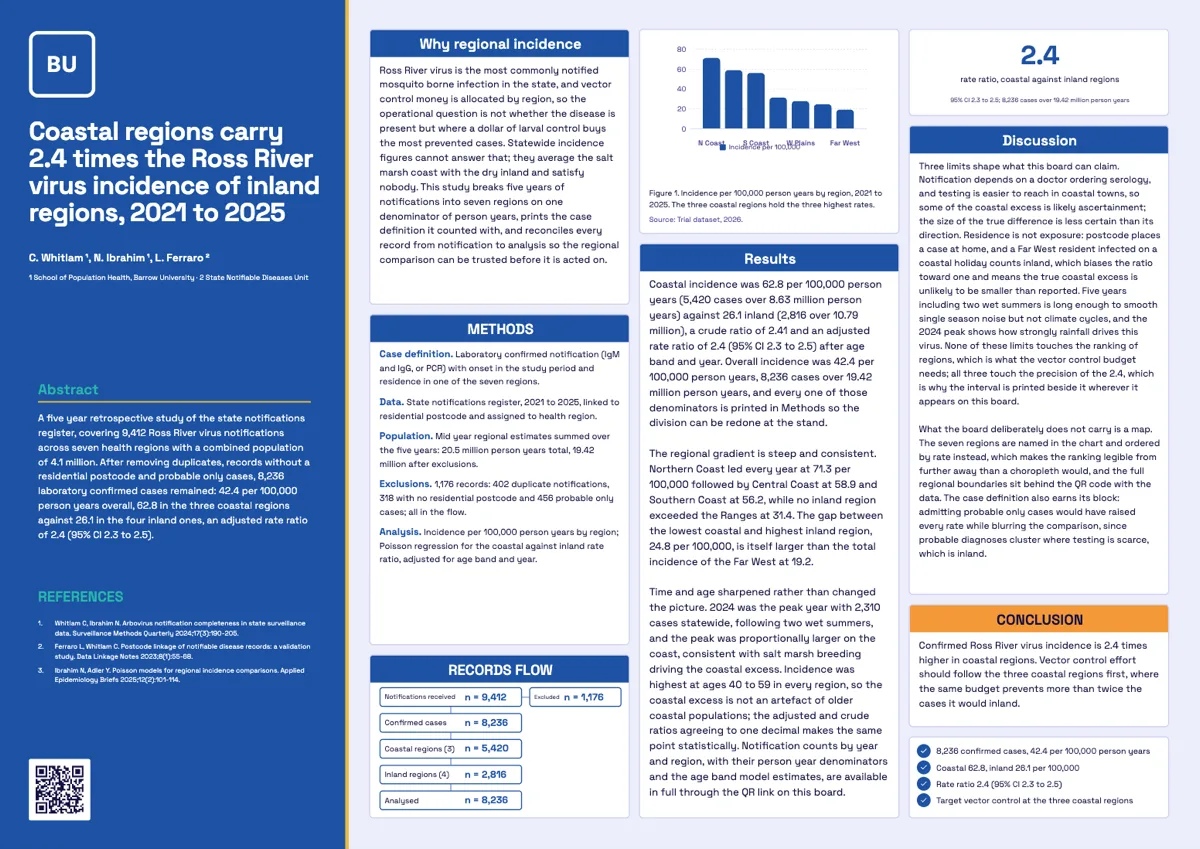 Epidemiology posterMade with OneCraft, exactly as the generator and editor left it. Open the page for the full breakdown.
Pricing in plain terms
Checked 29 September 2026. Venngage's pricing page lists Free at $0 with 5 designs and 6 image uploads, Premium at $10 a month billed yearly or $19 monthly with PNG and HD PNG export, Business at $24 a month billed yearly or $49 monthly per user with PDF and PowerPoint export and brand kits, and Enterprise from $499 a month for at least 10 members. OneCraft's pricing page lists Free at $0 with 100 credits a month, Starter at $8 a month with 500 credits, Pro at $25 a month with 1,500 credits, Pro+ at $125 a month with 7,500 credits, and a custom Enterprise plan. A poster generation costs twice a flyer.
Moving across
Venngage designs cannot be imported. For a poster, attach the abstract or the paper as a PDF to a OneCraft brief on a paid plan and let the generator fill a board; attachments are read for their text and key points, so figures are rebuilt as charts from numbers you confirm. Existing images can be uploaded into figure slots.
What could not be checked
Venngage's pages checked do not give a poster template count beyond hundreds, do not list its table or chart types one by one, and do not state export DPI, so those cells say not itemised. The accessibility checker's WCAG level is quoted from its own accessibility page.
How the OneCraft side was verified
Every OneCraft cell names a row in an internal fact ledger checked against the product's source code: the 40 poster files and the blocks counted across them, the 10 chart kinds, the export scale factor that sets A0 at 3312 by 4680 pixels, and the credit multiplier for posters. The missing accessibility checker is stated as an absence.
Choosing between them
A research group preparing for a conference usually needs two things: the A0 poster for the session and a short handout or social post announcing it. Venngage covers the poster alongside infographics and reports, checks accessibility and exports to PowerPoint for colleagues who edit there. OneCraft writes the poster into a research board from the abstract and results you give it, then makes the A4 or Instagram announcement in the same account. If an accessibility audit or an infographic is part of the brief, choose Venngage; if the bottleneck is getting the board written, OneCraft is quicker.
Who should stay with Venngage
Stay with Venngage if accessibility audits are a requirement, if infographics and reports are your main output, if you need PowerPoint or HTML email export, or if a team shares brand kits and folders. OneCraft is narrower: flyers and A0 posters written from a brief.
Questions people ask
Is there a Venngage alternative for scientific posters?
Yes. OneCraft's poster tab has 40 A0 templates for conference sessions, with sections, figures, author blocks and, on many boards, protocol, reference, statistic and CONSORT flow blocks. You describe the study and the generator writes the board, using only the numbers you give it.
How do I check colour contrast without an accessibility checker?
Compare the text colour and its background against the WCAG contrast guidance: 4.5 to 1 for body text and 3 to 1 for large text. OneCraft has no built in checker, so on a poster pick a theme with a dark ink on a light surface and view the board at arm's length before printing.
What resolution does a OneCraft A0 poster export at?
A0 portrait exports at 3312 by 4680 pixels, because the capture runs at twice the working canvas. That is enough for most poster printers at viewing distance. The file is RGB with no bleed, so ask your printer whether they need a margin added.
Can OneCraft make a long infographic?
Not as a format of its own. OneCraft makes flyers in 8 fixed sizes and A0 posters, with charts, diagrams, statistics and tables you can place on them. A tall scrolling infographic is Venngage's home ground, and it is the better tool for that job.
Does a poster cost more than a flyer?
Yes. A poster generation bills at twice the credits of a flyer generation, because the board is larger and carries more text. Exporting the same saved version again returns the file already rendered rather than rendering it a second time, so check the board, save, then export once it is final.
Can I put a CONSORT diagram on the poster?
Yes, on the 10 boards that ship a CONSORT flow block. It lays out enrolment, allocation, follow up and analysis for a randomised trial. Choose one of those boards when you generate, or pick it in the template picker, since the block cannot be added to a board that lacks it.
Try the flyer side of OneCraft
The button opens the generator with a starting prompt already filled in. Change the wording to match your own work before you run it.
Create a flyer with OneCraftMore comparisons
- A Visme alternative for flyers, posters and decksA Visme alternative for flyers, posters and decks: OneCraft and Visme compared on price, AI from a brief, slide templates, interactivity, brand kit and export.
- A PosterPresentations alternative: generator vs PowerPoint templatesOneCraft's poster generator as a PosterPresentations.com alternative: 40 A0 layouts filled from your abstract, against free PowerPoint templates plus printing.
- A Canva alternative for flyersOneCraft as a Canva alternative for flyers: 259 designs in 8 sizes filled from a description, against Canva's library, editor and print service.
What the module actually does, feature by feature: the AI flyer maker page, and the flyers maker page.
Step by step in the builder: Add charts and diagrams to a flyer, then Choose your flyer template, theme and size.
Written and checked by the OneCraft team. Last checked .