Flyers · Alternative
A Visme alternative for flyers, posters and decks
A Visme alternative for flyers, posters and slide decks should write the first draft for you, and OneCraft generates all three from a brief, with editable PowerPoint export for decks. Visme stays the broader tool, with interactivity, animation, analytics, forms and a brand kit in one editor.
Updated , competitor details checked . Visme is a trademark of its owner. OneCraft is not affiliated with or endorsed by it.
Indunil Asanka · Co-founder
3 min read · Published
The short verdict
Visme suits people who want one editor for many content types with hotspots, animation, analytics, forms and a brand kit, and who are happy to design from templates. OneCraft suits people who want flyers, A0 posters and slide decks generated from a brief, with native flyer sizes and an editable PowerPoint file for decks, and no interactivity.
| Feature | Visme | OneCraft |
|---|---|---|
| Price | Basic free with a Visme logo; Starter $12.25 a month billed $147 yearly; Pro $24.75 a month billed $297 yearly checked 2026-09-29 | Free at $0 with 100 credits a month, then Starter $8, Pro $25 and Pro+ $125 a month; generating from your own files starts on Starter |
| Flyers and posters from a brief | An AI designer turns "a text prompt into a ready-to-use design" checked 2026-09-29 | One prompt fills a flyer or poster design with text, image prompts and icons; 2 options when no template is chosen |
| Slide decks | Presentations among "over 50 content types" and "thousands of customizable templates" checked 2026-09-29 | 1,071 slide templates across 26 roles, generated as 3 to 20 slide decks |
| Interactivity | Hotspots, hover effects and clickable menus checked 2026-09-29 | OneCraft designs have no hotspots, hover effects or clickable menus |
| Animation | Animations on elements and designs checked 2026-09-29 | Flyers are still images; decks offer 8 slide transitions including none |
| Brand kit | Brand fonts, colours and logo in a brand kit on Pro checked 2026-09-29 | Account brand kits (logo and three colours) offered as a Your brand theme, plus 99 themes and custom hex colours on text |
| Analytics | Analytics on Pro and above checked 2026-09-29 | No viewer analytics; a deck share link is read only and records nothing |
| Export | JPG, PNG and PDF free; MP4, GIF, PPTX and HTML5 from Starter checked 2026-09-29 | Flyers as PDF, PNG and JPG; decks as PDF, PowerPoint and editable PPTX with native charts |
| Charts | A graph maker in the editor checked 2026-09-29 | 10 chart kinds on flyers and slides, with 12 diagram tiles in the flyer add items panel |
Where Visme is better
Interactive and animated content
Visme adds hotspots, hover effects, clickable menus and animation, and exports HTML5, MP4 and GIF from Starter. OneCraft flyers are still images and its decks have slide transitions only.
Analytics and forms in the same tool
Visme Pro includes analytics, and every plan includes its form builder. OneCraft has a separate forms module, but its decks and flyers carry no analytics.
Brand kits that reach animated and interactive content
Visme Pro's brand kit applies brand fonts, colours and logos across interactive, animated and HTML5 content. OneCraft brand kits apply colours and a logo to flyers, posters and decks, which are static outputs.
More content types
Visme covers over 50 content types, including infographics, documents, videos and forms, in one editor. OneCraft splits its work into separate generators, and infographics are not one of them.
Where OneCraft is different
A draft you edit, not a blank template
Each generator writes the copy into a finished layout. For flyers the rules forbid inventing prices, dates or statistics; for decks the outline can be grounded by one web search and one page fetch.
Decks that leave as editable PowerPoint
The editable PPTX export writes text, lists, images, tables and 9 of 10 chart kinds as native PowerPoint objects, so a deck carries on in PowerPoint after it leaves OneCraft.
Native flyer sizes
All 259 flyer designs are authored in all 8 sizes, from A4 to an X header, and switching size swaps in the matching variant instead of stretching the layout.
A0 posters for research sessions
40 A0 poster boards with author blocks, figures, protocol and CONSORT flow blocks sit beside the flyers, which Visme's general templates do not specialise in.
A finished example
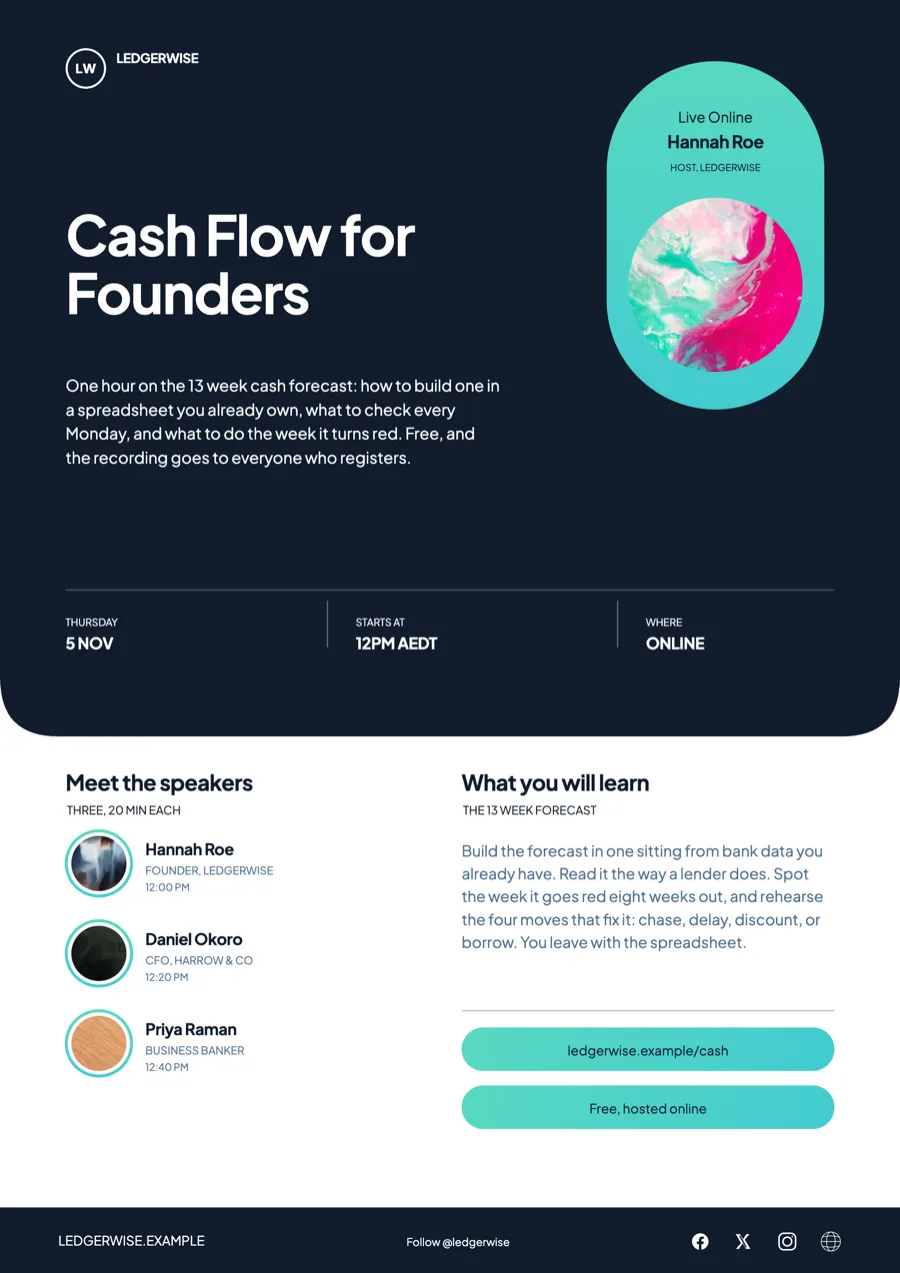 Webinar flyer for an online accounting education companyMade with OneCraft, exactly as the generator and editor left it. Open the page for the full breakdown.
Pricing in plain terms
Checked 29 September 2026. Visme's pricing page lists Basic free with 500 MB of storage and a Visme logo on projects, Starter at $12.25 a month billed $147 a year with 200 AI credits and PPTX, MP4 and HTML5 downloads, Pro at $24.75 a month billed $297 a year with a brand kit, analytics and 500 AI credits, and custom Enterprise pricing. OneCraft's pricing page lists Free at $0 with 100 credits a month, Starter at $8 a month with 500 credits, Pro at $25 a month with 1,500 credits, Pro+ at $125 a month with 7,500 credits, and a custom Enterprise plan. Deck PowerPoint export needs a paid plan.
Moving across
Visme projects cannot be imported. Export the current flyer or deck as a PDF and attach it to a OneCraft brief on a paid plan; the text is read and a new flyer or deck is generated from it. Layouts, animation and interactivity do not come across, and a deck arrives as fresh slides in OneCraft templates.
What could not be checked
Visme's pages checked do not state a flyer template count or which chart types its graph maker offers, so neither is in the table. Its homepage claim of thousands of templates across over 50 content types is quoted as written.
How the OneCraft side was verified
Every OneCraft cell names a row in an internal fact ledger checked against the product's source code: the 1,071 slide templates and 259 flyer designs, each in all 8 sizes, counted on disk, the 8 transitions, the export formats per module and the read only share link. Interactivity, animation and analytics are recorded as absences.
Choosing between them
A training company launching a webinar might need a flyer, a registration form, a short deck and an interactive landing asset. Visme can produce all of those in one editor, including hotspots and analytics on who viewed what. OneCraft produces the flyer, the deck and the form from separate generators, each written from a brief, with no interactivity and no analytics. Teams that measure engagement inside their content, or that animate it, should stay with Visme. Teams that mostly need the first draft written and laid out will save the most time with OneCraft.
Who should stay with Visme
Stay with Visme if your content needs to be interactive or animated, if you rely on its analytics or forms, if a brand kit is how your team stays consistent, or if you export HTML5 and video. OneCraft does not do any of those and is not trying to.
Questions people ask
Can OneCraft make both flyers and presentations?
Yes. There are separate generators for flyers, A0 posters and slide decks in one account. Flyers come in 8 sizes from 259 designs; decks run from 3 to 20 slides across 1,071 templates. Each is edited in its own editor, and one set of monthly credits covers them all.
Does OneCraft support interactive content?
No. There are no hotspots, hover states or clickable menus on flyers or slides, and flyers do not animate. Decks have 8 slide transition options including none, set for the deck with a per slide override. For interactive content, Visme is the better tool.
Which export formats does OneCraft offer?
Flyers and posters export as PDF, PNG and JPG. Decks export as PDF, PowerPoint and editable PPTX, and the PowerPoint formats need a paid plan. There is no HTML5, GIF or MP4 export from the flyer or deck editors; video is its own module.
Can a OneCraft deck be edited in PowerPoint afterwards?
Yes, with the editable PPTX export on a paid plan. Text, lists, images, tables and 9 of the 10 chart kinds arrive as native PowerPoint objects; diagram artwork stays a picture but its labels become text boxes. Visme exports PPTX from its Starter plan, and its pages do not say how charts arrive.
Can I keep brand colours consistent across OneCraft flyers?
Yes. Save a brand kit in account settings with your logo and three colours, and it appears as a Your brand theme at the top of the flyer theme panel. Picking it applies the colours and places the logo in the design's logo slots, while the font stays the theme's own until you pick another. Custom hex colours on text cover any exact shade the kit does not.
Try the flyer side of OneCraft
The button opens the generator with a starting prompt already filled in. Change the wording to match your own work before you run it.
Create a flyer with OneCraftMore comparisons
- A Venngage alternative for posters and data flyersA Venngage alternative for research posters and data flyers: OneCraft and Venngage compared on price, poster boards, charts, accessibility, AI and export.
- A Decktopus alternative with editable PPTX exportA Decktopus alternative with editable PPTX export: OneCraft and Decktopus compared on price, AI credits, templates, chat editing, research and presenting.
- An Adobe Express alternative for flyers and postersAn Adobe Express alternative for flyers and posters: OneCraft and Adobe Express compared on price, templates, AI, sizes, themes, print and research posters.
What the module actually does, feature by feature: the AI flyer maker page, and the flyers maker page.
Step by step in the builder: Add charts and diagrams to a flyer, then Make a pitch presentation with AI.
Written and checked by the OneCraft team. Last checked .