Classic form
Employee bank details form with split pay
An employee bank details form collects the account name, BSB and account number that wages are paid into, the pay date the change starts from and the employee's signature. This Australian payroll version adds an optional fixed amount to a second account and warns staff about payment redirection scams.
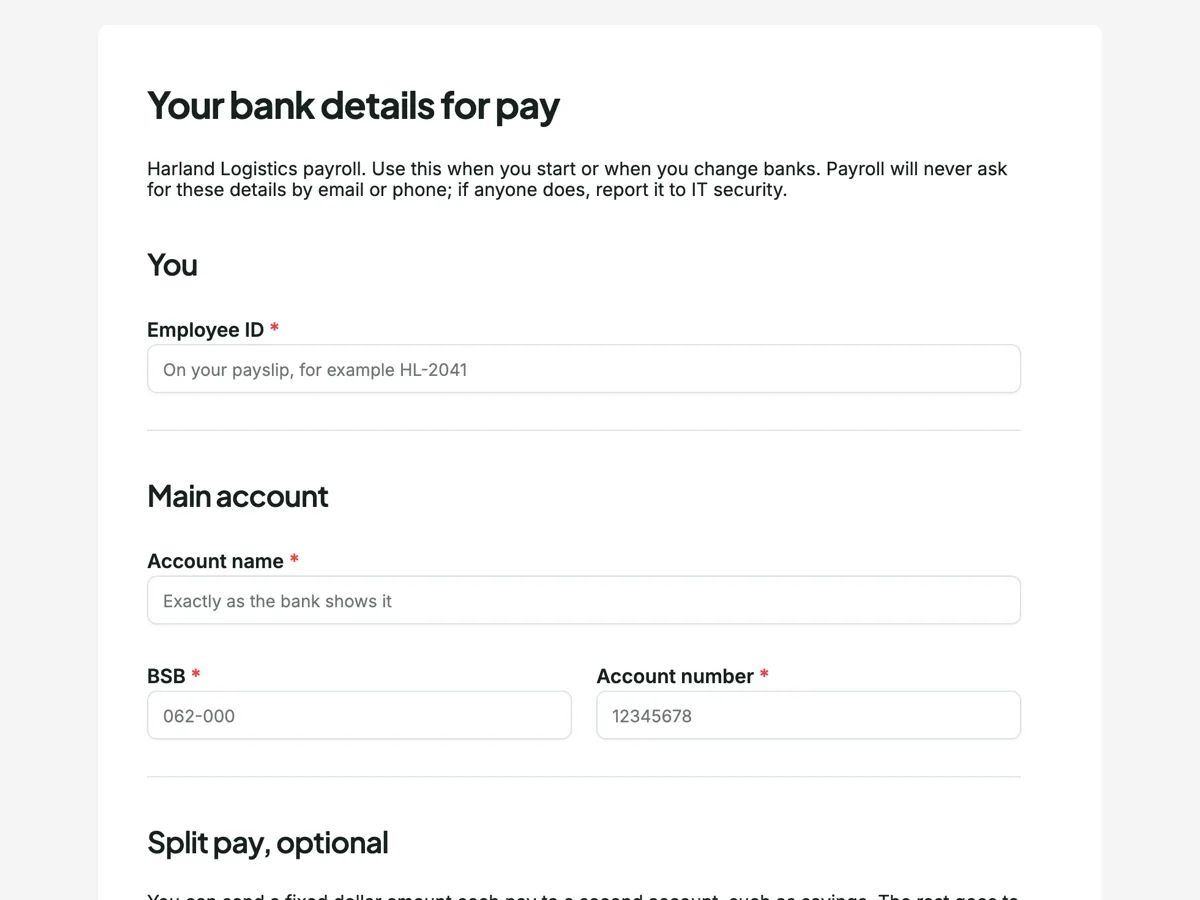
The form itself
A static copy of the finished form, exactly as it renders. Nothing here can be filled in or submitted, so read it as a reference and build your own from the button above.
Every field, and what it collects
The complete field list, in the order respondents meet it.
- Employee IDShort textRequired
- Account nameShort textRequired
- BSBShort textRequired
- Account numberShort textRequired
- Split my pay?Single choiceRequired
- Options: No, all to the main account · Yes, a fixed amount to a second account
- Second account BSB and numberShort text
- Amount each pay, $Number
- Start from the pay dateDateRequired
- Your signatureSignatureRequired
You
Main account
Split pay, optional
What each field on this form collects
The employee ID ties the change to one person. The main account section asks for the account name exactly as the bank shows it, then the BSB and account number side by side, each with a minimum and maximum length so a missing digit is caught. A paragraph explains split pay and a required single choice asks whether to use it. If yes, the second account and a fixed dollar amount share a row. The start pay date and the employee's signature finish it.
Why payroll calls back
Payment redirection fraud is one of the most common scams against businesses: someone pretending to be an employee asks payroll to change the bank account, and the next pay goes to the criminal. The intro tells staff that payroll never asks for bank details by email or phone, and the thank you screen says payroll confirms every change by calling the number already on the HR file, not a number given with the change. That call back, to a number known before the request arrived, is what stops the scam. The form itself can also be restricted to signed in staff.
Paying wages into an account
Fair Work Ombudsman guidance on paying wages says employees must be paid in money, usually by electronic transfer to an account the employee nominates, and at least monthly. The employee chooses the account; the employer cannot insist on a particular bank. A split to a second account is the employee's choice too, which is why it is optional and set as a fixed amount the employee controls. Any deduction is a different matter, needing written authority, and does not belong on this form.
How to adapt this form
A New Zealand business replaces the BSB with the bank and branch digits of its account format. A business paying contractors adds the ABN and whether GST is charged. A company with staff paid in another country adds the SWIFT code and the account currency.
What makes this form work
Length checks on the numbers
BSB and account number carry minimum and maximum lengths. A seven digit account number typed as six is caught before payroll ever sees it, which saves a failed payment.
The scam warning is in the form
The intro says payroll never asks for bank details by email or phone. Staff who know that are less likely to answer a fake request, and more likely to report it.
Split pay is a fixed amount
The second account receives a fixed dollar figure each pay and the rest goes to the main account. Payroll processes it without percentages to calculate.
Questions people ask
Can an employer choose which bank an employee is paid into?
No. Employees nominate the account, and the employer pays into it. Fair Work guidance says wages are paid in money, usually by electronic transfer, cheque or cash in some cases, as set by the award or agreement. A business can ask for the account details in a set way, as this form does.
How do businesses stop bank details scams?
By never changing bank details on the strength of an email or phone call alone, and confirming each change with the employee using contact details already on file. Restricting the form to signed in staff and telling staff payroll never asks by email both help. Train payroll staff to treat urgency as a warning sign.
Is it safe to collect bank details on an online form?
Bank details are personal information under the Privacy Act and should be collected only as needed, stored securely and seen only by payroll. Keep the form to signed in staff, limit who can see the responses and delete old submissions once they are recorded in the payroll system.
Can an employee split their pay between accounts?
Many payroll systems allow it, and this form offers a fixed amount to one second account. Whether a business offers splits is its choice. The employee decides the accounts and the amount, and can change them with a new form.
When does a change of bank details take effect?
From the pay date the employee chooses, as long as payroll receives it before its cut off. This business uses Tuesday noon. Changes after the cut off apply from the following pay, which the thank you screen explains so nobody expects the new account to be used sooner.
Does the form check that a BSB exists?
No. It checks the number of characters, not whether the BSB is real. Payroll checks the BSB against the bank directory, and the call back to the employee confirms the account name and number before the first payment goes to the new account.
Build your own in about a minute
The button below opens the generator with this use case already described. Change the wording to match your own, generate, then edit anything you like.
Make one like thisOther form examples
Disciplinary meeting record for a fair process
A disciplinary meeting record captures who attended, including any support person, the allegation as it was put, the evidence shown, the employee's response in their own words and the outcome. This Australian version is built around the steps that make a process fair, because those are what a tribunal looks at later.
Return to work plan form for an injured worker
A return to work form sets out how an injured worker comes back: the certificate of capacity it follows, suitable duties and who supervises them, hours per week, restrictions and when the plan is reviewed. This Australian civil contractor version is signed by the worker and the supervisor, so both have agreed to the same plan.
Parental leave form for Australian employees
A parental leave form records the expected birth or placement date, the leave start and end dates, how the employee will be paid while away and how they would like to stay in touch and come back. This Australian version follows the Fair Work notice rules and separates government Parental Leave Pay from the employer's own paid leave.
Want the steps in the builder? Read Require staff to sign in, then Text, number and signature fields. For everything this generator can do, see the form maker.
Written and checked by the OneCraft team. Last checked .