Classic form
Excavator pre start checklist with quick hitch checks
An excavator pre start checklist is the operator's walkaround before the first bucket: tracks, hoses, fluids, the rollover cab, the alarm and the quick hitch, each marked Pass, Fail or N/A. This one adds the three hitch checks that stop a bucket falling off and a tag out question that keeps a faulty machine parked.
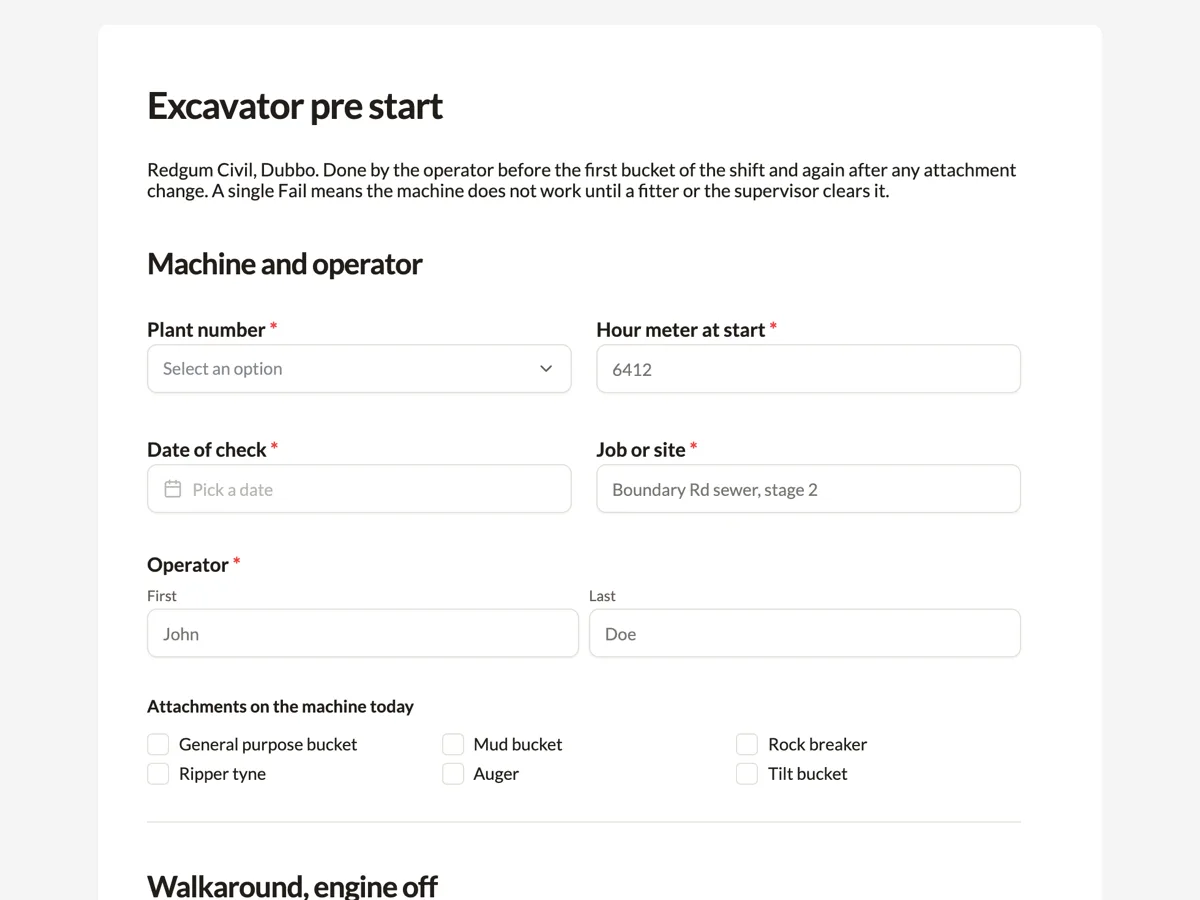
The form itself
A static copy of the finished form, exactly as it renders. Nothing here can be filled in or submitted, so read it as a reference and build your own from the button above.
Every field, and what it collects
The complete field list, in the order respondents meet it.
- Plant numberDropdownRequired
- Options: EX-03, 20 tonne excavator · EX-05, 13 tonne excavator · EX-07, 8 tonne excavator · EX-09, 5 tonne excavator
- Hour meter at startNumberRequired
- Date of checkDateRequired
- Job or siteShort textRequired
- OperatorNameRequired
- Attachments on the machine todayMultiple choice
- Options: General purpose bucket · Mud bucket · Rock breaker · Ripper tyne · Auger · Tilt bucket
- Walkaround checksRating gridRequired
- Statements:
- Tracks, rollers and idlers
- Bucket teeth, pins and bushes
- Boom and dipper hoses
- Hydraulic oil level
- Engine oil level
- Coolant level
- ROPS and FOPS undamaged
- Seatbelt latches and retracts
- Mirrors and camera clean
- Reversing alarm sounds
- Slew lock engages
- Fire extinguisher charged
- Quick hitch checksRating gridRequired
- Statements:
- Coupler locked on the attachment
- Safety pin fitted and clipped
- Bucket crowd test done with nobody near
- Will the machine lift loads today?Single choiceRequired
- Options: No lifting, digging only · Yes, with the rated capacity chart in the cab and hose burst valves fitted
- Photo of the faultPhoto upload
- One clear photo of anything marked Fail, close enough to read a part number or see the leak.
- What is wrong and whereLong text
- Controls tagged out?Single choiceRequired
- Options: No fault found · Yes, tagged and keys to supervisor
- Operator signatureSignatureRequired
Machine and operator
Walkaround, engine off
Quick hitch
Faults
What each field on this form collects
The first block ties the check to one machine on one day: plant number from a list of four excavators by size, the hour meter at start, the date, the job and the operator's name. A checkbox records which attachments are on the machine, because a rock breaker or an auger changes what the hitch has to hold. The walkaround grid has twelve rows read with the engine off, from tracks and rollers to the fire extinguisher, each with Pass, Fail and N/A. The quick hitch grid has three rows, then a single choice asks whether the machine will lift loads. The last block takes a photo of the fault, a description, the tag out answer and the operator's signature.
Why the quick hitch gets its own section
WorkSafe Victoria issued a safety alert after a young worker's leg was crushed when a bucket came off a semi automatic quick hitch during a demolition. On that kind of hitch the safety system is a pin that has to be put in by hand and secured with a clip each time an attachment changes, and on a busy day operators stop climbing out to do it. The form puts the pin in its own row, separate from the coupler lock, so a ticked lock cannot hide a missing pin. The crowd test row asks the operator to curl the bucket with nobody near before work starts, which is the cheap test that shows a hitch is engaged. Lifting gets its own question because an excavator lifting a suspended load is a different task from digging and needs the load chart and hose burst protection.
How to adapt this form
A hire company sending excavators out wet adds the hire docket number to the first block and a row for the operator manual in the cab. A contractor running a backhoe keeps most of the walkaround and swaps the slew lock for the stabiliser legs and the front loader pins. A crew working near overhead power lines adds a single choice asking whether a spotter has been arranged and the exclusion zone marked, since that decision belongs before the first lift, not in a toolbox talk afterwards.
What makes this form work
The safety pin is its own row
Coupler locked, safety pin fitted and clipped, and the crowd test are three separate rows. The failure WorkSafe Victoria describes is a hitch that looked coupled with the pin left out, so the form never lets one answer cover both.
N/A has a rule
The paragraph above the twelve row grid says N/A means the part is not fitted, never that nobody looked. On a 5 tonne machine with no camera that answer is honest; on the 20 tonne machine it would be a gap the supervisor can query.
A fault ends in a tag
The last required question asks whether the controls are tagged and the keys handed over. A photo and a description are useful, but the tag is what stops the next operator starting a machine with a weeping dipper ram.
Questions people ask
Who has to do the excavator pre start?
The operator who will run the machine that shift. The check is a before use inspection by the person who knows the machine best that day, not the periodic service by a fitter. Many contractors also ask a new operator to do the first pre start with a supervisor beside them, so both know what Pass looks like on that excavator.
Can an excavator lift a load like a crane?
Only when the manufacturer allows it and the machine is set up for it, which usually means a rated lifting point, a load chart in the cab and hose burst valves on the boom and dipper rams. That is why the form asks the lifting question separately. Answering yes commits the operator to those conditions before the first lift of the day.
What happens when one item fails?
The machine does not start work. The operator photographs the fault, describes it, tags the controls and hands the keys to the supervisor, and the form records each step. A fitter or the supervisor then decides whether it can be fixed on site. The form records the decision to stop; it does not calculate whether a fault is serious.
Should the pre start be redone after changing attachments?
Yes for the quick hitch rows. Every attachment change pulls the safety pin out and needs it put back, so the hitch checks only describe the attachment that was on when the form was filled. Some crews submit a second form with just the hitch section completed after each change, which leaves a time stamped record.
How long should the records be kept?
Keep them for as long as the machine is in service and at least as long as your WHS records policy requires, since a pre start is often the first document asked for after an incident. Every submission sits in the responses table with its time and can be exported to CSV or saved as a PDF with the photo printed inline.
Can the form be filled on a phone in the cab?
Yes. The published form works in a phone browser, the photo field takes a picture from the camera or the photo library, and the signature is drawn with a finger. Nothing is saved until the operator presses submit, so a check started in poor reception has to be finished in one go rather than left half done and resumed later.
Build your own in about a minute
The button below opens the generator with this use case already described. Change the wording to match your own, generate, then edit anything you like.
Make one like thisOther form examples
Telehandler pre start checklist by attachment
A telehandler pre start checklist starts with the attachment fitted, because forks, a bucket, a jib with a hook and a work platform each need their own load chart and sometimes their own licence. Then it tests the load moment indicator and checks the boom, stabilisers, steering mode, brakes and cab.
Compressor pre start checklist for stored pressure
A compressor pre start checklist looks at the relief valve, the gauge, the receiver drain, hoses, couplings and whip checks before air goes into the line, then the guards, fuel and oil. This blasting workshop version also records when the air receiver is next due for its periodic inspection.
Chainsaw pre start checklist with a chain brake test
A chainsaw pre start checklist tests the chain brake, chain catcher and throttle lockout, then the chain, bar oil and spark arrestor, before anyone cuts. This arborist version adds a protective gear grid, because the saw check alone says nothing about the leg the chain would hit.
Want the steps in the builder? Read The matrix, photo and signature fields, then Find and export every pre start. For everything this generator can do, see the form maker.
Written and checked by the OneCraft team. Last checked .