Classic form
Telehandler pre start checklist by attachment
A telehandler pre start checklist starts with the attachment fitted, because forks, a bucket, a jib with a hook and a work platform each need their own load chart and sometimes their own licence. Then it tests the load moment indicator and checks the boom, stabilisers, steering mode, brakes and cab.
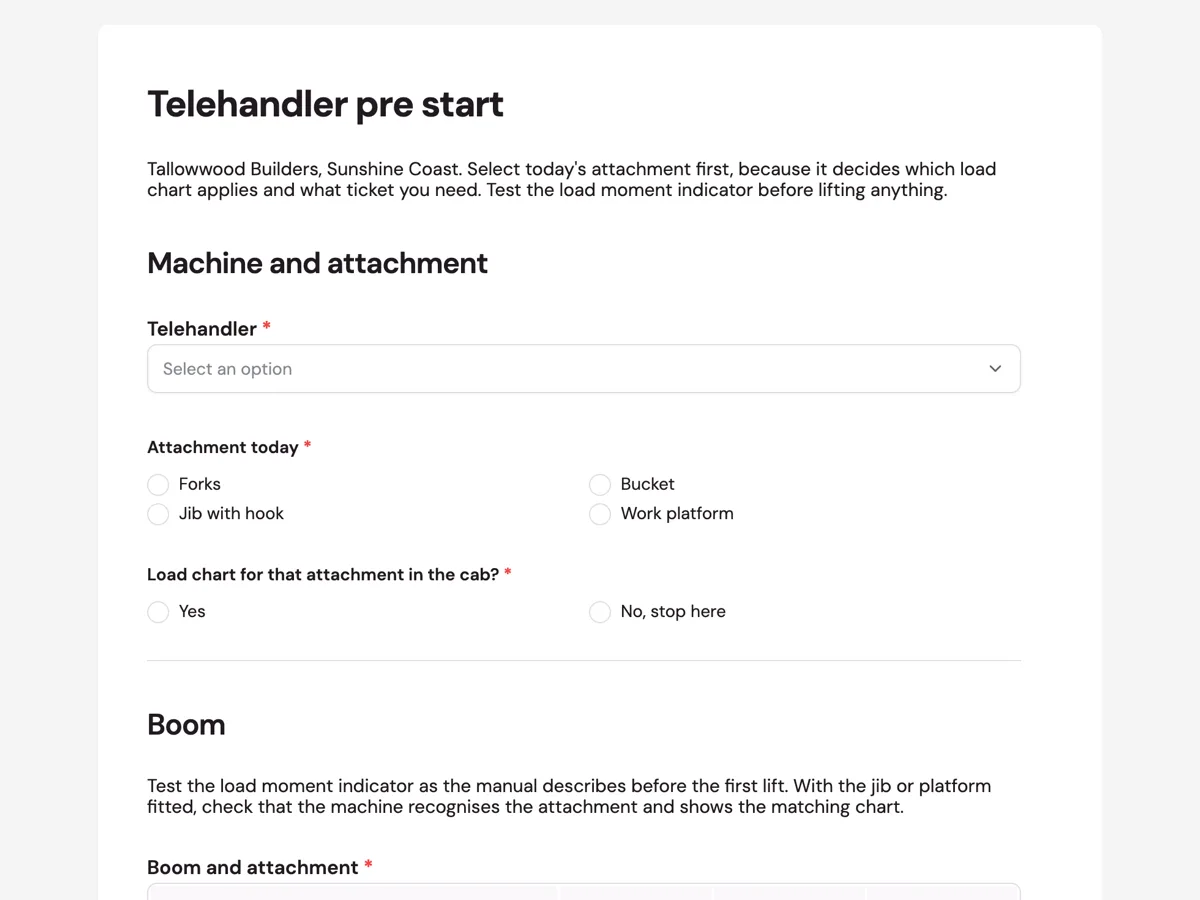
The form itself
A static copy of the finished form, exactly as it renders. Nothing here can be filled in or submitted, so read it as a reference and build your own from the button above.
Every field, and what it collects
The complete field list, in the order respondents meet it.
- TelehandlerDropdownRequired
- Options: TH-1, 3.5 t, 13 m reach · TH-2, 4 t, 17 m reach
- Attachment todaySingle choiceRequired
- Options: Forks · Bucket · Jib with hook · Work platform
- Load chart for that attachment in the cab?Single choiceRequired
- Options: Yes · No, stop here
- Boom and attachmentRating gridRequired
- Statements:
- Boom sections and wear pads
- Boom hoses and fittings
- Attachment locking pin
- Load moment indicator test
- Frame levelling
- ChassisRating gridRequired
- Statements:
- Stabilisers and pads
- Tyres and wheel nuts
- Steering mode selector
- Park brake
- Seatbelt
- Reversing camera
- Licence or ticket held for this attachmentShort textRequired
- Photo if anything failedPhoto upload
- Show the fault with the boom retracted and lowered.
- OperatorSignatureRequired
Machine and attachment
Boom
Chassis and cab
What each field on this form collects
The telehandler comes from a list of two, then a single choice records the attachment: forks, bucket, jib with hook or work platform. A second single choice asks whether the load chart for that attachment is in the cab, and its No answer says stop here. The boom grid has five rows: boom sections and wear pads, hoses, the attachment locking pin, the load moment indicator test and frame levelling. The chassis grid has six: stabilisers, tyres, steering mode selector, park brake, seatbelt and camera. A short text records the licence or ticket held, then a photo and the signature.
Why the attachment decides the check
A telehandler is a different machine depending on what is on the front. With forks it moves pallets; with a jib and hook it lifts a suspended load like a crane; with a work platform it carries people. Each has its own load chart, and lifting with the wrong chart is how telehandlers tip forward. Licensing follows the task as well, and a machine used to lift suspended loads or carry a work platform can fall into high risk work classes that forks alone do not. WorkSafe Victoria's alert about a fall from a telehandler man cage shows what happens when a platform is used outside its design.
Testing the load moment indicator
The load moment indicator warns, and on most modern machines cuts out the boom functions, as the machine nears tipping point. It is the device that stands between an operator's judgment and a forward tip. The manual for each model sets out how to test it, often a self test at start up and a check that the warning sounds in a controlled position. The form puts the test in the boom grid and the paragraph asks for it before the first lift, along with confirming that a jib or platform is recognised and the matching chart is shown.
How to adapt this form
A farm using a telehandler for hay bales replaces the jib and platform options with a bale spear and a grab, and adds a row for the cab guard against falling bales. A hire company adds the docket number and the delivery site. A builder who only ever runs forks can delete the platform option and lock the licence field to the ticket the business requires.
What makes this form work
Attachment first
Forks, bucket, jib with hook or work platform is the first required choice. The load chart, the licence and half of the boom checks depend on it, so it frames everything below.
No chart, no lift
The load chart question offers Yes or No, stop here. The option text tells the operator what a No means, and the response table shows the machine was not used with the wrong chart.
Licence matched to the task
Licence or ticket held for this attachment is a required short text with examples. A record of the right ticket for forks says nothing about a lift with a hook, and the field asks for the one that matches.
Questions people ask
Do you need a licence to operate a telehandler in Australia?
It depends on how it is used. A telehandler used only with forks may not fall into a high risk work licence class, though many sites require a forklift licence or a verification of competency. Used with a jib to lift suspended loads, or with a work platform, other licence classes can apply. Check your state regulator for the current rules.
How do you test a load moment indicator?
Follow the manufacturer manual for that model. Most machines run a self test at start up, and some manuals describe a controlled check that the warning sounds and boom functions cut out near the limit. Never test it by lifting an unknown load to see what happens. A failed test means the machine does not lift.
Can a telehandler lift a suspended load?
Only with an attachment the manufacturer approves for it, such as a jib with a hook, with the matching load chart in the cab and an operator licensed for that work where your state requires it. Hanging a sling off the forks is not the same thing and is not covered by the fork chart.
How often should the telehandler pre start be done?
Before the first use each shift and again whenever the attachment changes, since the chart and the locking pin change with it. A machine shared between operators gets a check from each. Every submission carries a time, so the responses table shows which attachment was checked when.
Why does the form ask about steering mode?
Many telehandlers switch between front wheel, four wheel and crab steering. A machine left in crab mode by the last operator moves sideways when the next one expects it to turn, which is a common cause of strikes on tight sites. Checking the selector at the start puts it in a known mode.
Build your own in about a minute
The button below opens the generator with this use case already described. Change the wording to match your own, generate, then edit anything you like.
Make one like thisOther form examples
Excavator pre start checklist with quick hitch checks
An excavator pre start checklist is the operator's walkaround before the first bucket: tracks, hoses, fluids, the rollover cab, the alarm and the quick hitch, each marked Pass, Fail or N/A. This one adds the three hitch checks that stop a bucket falling off and a tag out question that keeps a faulty machine parked.
Chainsaw pre start checklist with a chain brake test
A chainsaw pre start checklist tests the chain brake, chain catcher and throttle lockout, then the chain, bar oil and spark arrestor, before anyone cuts. This arborist version adds a protective gear grid, because the saw check alone says nothing about the leg the chain would hit.
Compressor pre start checklist for stored pressure
A compressor pre start checklist looks at the relief valve, the gauge, the receiver drain, hoses, couplings and whip checks before air goes into the line, then the guards, fuel and oil. This blasting workshop version also records when the air receiver is next due for its periodic inspection.
Want the steps in the builder? Read Single choice and grid fields, then Find checks by machine. For everything this generator can do, see the form maker.
Written and checked by the OneCraft team. Last checked .