Classic form
Power tool inspection checklist for building sites
A power tool inspection checklist looks at the guard, lead and plug, switch, body, blade or disc rating, handle and battery before a tool is used, and records the dates from its test tag. This builder version also asks whether the tool runs through an RCD.
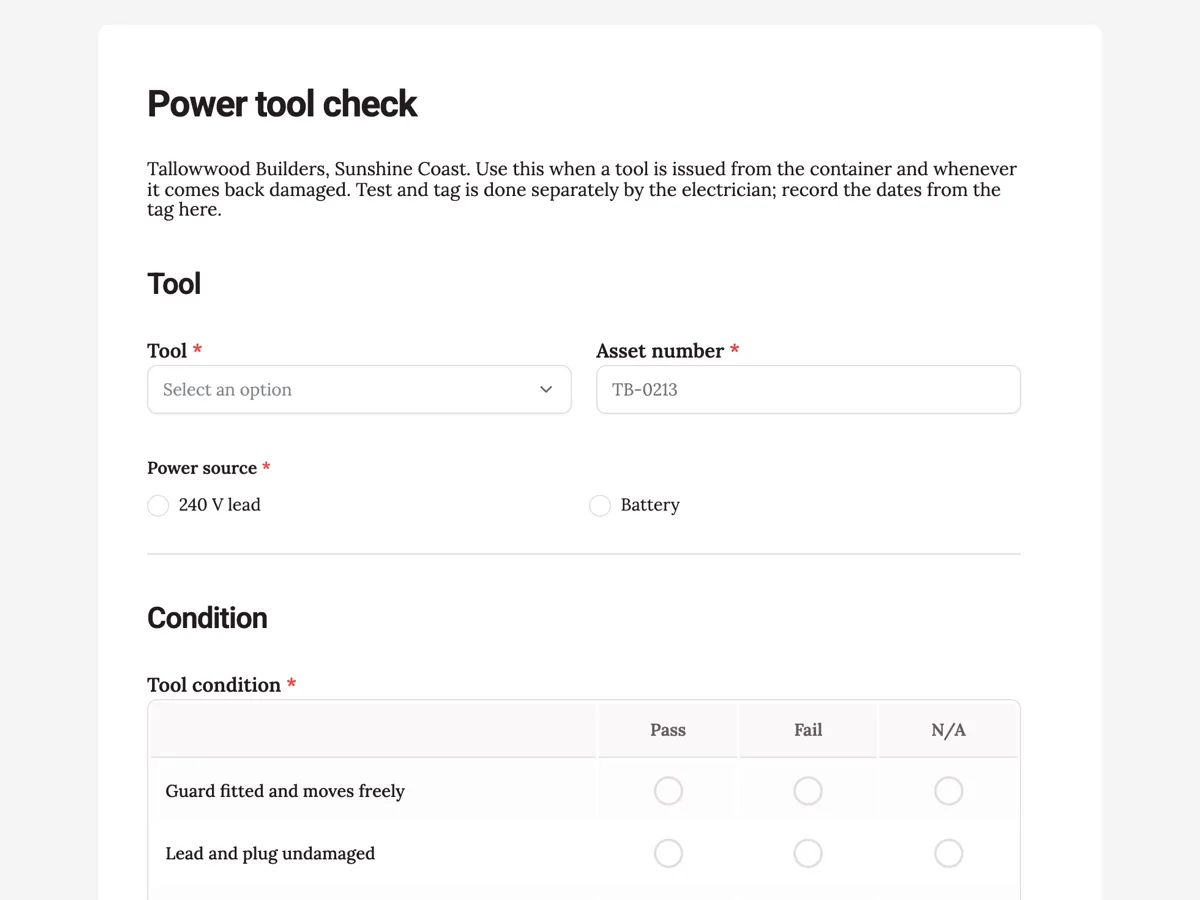
The form itself
A static copy of the finished form, exactly as it renders. Nothing here can be filled in or submitted, so read it as a reference and build your own from the button above.
Every field, and what it collects
The complete field list, in the order respondents meet it.
- ToolDropdownRequired
- Options: Angle grinder · Circular saw · Drill · Jigsaw · Nail gun · Drop saw
- Asset numberShort textRequired
- Power sourceSingle choiceRequired
- Options: 240 V lead · Battery
- Tool conditionRating gridRequired
- Statements:
- Guard fitted and moves freely
- Lead and plug undamaged
- Switch and lock off work
- No cracks in the body
- Blade or disc rated for the tool speed
- Side handle fitted
- Battery and charger undamaged
- Tested onDate
- Next test dueDate
- Plugged into an RCD on site?Single choiceRequired
- Options: Yes, portable or board RCD · Battery tool, not applicable
- Photo of the damagePhoto upload
- One photo of the guard, lead or body that failed.
- Worker signatureSignatureRequired
Tool
Condition
Test and tag
What each field on this form collects
The tool type comes from a list of six common site tools, with the asset number beside it and the power source as a single choice. The condition grid has seven rows: guard, lead and plug, switch and lock off, body, blade or disc rating, side handle, and battery and charger. Two dates copied from the test tag sit side by side, tested on and next due. A single choice asks whether the tool is plugged into an RCD. A damage photo and the worker's signature close it.
A before use check is not test and tag
Test and tag under AS/NZS 3760 is electrical testing by a competent person with an instrument, at intervals set by the environment, and on a construction site those intervals are short. The worker's check on this form is visual and mechanical: is the guard there, is the lead cut, does the switch lock off, is the disc rated for the grinder's speed. Both matter, and neither replaces the other. The form records the tag dates so a tool past its retest date is noticed at the container, not after it fails on the slab.
Guards and disc ratings
Grinder and saw injuries usually involve a guard that was removed to get into a tight spot or a disc that was never meant for that tool. A disc rated below the grinder's speed can shatter. The guard row and the disc rating row exist for those two failures. The side handle row is there because a grinder held one handed kicks harder and is harder to control. WorkSafe Victoria's electrical safety pages cover the lead, plug and RCD side, and HSE guidance on work equipment sets out the guarding duty.
How to adapt this form
A cabinet maker adds the dust extraction connection for each saw. A shopfitter with cordless tools only removes the lead and RCD questions and adds a row for battery swelling. A hire company adds the hire docket and checks the tool in and out with the same form, so damage is caught at return.
What makes this form work
Two tag dates on one row
Tested on and next test due sit side by side. When the second date is in the past, the person at the container sees it immediately and the tool goes back for testing.
Disc rated for the speed
The disc rating row asks a question workers rarely think about. A cutting disc rated for a slower grinder looks the same as the right one until it breaks.
Battery tools are not forgotten
The power source question and the battery row keep cordless tools in the check. Their batteries and chargers can be damaged, and the charger is the part that plugs into the mains.
Questions people ask
How often do power tools need to be tested and tagged?
AS/NZS 3760 sets intervals by environment. On construction sites the interval is short, commonly every three months, while offices are much longer. Hire equipment and some workplaces have their own rules. Check the current standard and your state regulator, because construction rules differ between states.
Do battery tools need test and tag?
A battery tool itself is not connected to the mains, so it is not tested like a corded tool. Its charger is, and chargers are tested and tagged. The form asks for the tag dates and notes that battery tools carry their tag on the charger.
What should you check on a grinder before use?
The guard is fitted and positioned, the disc is the right type and rated for the grinder's speed, the side handle is on, the lead and plug are undamaged, the switch works and locks off, and the body has no cracks. Never remove the guard to reach a tight spot.
Is an RCD needed for power tools on site?
Australian construction rules require RCD protection for electrical equipment on construction sites, either at the switchboard or with a portable unit. RCDs are tested on their own schedule. The RCD question on this form only confirms the tool is plugged into one on the day.
Can workers fill this in on their phones at the container?
Yes. The form works in a phone browser, the photo field takes a picture straight from the phone, and the signature is drawn on the screen. Each submission is time stamped, so the record shows when a tool was issued and who checked it.
Build your own in about a minute
The button below opens the generator with this use case already described. Change the wording to match your own, generate, then edit anything you like.
Make one like thisOther form examples
Scaffold inspection checklist with the four triggers
A scaffold inspection checklist records why the inspection is happening, checks the base, standards, ledgers, bracing, ties, decks and edge protection, and updates the scaffold tag. This builder version also takes elevation photos and the inspector's licence number.
Test and tag checklist and register entry
A test and tag checklist records the site, environment, appliance and class, a visual inspection of the cord, plug and casing, the earth continuity and insulation resistance readings, and the next due date. Submitted once per appliance, the entries become the register a client asks for.
Chain sling inspection checklist with measured link wear
A chain sling inspection checklist confirms the tag and its working load limit, then checks every link for stretch, wear, nicks, bends and heat damage, and every hook, latch, master link and shortener. This fabrication shop version also records the measured wear on the worst link of each leg.
Want the steps in the builder? Read Generate a tool check form, then Search checks by asset number. For everything this generator can do, see the form maker.
Written and checked by the OneCraft team. Last checked .