Classic form
Probation review form with evidence for every rating
A probation review form records how a new employee is going against a small set of areas, the evidence behind each rating, the support they have been given and the decision: continue, confirm, extend or escalate. This version is used twice, at three months and before probation ends, so the end has no surprises.
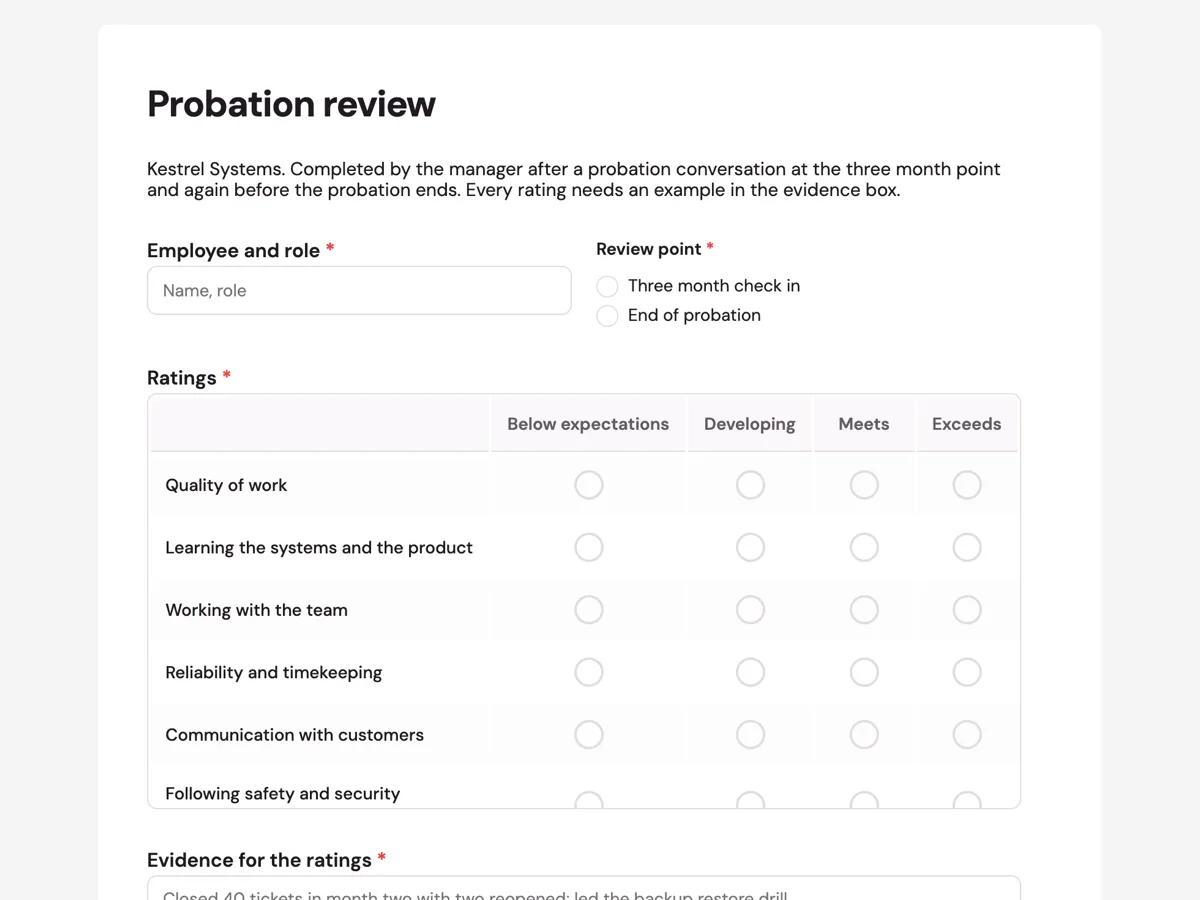
The form itself
A static copy of the finished form, exactly as it renders. Nothing here can be filled in or submitted, so read it as a reference and build your own from the button above.
Every field, and what it collects
The complete field list, in the order respondents meet it.
- Employee and roleShort textRequired
- Review pointSingle choiceRequired
- Options: Three month check in · End of probation
- RatingsRating gridRequired
- Statements:
- Quality of work
- Learning the systems and the product
- Working with the team
- Reliability and timekeeping
- Communication with customers
- Following safety and security practices
- Evidence for the ratingsLong textRequired
- Support and training givenLong textRequired
- DecisionSingle choiceRequired
- Options: On track, continue probation · Confirm employment · Extend probation with a support plan · Concerns, refer to People and Culture
- ManagerSignatureRequired
- Employee, acknowledging the reviewSignature
What each field on this form collects
The employee and role sit beside the review point, a three month check in or the end of probation. A ratings grid covers six areas: quality of work, learning the systems, teamwork, reliability, communication with customers and safety practices, each rated from below expectations to exceeds. Two required long texts take the evidence for the ratings and the support given. A single choice records the decision, and the manager and the employee sign.
Two reviews, no surprises
A probation that ends with a surprise has usually gone wrong earlier. Reviewing at three months gives the employee a clear picture with time to act on it, and gives the manager a record that concerns were raised and support offered. The ACAS guidance on probation periods in the UK makes the same point: regular reviews and honest feedback during probation. The decision list includes on track, continue for the first review, so the three month record is not mistaken for a final verdict.
Probation and unfair dismissal in Australia
Probation is a contract term, not a legal status. In Australia, the Fair Work Ombudsman explains that unfair dismissal protection generally starts after a minimum employment period, six months, or twelve months for a small business, regardless of what the contract calls probation. Notice and other entitlements still apply during probation. A manager who wants to end employment during probation should still follow a fair process, and the referral option on this form sends that case to People and Culture.
How to adapt this form
A hospital adds clinical competencies signed off by a senior nurse. A sales role adds pipeline and activity numbers. A business with a longer probation adds a six month review point and keeps the same ratings so progress is easy to compare. A team hiring several people at once can export the reviews and see whether one area, such as learning the systems, is hard for everyone, which points to the onboarding rather than the people.
What makes this form work
Evidence is required
The evidence box is required and its placeholder shows numbers and events. Ratings without examples are opinions; with examples they are a record both sides can discuss.
Support is recorded too
Support and training given is required. A review that shows a new employee had a buddy, courses and weekly check ins is fairer, and more defensible, than one that only rates them.
Four decisions, including escalate
Continue, confirm, extend with a support plan, or refer to People and Culture. The form never pushes a manager toward an outcome they are not ready to make alone.
Questions people ask
What should a probation review cover?
How the person is performing in a few key areas, the evidence for each rating, the support and training they have had, what needs to improve and the decision. Hold a review partway through and one before the end, so the final review confirms what was already discussed.
How long is a probation period?
Commonly three to six months, as set in the employment contract. In Australia, it does not change the minimum employment period for unfair dismissal, which is six months, or twelve for a small business. Long probation periods do not extend that.
Can probation be extended?
Often yes, if the contract allows it and the employee is told why and what support they will get. An extension should come with a clear plan and a new review date. In Australia it does not delay unfair dismissal protection beyond the minimum employment period.
Does the employee get a copy of the review?
They should. Each submission can be saved as a PDF from the responses table and given to the employee. The employee's signature on this form acknowledges the review; it does not mean they agree with every rating. Their comments can be added to the next review or sent in writing.
Can employment be ended during probation?
Yes, with notice under the contract and the National Employment Standards, and through a fair process. Ending employment soon after a complaint or for a discriminatory reason can still be unlawful during probation. Seek advice before deciding, which is what the referral option is for.
Why use a ratings grid?
A grid gives every new starter the same areas and scale, which makes reviews fairer and easier to compare across a team. A required matrix is satisfied once any one row is answered, so managers should check every row is rated before saving.
Build your own in about a minute
The button below opens the generator with this use case already described. Change the wording to match your own, generate, then edit anything you like.
Make one like thisOther form examples
Employee goal setting form with three measured goals
An employee goal setting form records a small number of goals for a set period, how each will be measured, when it is due, how the goals connect to team priorities, what support is needed and when progress will be checked. This version limits each employee to three goals and asks both employee and manager to sign.
Contractor onboarding form for an Australian studio
A contractor onboarding form collects what a business needs before it can pay a contractor: the ABN and GST status, insurance, bank details, the services and the rate, and agreement to the contract terms. This Australian studio version will not pay an invoice until the form and the certificate of currency are on file.
Employee resignation form with notice and last day
An employee resignation form is a written resignation: the last day, how much notice is being given, a handover contact, the property to return and where to send final documents. This small cafe version keeps the reason for leaving optional and thanks the employee rather than asking them to justify leaving.
Want the steps in the builder? Read A ratings matrix, then Give the employee a PDF copy. For everything this generator can do, see the form maker.
Written and checked by the OneCraft team. Last checked .